

A reverse proxy is a server that receives requests from users and forwards them to the appropriate backend server. It acts as an entry point between visitors and the websites, applications, or APIs running behind it.
A reverse proxy can help manage incoming traffic, improve security controls, simplify HTTPS management, and distribute requests across multiple servers. It is commonly used in web hosting environments where several websites or applications need to operate through a single public entry point.
For businesses using VPS hosting, understanding what a reverse proxy is and how it works can help them build a more organized, secure, and scalable server environment.
What Is a Reverse Proxy Server?
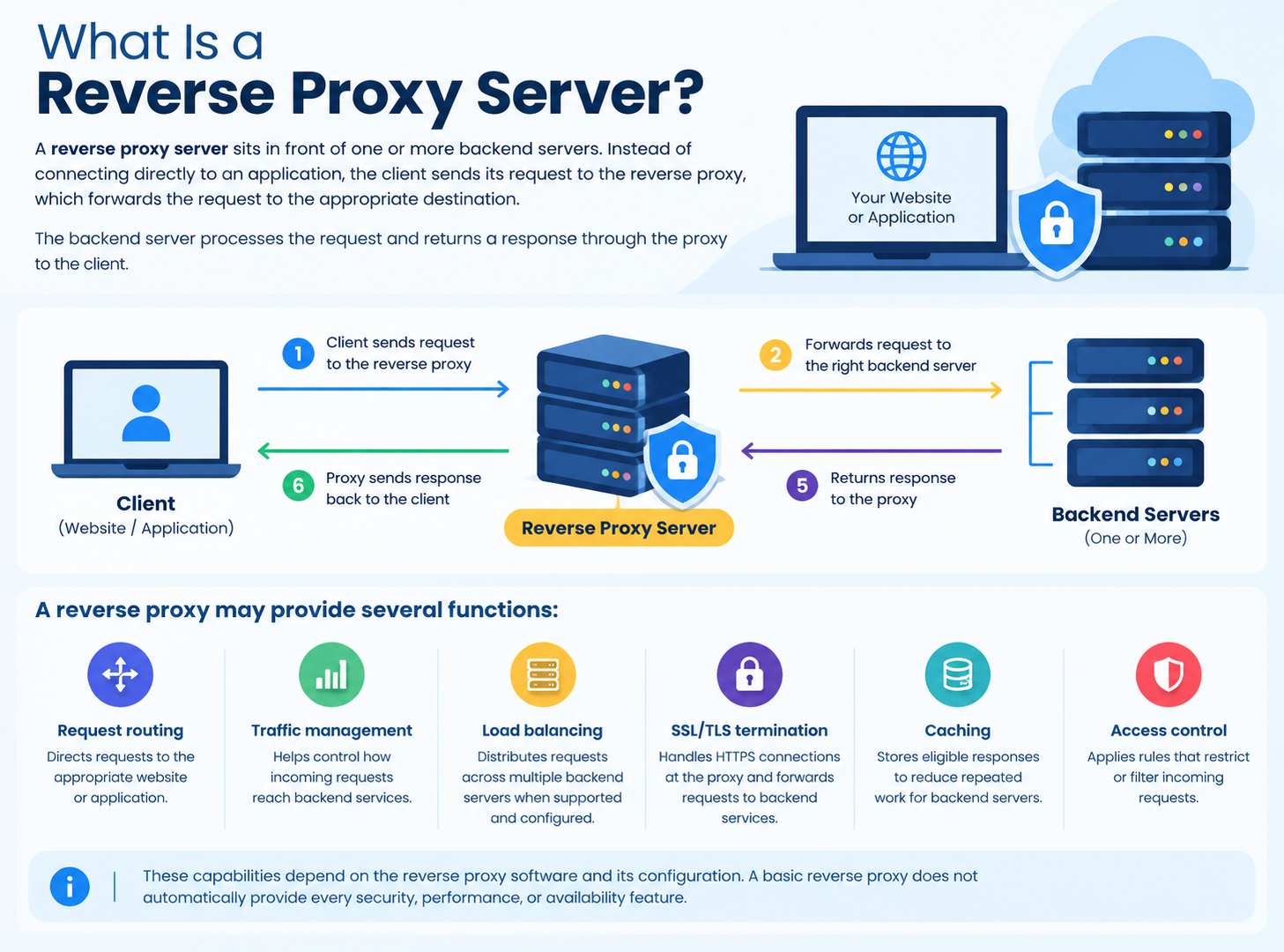
A reverse proxy server sits in front of one or more backend servers. Instead of connecting directly to an application, the client sends its request to the reverse proxy, which forwards the request to the appropriate destination.
The backend server processes the request and returns a response through the proxy to the client.
For example, a business might run a website, a web application, and an API on separate services. A reverse proxy can receive incoming requests and direct each one to the correct service according to configured routing rules.
A reverse proxy may provide several functions:
- Request routing: Directs requests to the appropriate website or application.
- Traffic management: Helps control how incoming requests reach backend services.
- Load balancing: Distributes requests across multiple backend servers when supported and configured.
- SSL/TLS termination: Handles HTTPS connections at the proxy and forwards requests to backend services.
- Caching: Stores eligible responses to reduce repeated work for backend servers.
- Access control: Applies rules that restrict or filter incoming requests.
These capabilities depend on the reverse proxy software and its configuration. A basic reverse proxy does not automatically provide every security, performance, or availability feature.
How Does a Reverse Proxy Work?
A reverse proxy works by receiving a client request, selecting the appropriate backend server, and forwarding the request. It then returns the backend’s response to the client.
The process typically follows five steps:
- The client sends a request. A visitor opens a website or accesses an application through a browser or another client.
- The reverse proxy receives the request. The proxy accepts the connection and examines information such as the hostname, URL path, and configured routing rules.
- The proxy selects a backend. It forwards the request to the appropriate web server or application.
- The backend processes the request. The application generates the requested page, data, or response.
- The proxy returns the response. The result travels back through the proxy to the client.
This process can happen without the visitor needing to know which internal server handles the request.
Practical Example: A Reverse Proxy on a VPS
Imagine a business hosts a web application on a VPS with the following setup:
- Public domain: app.example.com
- Reverse proxy: Nginx listening on HTTPS port 443
- Backend application: Listening on 127.0.0.1:3000
When a visitor opens https://app.example.com, Nginx receives the HTTPS request and forwards it to the application on the local interface and port 3000. The application processes the request, and Nginx returns the response to the visitor.
In this example, the application does not need to accept direct public connections. If the application is intended to be private, its port should remain restricted to the appropriate local or trusted network interfaces.
This is an illustrative architecture, not a default Nginx configuration. The proxy rules, TLS certificate, application address, and firewall settings must be configured for the actual environment.
What Are the Benefits of Using a Reverse Proxy?
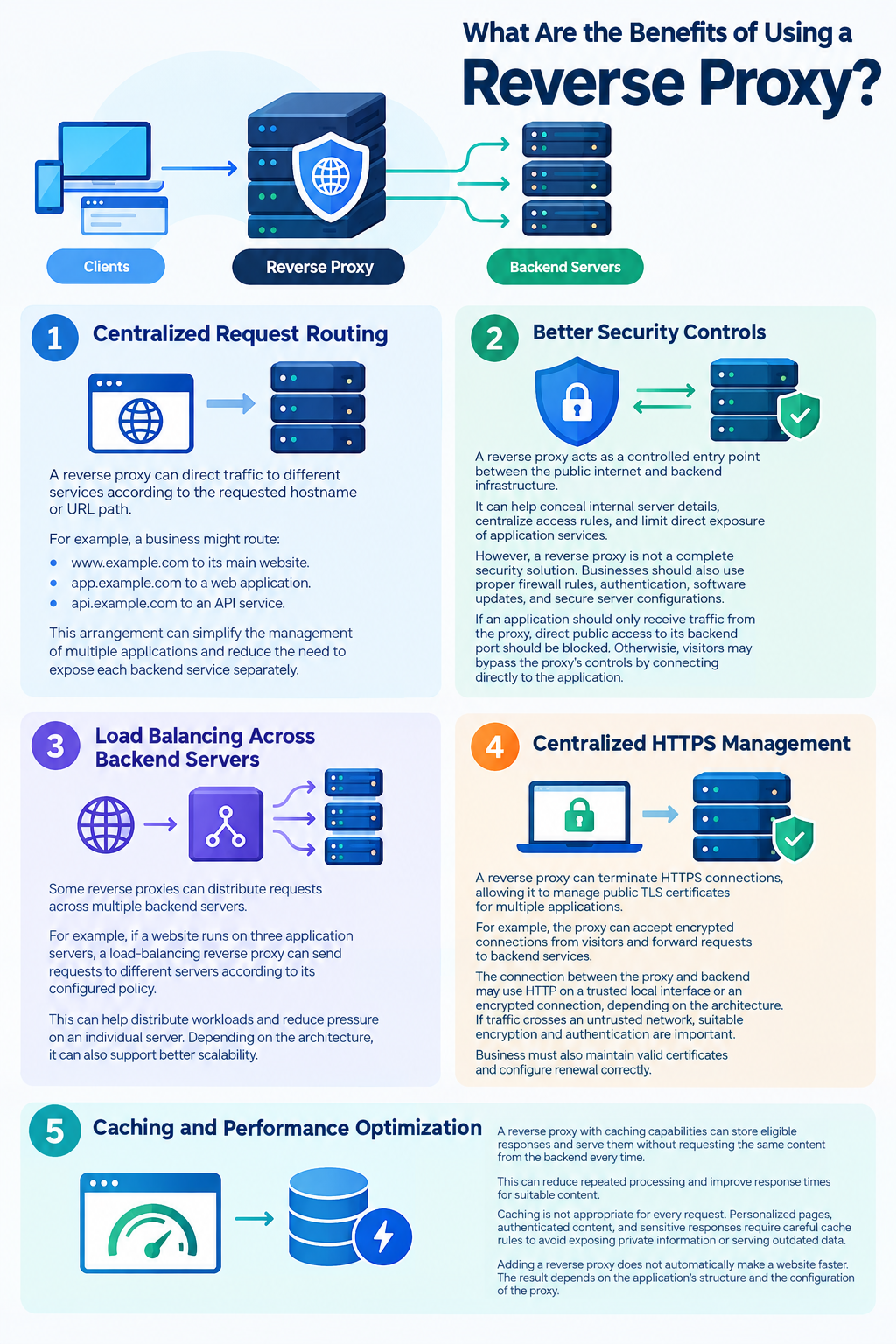
A reverse proxy can improve how a website or application handles incoming requests. The benefits depend on the workload and the features enabled.
1. Centralized Request Routing
A reverse proxy can direct traffic to different services according to the requested hostname or URL path.
For example, a business might route:
- www.example.com to its main website.
- app.example.com to a web application.
- api.example.com to an API service.
This arrangement can simplify the management of multiple applications and reduce the need to expose each backend service separately.
2. Better Security Controls
A reverse proxy can act as a controlled entry point between the public internet and backend infrastructure.
It can help conceal internal server details, centralize access rules, and limit direct exposure of application services.
However, a reverse proxy is not a complete security solution. Businesses should also use appropriate firewall rules, application authentication, software updates, and secure server configurations.
If an application should only receive traffic from the proxy, direct public access to its backend port should be blocked. Otherwise, visitors may bypass the proxy’s controls by connecting directly to the application.
3. Load Balancing Across Backend Servers
Some reverse proxies can distribute requests across multiple backend servers.
For example, if a website runs on three application servers, a load-balancing reverse proxy can send requests to different servers according to its configured policy.
This can help distribute workloads and reduce pressure on an individual server. Depending on the architecture, it can also support better availability.
However, load balancing alone does not guarantee high availability. Backend health checks, server redundancy, session handling, and recovery procedures must also be considered.
4. Centralized HTTPS Management
A reverse proxy can terminate HTTPS connections, allowing it to manage public TLS certificates for multiple applications.
For example, the proxy can accept encrypted connections from visitors and forward requests to backend services.
The connection between the proxy and backend may use HTTP on a trusted local interface or an encrypted connection, depending on the architecture. If traffic crosses an untrusted network, suitable encryption and authentication are important.
Businesses must also maintain valid certificates and configure renewal correctly.
5. Caching and Performance Optimization
A reverse proxy with caching capabilities can store eligible responses and serve them without requesting the same content from the backend every time.
This can reduce repeated processing and improve response times for suitable content.
Caching is not appropriate for every request. Personalized pages, authenticated content, and sensitive responses require careful cache rules to avoid exposing private information or serving outdated data.
Adding a reverse proxy does not automatically make a website faster. The result depends on the application’s workload, network configuration, and enabled features.
Reverse Proxy vs. Forward Proxy
A reverse proxy and a forward proxy both act as intermediaries, but they serve different purposes.
| Feature | Reverse proxy | Forward proxy |
| Represents | Backend servers | Clients |
| Typical traffic | Incoming requests to hosted services | Outgoing requests from clients |
| Main purpose | Manage access to websites and applications | Mediate clients’ access to external resources |
| Common use cases | Web hosting, application routing, load balancing | Corporate internet access, outbound filtering |
A forward proxy typically sits between users and the external resources they access. A reverse proxy sits in front of the servers that provide services to users.
The key distinction is which side of the connection the proxy represents.
Reverse Proxy vs. Load Balancer
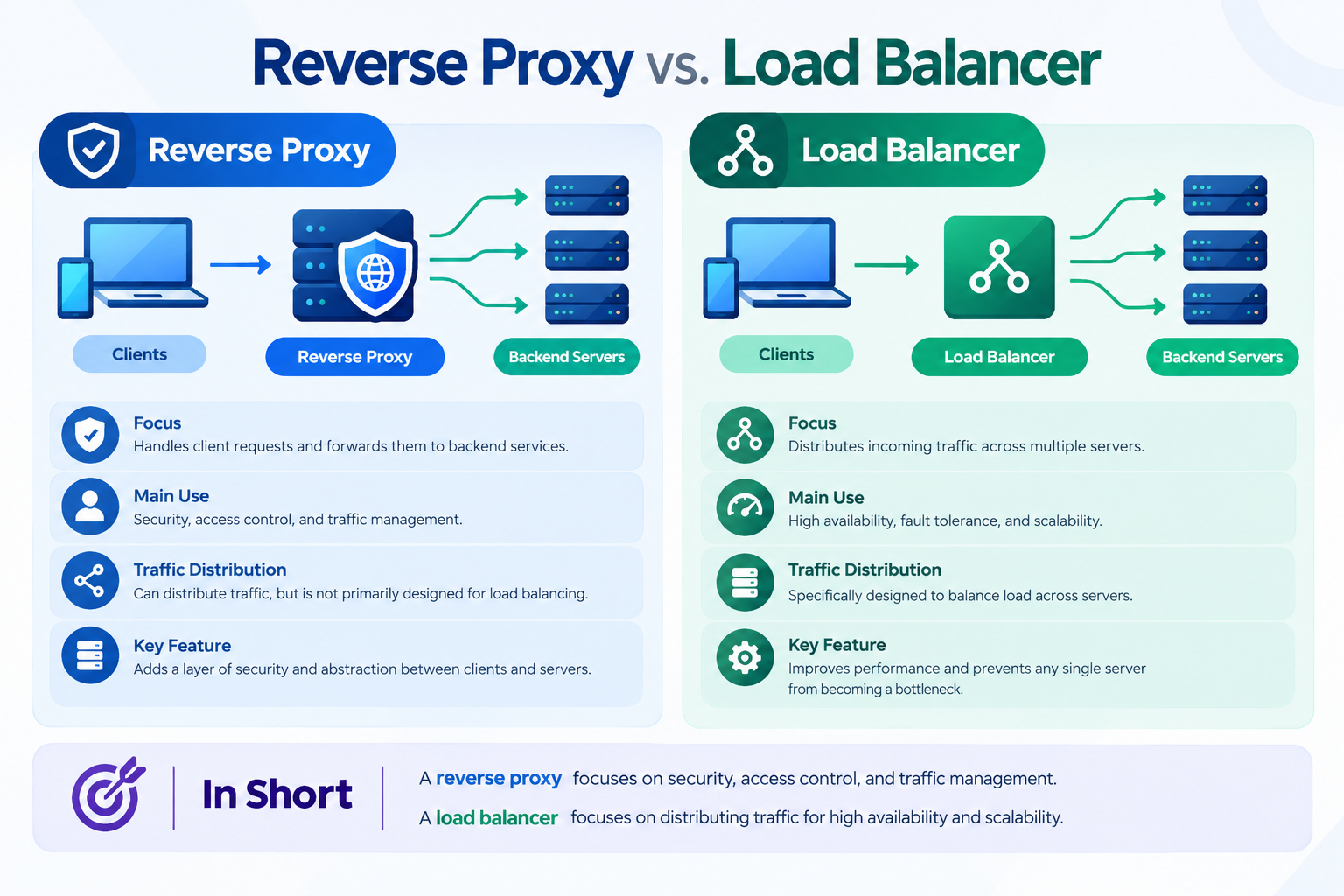
A reverse proxy and a load balancer are related, but they are not the same thing.
A reverse proxy receives client requests and forwards them to backend services. A load balancer distributes traffic across multiple servers or application instances.
Some reverse proxy software includes load-balancing features, allowing a single system to perform both functions. However, a reverse proxy can also route traffic to just one backend server.
For example, a small business running an application on one VPS may only need a reverse proxy to route domain requests. A larger application running on several servers may benefit from reverse proxy functionality combined with load balancing.
The right choice depends on the application’s traffic, architecture, and availability requirements.
Common Reverse Proxy Software
Several software solutions can operate as reverse proxies. The best option depends on the server environment and the features required.
Nginx
Nginx is widely used for web serving and reverse proxying. It can route requests to backend applications, handle HTTPS, cache eligible responses, and distribute traffic across upstream servers.
It is a versatile option for VPS environments hosting websites, web applications, and APIs.
HAProxy
HAProxy is commonly used for proxying and load balancing HTTP and TCP traffic. It is particularly relevant when distributing connections across backend servers and monitoring backend availability.
Caddy
Caddy is a web server and reverse proxy known for its straightforward configuration and automatic HTTPS capabilities when the required domain, network, and configuration conditions are met.
Apache HTTP Server
Apache can operate as a reverse proxy using modules such as mod_proxy. It can be a suitable choice for environments that already use Apache or need to integrate proxying with an existing Apache configuration.
These solutions have different capabilities and operational requirements. There is no single best reverse proxy for every VPS deployment.
For step-by-step installation or configuration, consult a dedicated guide for the selected software rather than treating this overview as an implementation tutorial.
When Should You Use a Reverse Proxy on a VPS?
A reverse proxy is particularly useful when a VPS hosts several services or requires a centralized way to manage incoming requests.
Common use cases include:
- Multiple websites: Route requests for different domains to their respective website services.
- Web applications: Forward public requests to applications listening on internal ports.
- API hosting: Direct requests to the appropriate API service.
- HTTPS management: Handle public TLS certificates for several applications from a central entry point.
- Multi-server applications: Distribute incoming traffic across backend servers when load balancing is needed.
- Private backend services: Allow public access through the proxy while restricting direct connections to application ports.
For example, a web development agency might host several client applications on a VPS. A reverse proxy can route requests to the correct application based on each domain, while firewall rules restrict direct access to backend ports.
This arrangement can make application routing easier to manage, but the agency still needs to monitor resource usage, maintain software updates, and protect each application.
A single reverse proxy can also become a bottleneck or a single point of failure. Businesses with demanding workloads should consider capacity planning, monitoring, redundancy, and recovery requirements.
Important Security Considerations
A reverse proxy should be configured as part of a broader server security strategy.
Before deploying one, consider the following:
- Restrict backend access: Allow only the proxy or other trusted systems to reach private application ports.
- Configure HTTPS correctly: Use valid certificates and maintain their renewal.
- Handle client IP addresses carefully: Configure forwarded headers correctly and trust them only when they come from known proxy infrastructure.
- Monitor requests and errors: Review logs, connection failures, HTTP errors, and resource usage.
- Protect the proxy itself: Apply security updates and use suitable firewall and access-control rules.
- Test application behavior: Confirm that routing, authentication, redirects, and HTTPS work correctly before production use.
One common mistake is configuring the reverse proxy correctly while leaving the backend application publicly accessible. In that situation, attackers or other clients may be able to bypass controls implemented at the proxy.
Another mistake is trusting client-supplied forwarding headers without verifying their source. Incorrectly handled headers can affect visitor IP logging and applications that rely on IP-based restrictions.
For more detailed implementation advice, see a dedicated VPS Firewall Setup Guide or Nginx Reverse Proxy Configuration Guide.
Frequently Asked Questions
