
Dedicated server hosting provides businesses with an entire physical server instead of sharing computing resources with other hosting customers. It gives users dedicated access to processing power, memory, storage, and network resources for hosting websites, applications, databases, and business systems.
But how does dedicated server hosting actually work? What happens after you order a server, and how does it process requests from website visitors?
Understanding how dedicated server hosting works helps businesses make informed decisions about their hosting infrastructure. This guide explains the process, from physical hardware preparation and server provisioning to operating system installation, resource allocation, and website delivery.

What Is a Dedicated Server?
A dedicated server is a physical computer installed in a professional data centre and allocated to a single customer.
Unlike shared hosting, where multiple customers use the same server, dedicated server hosting provides exclusive access to the allocated physical machine.
A dedicated server typically includes:
- CPU: Processes instructions, website requests, and application operations.
- RAM: Provides working memory for running applications and services.
- Storage: Stores the operating system, website files, databases, and application data.
- Network Interface: Connects the server to the internet and handles incoming and outgoing traffic.
- Power and Cooling: Support continuous operation of the physical hardware.
These resources provide the computing capacity required to run demanding websites, ecommerce platforms, databases, and business applications.
For a more detailed introduction, see our guide on What Is a Dedicated Server?.
How Dedicated Server Hosting Works
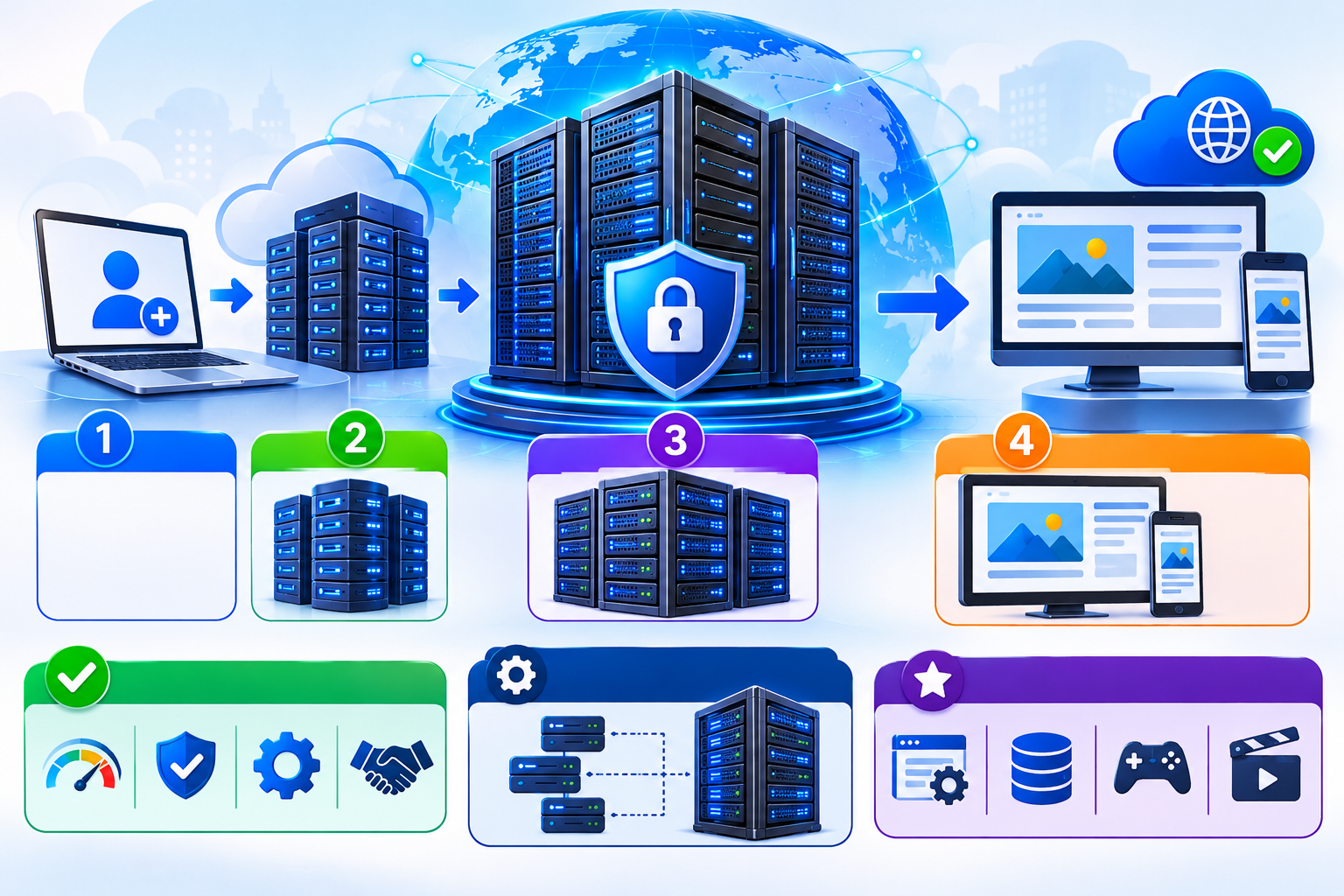
Dedicated server hosting works by assigning an entire physical machine to a customer and making its resources available for hosting applications and services.
The hosting provider maintains the physical infrastructure, while the customer uses the server to deploy and manage their workloads.
The process involves several stages.
1. Physical Server Hardware Is Prepared
The process starts with a physical server installed in a professional data centre.
The server contains hardware components selected according to its intended workload. These may include multiple processor cores, substantial RAM, SSD or NVMe storage, and high-speed network interfaces.
The data centre provides the supporting infrastructure required to operate the machine, including:
- Reliable electrical power.
- Cooling and temperature control.
- Network connectivity.
- Physical security.
- Infrastructure monitoring.
Once the hardware is installed, connected, and tested, it is ready for server provisioning.
2. The Dedicated Server Is Provisioned
Server provisioning is the process of preparing a physical server so that a customer can start using it.
After an order is confirmed, the hosting provider typically performs several tasks:
- Assigns an available physical server to the customer.
- Configures the required hardware and storage.
- Installs the selected operating system.
- Configures network connectivity and IP addressing.
- Applies the agreed initial configuration.
- Tests server accessibility and connectivity.
Once provisioning is complete, the customer receives the necessary access information.
This commonly includes the server’s IP address, administrative credentials, and remote access details.
The exact provisioning process depends on the hosting provider and the selected server configuration.
3. Hardware Resources Are Allocated
Unlike shared hosting, dedicated server hosting provides one customer with access to the entire allocated physical machine.
For example, consider a dedicated server with:
- 16 CPU cores.
- 64 GB RAM.
- 2 TB NVMe storage.
- 1 Gbps network port.
These resources are available to the customer’s server environment rather than being divided among unrelated hosting accounts.
The customer can use the available computing capacity according to their applications and workload requirements.
This provides greater control over resource consumption and reduces the risk of performance interference from other customers sharing the same physical server.
4. An Operating System Is Installed
After preparing the hardware, the hosting provider installs an operating system.
The operating system manages the physical hardware and provides the environment required to run websites, applications, databases, and other services.
Common operating system options include:
Linux Server
Popular distributions include:
- Ubuntu Server.
- Debian.
- AlmaLinux.
- Rocky Linux.
Linux is widely used for web hosting, databases, application servers, and other server workloads.
Windows Server
Windows Server is commonly selected for applications that depend on Microsoft technologies, including ASP.NET and Microsoft SQL Server.
The operating system manages important server functions such as:
- CPU scheduling.
- Memory allocation.
- Storage access.
- Network communication.
- User accounts and permissions.
- Running processes and services.
Customers with administrative access can configure the operating system according to their technical requirements.
5. Network Connectivity Is Configured
A dedicated server needs a reliable internet connection so that websites and applications can communicate with visitors.
The hosting provider connects the physical machine to its data centre network and configures the required network settings.
These typically include:
- Public IP address assignment.
- Network gateway configuration.
- IP routing.
- DNS configuration.
- Network interface settings.
- Bandwidth and traffic policies.
When someone visits a website hosted on the server, their browser sends a request through the internet to the server’s public IP address.
The server receives the request, processes it, and sends the requested information back to the visitor.
It is important to understand the difference between network speed and data transfer allowance.
For example, a 1 Gbps network port describes the maximum link speed, while a monthly traffic allowance, if applicable, describes how much data can be transferred during a billing period.
Actual transfer speeds also depend on network conditions, routing, and provider policies.
6. Websites and Applications Are Deployed
Once the operating system and network are configured, the dedicated server is ready to host websites and applications.
The customer can install the software required for their workload.
Common examples include:
- Apache or Nginx web servers.
- MySQL or MariaDB databases.
- PHP and other application runtimes.
- cPanel or Plesk hosting control panels.
- Security and monitoring software.
A business can host one large website or multiple websites on the same dedicated server, depending on available resources and application requirements.
Developers can also deploy custom applications, APIs, databases, and internal business systems.
The main advantage is flexibility. Customers can configure the server environment to meet their specific technical requirements.
7. The Server Processes Incoming Requests
After deployment, the dedicated server starts handling requests from website visitors and application users.
Consider what happens when someone visits an ecommerce website hosted on a dedicated server.
- The visitor enters the website address in a browser.
- DNS translates the domain name into the server’s IP address.
- The browser establishes a connection and sends an HTTP or HTTPS request.
- The web server receives and processes the request.
- If required, the application communicates with a database.
- The server generates the requested response.
- The response travels back to the visitor’s browser.
These operations use the server’s CPU, RAM, storage, and network resources.
For example, when a customer opens a product page, the application may retrieve product information from a database, process the request, and return the page to the browser.
This is how dedicated server hosting delivers websites and applications to users.
How Dedicated Server Resources Work
Each hardware component performs a different function. Understanding these resources helps explain how dedicated hosting supports websites and applications.
| Resource | How It Works |
| CPU | Executes instructions and processes application requests. |
| RAM | Stores active processes and frequently accessed data temporarily. |
| SSD/NVMe Storage | Stores files, databases, operating systems, and application data. |
| Network Port | Provides the server’s network connection and link capacity. |
| Bandwidth | Refers to available data transfer capacity or the provider’s traffic allowance, depending on context. |
CPU: Processing Power
The CPU performs calculations and executes instructions required by websites and applications.
More CPU cores can help a server handle multiple workloads simultaneously. However, actual performance also depends on processor architecture, clock speed, application design, and workload characteristics.
CPU performance is particularly important for database operations, dynamic websites, and resource-intensive applications.
RAM: Working Memory
RAM provides temporary memory for running applications and active processes.
For example, a busy ecommerce website may need memory for its web server, database, application processes, and caching services.
Insufficient RAM can affect performance and may force the operating system to use swap space.
Storage: Data Access
Dedicated servers commonly use SSD or NVMe storage.
These storage technologies allow applications to access website files, databases, and other information.
NVMe storage can offer higher throughput and lower latency than traditional SATA SSDs, depending on the hardware and workload.
Both storage capacity and performance should be considered when selecting a dedicated server.
Can a Dedicated Server Run Virtual Machines?
Yes. A dedicated physical server can run applications directly on its operating system or host multiple virtual machines using virtualization software.
When virtualization is required, a hypervisor is installed on the physical server.
The hypervisor allows the machine’s hardware resources to be divided among multiple virtual machines, each with its own operating system and allocated resources.
Common virtualization technologies include:
- KVM.
- VMware ESXi.
- Microsoft Hyper-V.
For example, a business may use one physical dedicated server to run separate virtual machines for its web applications, databases, and development environments.
This approach provides flexibility when running multiple isolated workloads on the same physical hardware.
However, the available CPU, RAM, and storage capacity must still be shared among the virtual machines.
For a deeper explanation, see our guide on What Is a Hypervisor?.
How Dedicated Server Hosting Is Managed
After deployment, a dedicated server requires ongoing administration to maintain performance, security, and availability.
Management responsibilities depend on whether the customer chooses managed or unmanaged dedicated server hosting.
Unmanaged Dedicated Server
With unmanaged hosting, the customer is generally responsible for most server administration tasks.
These may include:
- Operating system updates.
- Software installation and configuration.
- Security patches.
- Firewall configuration.
- Backup management.
- Performance monitoring.
- Troubleshooting server and application issues.
This option is suitable for businesses with experienced system administrators or technical teams.
Managed Dedicated Server
With managed dedicated server hosting, the hosting provider takes responsibility for agreed server management tasks.
Depending on the service package, these may include:
- Operating system maintenance.
- Server monitoring.
- Security updates.
- Technical troubleshooting.
- Software configuration.
- Backup assistance.
The exact scope of management varies between hosting providers. Customers should confirm which services are included before selecting a managed server plan.
What Happens When a Dedicated Server Experiences High Traffic?
When a website receives more visitors, the dedicated server must process additional requests.
Each request consumes some combination of CPU, RAM, storage operations, and network capacity.
If the server has sufficient resources and the application is properly optimized, it can continue handling increased traffic.
However, excessive demand can create resource bottlenecks.
Common examples include:
- High CPU usage from application processes.
- RAM exhaustion caused by too many active processes.
- Slow database queries.
- Storage input/output limitations.
- Network congestion.
A dedicated server does not automatically eliminate performance problems. Application optimization, suitable hardware, and server monitoring remain important.
When workloads exceed available capacity, businesses may need to upgrade hardware or distribute workloads across multiple servers.
How Dedicated Servers Maintain Reliability
Dedicated server reliability depends on both physical infrastructure and ongoing server administration.
Professional data centres typically use redundant power systems, cooling infrastructure, and network connectivity to reduce the risk of service interruptions.
However, infrastructure redundancy does not guarantee that an individual server will always remain operational.
Businesses should also consider:
- Regular server backups.
- Hardware health monitoring.
- Operating system maintenance.
- Security updates.
- Disaster recovery planning.
- Backup restoration testing.
Some dedicated servers also use RAID storage configurations to improve availability when a supported disk fails.
However, RAID is not a replacement for independent backups. It does not protect against accidental deletion, ransomware, or every type of data corruption.
Maintaining separate backup copies is essential for protecting important business data.
Frequently Asked Questions
