

A dedicated server is a physical computer allocated to one customer for running websites, applications, databases, and other workloads. Unlike shared hosting, where multiple customers use the same hosting environment, dedicated server hosting gives one customer access to the resources of an entire physical machine.
For businesses with demanding websites or applications, a dedicated server can provide greater control over hardware, software, and server configuration. However, it usually costs more than shared hosting or VPS hosting and may require additional technical knowledge.
In this beginner’s guide, you will learn what a dedicated server is, how it works, what it is used for, and how to decide whether it is the right hosting option for your needs.
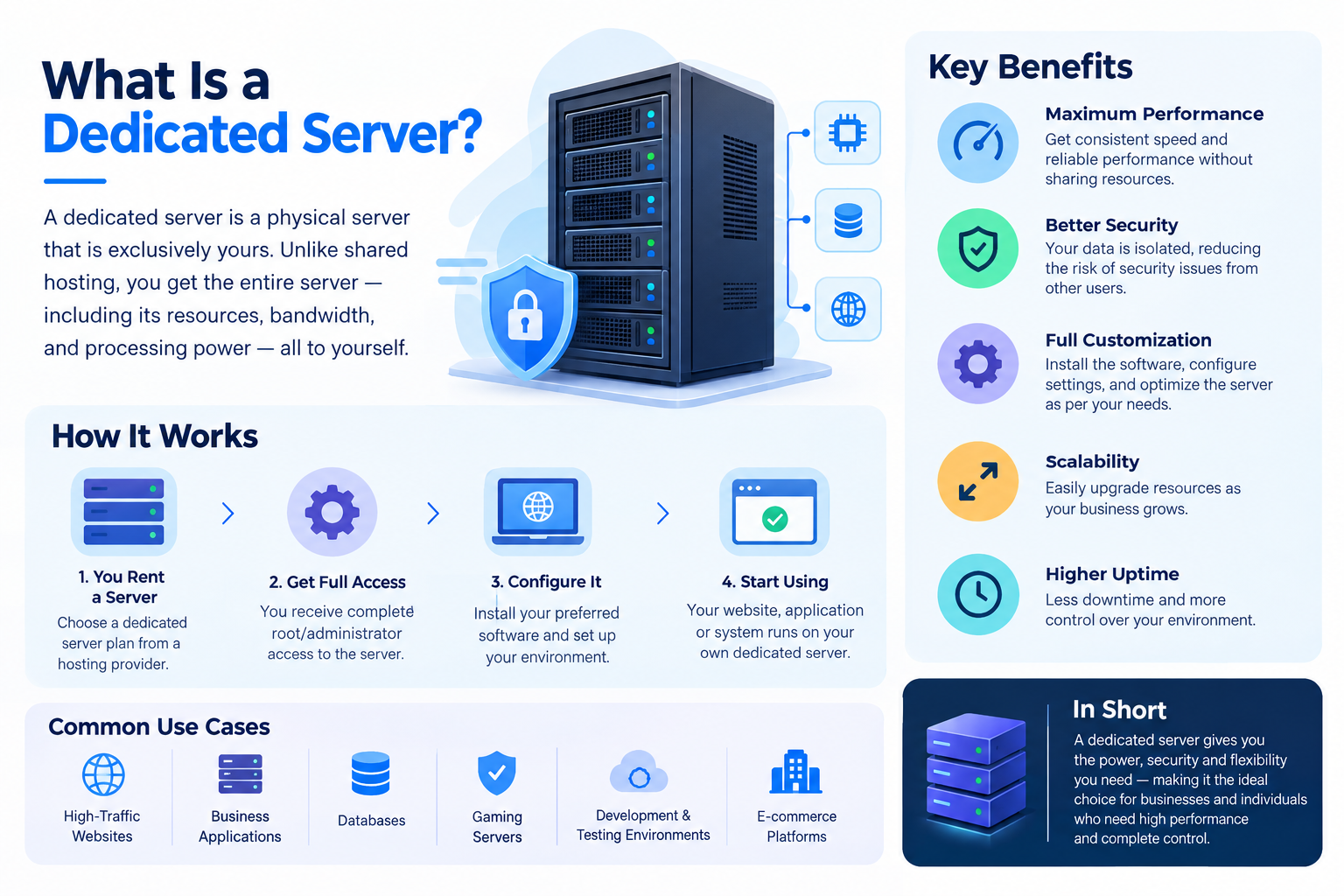
What Is a Dedicated Server?
A dedicated server is a physical server assigned exclusively to one customer. Its physical CPU, RAM, storage, and other hardware resources are allocated to that customer’s workloads rather than being shared with unrelated hosting customers on the same machine.
Think of a dedicated server as renting an entire office building instead of sharing office space with other businesses. You have greater control over how the space is used, but you also have more responsibilities.
A dedicated server can host one website, multiple websites, databases, business applications, or virtual machines, depending on its configuration.
It is helpful to distinguish between two related terms:
- Dedicated server: The physical machine allocated to a customer.
- Dedicated server hosting: The service through which a hosting provider supplies access to that machine, typically in a data center.
The hosting provider generally supplies the physical hardware, power, network connectivity, and data-center facilities. Depending on the hosting agreement, the customer or provider manages the operating system, software, security updates, backups, and other administrative tasks.
How Does a Dedicated Server Work?
A dedicated server receives requests, processes them using its hardware and software, and returns the appropriate response over a network.
For example, when someone visits a website hosted on a dedicated server, the process generally works as follows:
- A visitor requests a page. The visitor enters a website address or clicks a link.
- The request reaches the server. The Domain Name System (DNS) helps direct the browser to the appropriate server address.
- The server processes the request. Web server software, application code, and a database work together when necessary to retrieve or generate the requested content.
- The server returns a response. The browser receives the page data and displays the website.
The CPU processes instructions, RAM holds data that running applications need, and storage keeps website files, databases, and other information. Network connectivity enables communication between the server, visitors, and other systems.
A hosting provider usually keeps the physical machine in a data center. Customers can administer it remotely using tools such as SSH for many Linux systems or Remote Desktop for supported Windows Server configurations.
The exact access and control available depend on the operating system, hosting plan, and management arrangement.
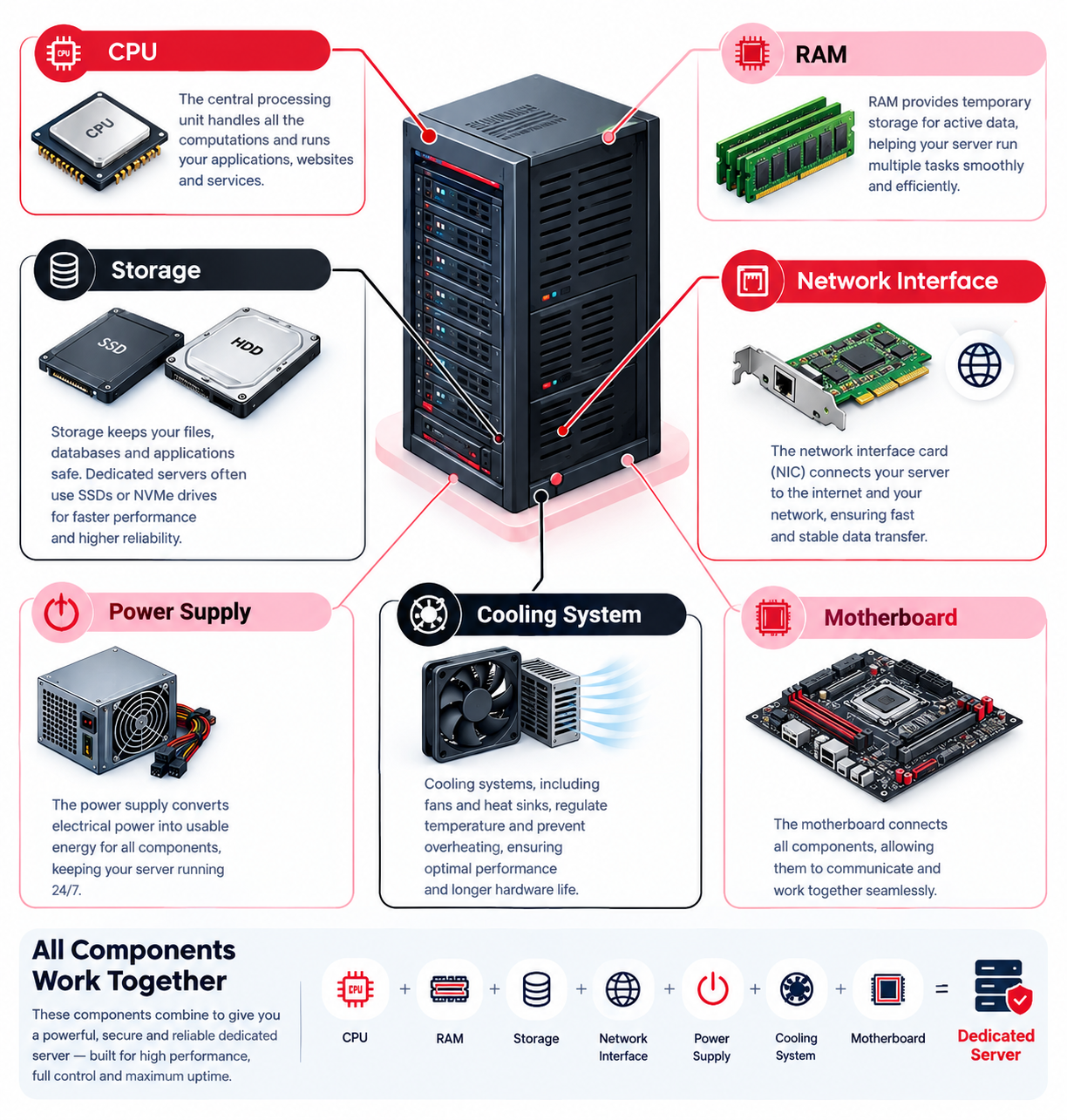
What Are the Main Components of a Dedicated Server?
Understanding the main hardware components helps you evaluate a dedicated server without getting lost in technical details.
1. CPU (Processor)
The central processing unit executes instructions and performs calculations. It affects how efficiently a server handles application logic, database queries, and simultaneous requests.
A processor-intensive application may need more processing capacity than a website that mainly delivers static files. The right choice depends on the actual workload, not just the processor’s advertised speed.
2. RAM (Memory)
RAM temporarily holds data and instructions that running programs need to access quickly.
Adequate memory helps a server run its operating system, web server, databases, and applications without excessive reliance on slower storage.
The required amount depends on the software being used, the number of active processes, and the workload. Insufficient memory can reduce performance even when the server has a powerful CPU.
3. Storage
Storage holds the operating system, website files, databases, applications, backups, and other data.
Common storage options include:
- SSD: Solid-state storage that generally provides faster access than traditional mechanical hard drives.
- NVMe SSD: Solid-state storage using the NVMe interface, designed for high-speed communication with compatible storage devices.
- HDD: Mechanical storage that can be useful for certain capacity-focused workloads.
The appropriate storage type and capacity depend on performance requirements, the amount of data being stored, and the available budget.
4. Network Connectivity
Network connectivity allows the server to communicate with website visitors, applications, databases, and other systems.
Important considerations include network capacity, latency, traffic allowances, and the provider’s network infrastructure. A powerful server can still deliver a poor user experience if its network connection or software becomes a bottleneck.
5. Operating System
The operating system manages hardware resources and provides the environment in which applications run.
Common server operating systems include Linux distributions and Microsoft Windows Server. The appropriate choice depends on application compatibility, licensing, administrative experience, and software requirements.
6. Security and Management Tools
Server management tools help administrators monitor performance, control access, configure services, and maintain the system.
Depending on the environment, these may include firewalls, monitoring software, backup tools, security updates, and administrative control panels.
These tools help support secure operation, but installing them alone does not guarantee protection against every threat.
What Is a Dedicated Server Used For?
Dedicated servers support many types of workloads. They are particularly useful when an organization needs substantial computing resources, greater control over its environment, or physical isolation from other hosting customers.
High-Traffic Websites and Online Stores
Websites with demanding workloads may benefit from dedicated hardware when shared hosting or a VPS no longer meets their resource requirements.
An online store, for example, may need sufficient CPU capacity, memory, and database performance to handle product searches, customer accounts, and checkout requests.
However, increasing traffic does not automatically mean a dedicated server is necessary. Caching, application optimization, database design, and traffic patterns also influence performance.
Business Applications
Companies may run internal applications, customer portals, reporting systems, or other business software on dedicated servers.
The main considerations include application requirements, access controls, availability needs, and ongoing maintenance.
Database Hosting
Applications that process substantial amounts of data may require carefully configured CPU, RAM, and storage resources.
A dedicated server can provide greater control over database configuration and resource allocation. Actual performance still depends on the hardware, database software, and workload.
Game Servers
Multiplayer games and other real-time applications can require predictable processing capacity and responsive network connectivity.
A dedicated server may be appropriate when the game or application benefits from dedicated hardware and specific configuration options.
Virtualization and Multiple Services
A sufficiently capable dedicated server can run virtualization software to host multiple virtual machines. Each virtual machine can operate as a separate environment with its own allocated resources and operating system.
This arrangement can support testing environments, internal services, or multiple applications on the same physical machine.
The number of virtual machines that can run effectively depends on the server’s available resources and the demands of each workload.
What Are the Benefits of a Dedicated Server?
Dedicated hosting can offer several advantages, particularly for organizations with specific technical or operational requirements.
Dedicated Physical Resources
The server’s physical CPU, RAM, and storage are allocated to your workloads rather than shared with unrelated customers on the same machine.
This can improve resource predictability compared with shared environments, although hardware limitations, software problems, and network bottlenecks can still affect performance.
Greater Configuration Control
Depending on the service agreement, you may be able to select the operating system, install supported software, configure server services, and adjust security settings.
This flexibility is useful when an application requires a particular software environment or custom configuration.
Workload Isolation
A dedicated server provides physical hardware isolation from other hosting customers using separate machines.
This reduces exposure to certain issues associated with shared hardware, but it does not eliminate risks from vulnerable software, weak passwords, incorrect configurations, or network attacks.
Flexible Workload Deployment
One server can support multiple websites, applications, databases, or virtual machines when the hardware and software permit it.
This can be useful for businesses that want to consolidate services while maintaining control over the server environment.
Greater Control Over Security
Administrators can implement security policies suited to their applications, including access restrictions, firewall rules, encryption, and monitoring.
Effective security still requires appropriate configuration, regular maintenance, and attention to emerging threats.
What Are the Limitations of a Dedicated Server?
Although dedicated servers offer greater control and dedicated hardware, they are not the right solution for every website or business.
Higher Cost
Dedicated hosting generally costs more than entry-level shared hosting and many VPS plans because the service includes access to an entire physical machine.
The total cost may also include operating system licences, control panels, backups, management services, and additional security tools.
Greater Technical Responsibility
Unmanaged dedicated servers can require knowledge of operating systems, networking, security, backups, and troubleshooting.
Incorrect configuration or neglected maintenance can cause downtime, data loss, or security problems.
Ongoing Maintenance
Servers need regular updates, monitoring, backup checks, access reviews, and performance management.
Hardware failures and software problems can still occur, so having a suitable recovery plan is important.
A Single Server Can Become a Single Point of Failure
A dedicated server does not automatically provide redundancy or uninterrupted availability. If its hardware fails or a critical service stops working, hosted applications may become unavailable until the issue is resolved.
Appropriate backups, documented recovery procedures, and, where necessary, redundant infrastructure can help reduce the impact of a failure. Backups are important for recovering data, but they do not by themselves guarantee continuous service.
Capacity Planning
A dedicated server has finite resources. If CPU, memory, storage, or network capacity becomes insufficient, you may need to optimize the workload, upgrade hardware, or move to a different hosting arrangement.
Adding resources may require a service change or planned maintenance, depending on the hardware and provider.
Dedicated Server vs Shared Hosting vs VPS Hosting
Dedicated servers, shared hosting, and virtual private servers (VPS) differ mainly in how their underlying resources are allocated and how much control the customer receives.
|
Feature |
Shared Hosting |
VPS Hosting |
Dedicated Server |
|
Infrastructure |
Multiple customers share a hosting environment |
Virtual servers share a physical host |
One customer is allocated an entire physical server |
|
Resource allocation |
Shared according to the hosting plan |
Virtual resources allocated to each VPS |
Physical resources dedicated to the customer’s workloads |
|
Administrative control |
Usually limited |
Greater control, depending on the plan |
Generally extensive control, subject to the service agreement |
|
Typical cost |
Lower |
Moderate |
Usually higher |
|
Management |
Often provider-managed |
Varies by provider and plan |
Managed or unmanaged |
|
Common uses |
Personal websites and smaller sites |
Growing websites and business applications |
Demanding workloads requiring dedicated hardware or greater control |
Actual features, performance, management options, and prices vary between providers.
When Should You Choose Shared Hosting?
Shared hosting may be suitable if you are launching a small website, personal blog, portfolio, or basic business website and want a relatively simple, affordable solution.
It is often a practical starting point when you do not need extensive server-level control.
When Should You Choose VPS Hosting?
VPS hosting may be appropriate when you need more control and allocated computing resources than a typical shared hosting plan provides, but do not require an entire physical server.
It can offer a useful balance between cost, flexibility, and administration.
When Should You Choose a Dedicated Server?
A dedicated server may be worth considering when your workload requires substantial resources, custom server configuration, physical hardware isolation, or a level of control that your existing hosting arrangement cannot provide.
The decision should be based on measured resource needs, security requirements, management capacity, and total cost rather than the assumption that a dedicated server is automatically faster.
Who Should Consider a Dedicated Server?
Dedicated server hosting may be appropriate for:
- Businesses running resource-intensive websites or applications.
- Online stores with demanding database and application workloads.
- Organizations requiring greater control over their server environment.
- Development teams running specialized software or virtualization workloads.
- Businesses with technical staff or a budget for managed server administration.
A small business can use a dedicated server, but it may not need one. If a website runs reliably on shared hosting or a VPS, upgrading to dedicated hardware may add cost and management work without providing enough practical benefit.
How Do You Know When It Is Time to Upgrade?
Before upgrading, review the performance of your existing hosting environment.
- Check resource usage. Review CPU utilization, memory consumption, storage performance, and network usage over representative busy periods.
- Identify the bottleneck. Slow performance may come from inefficient code, database queries, caching problems, limited memory, or network issues rather than the hosting plan alone.
- Optimize the application. Improve caching, database queries, and other inefficient processes where appropriate.
- Evaluate your current plan. Determine whether your existing VPS or hosting package can be upgraded to meet the workload.
- Compare the cost and operational needs. Consider the cost of dedicated hardware alongside management, maintenance, backups, and recovery requirements.
For example, an online store experiencing slow checkout pages should not automatically move to a dedicated server just because visitor numbers are increasing. First, investigate whether database queries, CPU usage, memory limits, or another bottleneck is responsible. If optimization and a suitable hosting upgrade are insufficient, a dedicated server may be worth evaluating.
Microsoft’s server performance guidance similarly emphasizes matching hardware to the workload and identifying resource bottlenecks before making configuration decisions.
Is a Dedicated Server Right for Beginners?
Yes. Beginners can use dedicated server hosting, but the experience depends heavily on whether the service is managed or unmanaged.
Managed dedicated hosting typically includes an agreed level of technical assistance from the provider. Depending on the package, this may cover server setup, updates, monitoring, security maintenance, and troubleshooting.
Unmanaged dedicated hosting generally gives the customer more responsibility for configuring, maintaining, and securing the server. The provider’s responsibilities may focus primarily on physical hardware, network connectivity, and data-center infrastructure.
Before choosing either option, consider:
- Whether you can administer the server or have access to qualified technical support.
- Which maintenance and security tasks the provider will handle.
- How backups and disaster recovery will work.
- Whether the operating system and required software are supported.
- How technical support, hardware replacement, and service interruptions are handled.
If you are unfamiliar with server administration, managed hosting may reduce the operational burden. Review the provider’s service agreement to understand exactly what is included.
Frequently Asked Questions
