
A hypervisor is software that creates and manages virtual machines (VMs) on a physical computer or server. It allows multiple virtual machines to share the same physical hardware while operating as separate computing environments.
Hypervisors manage access to hardware resources such as CPU, RAM, storage, and network interfaces. They make it possible to run different operating systems and applications on a single physical server without requiring a separate machine for every workload.
Hypervisors are an essential part of modern virtualization technology. They are widely used in data centers, cloud computing, and VPS hosting environments.
If you use a Virtual Private Server (VPS), a hypervisor is often one of the technologies that makes your virtual server possible.
What Does a Hypervisor Do?
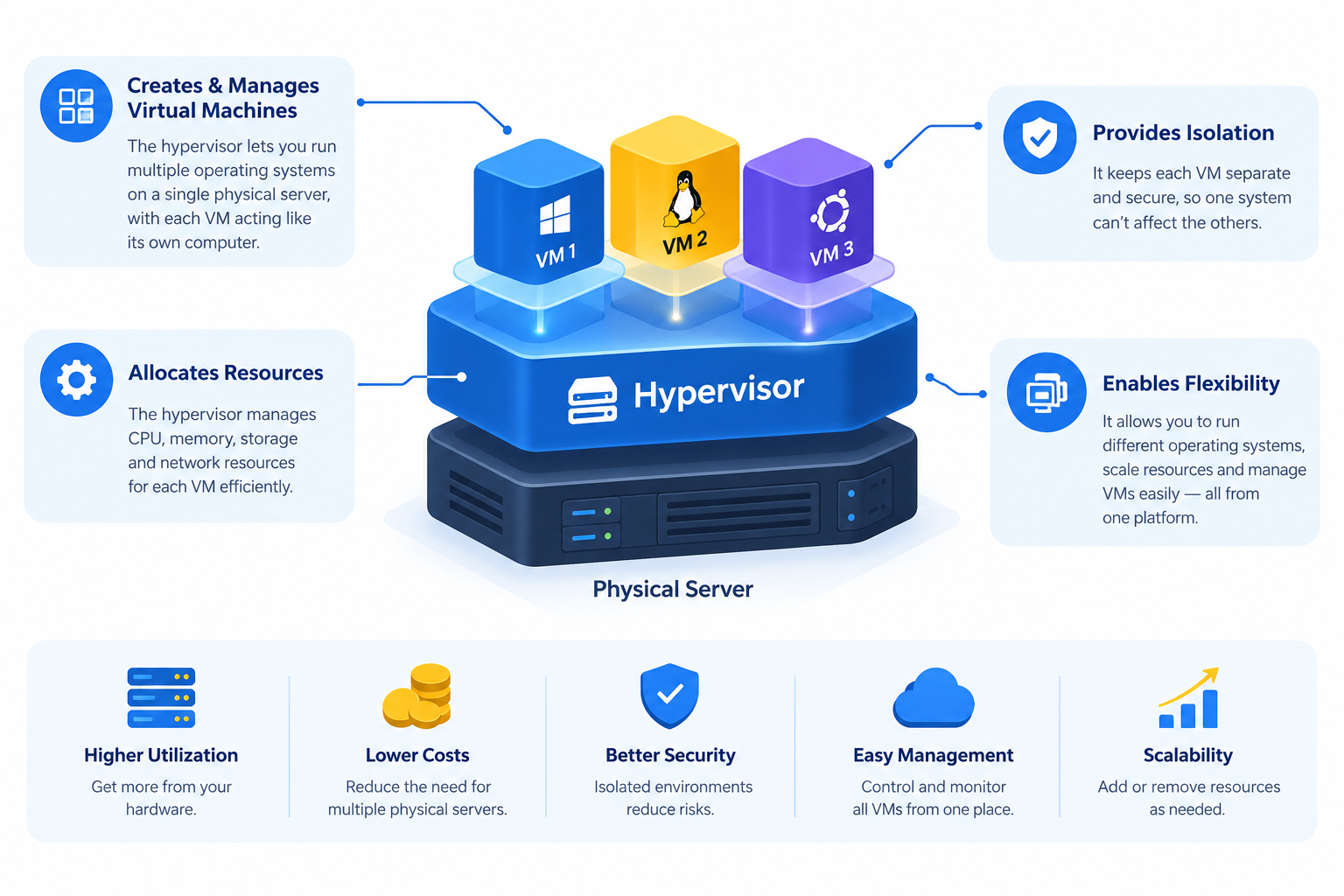
A hypervisor, also known as a Virtual Machine Monitor (VMM), creates and manages virtual machines while controlling how they access the underlying physical hardware.
A physical server has a limited amount of processing power, memory, storage, and network capacity. The hypervisor manages these resources and makes them available to individual virtual machines according to their configurations.
Its main responsibilities include:
- Creating virtual machines: Provides virtual hardware environments where separate operating systems can run.
- Managing CPU resources: Assigns virtual CPUs (vCPUs) and schedules their access to physical processing resources.
- Managing memory: Allocates or manages physical RAM for virtual machines.
- Managing storage: Provides virtual disks for operating systems, applications, and data.
- Handling network connectivity: Connects virtual machines to virtual networks and external networks.
- Maintaining isolation: Helps keep virtual machines separate so that one VM cannot normally access another VM’s resources without authorization.
These functions allow multiple operating systems and applications to run on the same physical server while maintaining separate virtual environments.
How Does a Hypervisor Work?
A hypervisor creates a virtualization layer that allows multiple virtual machines to use the resources of one physical server.
It presents each virtual machine with virtual hardware, including processors, memory, storage devices, and network interfaces. The guest operating system installed inside each VM interacts with this virtual hardware as it would with a physical computer.
Consider a physical server with the following specifications:
- 32 physical CPU cores
- 128 GB physical RAM
- 2 TB SSD storage
- Network interfaces
A hypervisor can use this hardware to host multiple virtual machines. Each VM receives a configured amount of virtual CPU capacity, memory, storage, and network connectivity.
The general process works as follows:
- Physical hardware: The server provides CPU, RAM, storage, and network resources.
- Hypervisor installation: The virtualization platform is installed or configured according to its architecture.
- Virtual machine creation: An administrator creates VMs and defines their virtual hardware configurations.
- Resource allocation: The hypervisor manages access to physical CPU, memory, storage, and networking.
- Operating system installation: Each VM receives a guest operating system, such as Linux or Windows Server.
- Independent operation: Each VM runs its own operating system and applications within its virtual environment.
Although these virtual machines share the same physical infrastructure, they operate as separate computing environments.
Understanding Hypervisor Architecture
The following simplified diagram illustrates how a Type 1 hypervisor connects physical server hardware with multiple virtual machines.
PHYSICAL SERVER
CPU | RAM | SSD | NETWORK
|
|
HYPERVISOR
|
+——-+——-+
| | |
VM 1 VM 2 VM 3
| | |
Linux Windows Linux
| | |
Apps Apps Apps
Each virtual machine has its own guest operating system and applications. The hypervisor manages their access to the underlying physical resources.
Actual implementations may include additional management components, virtual switches, storage services, and device emulation layers.
What Are the Two Main Types of Hypervisors?
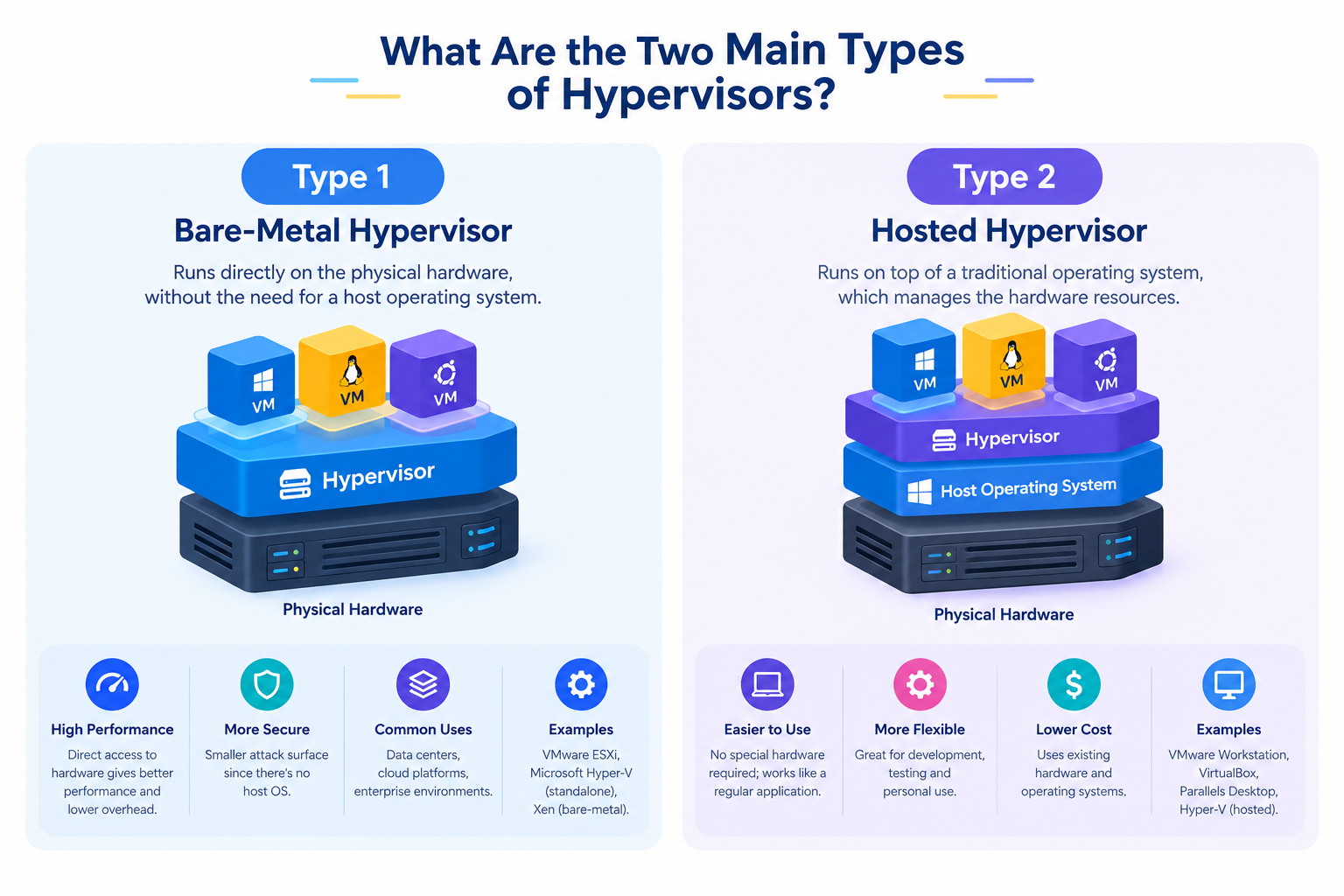
Hypervisors are generally divided into two categories: Type 1 and Type 2. The main difference is how they operate in relation to the physical hardware and host operating system.
1. Type 1 Hypervisor (Bare-Metal Hypervisor)
A Type 1 hypervisor runs directly on physical server hardware rather than operating as an ordinary application inside a conventional host operating system.
It provides the virtualization layer and manages the resources required by virtual machines.
Some Type 1 platforms also use privileged management components or a parent operating-system partition. Therefore, running directly on hardware does not necessarily mean that no operating-system components are involved.
Type 1 hypervisors are commonly used in:
- Enterprise data centers.
- Cloud computing infrastructure.
- VPS hosting environments.
- Dedicated server virtualization.
- Large-scale virtual machine deployments.
Examples of Type 1 hypervisors include:
- VMware ESXi
- Microsoft Hyper-V
- KVM (Kernel-based Virtual Machine)
- Xen
Advantages of Type 1 hypervisors:
- Designed for server and data center environments.
- Efficient management of hardware resources.
- Isolation between virtual machines.
- Support for centralized virtualization management.
- Suitable for production workloads.
Because they are designed for server virtualization, Type 1 hypervisors are widely used in professional hosting and cloud infrastructure.
2. Type 2 Hypervisor (Hosted Hypervisor)
A Type 2 hypervisor runs as an application on top of an existing operating system, such as Windows, Linux, or macOS.
Instead of managing physical hardware directly, it relies on the host operating system to access CPU, memory, storage, and other resources.
Type 2 hypervisors are commonly used for:
- Desktop virtualization.
- Software development and testing.
- Learning different operating systems.
- Running Linux on a Windows computer.
- Testing applications in isolated environments.
Examples of Type 2 hypervisors include:
- Oracle VirtualBox
- VMware Workstation
- VMware Fusion
Advantages of Type 2 hypervisors:
- Easy to install on an existing computer.
- Convenient for developers and individual users.
- Useful for testing different operating systems.
- Does not normally require a dedicated physical server.
- Allows virtual machines to run alongside regular desktop applications.
Type 2 hypervisors are generally more suitable for personal computing, development, and testing than large-scale production server infrastructure.
Type 1 vs. Type 2 Hypervisor: Key Differences
Both hypervisor types create and manage virtual machines, but their architecture and intended uses are different.
| Feature | Type 1 Hypervisor | Type 2 Hypervisor |
| Also known as | Bare-metal | Hosted |
| Installation | Directly on physical hardware | On a host operating system |
| Hardware access | Through the virtualization platform | Through the host OS and virtualization software |
| Typical environment | Data centers and servers | Desktop computers |
| Performance overhead | Generally designed for efficient server virtualization | Includes a host operating system layer |
| Management | Dedicated virtualization tools | Host OS and virtualization application |
| Common examples | ESXi, Hyper-V, KVM, Xen | VirtualBox, VMware Workstation |
Which Type of Hypervisor Is Better?
Neither type is universally better. The appropriate choice depends on the intended workload and infrastructure.
- For production servers and VPS hosting: Type 1 hypervisors are generally preferred because they are designed for server virtualization and centralized resource management.
- For desktop testing and development: Type 2 hypervisors are often more convenient because they can be installed on an existing computer.
The final choice should consider performance requirements, hardware compatibility, security, and management needs.
What Is the Role of a Hypervisor in VPS Hosting?
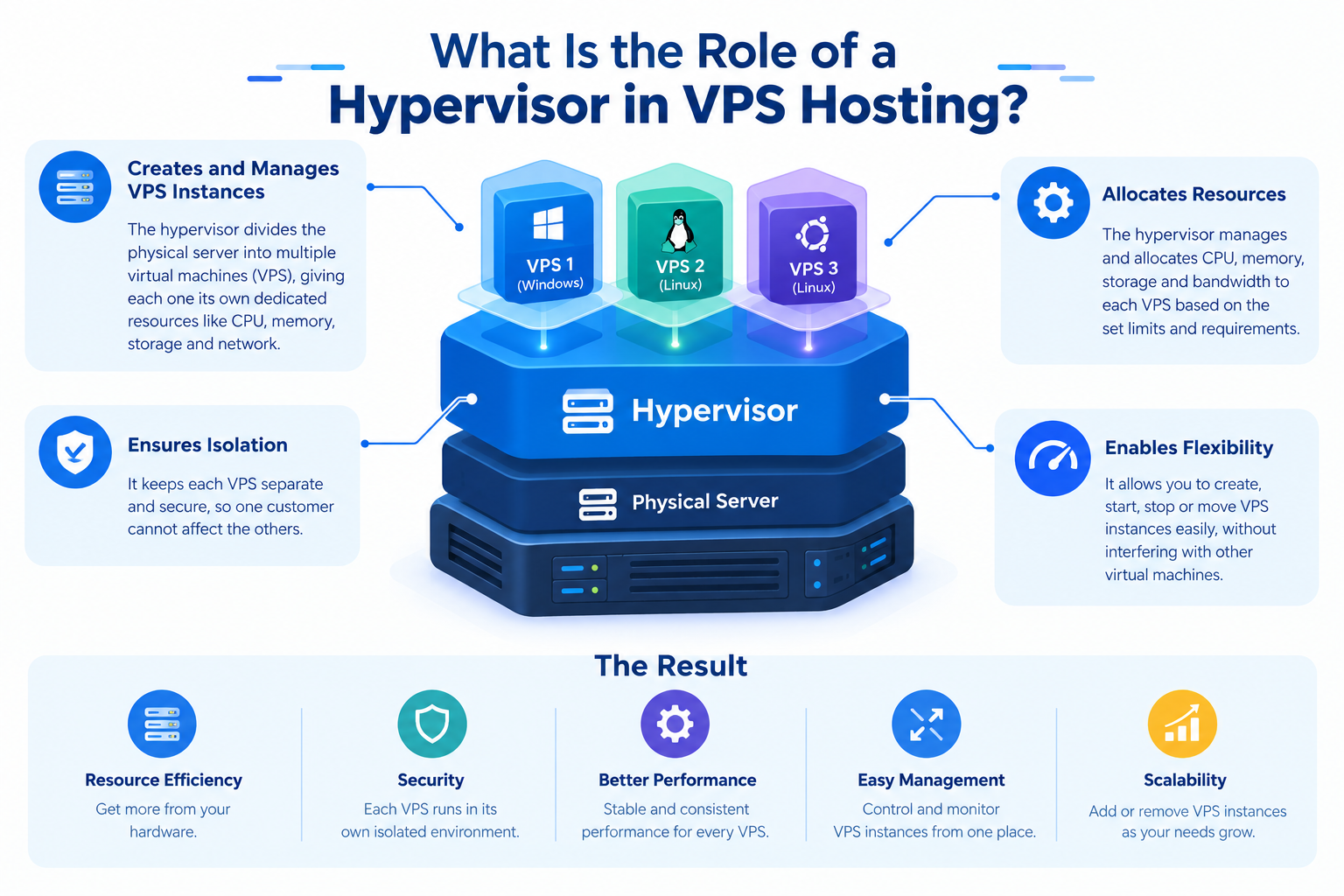
A hypervisor plays an important role in VPS hosting because it allows hosting providers to create multiple virtual servers on a single physical machine.
Instead of providing a separate physical server to every customer, a hosting provider can use virtualization technology to divide a powerful physical server into multiple virtual machines.
Each VPS can have its own:
- Virtual CPU allocation.
- RAM allocation.
- SSD or NVMe storage.
- Operating system.
- Network configuration.
- Administrative access.
Customers can manage their VPS independently, install supported software, configure applications, and host websites without managing the underlying physical server.
A Practical VPS Hosting Example
Suppose a hosting provider has a physical server with 32 CPU cores and 128 GB RAM.
Using a hypervisor, the provider can create several VPS instances with different configurations.
| VPS | vCPU allocation | RAM allocation |
| VPS 1 | 4 vCPUs | 16 GB |
| VPS 2 | 4 vCPUs | 16 GB |
| VPS 3 | 8 vCPUs | 32 GB |
| VPS 4 | 4 vCPUs | 16 GB |
This is an illustrative allocation, not a fixed hosting configuration. Actual capacity depends on the server’s available resources, hypervisor configuration, workload demands, and resource management policies.
It is also important to understand that a virtual CPU is not necessarily a permanently dedicated physical CPU core. The hypervisor schedules virtual CPU execution on available physical processors.
Similarly, allocated virtual memory does not always mean that an identical amount of physical RAM is permanently reserved. This depends on the platform and its memory allocation policies.
Why Do Hosting Providers Use Hypervisors?
Hosting providers use hypervisors for several important reasons.
1. Better hardware utilization
Multiple virtual machines can share a physical server, helping providers use available hardware more efficiently.
2. Independent virtual environments
Each VPS can run its own operating system and applications without requiring a separate physical server.
3. Flexible resource allocation
Providers can configure virtual CPU, memory, storage, and networking according to different VPS plans.
4. Easier virtual server management
Virtualization management tools help administrators create, monitor, maintain, and manage virtual machines.
5. Scalability
Providers can deploy additional virtual machines as infrastructure capacity allows, without purchasing a separate physical server for every new customer.
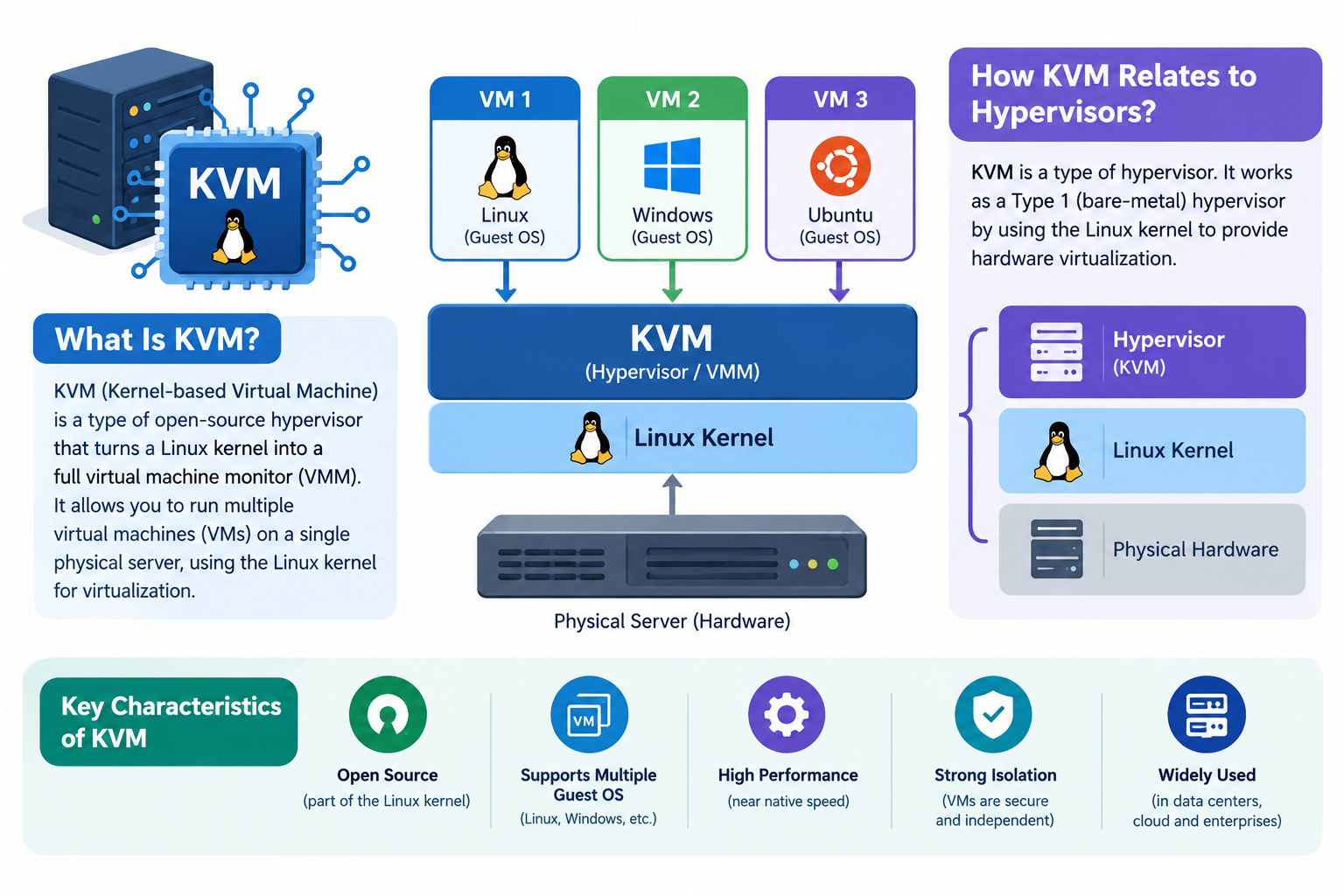
What Is KVM and How Is It Related to Hypervisors?
KVM stands for Kernel-based Virtual Machine. It is an open-source virtualization technology built into the Linux kernel.
KVM allows a Linux system to function as a virtualization host, using hardware-assisted virtualization features provided by compatible processors.
It is commonly used in server virtualization and cloud computing environments.
KVM works with other virtualization components:
- Linux Kernel: Provides the underlying virtualization capabilities through KVM kernel modules.
- QEMU: Provides the virtual machine hardware model, device emulation, and related functionality.
- Libvirt: Provides management interfaces and tools for configuring and controlling virtual machines.
These components work together to create and manage virtual machines on a Linux-based physical server.
KVM is generally classified as a Type 1 hypervisor because its virtualization functionality is integrated into the Linux kernel. However, it differs architecturally from standalone bare-metal hypervisors because it relies on the Linux kernel and supporting userspace components.
KVM is particularly relevant to VPS hosting because it supports hardware-assisted virtualization and independent virtual machine environments.
What Is the Difference Between Virtual Machines and Containers?
Virtual machines and containers both provide isolated environments for running applications, but they use different virtualization approaches.
A virtual machine uses virtual hardware and runs its own guest operating system. A container shares the host operating system kernel while keeping applications and their dependencies isolated.
| Feature | Virtual Machines | Containers |
| Operating system | Each VM runs its own guest OS | Share the host OS kernel |
| Isolation | Virtualization-based isolation | Operating-system-level isolation |
| Resource usage | Includes guest OS resource requirements | Generally lighter |
| Startup | Usually takes longer | Usually faster |
| Management | Managed through a hypervisor or VM platform | Managed through container platforms |
| Common examples | KVM, VMware, Hyper-V | Docker, containerd |
When should you use each?
Virtual machines are useful when separate operating systems, stronger workload separation, or different operating-system environments are required.
Containers are useful when deploying applications in lightweight, portable, and consistent environments.
They are not direct replacements for each other. Some infrastructure also runs containers inside virtual machines.
Does a Hypervisor Affect VPS Performance?
Yes. A hypervisor can influence VPS performance because it manages how virtual machines access physical server resources.
However, performance does not depend on the hypervisor alone. It also depends on physical server hardware, resource allocation, storage performance, network configuration, and the workloads running inside each VM.
Several factors can influence VPS performance:
- CPU allocation: The number of vCPUs and available physical processing capacity affect computing performance.
- CPU scheduling: The hypervisor schedules virtual CPU execution on physical processors. High contention can increase waiting time.
- RAM allocation: Insufficient memory or excessive memory overcommitment can affect applications and operating system performance.
- Storage technology: SSD and NVMe storage can improve disk performance compared with slower storage.
- Network capacity: Network interfaces, bandwidth, and configuration affect connectivity and data transfer.
- Server workload: The number of active virtual machines and their resource demands influence overall server capacity.
- Hypervisor configuration: Proper configuration and resource management help maintain efficient virtualization.
What Is Resource Overcommitment?
Resource overcommitment occurs when a virtualization platform assigns more virtual resources to virtual machines than the physical server has available.
For example, a server may have 32 physical CPU cores while the combined vCPU allocations across its virtual machines exceed 32.
This can work when virtual machines do not use all their assigned processing capacity simultaneously. However, heavy workloads can create CPU contention.
Memory overcommitment is also possible, but it requires careful management. Excessive memory pressure and swapping can significantly reduce performance.
Overcommitment is not automatically a problem, but it must be managed according to workload requirements and available hardware capacity.
A well-configured hypervisor running on suitable hardware can provide efficient performance for many VPS workloads.
Are Hypervisors Secure?
Hypervisors provide isolation between virtual machines, but virtualization does not automatically guarantee complete security.
Because multiple virtual machines share the same physical infrastructure, vulnerabilities or incorrect configurations at the virtualization layer can potentially affect more than one VM.
One security risk is known as a VM escape. This occurs when malicious code running inside a virtual machine exploits a vulnerability in the virtualization layer or an associated component to gain access beyond its intended isolation boundary.
Although such vulnerabilities are not routine, they demonstrate why hypervisor security is important.
Hosting providers and server administrators should follow security best practices, including:
- Keeping hypervisor software and related components updated.
- Restricting access to virtualization management interfaces.
- Using strong authentication and access controls.
- Configuring virtual networks securely.
- Monitoring physical server resources and system activity.
- Maintaining regular backups of important virtual machines.
- Applying security updates to guest operating systems.
Proper security management helps protect both the virtualization infrastructure and the virtual machines running on it.
Frequently Asked Questions About Hypervisors
