
A socket is a software interface that an application uses to communicate over a network. Sockets are used by web servers, databases, APIs, SSH services, and many other applications running on VPS servers.
When a browser connects to a website hosted on a VPS, for example, the web server uses network sockets to communicate with that browser. Understanding sockets also makes it easier to understand related concepts such as IP addresses, ports, TCP, UDP, and network connections.
What Is a Network Socket?
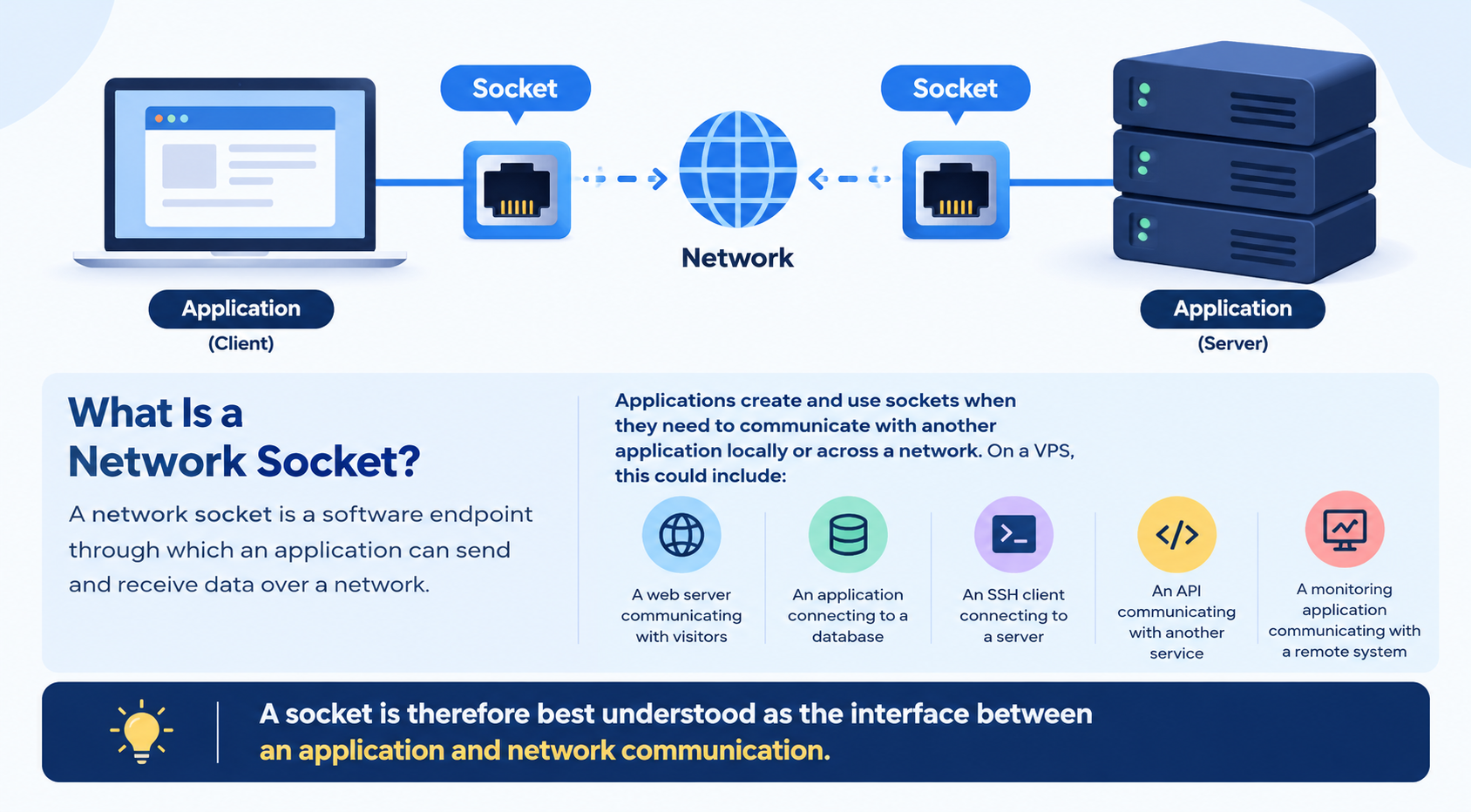
A network socket is a software endpoint through which an application can send and receive data over a network.
Applications create and use sockets when they need to communicate with another application locally or across a network. On a VPS, this could include:
- A web server communicating with visitors
- An application connecting to a database
- An SSH client connecting to a server
- An API communicating with another service
- A monitoring application communicating with a remote system
A socket is therefore best understood as the interface between an application and network communication.
How Does a Socket Work?
The exact process depends on whether the application is acting as a client or server.
A typical server-side socket works like this:
- The server application creates a socket.
- It associates the socket with a local IP address and port.
- The application listens for incoming connections.
- A client attempts to connect.
- The server accepts the connection.
- The applications exchange data.
- The connection eventually closes.
A client socket normally initiates the connection instead of waiting for incoming connections.
You do not normally need to manage these steps manually when running a VPS. Web servers and other applications handle socket operations through the operating system and their networking libraries.
What Is a Socket Address?
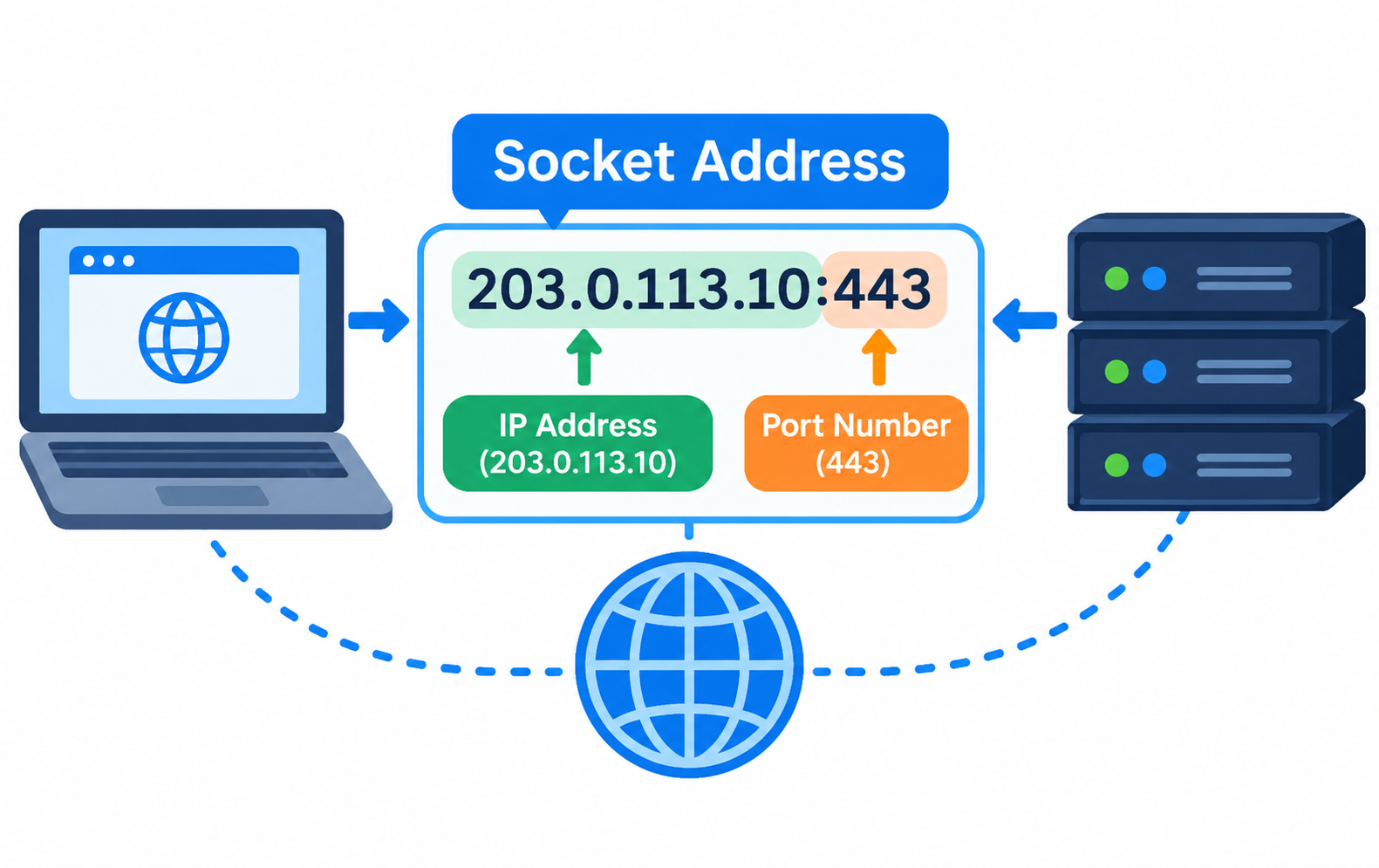
A socket address generally combines an IP address and a port number.
For example:
203.0.113.10:443
Here:
- 203.0.113.10 is the IP address.
- 443 is the port number.
- TCP or UDP determines the transport protocol being used.
The socket address helps identify where network communication should be sent.
It is important not to confuse a socket with a socket address. A socket is the application’s software interface for network communication, while a socket address identifies a network endpoint.
Socket vs Port: What’s the Difference?
A socket and a port are not the same thing.
A port is a logical number used to direct network traffic to the appropriate service on a host. A socket is the software interface that an application uses to communicate through the network.
A simple way to think about it is:
A port is like a numbered doorway, while a socket is the mechanism an application uses to communicate through that doorway.
For example, a web server may listen for HTTPS traffic on port 443. The web server uses sockets to accept and communicate with clients connecting to that service.
Understanding this distinction is particularly useful when troubleshooting VPS networking.
For a deeper explanation of ports, see the dedicated VPS Ports and Port Numbers Guide.
TCP Sockets vs UDP Sockets
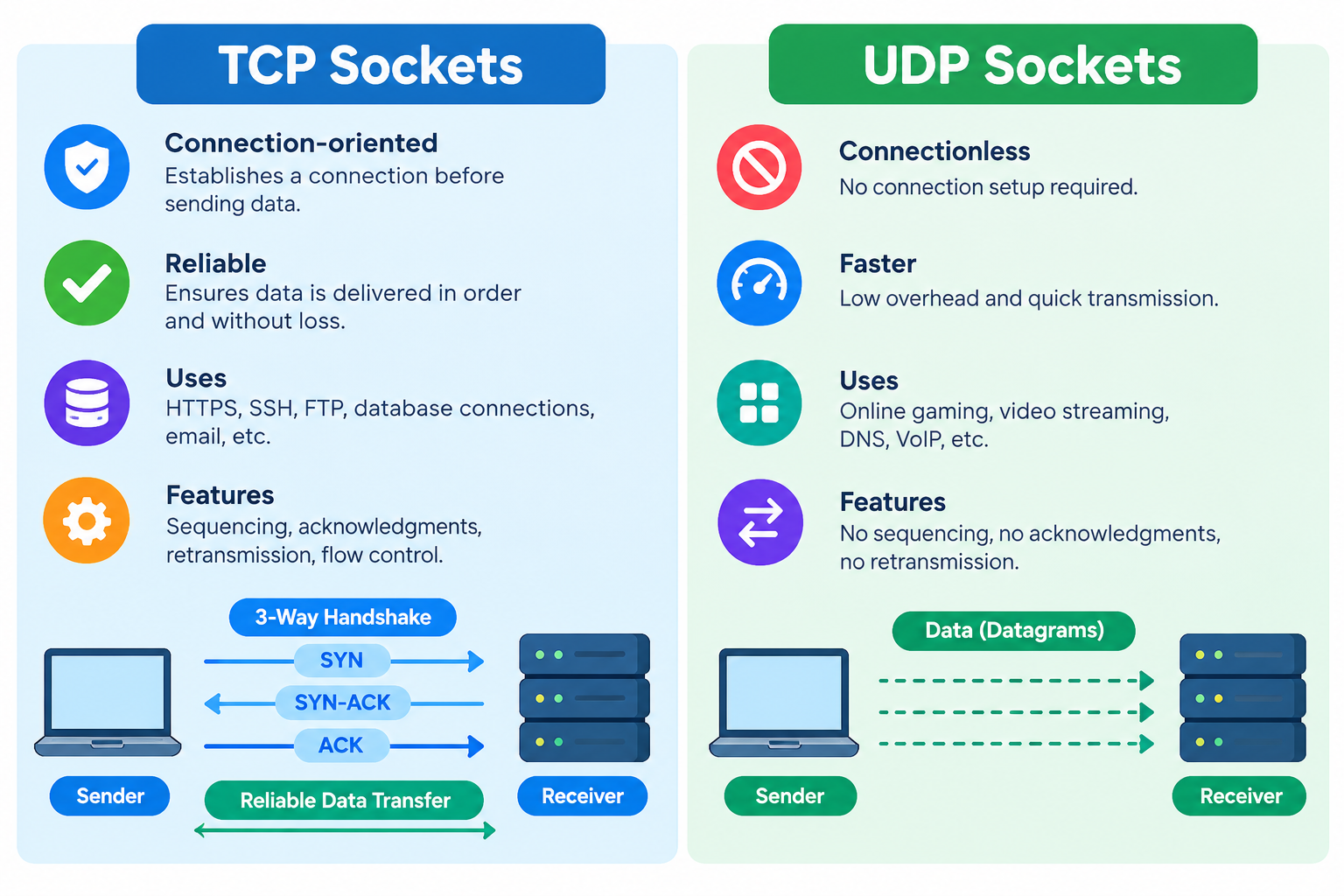
Sockets can be used with different network transport protocols. Two of the most common are TCP and UDP.
TCP Sockets
TCP is connection-oriented and provides reliable, ordered delivery of data.
TCP sockets are commonly used for services such as:
- HTTPS
- SSH
- FTP
- Many database connections
- Other applications that require reliable communication
TCP handles mechanisms such as sequencing, acknowledgements, and retransmission.
UDP Sockets
UDP is connectionless and has less protocol overhead than TCP.
UDP sockets are commonly used for applications where low overhead or fast communication is important, including:
- DNS
- Real-time applications
- Voice and video communication
- Online gaming
- Certain monitoring applications
UDP does not provide TCP’s built-in guarantees for reliable, ordered delivery.
If you need to understand the differences between these protocols in greater depth, see the dedicated TCP vs UDP Guide.
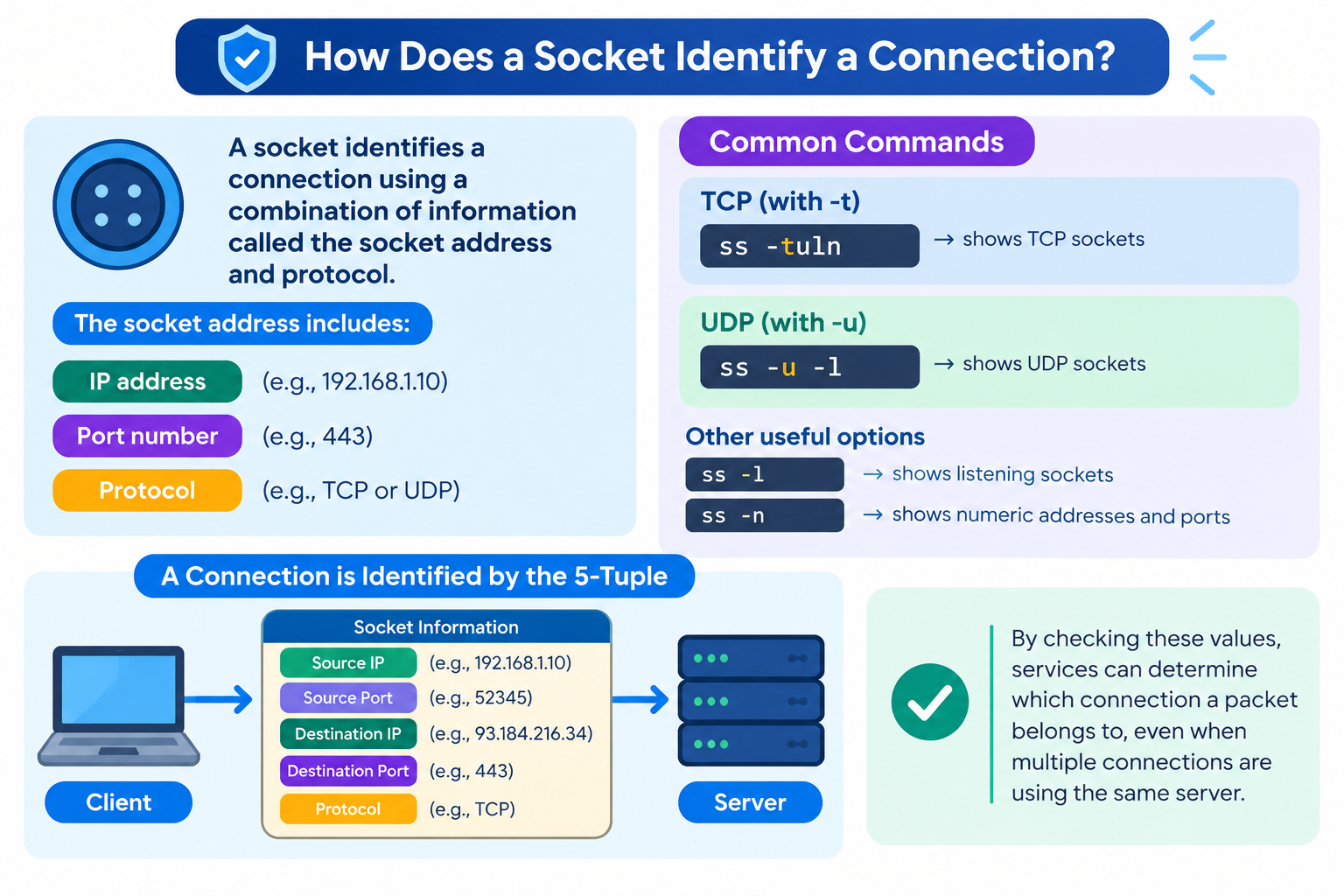
How Does a Socket Identify a Connection?
A common source of confusion is how a server can handle many clients using the same port.
For a TCP connection, the communication is identified by information including the source and destination IP addresses and port numbers, along with the protocol.
For example:
Client: 198.51.100.25:51842
Server: 203.0.113.10:443
Another visitor might connect using:
Client: 198.51.100.30:53217
Server: 203.0.113.10:443
Both connections can communicate with the same web server port, 443, while remaining separate connections.
This is why a busy VPS can serve many visitors through the same web service without all their traffic being treated as one connection.
Listening Sockets vs Connected Sockets
A server normally has a listening socket waiting for incoming connection requests.
For example, a web server might have a listening socket associated with port 443.
When a client connects, the operating system provides a separate connected socket through which the server communicates with that particular client.
In simple terms:
Listening socket
↓
Port 443
↓
Incoming connection
↓
Individual client connection
This distinction becomes useful when examining network activity on a Linux VPS. A listening socket indicates that a service is waiting for connections, while an established connection represents active communication.
Example: Sockets on a VPS Web Server
Consider a VPS running a website over HTTPS.
The web server listens for incoming connections on port 443.
A visitor’s browser might connect like this:
Client: 198.51.100.25:51842
↓
VPS: 203.0.113.10:443
The web server uses a socket to communicate with that visitor.
When another visitor connects, their source address and port may be different:
Client: 198.51.100.30:53217
↓
VPS: 203.0.113.10:443
Both visitors can use the same HTTPS service while maintaining separate connections.
This is one reason sockets are fundamental to websites, APIs, databases, and other network applications hosted on VPS servers.
How to Check Sockets on a Linux VPS
Linux provides tools for viewing network sockets and active connections. One of the most useful modern tools is ss.
To display listening TCP and UDP sockets, you can use:
ss -tuln
The options mean:
- -t — show TCP sockets
- -u — show UDP sockets
- -l — show listening sockets
- -n — display numerical addresses and ports without name resolution
To view TCP and UDP connections more generally:
ss -tun
These commands can be useful when checking which services are listening on a VPS or investigating network connections.
For a complete procedure for checking exposed services and ports, use a dedicated Linux VPS Open Ports Guide rather than treating this article as a full networking troubleshooting guide.
Why Are Sockets Important in VPS Hosting?
Sockets are fundamental to almost every network-based application running on a VPS.
A website, database, API, mail service, remote administration tool, or custom application may create or use sockets whenever it communicates over a network.
Understanding sockets can help you:
- Understand how applications communicate
- Interpret network connection information
- Understand the relationship between ports and services
- Investigate basic connection problems
- Understand Linux networking tools
- Communicate more effectively when troubleshooting VPS issues
You generally do not manage individual sockets manually. Instead, you manage the applications and services that create and use them.
Common Socket Misconceptions
A Socket Is Not the Same as a Port
A port is a logical network identifier, while a socket is an application interface for network communication.
Every Open Socket Is Not a Security Problem
A VPS normally needs listening sockets for services such as web servers, SSH, and databases to function.
The important question is whether the listening service is expected and properly secured.
TCP and UDP Sockets Do Not Work the Same Way
TCP and UDP have different communication models. A troubleshooting approach that works for TCP may not apply directly to a UDP-based application.
WebSockets and Network Sockets Are Not the Same Thing
Despite the similar name, WebSocket is a higher-level communication technology that provides persistent, two-way communication between a client and server.
WebSockets use network communication underneath, but the terms should not be treated as interchangeable.
Frequently Asked Questions
