
Healthcare applications often need reliable server resources, controlled access, database support, and an environment that can grow with the organization. Applications such as patient management systems, appointment platforms, healthcare management software, and some telemedicine solutions may require more control than basic shared hosting can provide.
A VPS for Healthcare Applications can provide an isolated virtual server environment with allocated resources and greater configuration flexibility. This makes VPS hosting a practical option for some healthcare software applications, particularly when they require custom server configurations or predictable resource allocation.
However, a VPS is not automatically secure or compliant simply because it is isolated. The application, operating system, server configuration, access controls, hosting provider, and applicable regulations all need to be considered.
Why Use a VPS for Healthcare Applications?
Healthcare applications can have infrastructure requirements that are different from those of a simple business website. A database-driven application, for example, may need consistent CPU and RAM resources, specific software versions, database access, and server-level configuration.
A VPS can provide a useful middle ground between shared hosting and dedicated infrastructure.
Depending on the application and hosting configuration, a healthcare VPS can provide:
- Allocated virtual CPU and RAM resources
- An isolated hosting environment
- Greater server configuration control
- Operating system flexibility
- Support for custom software and databases
- Administrative access where required
- Resource scalability
- More predictable resource allocation than typical shared hosting
The appropriate configuration depends on the application’s architecture and workload rather than simply choosing the largest VPS available.
What Healthcare Applications Can Run on a VPS?
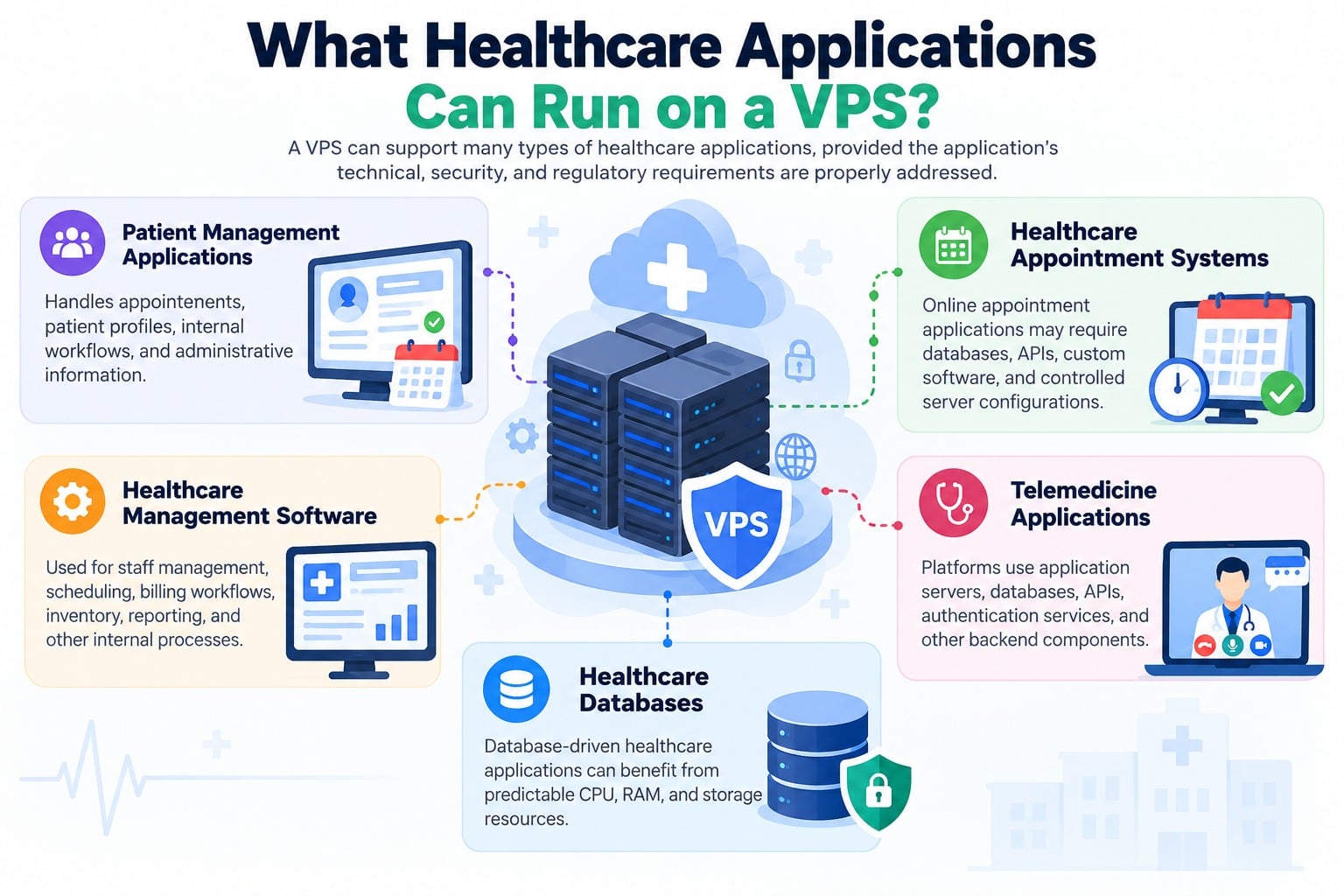
A VPS can support many types of healthcare applications, provided the application’s technical, security, and regulatory requirements are properly addressed.
Patient Management Applications
Patient management systems may handle appointments, patient profiles, internal workflows, and administrative information. A VPS can provide an environment for the application’s web server, application components, and database.
Healthcare Appointment Systems
Online appointment applications may require databases, APIs, custom software, and controlled server configurations. A VPS can provide the flexibility required by these applications.
Healthcare Management Software
Clinics and healthcare organizations may use custom applications for staff management, scheduling, billing workflows, inventory, reporting, and other internal processes.
Telemedicine Applications
Some telemedicine platforms use application servers, databases, APIs, authentication services, and other backend components. A VPS may host some or all of these components depending on the application’s architecture and operational requirements.
Telemedicine platforms can have additional requirements for availability, security, networking, and data protection, so infrastructure should be evaluated according to the specific application.
Healthcare Databases
Database-driven healthcare applications can benefit from predictable CPU, RAM, and storage resources. Database requirements should be assessed based on the number of users, queries, database size, and application architecture.
What Should a Healthcare VPS Provide?
There is no universal VPS specification for healthcare applications. The server should be selected according to the application’s actual workload.
CPU and RAM
CPU and memory affect the application’s ability to process requests and database operations.
Consider:
- Expected number of users
- Concurrent users
- Database workload
- Background processes
- Application framework
- Caching requirements
An application with a small number of users may require considerably fewer resources than a healthcare platform serving multiple locations.
Storage
Healthcare applications may store databases, documents, application files, logs, and other data.
SSD storage can provide fast disk operations, but capacity should be planned around current usage and expected growth.
It is also important to distinguish primary VPS storage from backup storage. The VPS itself should not be considered the only copy of important application data.
For backup planning, see the Offsite VPS Backup Guide and VPS Backup & Disaster Recovery Guide.
Network Connectivity
Applications accessed by healthcare staff, patients, external systems, or APIs depend on reliable network connectivity.
Network requirements can increase when an application handles:
- File uploads
- Remote users
- API traffic
- Large documents
- Video-related services
- Database synchronization
The required bandwidth depends on the application’s actual workload.
Operating System
The required operating system depends on the application’s software stack.
Linux may be appropriate for applications using technologies such as PHP, Python, Node.js, or many open-source databases. Applications built around Microsoft technologies may require Windows Server.
The operating system should therefore be selected according to the application’s technical requirements.
Scalability
Healthcare applications may grow as an organization adds users, locations, services, or features.
A suitable VPS environment should allow resources to be increased when the application needs more CPU, RAM, storage, or other infrastructure capacity.
Scaling should be based on the actual bottleneck. Increasing VPS resources will not necessarily fix inefficient application code, poorly optimized database queries, or other application-level problems.
Is a VPS Suitable for Your Healthcare Application?
A VPS may be appropriate when an application requires greater control and resource allocation than shared hosting can provide.
A VPS can make sense when the application needs:
- Custom server software
- Specific operating system requirements
- Database access and configuration
- Dedicated virtual resources
- Server-level configuration
- Custom APIs or backend services
- Greater control over the hosting environment
- The ability to increase resources as usage grows
A VPS may not be the best infrastructure choice for every healthcare application. Large or highly complex platforms may require multiple servers, specialized cloud infrastructure, managed services, or a distributed architecture.
The key question is not simply whether a VPS can run the application, but whether the VPS environment can meet the application’s performance, security, availability, scalability, and regulatory requirements.
Consider the Application Architecture
Before selecting a VPS, understand how the healthcare application is structured.
A simple application might use:
Users → Web/Application Server → Database
A more complex application could involve:
Users → Web Server → Application Server → Database → File Storage → External APIs
The VPS requirements can change significantly depending on this architecture.
For example, an application that needs a separate database server, file storage system, background processing, or external API services may require more than a single VPS.
This is why VPS selection should be based on the application’s architecture and workload rather than website traffic alone.
Security and Compliance Considerations
Healthcare applications may process sensitive information, so security needs to be considered at multiple levels.
A VPS gives administrators more control, but that control also creates responsibilities.
Important areas include:
- Strong authentication
- Access control
- Regular operating system updates
- Firewall configuration
- Secure application configuration
- Encryption where appropriate
- Monitoring and logging
- Secure backups
- Backup verification
A VPS does not automatically make an application secure.
Security depends on the combined configuration of the application, operating system, database, server, user accounts, network controls, and backup environment.
For server-level security controls, see the VPS Server Hardening Checklist.
Healthcare Compliance Is a Separate Consideration
Healthcare organizations should identify the regulations and contractual requirements that apply to their location, patients, business relationships, and type of data.
For example, organizations subject to U.S. HIPAA requirements may have specific obligations when electronic protected health information is handled by a cloud service provider. Other countries and regions may have different privacy, healthcare, security, and data-residency requirements.
Therefore, organizations should not assume that a VPS is automatically compliant with HIPAA or any other healthcare regulation.
Before storing sensitive healthcare information, evaluate:
- Applicable regulations
- Data protection requirements
- Data residency requirements
- Encryption requirements
- Access controls
- Audit and logging requirements
- Data retention policies
- Hosting provider responsibilities
- Contractual requirements
Compliance is a property of the overall technology environment and operating processes, not simply the VPS package.
Consider Where Healthcare Data Is Hosted
The physical location of a VPS can matter when healthcare applications process sensitive information.
Organizations should determine whether applicable laws, contracts, customers, regulators, or internal policies require data to be stored or processed in a particular country or region.
Before selecting a VPS location, consider:
- Where the organization operates
- Where users and patients are located
- Where data is legally permitted to be stored
- Contractual data-location requirements
- Backup and disaster recovery locations
Data residency requirements should be evaluated before deployment rather than after the application is already storing sensitive information.
Common Mistakes When Hosting Healthcare Applications on a VPS
Choosing a VPS Based Only on Price
The cheapest VPS is not necessarily the right choice for a healthcare application.
Consider resources, infrastructure reliability, scalability, support, security capabilities, and the application’s actual requirements.
Choosing Too Few Resources
An underpowered server can result in slow application response times and database performance problems.
Estimate the workload before selecting the VPS and monitor actual resource usage after deployment.
Treating the VPS as a Backup
The primary VPS should not be the only location containing important application data.
Maintain an appropriate backup strategy and separate backup copies from the production environment.
For more information, see the Offsite VPS Backup Guide.
Giving Excessive Administrative Access
Not every user needs server-level access. Administrative privileges should be limited to people who require them.
Ignoring Future Growth
An application that works well with a small number of users may require additional resources as usage increases.
Select an environment that allows practical resource upgrades when needed.
Assuming the VPS Provider Handles Everything
A VPS gives the customer more control than many fully managed application platforms, which means some responsibilities may remain with the organization or application administrator.
Understand which responsibilities belong to the hosting provider and which belong to the application owner.
How to Choose a VPS for a Healthcare Application
Before selecting a VPS, follow a simple evaluation process:
1. Identify Application Requirements
Check the application’s CPU, RAM, storage, operating system, database, and software requirements.
2. Understand the Workload
Estimate current users, concurrent users, database activity, storage consumption, and expected growth.
3. Review the Application Architecture
Determine whether the application needs one server or multiple components such as databases, APIs, background services, and file storage.
4. Identify Security Requirements
Determine the authentication, access control, encryption, monitoring, and server security measures required by the application.
5. Define Backup and Recovery Requirements
Determine how frequently application data should be backed up and how quickly the system needs to be restored after a failure.
Detailed backup implementation should be handled through a dedicated VPS Backup & Disaster Recovery Guide rather than this article.
6. Check Data Location Requirements
Review applicable privacy, regulatory, contractual, and data-residency requirements before selecting the server location.
7. Plan for Growth
Choose a VPS environment that can be upgraded as application requirements increase.
Frequently Asked Questions
