
What Is Blue-Green Deployment?
Blue-green deployment is a release strategy that uses two separate, closely matched production environments for an application.
One environment handles live traffic while the other is prepared with the new application version. After the new version has been deployed and tested, traffic is switched to the new environment.
The environments are commonly called Blue and Green.
For example:
- Blue: Current production version
- Green: New application version
- Blue: Serving users
- Green: Being prepared and tested
After a successful deployment, Green becomes the live environment and Blue can remain available as a rollback option.
For applications hosted on a VPS, this approach can reduce the disruption associated with updating a production application. However, it does require additional planning and, depending on the architecture, additional infrastructure resources.
How Blue-Green Deployment Works
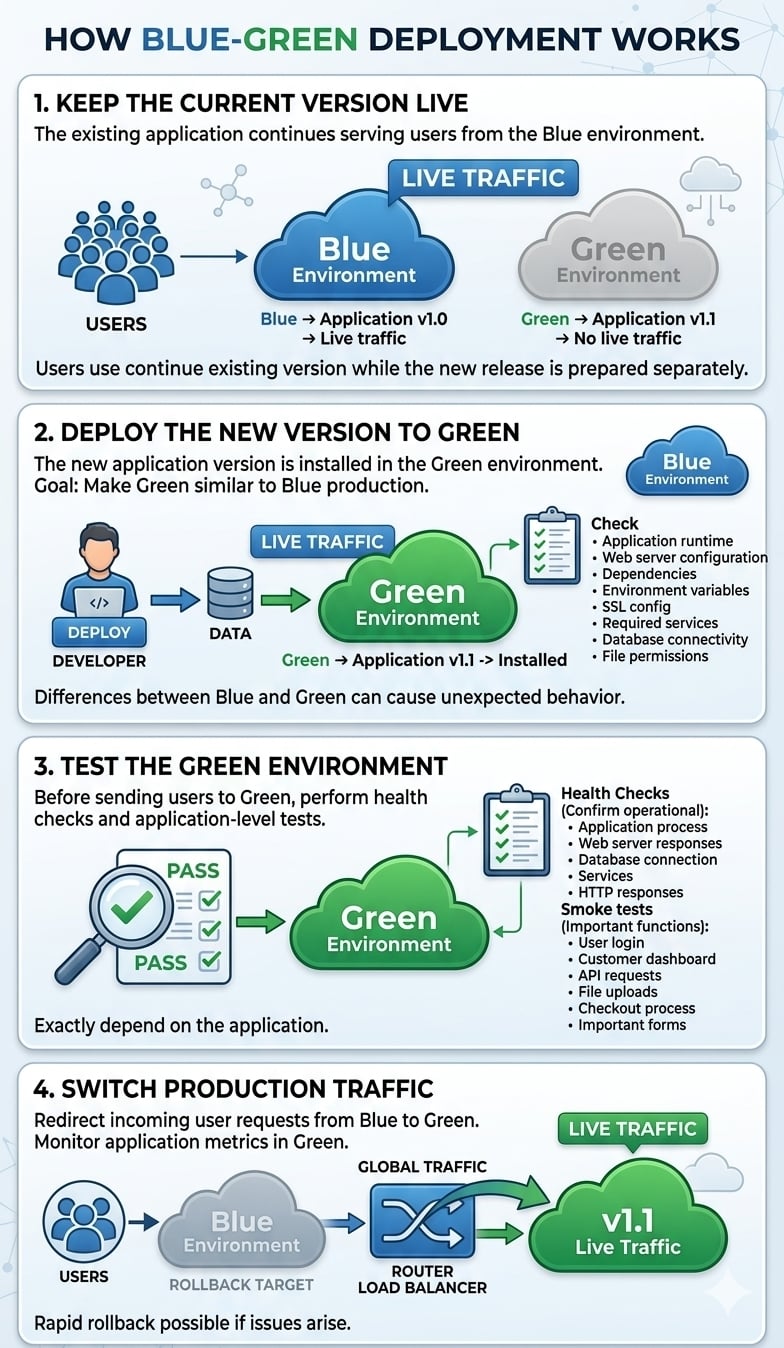
The basic process has five stages.
1. Keep the Current Version Live
The existing application continues serving users from the Blue environment.
For example:
Blue → Application v1.0 → Live traffic
Green → Application v1.1 → No live traffic
Users continue using the existing version while the new release is prepared separately.
2. Deploy the New Version to Green
The new application version is installed in the Green environment.
The goal is to make Green as similar as practical to the existing production environment.
Check important components such as:
- Application runtime
- Web server configuration
- Application dependencies
- Environment variables
- SSL configuration
- Required services
- Database connectivity
- File permissions
Differences between Blue and Green can cause unexpected behavior after the traffic switch.
3. Test the Green Environment
Before sending users to Green, perform health checks and application-level tests.
Health checks can confirm that the environment is operational, such as:
- Application process is running
- Web server responds correctly
- Database connection works
- Required services are available
- Expected HTTP responses are returned
Smoke tests go a step further by testing important application functions.
For example:
- User login
- Customer dashboard
- API requests
- File uploads
- Checkout process
- Important forms
The exact tests depend on the application.
4. Switch Production Traffic
Once Green is ready, traffic can be redirected from Blue to Green.
Traffic switching can be handled through:
- Load balancers
- Reverse proxies
- Application gateways
- DNS in simpler architectures
A load balancer or reverse proxy generally gives more direct control over traffic switching than relying on DNS changes, because DNS behavior can be affected by caching and TTL settings.
The deployment then changes from:
Blue → Live
Green → Ready
to:
Blue → Standby
Green → Live
5. Monitor the New Environment
The deployment is not finished simply because traffic has been switched.
Monitor the new production environment for signs of problems, including:
- HTTP 5xx errors
- Application errors
- Response times
- CPU usage
- Memory usage
- Database performance
- Failed transactions
- Queue or worker failures
- Application logs
Keep the previous Blue environment available until the new release has demonstrated that it is stable.
Blue-Green Deployment Architecture on a VPS
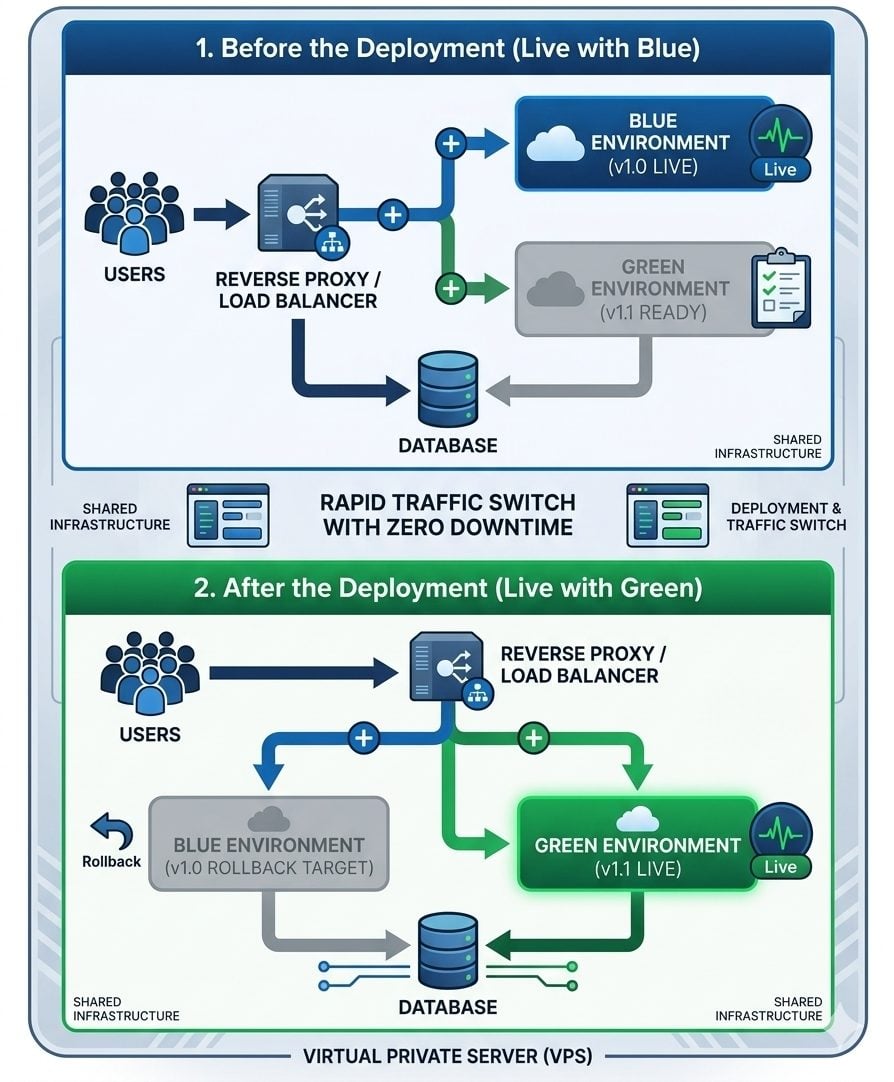
Blue-green deployment does not necessarily require two physical VPS servers.
Blue and Green are logical application environments. Depending on the application, they can be implemented using separate VPS instances, virtual machines, containers, or isolated environments on the same infrastructure.
A simple VPS architecture could look like this:
USERS
|
v
Reverse Proxy / Load Balancer
|
+———-+———-+
| |
v v
BLUE ENVIRONMENT GREEN ENVIRONMENT
v1.0 LIVE v1.1 READY
| |
+———-+———-+
|
v
DATABASE
After the deployment:
USERS
|
v
Reverse Proxy / Load Balancer
|
+———-+———-+
| |
v v
BLUE ENVIRONMENT GREEN ENVIRONMENT
v1.0 STANDBY v1.1 LIVE
The exact architecture depends on the application, database, traffic requirements, and available VPS resources.
Blue-Green Deployment and Database Changes
The application environment is only one part of a deployment.
Database changes require special attention.
Suppose version 1.1 requires a database structure that version 1.0 cannot understand. If Green becomes live and changes the database, switching traffic back to Blue may no longer be safe.
This means application rollback and database rollback are not necessarily the same thing.
Use Backward-Compatible Database Changes
Where possible, database changes should be introduced in a way that allows the old and new application versions to work with the database during the transition.
A safer deployment sequence might look like:
- Make a backward-compatible database change
- Deploy the new application
- Test Green
- Switch traffic to Green
- Monitor the application
- Remove old database structures later
This is safer than making an irreversible database change at the same time as the application release.
Important: Blue-green deployment makes application rollback easier, but it does not automatically make database rollback safe. If the new version changes stored data or database structures, a separate database recovery and compatibility strategy is required.
For applications with complex database migrations, the database deployment process should therefore be planned separately from the application traffic switch.
How Rollback Works in Blue-Green Deployment
One of the main advantages of blue-green deployment is that the previous application environment can remain available after the new version goes live.
Suppose:
Blue → v1.0
Green → v1.1
Green is tested successfully and becomes live.
If a serious application problem appears, traffic may be redirected back to Blue:
Before rollback:
Users → Green v1.1
Blue v1.0
After rollback:
Users → Blue v1.0
Green v1.1
This can be much faster than rebuilding or reinstalling the previous application version.
However, rollback is not automatically safe in every situation.
If Green has already written data that Blue cannot understand, returning traffic to Blue may create additional problems.
Therefore, a rollback plan should consider:
- Application compatibility
- Database schema changes
- Data written by the new version
- Background jobs
- Cached data
- User sessions
- External services
A rollback procedure should also be tested before it is needed during a production incident.
Blue-Green Deployment vs. Traditional Deployment
Traditional deployment usually updates the existing production environment directly.
A simplified process looks like this:
Production v1.0
↓
Stop or put application into maintenance
↓
Install v1.1
↓
Restart
↓
Test
↓
Production v1.1
If the release fails, the previous version must be restored or repaired.
Blue-green deployment separates the release from the live environment:
Blue v1.0 → Live
Green v1.1 → Deploy and test
↓
Switch
↓
Green v1.1 → Live
Blue v1.0 → Standby
This provides a clearer rollback path and allows much of the testing to happen before production traffic is moved.
Blue-Green Deployment and Zero Downtime
Blue-green deployment is often used as part of a zero-downtime deployment strategy, but it does not automatically guarantee zero downtime.
A successful traffic switch depends on several factors, including:
- Traffic-routing configuration
- Application startup time
- Database compatibility
- Session handling
- DNS behavior
- Health checks
- External dependencies
A better way to describe the benefit is that blue-green deployment can minimize or greatly reduce deployment downtime when properly designed.
The deployment strategy alone cannot guarantee that every release will be completely interruption-free.
Benefits and Limitations of Blue-Green Deployment
Blue-green deployment offers several practical advantages, but it also introduces additional infrastructure and operational requirements.
Benefits
- Reduced deployment downtime: The new version can be prepared before receiving live traffic.
- Safer releases: Production traffic stays on the existing environment while the new version is tested.
- Simpler application rollback: The previous environment can remain available.
- Better release control: Traffic can be moved only after deployment checks pass.
- Lower deployment risk: Problems can potentially be detected before affecting all users.
Limitations
- Higher resource requirements: Running two environments can require additional CPU, RAM, storage, or another VPS.
- More operational complexity: Both environments must be maintained and kept consistent.
- Database challenges: Database changes can complicate rollback.
- More testing: Each release needs meaningful health and application checks.
- Additional monitoring: The new environment needs close observation after traffic is switched.
For a small website with infrequent updates, a full blue-green architecture may provide little benefit compared with its additional complexity.
When Should You Use Blue-Green Deployment on a VPS?
Blue-green deployment is most useful when application availability and controlled releases are important.
It can be a good fit for:
- SaaS applications
- E-commerce websites
- Customer portals
- Business applications
- APIs
- Frequently updated applications
- Applications with limited maintenance windows
For example, an e-commerce application that receives regular updates may not want to take the entire site offline whenever a new version is released.
Blue-green deployment allows the business to prepare and test the new version separately before moving production traffic.
However, the additional infrastructure should be considered.
If maintaining two environments requires substantially more VPS resources than the application normally needs, a simpler deployment method may be more appropriate.
Blue-Green Deployment Best Practices
A reliable blue-green deployment process should include more than simply creating two application environments.
Keep Blue and Green Consistent
Use comparable:
- Application versions
- Runtime versions
- Dependencies
- Web server configurations
- Environment variables
- SSL configuration
The closer the environments are, the lower the chance of environment-specific problems.
Automate the Deployment Process
Automating application deployment can reduce manual errors and make it easier to reproduce the same release across environments.
Test Before Switching Traffic
At minimum, verify application availability and critical user workflows before making Green live.
Make Database Changes Compatible
Design database changes so that old and new application versions can coexist when a rollback may be required.
Define Rollback Before Deployment
Know:
- What triggers a rollback
- Who makes the decision
- How traffic will be switched
- What happens to new data
- How the database will be handled
Monitor After the Switch
Continue monitoring after Green becomes live.
Do not immediately remove Blue simply because the first tests passed.
Keep Backups Separate
Blue-green deployment is not a replacement for VPS backups.
A deployment environment helps with application rollback. A backup protects against problems such as accidental deletion, data corruption, hardware failure, or other incidents that affect the underlying data.
For backup and disaster recovery planning, use a dedicated VPS Backup & Disaster Recovery Guide rather than treating deployment environments as backups.
Blue-Green Deployment Checklist
Before switching production traffic to the new environment, verify:
- New application version is deployed
- Runtime and dependencies are correct
- Configuration has been verified
- SSL is working
- Database connectivity works
- Health checks pass
- Critical application functions have been tested
- Traffic routing is configured correctly
- Monitoring is active
- Rollback procedure is ready
- Database compatibility has been considered
- Required backups have been completed
- Previous production environment is still available
This checklist can help prevent a deployment issue from becoming a larger production incident.
Related VPS Resources
Blue-green deployment is part of a larger VPS operations workflow. These dedicated resources can cover related topics without duplicating this guide:
- Zero Downtime VPS Migration — for moving workloads while minimizing service interruption.
- VPS Monitoring Guide — for monitoring server and application performance after deployment.
- VPS Backup & Disaster Recovery Guide — for protecting application and server data independently of deployment environments.
- VPS Server Hardening Checklist — for securing the underlying VPS infrastructure.
Each resource should address its own topic in greater depth rather than repeating the blue-green deployment process.
Frequently Asked Questions
