

Latency and throughput are two important measures of network performance. When using a Virtual Private Server (VPS), latency measures communication delay, while throughput measures how much data is successfully transferred over a period of time.
Understanding latency vs throughput helps you identify network performance problems, evaluate VPS connectivity, and determine whether an application is affected by slow communication or limited data transfer capacity.
For example, a website may feel slow because requests take too long to receive responses. A VPS transferring large backup files may instead struggle because its available throughput is insufficient. Although both situations involve network performance, they require different investigations.
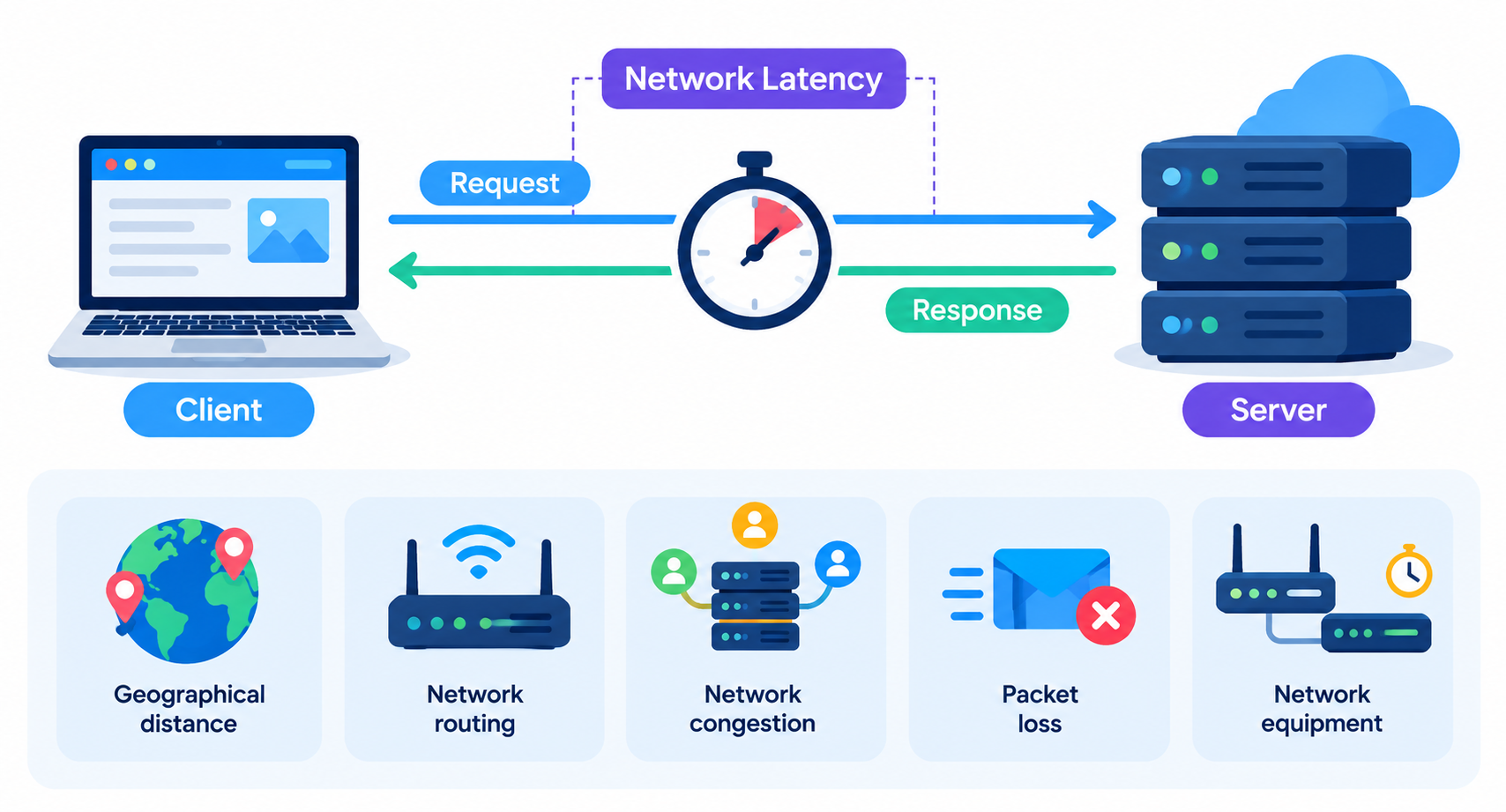
What Is Network Latency?
Network latency is the time it takes for data to travel between two points. It is commonly measured in milliseconds (ms).
When checking connectivity between a client and a VPS, administrators often measure round-trip time (RTT). RTT is the time a packet takes to travel to its destination and for a response to return.
Lower latency generally means faster communication between the client and the server.
Several factors can affect VPS network latency:
- Geographical distance: Data generally takes longer to travel between distant locations.
- Network routing: The route taken by network traffic can introduce additional delays.
- Network congestion: Busy network links may increase delays.
- Packet loss: Lost packets can require retransmission, increasing communication time.
- Network equipment: Routers, firewalls, and other devices may introduce processing delays.
Why Does Latency Matter?
Low latency is particularly important for applications that exchange frequent requests and responses.
Examples include:
- Interactive websites and web applications.
- Online gaming and real-time communication.
- SSH connections and remote server administration.
- Database applications that depend on frequent queries.
- Remote desktop sessions.
For example, a user connecting to a VPS located geographically close to them may experience lower network latency than a user connecting to a distant server, assuming other network conditions are comparable.
However, low network latency does not guarantee a fast website. Total application response time can also include server processing, database execution, application code, and response transmission.
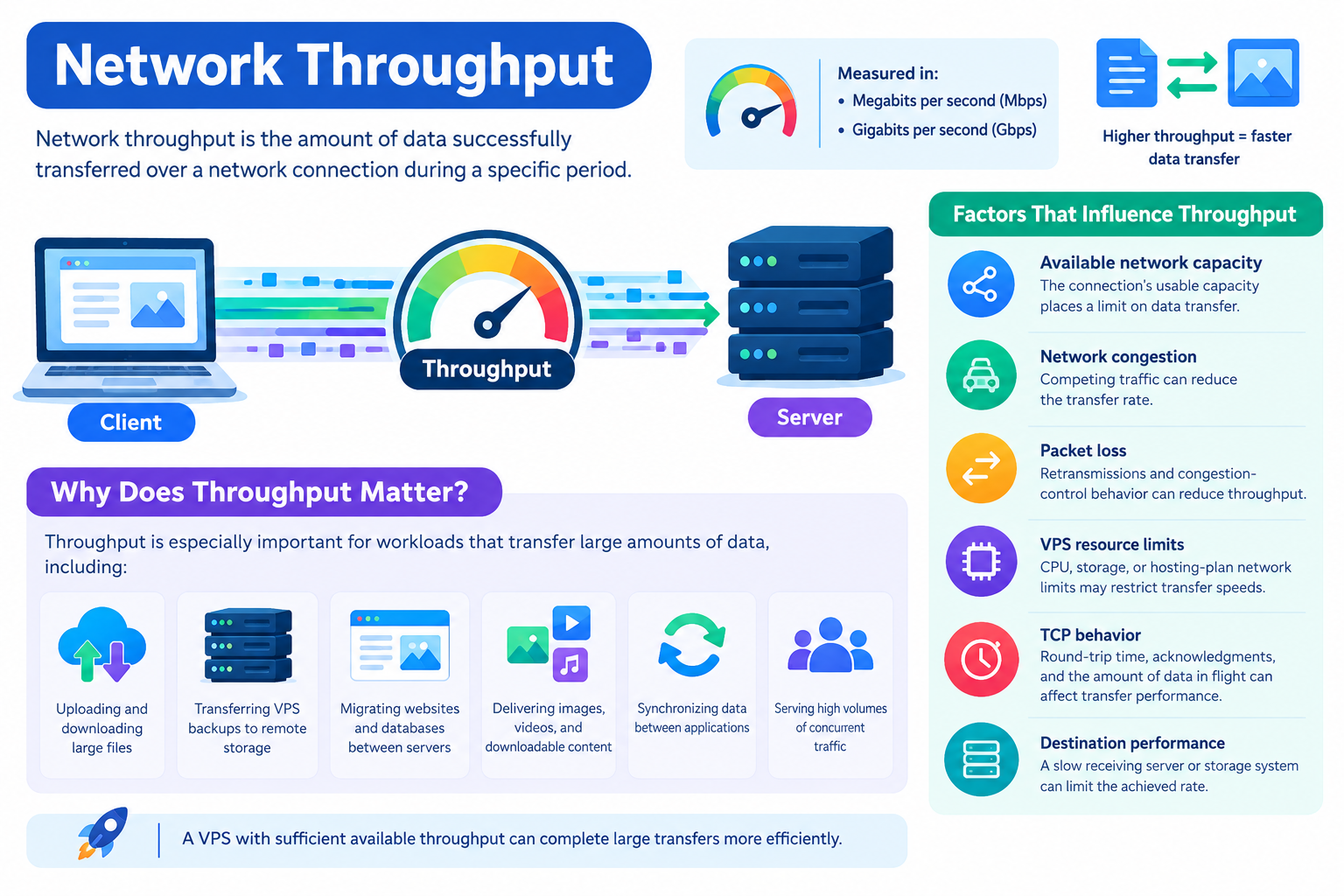
What Is Network Throughput?
Network throughput is the amount of data successfully transferred over a network connection during a specific period.
It is commonly measured in megabits per second (Mbps) or gigabits per second (Gbps). File transfer applications may display rates in megabytes per second (MB/s).
Higher throughput allows more data to be transferred in the same amount of time, provided the source, destination, and other system resources can sustain the transfer.
Factors that influence throughput include:
- Available network capacity: The connection’s usable capacity places a limit on data transfer.
- Network congestion: Competing traffic can reduce the transfer rate.
- Packet loss: Retransmissions and congestion-control behavior can reduce throughput.
- VPS resource limits: CPU, storage, or hosting-plan network limits may restrict transfer speeds.
- TCP behavior: Round-trip time, acknowledgments, and the amount of data in flight can affect transfer performance.
- Destination performance: A slow receiving server or storage system can limit the achieved rate.
Why Does Throughput Matter?
Throughput is especially important for workloads that transfer large amounts of data, including:
- Uploading and downloading large files.
- Transferring VPS backups to remote storage.
- Migrating websites and databases between servers.
- Delivering images, videos, and downloadable content.
- Synchronizing data between applications.
- Serving high volumes of concurrent traffic.
A VPS with sufficient available throughput can complete large transfers more efficiently. However, the achievable speed depends on the entire transfer path, not just the VPS’s advertised network capacity.
Latency vs Throughput: What’s the Difference?
Latency and throughput describe different aspects of network performance. Latency measures delay, while throughput measures the achieved data transfer rate.
| Comparison | Latency | Throughput |
| Meaning | Time taken for data to travel | Amount of data transferred per unit of time |
| Common units | Milliseconds (ms) | Mbps or Gbps |
| Desired result | Lower latency | Higher throughput |
| Main concern | Communication delay | Data transfer capacity and efficiency |
| Important for | Interactive applications and frequent requests | Large files, backups, and bulk transfers |
| Common limitations | Distance, routing, congestion | Capacity limits, packet loss, congestion, endpoint bottlenecks |
| Example | A measured RTT of 20 ms | A transfer rate of 500 Mbps |
A Practical Example
Imagine two VPS environments:
- VPS A: RTT of 15 ms and a measured transfer rate of 100 Mbps.
- VPS B: RTT of 80 ms and a measured transfer rate of 500 Mbps.
These are illustrative figures, not benchmarks for any particular hosting provider.
VPS A may offer more responsive communication for an interactive application, assuming comparable server processing and application behavior. VPS B may transfer a large backup faster if the measured throughput can be sustained throughout the transfer.
The best choice depends on the workload. Interactive applications often benefit from low latency, while large data transfers benefit from high throughput. Many business applications need both.
Latency vs Throughput vs Bandwidth
Latency, throughput, and bandwidth are related, but they are not interchangeable.
- Latency measures the time delay associated with communication.
- Bandwidth describes the maximum or configured data-carrying capacity of a connection.
- Throughput measures the rate at which data is actually transferred successfully.
For example, a VPS may have access to a connection with a capacity of 1 Gbps but achieve only 400 Mbps during a particular transfer.
Possible reasons include congestion, packet loss, TCP behavior, CPU limitations, storage performance, or restrictions elsewhere on the network path.
A high-bandwidth connection can also have high latency if traffic must travel a long distance or follow a less direct route.
Increasing bandwidth does not automatically reduce latency. If communication delay is caused by geographical distance or routing, upgrading network capacity alone may not solve the problem.
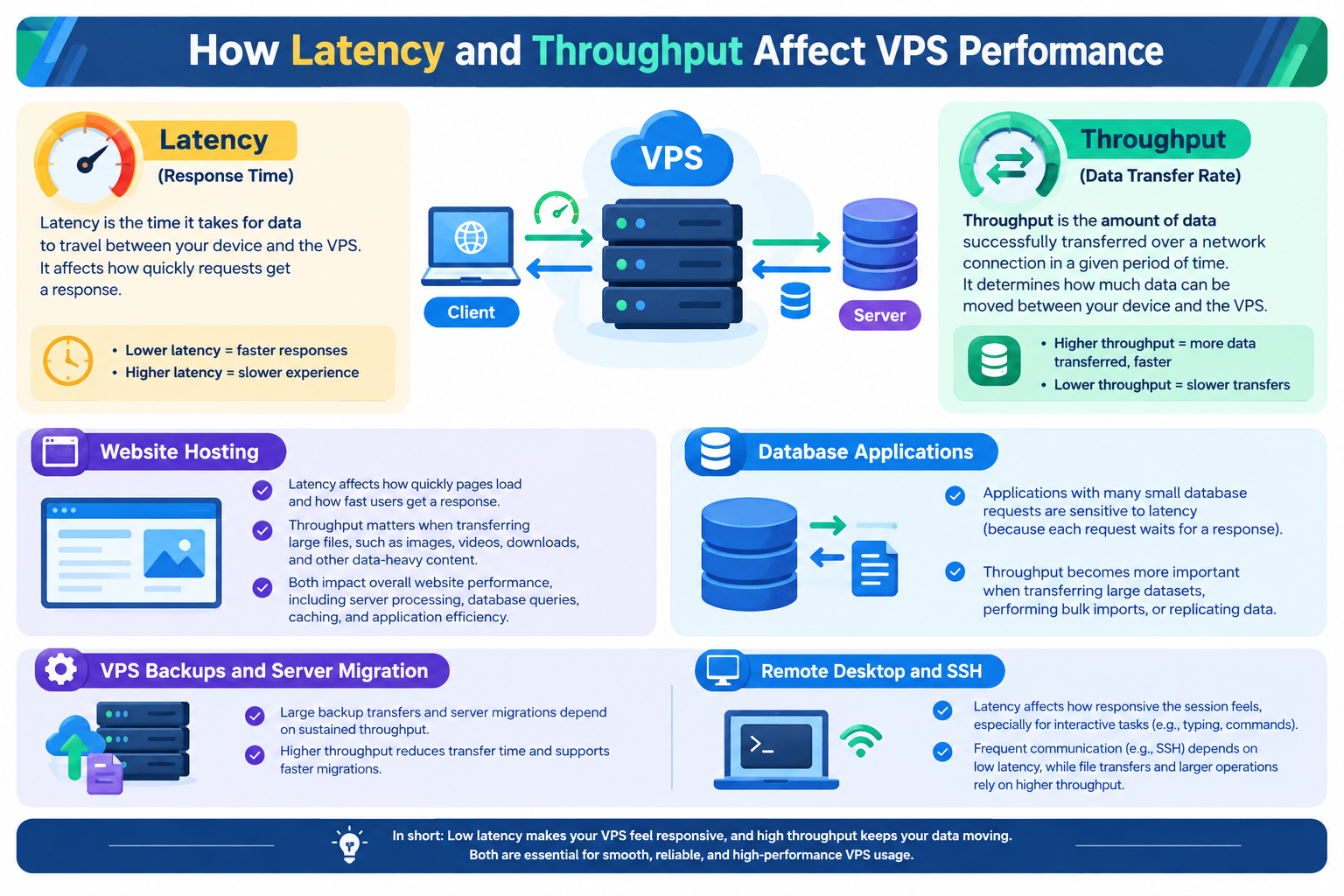
How Latency and Throughput Affect VPS Performance
The importance of each metric depends on how an application communicates and transfers data.
Website Hosting
Network latency affects how quickly requests and responses travel between a browser and a VPS. Throughput becomes more important when transferring large images, downloads, and other data-heavy content.
Overall website response time also depends on server processing, database queries, caching, and application efficiency.
Database Applications
Applications that issue many small database requests may be sensitive to latency because each request can involve waiting for a response.
Throughput becomes more important when transferring large datasets, performing bulk imports, or replicating substantial amounts of data.
VPS Backups and Server Migration
Large backup transfers and server migrations often depend on sustained throughput. Higher throughput can reduce transfer time when the source, destination, and network path can support the increased rate.
Latency can also affect throughput, particularly for TCP transfers that depend on acknowledgments. When the round-trip time is high and the sender cannot keep enough data in flight, a transfer may fail to use the available network capacity fully.
Remote Desktop and SSH
Remote administration and interactive remote sessions benefit from low latency because user actions and server responses depend on frequent communication.
High throughput can help with file transfers and data-heavy sessions, but it cannot completely eliminate the effects of communication delays.
How to Measure VPS Latency and Throughput
Measuring both metrics can help you identify possible network bottlenecks. However, no single test explains every performance problem.
1. Measure Latency With Ping
On a Linux VPS or another system with the ping utility, run:
ping -c 10 example.com
This sends ten ICMP echo requests to the destination and reports response times and packet loss when responses are received.
Review:
- Average RTT: Provides an indication of round-trip delay.
- Minimum and maximum RTT: Show the range of observed delays.
- Packet loss: Indicates how many probes did not receive a response.
A failed ping does not always mean the server is unavailable. Some systems block or deprioritize ICMP traffic, and ICMP measurements do not necessarily represent application performance.
For further investigation, tools such as mtr or traceroute can help examine the network path.
2. Measure Throughput With iperf3
iperf3 measures data transfer performance between two participating endpoints.
On the receiving endpoint, start the server:
iperf3 -s
On the sending endpoint, run:
iperf3 -c SERVER_IP
Replace SERVER_IP with the receiving endpoint’s IP address. Ensure the required port is accessible and that you have permission to run the test.
To test the reverse transfer direction, use:
iperf3 -c SERVER_IP -R
This measures transfer performance in the opposite direction.
Review the reported transfer rate and compare results across test runs. Different directions may produce different results because network paths, traffic conditions, and endpoint limitations can vary.
Important: An iperf3 result is a measurement under specific test conditions, not a guarantee of the speed every application will achieve. Use suitable endpoints, avoid unauthorized or disruptive tests, and consider CPU usage and other resource limits when interpreting the results.
How to Troubleshoot Poor VPS Network Performance
The most useful first step is to identify the symptom and investigate the likely causes rather than immediately upgrading the VPS.
| Observed symptom | What to investigate |
| High round-trip time | Geographic distance, routing, congestion, and endpoint conditions |
| Packet loss | Network path quality, congestion, and endpoint or interface issues |
| Low throughput despite reasonable RTT | Network capacity, packet loss, TCP behavior, and source or destination limitations |
| Slow website responses despite low network latency | Application processing, database queries, caching, and server resources |
| Slow large-file transfers | Achieved throughput, storage performance, destination limits, and competing traffic |
| Performance varies by direction | Different routing paths, congestion, and sender or receiver limitations |
These symptoms are diagnostic clues, not definitive proof of a specific cause. Compare measurements over time and investigate both endpoints before deciding on a solution.
Ways to Improve Latency
- Choose a VPS location closer to the primary users or application dependencies when practical.
- Investigate persistent routing problems and packet loss.
- Review network congestion and infrastructure conditions.
- Reduce unnecessary network round trips through appropriate application design and caching.
- Check server and database processing when network latency is already low.
Ways to Improve Throughput
- Confirm that the VPS plan provides sufficient network capacity.
- Investigate packet loss and network congestion.
- Check CPU and storage performance at both ends of the transfer.
- Review applicable network limits and traffic policies.
- Use suitable transfer protocols and parallel connections when the workload benefits from them.
Avoid assuming that a more powerful VPS will automatically fix a network problem. Identify the actual bottleneck first.
For additional help, consult CreativeON’s related guides on VPS monitoring, high CPU usage, VPS network troubleshooting, and VPS backup and disaster recovery.
Frequently Asked Questions
