
Introduction
When comparing VPS hosting plans, most people immediately look at CPU cores, RAM, and storage. While these specifications are important, they are only part of the picture.
Every VPS relies on a network connection to communicate with users, websites, applications, APIs, and other internet services. Even a powerful VPS can deliver a poor user experience if the network side is not properly understood.
Three networking terms appear on almost every VPS hosting plan:
- IP Address
- Bandwidth
- Latency
These terms are often mentioned by hosting providers but rarely explained in practical language.
This guide explains VPS network basics in simple terms so you can understand how data reaches your VPS, what network specifications actually mean, and what to look for when evaluating a VPS provider.
Why Networking Is Important in a VPS Environment
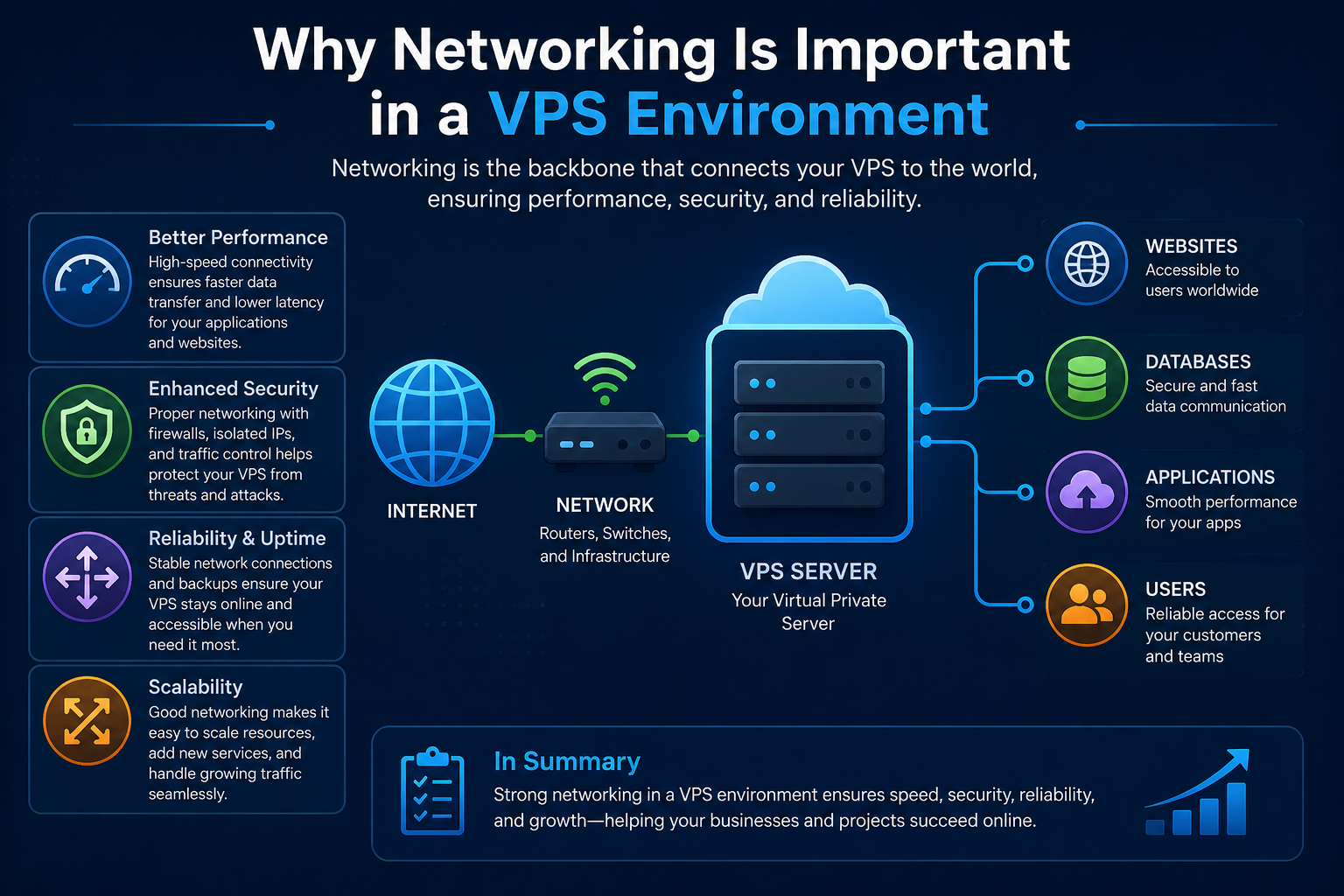
A VPS is connected to the internet through the hosting provider’s network infrastructure.
Every VPS receives a virtual network interface that allows it to send and receive data across the internet. Whenever a visitor loads your website, downloads a file, sends an email, or interacts with an application, data travels through this network connection.
Examples include:
- Website page requests
- Email delivery
- API communications
- Remote desktop connections
- SSH access
- Game server traffic
The quality of this communication depends heavily on network-related factors rather than server hardware alone.
Understanding IP addresses, bandwidth, and latency helps you interpret VPS plans more accurately and avoid choosing a server based only on CPU and RAM specifications.
Understanding IP Addresses in VPS Hosting
An IP address is the unique network identifier assigned to your VPS.
Think of it as the server’s address on the internet. Just as a postal address helps mail reach the correct destination, an IP address allows internet traffic to locate your VPS.
When someone visits a website hosted on your VPS, their browser ultimately connects to an IP address behind the scenes.
For example:
192.0.2.10
Without an IP address, users and services would have no way to communicate with your server.
How IP Addresses Work Inside a VPS
Every VPS is connected to a virtual network interface managed by the hosting provider.
This virtual interface receives one or more IP addresses that allow communication between your VPS and external networks.
The hosting provider’s infrastructure handles routing traffic to the correct VPS, even when multiple virtual servers operate on the same physical machine.
This process is invisible to most users but forms the foundation of VPS networking.
Public IP vs Private IP
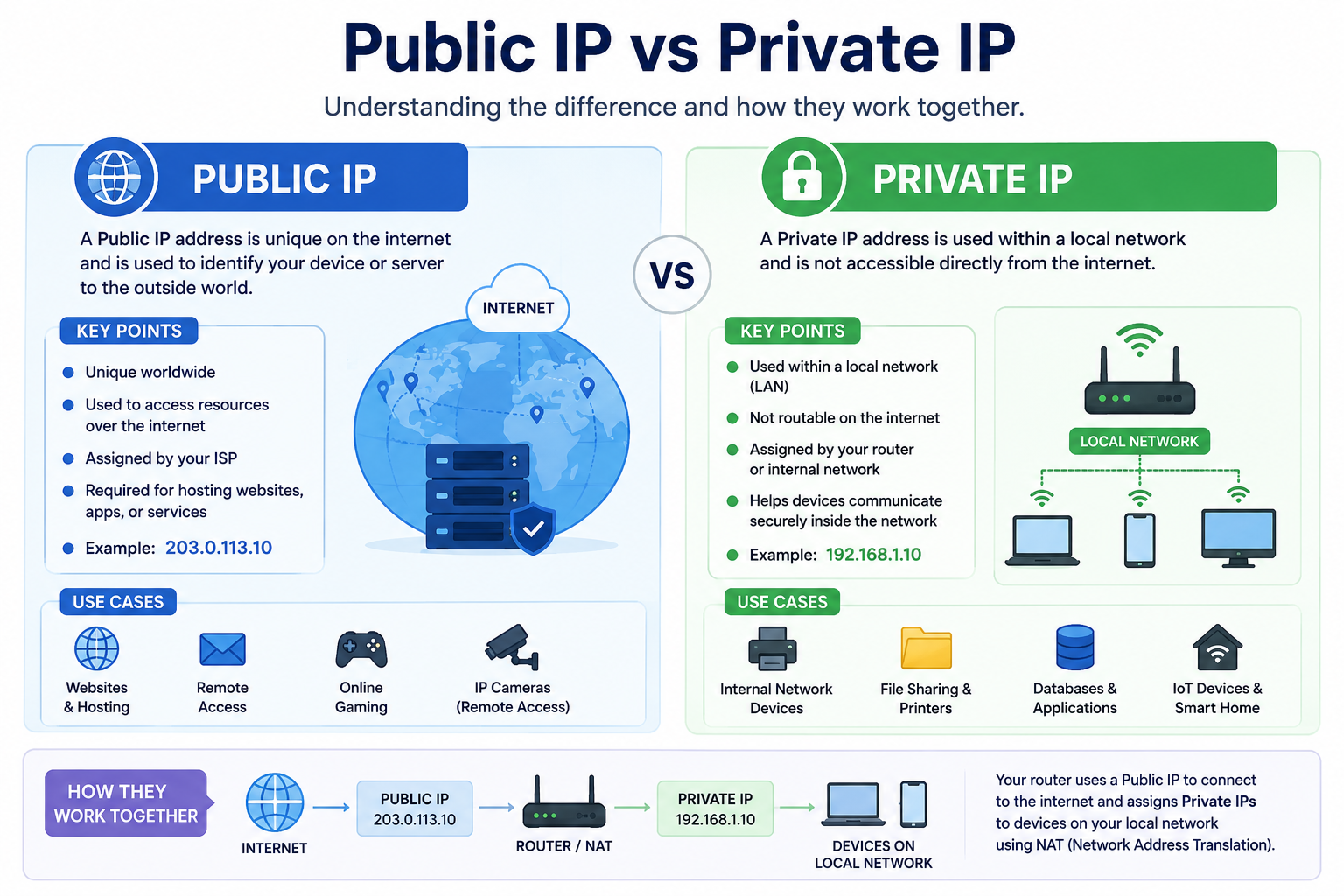
Public IP Address
A public IP address is reachable from the internet.
It allows:
- Website access
- Remote administration
- Email services
- API connections
- Application access
Most VPS users primarily work with their public IP.
Private IP Address
A private IP address is used for internal communication within a provider’s network.
Private networking is often used when:
- Application servers connect to databases
- Multiple VPS instances communicate internally
- Internal traffic needs separation from public internet traffic
Many VPS users never directly interact with private IP addresses, but they are common in larger deployments.
Dedicated IP vs Shared IP
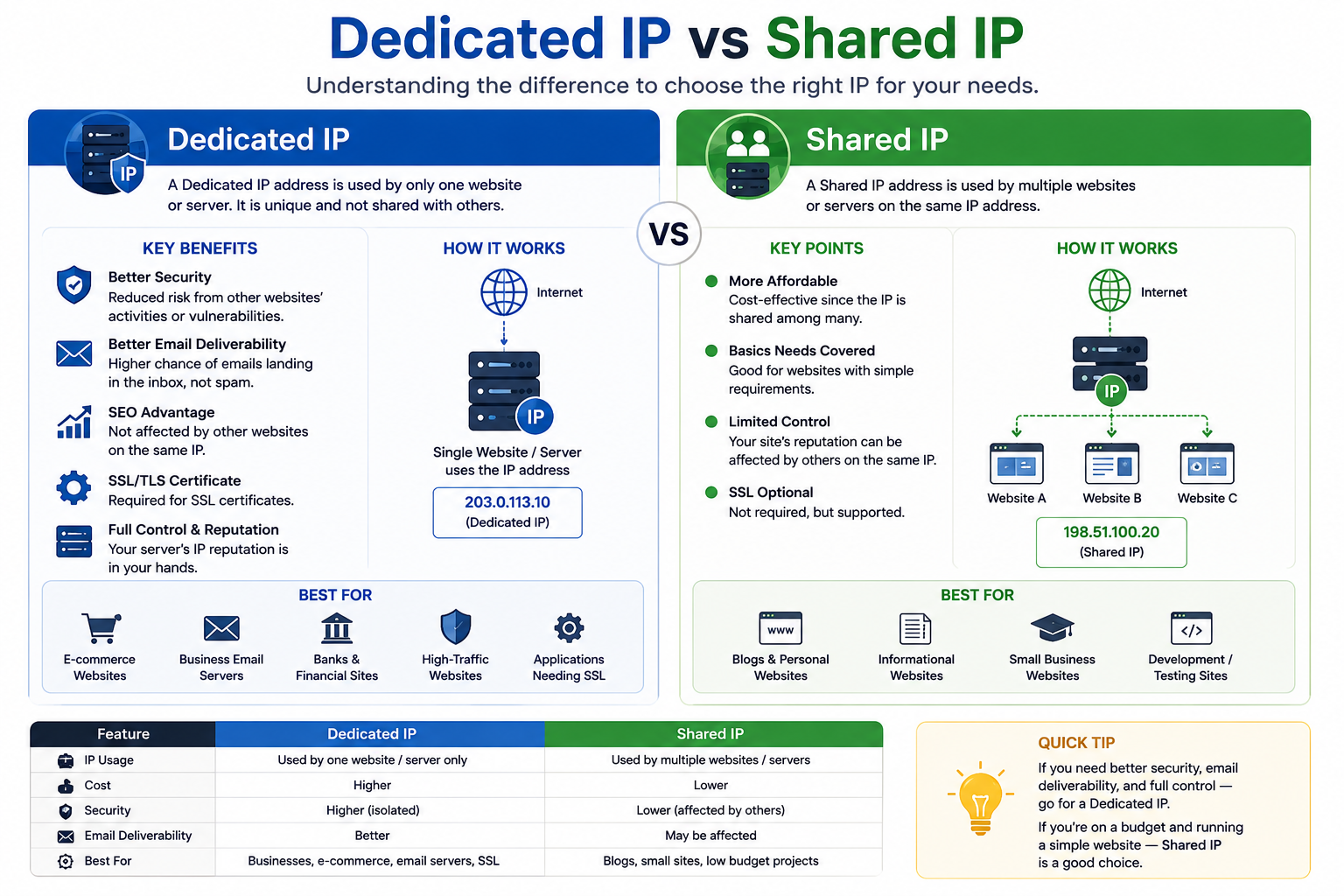
One advantage of VPS hosting is that most plans include a dedicated public IP address.
A dedicated IP is assigned specifically to your VPS and is not shared with other customers for primary access purposes.
In contrast, some shared hosting environments may place many websites behind the same public IP address.
For VPS users, a dedicated IP provides direct server accessibility and simplifies administration, DNS configuration, and service management.
IPv4 and IPv6 in VPS Hosting
When ordering a VPS, you may notice references to IPv4 and IPv6.
These are two different internet addressing systems.
IPv4
IPv4 remains the most commonly used addressing format today.
Example:
192.0.2.10
Most websites, applications, and services still rely heavily on IPv4 connectivity.
IPv6
IPv6 was developed to support a much larger number of internet-connected devices.
Example:
2001:db8::1
Many modern VPS providers now offer IPv6 alongside IPv4.
For most VPS users, both perform the same basic function: making the server reachable across networks.
Understanding Bandwidth in VPS Hosting
Bandwidth refers to the amount of data transferred between your VPS and internet users.
Every interaction with your VPS consumes bandwidth.
Examples include:
- Website page views
- File downloads
- Video streaming
- Software updates
- Email delivery
- API requests
The more traffic your VPS handles, the more bandwidth it consumes.
Hosting providers commonly express bandwidth as:
- 1 TB per month
- 5 TB per month
- 10 TB per month
- Unmetered bandwidth
A Simple Bandwidth Example
Imagine your website serves pages averaging 2 MB each.
If 10,000 visitors load those pages during a month:
2 MB × 10,000 = 20 GB
Your VPS would consume approximately 20 GB of bandwidth.
As traffic grows, bandwidth consumption increases proportionally.
What Types of Workloads Consume More Bandwidth?
Certain VPS workloads naturally generate larger amounts of network traffic.
Examples include:
- Video streaming platforms
- Download servers
- Software repositories
- Media-heavy websites
- Backup systems
- High-traffic applications
Understanding expected traffic volumes helps prevent bandwidth-related surprises later.
Bandwidth Is Not the Same as Speed
A common misconception is that higher bandwidth automatically makes a VPS faster.
Bandwidth measures transfer capacity.
It does not measure responsiveness.
A VPS can have a large bandwidth allowance while still experiencing delays caused by network distance or routing conditions.
To understand responsiveness, you must look at latency.
Understanding Latency in VPS Hosting
Latency measures the time required for data to travel between a user and a VPS.
It is typically measured in milliseconds (ms).
Lower latency means faster communication.
Higher latency means more delay.
Unlike bandwidth, which measures quantity, latency measures time.
A Simple Latency Example
Suppose a visitor in Lahore accesses a VPS located in Karachi.
The request travels:
Visitor → Internet → VPS
The VPS then responds:
VPS → Internet → Visitor
The total round-trip travel time becomes the latency value.
Examples:
- 10 ms = excellent
- 50 ms = very good
- 100 ms = acceptable
- 200+ ms = noticeable delay
Actual results vary depending on routing and network conditions.
What Influences VPS Latency?
Several factors affect latency.
Physical Distance
The farther data must travel, the longer communication typically takes.
Network Routing
Internet traffic rarely travels in a perfectly straight path.
Additional routing points can increase response times.
Data Center Location
The location of your VPS significantly affects latency.
A VPS located near your audience often provides a better user experience.
Internet Congestion
Temporary network congestion can also increase latency during busy periods.
Real-World VPS Networking Scenarios
Understanding network specifications becomes easier when viewed through practical examples.
Website Hosting
A website targeting visitors in Pakistan will usually respond faster when hosted on a VPS located in Pakistan or a nearby region than on a VPS located thousands of miles away.
Lower latency often improves perceived website responsiveness.
API Applications
Applications frequently exchange data with external APIs.
Even small increases in latency can accumulate across thousands of requests, making applications feel slower.
Game Servers
Online games are highly sensitive to latency because player actions must continuously travel between users and the server.
Lower latency generally creates a smoother experience.
Remote Administration
Administrators connecting through SSH or remote desktop sessions often notice latency immediately because every action depends on network responsiveness.
Why VPS Network Quality Matters When Choosing a Provider
Two VPS plans may offer identical CPU, RAM, and storage specifications while delivering very different network experiences.
This is because network quality depends on factors beyond hardware.
When comparing VPS providers, evaluate:
- Data center location
- IPv4 and IPv6 availability
- Network redundancy
- Bandwidth limits
- Backbone connectivity
- Routing quality
These factors can significantly influence the experience your visitors and applications receive.
A Common VPS Buying Mistake
Many first-time VPS buyers focus exclusively on hardware specifications.
They compare:
- CPU cores
- RAM
- SSD storage
but ignore network characteristics entirely.
In reality, a well-connected VPS with appropriate bandwidth and low latency can often provide a better user experience than a more powerful server with poor network connectivity.
This is especially important for customer-facing websites and applications.
Related VPS Topics to Explore
If you are learning about VPS infrastructure, these related topics can help deepen your understanding without overlapping networking fundamentals:
- VPS Firewall Setup Guide
- VPS Resource Allocation Guide
- VPS Monitoring and Resource Tracking Guide
- VPS Vertical vs Horizontal Scaling Guide
For example, network latency should not be confused with resource bottlenecks covered in the VPS Resource Allocation Guide, while traffic growth and bandwidth planning are more closely related to VPS Scaling concepts.
Final Thoughts
Understanding VPS network basics is essential when choosing, configuring, or managing a virtual server.
The three most important concepts are straightforward:
- An IP address identifies your VPS on the internet.
- Bandwidth determines how much data can be transferred.
- Latency determines how quickly data moves between users and the server.
Together, these networking fundamentals influence how websites, applications, APIs, and online services communicate with the outside world.
When evaluating VPS hosting, looking beyond CPU and RAM specifications can help you make better infrastructure decisions. A VPS with strong network connectivity, appropriate bandwidth, and low latency often delivers a noticeably better experience for both administrators and end users.
By understanding these concepts, you can compare VPS plans more confidently and select a solution that aligns with the needs of your project.
