
Introduction
WordPress performance is not just about “faster loading”—it directly impacts search visibility, user behavior, and business conversions. One of the most effective ways to improve WordPress speed without redesigning your website is caching.
Caching works by reducing repeated server work and serving pre-generated content to users. Instead of rebuilding every page request from scratch, WordPress delivers optimized static versions of your content almost instantly.
In enterprise WordPress hosting environments, caching is not optional—it is a core performance layer that determines how efficiently your website handles traffic, scale, and Core Web Vitals performance.
This guide breaks down the best caching plugins for WordPress speed optimization, but more importantly, it helps you understand which one fits which performance environment and why.
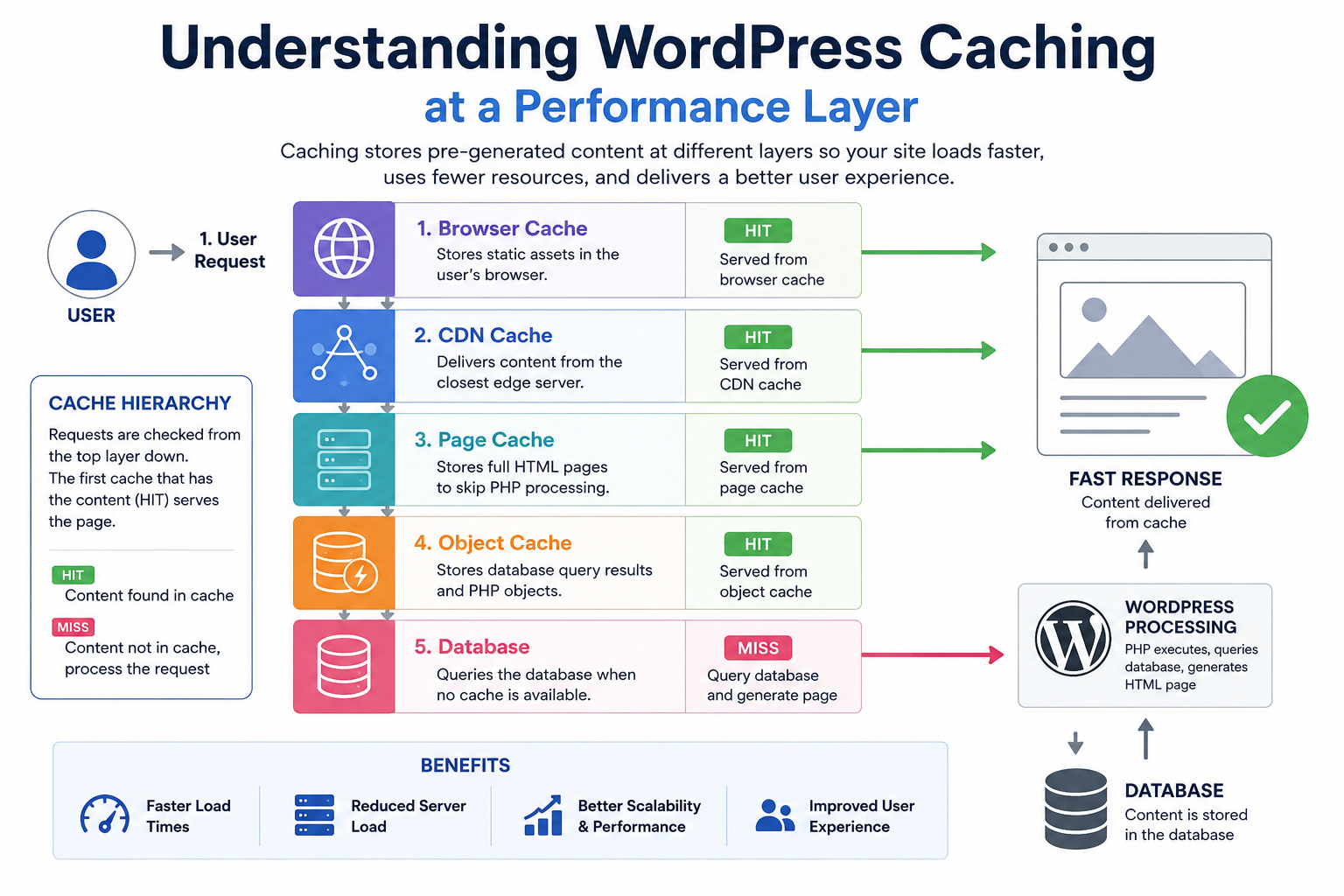
Understanding WordPress Caching at a Performance Layer
Before comparing plugins, it’s important to understand what caching actually improves inside a WordPress execution cycle.
Every WordPress page request normally goes through:
- PHP execution
- Database queries
- Theme rendering
- Plugin processing
- Asset loading
Caching interrupts this cycle by storing a pre-built version of the page so that future users bypass most of these steps.
This directly improves:
- Time to First Byte (TTFB) – server responds faster
- Largest Contentful Paint (LCP) – content appears sooner
- Server CPU usage – reduced load during traffic spikes
- Database efficiency – fewer repeated queries
In real-world hosting environments, caching is often the difference between a site that struggles under load and one that scales smoothly.
Types of Caching That Actually Matter in WordPress
Not all caching behaves the same way. In a serious WordPress hosting environment, these layers matter most:
Page Caching
Stores full HTML output of pages for fast delivery.
Browser Caching
Stores static assets locally in the visitor’s browser.
Object Caching
Reduces repeated database queries for dynamic content.
Opcode Caching
Optimizes PHP execution (usually server-level, not plugin-controlled).
Edge Caching (CDN Layer)
Serves content from global locations closer to users.
Most WordPress caching plugins focus on page + browser caching, while advanced setups integrate deeper optimization layers.
Best Caching Plugins for WordPress Speed Optimization
Below is a performance-focused breakdown of the most reliable caching solutions used in real hosting environments.
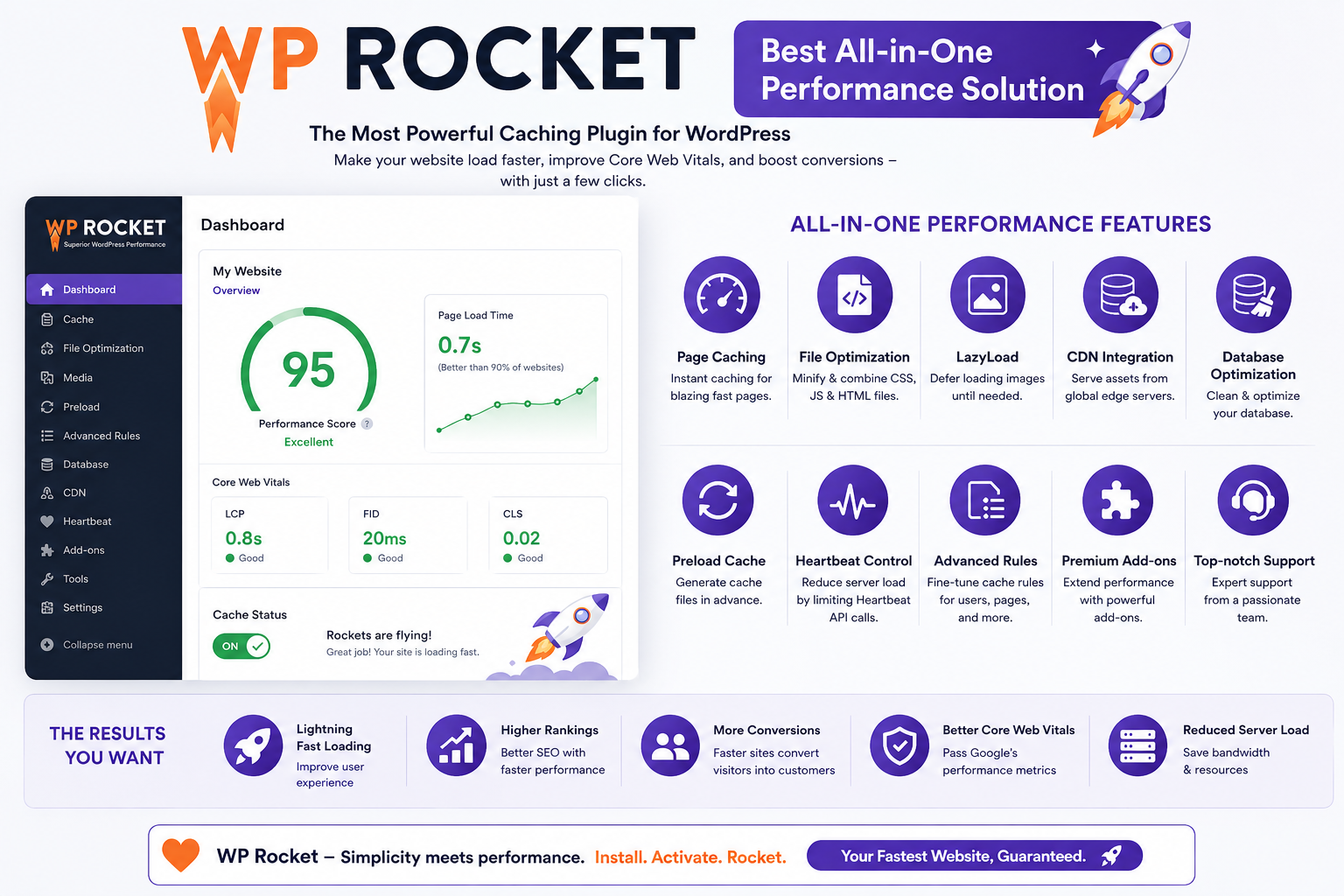
WP Rocket (Best All-in-One Performance Solution)
WP Rocket is widely considered the most balanced caching solution for WordPress performance optimization.
Unlike many plugins that require manual tuning, WP Rocket applies optimized defaults immediately after activation.
Why it performs well in real environments
WP Rocket is designed for execution simplicity + high impact optimization, which makes it ideal for business websites and non-technical users.
It typically handles:
- Page caching automatically
- Cache preloading for faster first visits
- CSS/JS optimization (minification + deferral)
- Lazy loading for images and videos
- Database cleanup for long-term performance stability
Best use case
- Business websites
- WooCommerce stores
- Agencies managing multiple client sites
- Users who want performance without technical tuning
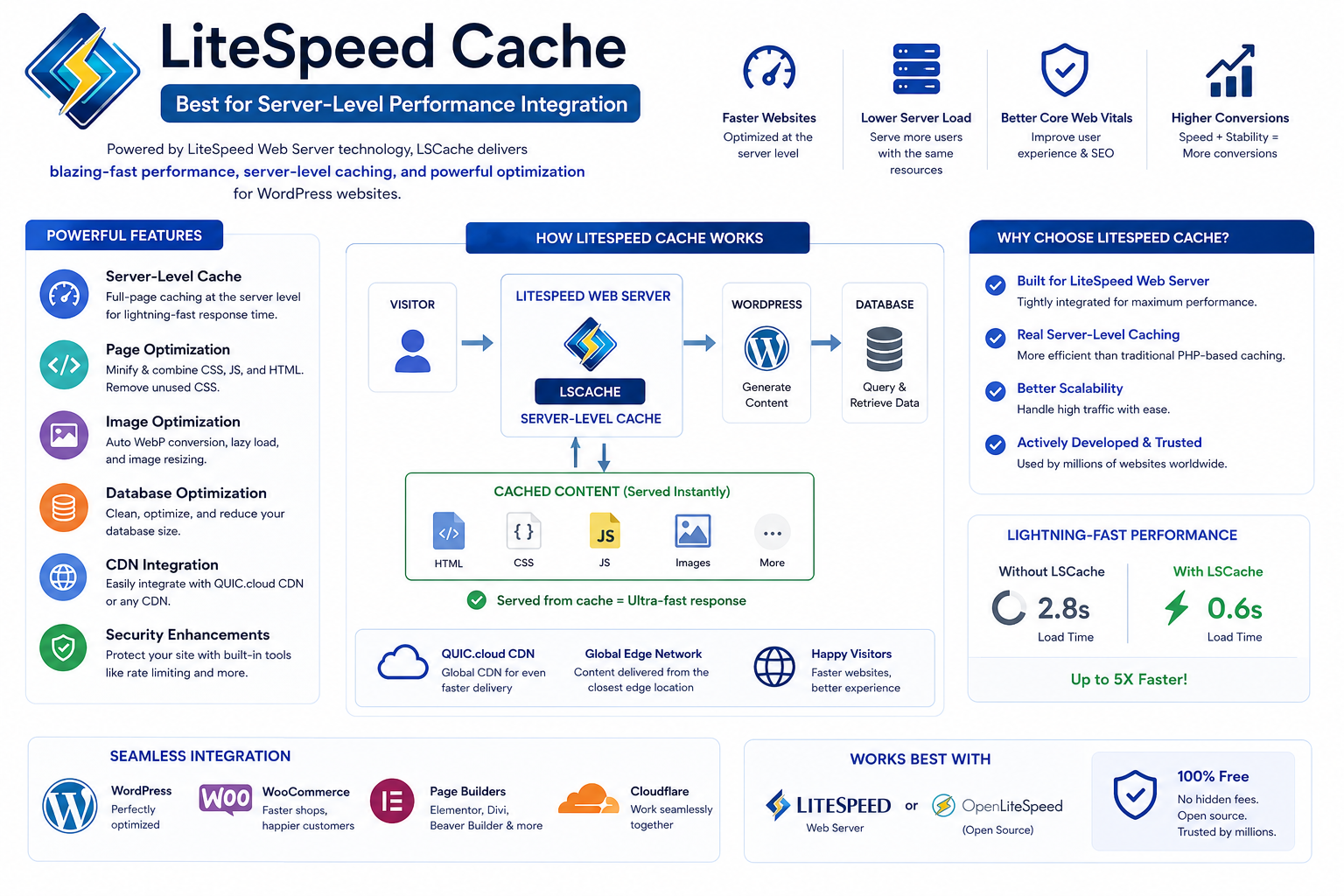
LiteSpeed Cache (Best for Server-Level Performance Integration)
LiteSpeed Cache is not just a caching plugin—it is a server-aware performance system.
Its effectiveness depends heavily on whether your hosting environment uses LiteSpeed architecture.
Why it is extremely fast on compatible hosting
Instead of relying only on WordPress-level caching, LiteSpeed Cache integrates directly with the web server. This reduces processing overhead significantly.
Key capabilities include:
- Server-level page caching (very low latency)
- Built-in image optimization pipeline
- Critical CSS generation
- QUIC.cloud CDN integration
- Edge-side optimization features
Best use case
- Websites hosted on LiteSpeed servers
- High-traffic blogs
- Performance-sensitive applications
- SEO-focused content websites
W3 Total Cache (Advanced Engineering-Level Control)
W3 Total Cache is a full performance framework rather than a simple plugin.
It is designed for developers or advanced users who want granular control over every caching layer.
Strengths
- Page caching with multiple storage methods
- Object and database caching support
- CDN integration flexibility
- Minification and compression controls
- Fragment caching options for advanced setups
Tradeoff
While extremely powerful, incorrect configuration can degrade performance instead of improving it.
Best use case
- Developer-managed websites
- Custom WordPress applications
- Enterprise setups requiring full control
WP Super Cache (Stable and Lightweight Caching)
WP Super Cache is a lightweight caching solution designed for stability and simplicity.
It generates static HTML files and serves them directly to users, reducing server load with minimal configuration.
Why it is still widely used
- Extremely low resource usage
- Very stable under basic configurations
- Easy to enable and maintain
- Developed by Automattic (WordPress ecosystem trust factor)
Best use case
- Small business websites
- Low-to-medium traffic blogs
- Users who want “no-risk caching”
Autoptimize (Frontend Performance Optimization Layer)
Autoptimize is not a caching plugin in the traditional sense—it is a frontend optimization engine.
It enhances performance by optimizing asset delivery rather than page storage.
What it actually improves
- CSS aggregation and minification
- JavaScript optimization and deferral
- HTML cleanup
- Font loading efficiency
Why it matters in real performance stacks
Even with caching enabled, unoptimized assets can block rendering. Autoptimize helps eliminate that bottleneck.
Best use case
- Sites already using a caching plugin
- SEO-focused performance tuning
- Core Web Vitals optimization workflows
Enterprise Comparison Matrix (Performance Decision Layer)
| Plugin | Ideal Environment | Setup Complexity | Performance Impact | Hosting Dependency |
| WP Rocket | Business & WooCommerce | Very Easy | Very High | Low |
| LiteSpeed Cache | LiteSpeed Hosting | Medium | Very High | High |
| W3 Total Cache | Advanced systems | Hard | High (if tuned) | Medium |
| WP Super Cache | Basic hosting setups | Easy | Medium | Low |
| Autoptimize | Frontend optimization layer | Easy | Medium | None |
Which Caching Plugin Should You Actually Use?
Choosing a caching plugin is not about features—it is about alignment with your hosting environment and technical capacity.
- If you want maximum simplicity with strong performance → WP Rocket
- If your hosting uses LiteSpeed → LiteSpeed Cache
- If you need engineering-level control → W3 Total Cache
- If you want stable basic caching → WP Super Cache
- If you want to improve Core Web Vitals further → Autoptimize (alongside caching)
The best performance stacks often combine:
one caching plugin + one optimization plugin + CDN layer
How Caching Impacts Core Web Vitals
Caching directly influences key performance metrics used by Google:
- TTFB improves due to reduced server processing
- LCP improves because content loads faster
- INP improves due to reduced script blocking
- CLS indirectly improves through faster asset loading
In modern SEO systems, caching is no longer optional—it is a ranking support factor.
Common Enterprise-Level Mistakes
Even advanced users often reduce performance due to misconfiguration:
- Running multiple caching plugins simultaneously
- Over-minifying JavaScript causing layout issues
- Ignoring mobile-specific caching behavior
- Not clearing cache after deployment changes
- Misusing CDN + cache combination layers
Correct architecture matters more than plugin selection alone.
Final Thoughts
Caching is one of the most powerful and cost-effective ways to improve WordPress performance. However, its real impact depends on matching the right plugin to the right environment.
In enterprise WordPress hosting setups, caching is not just a plugin feature—it is a performance strategy layered across server, application, and delivery systems.
When implemented correctly, it significantly improves speed, SEO performance, and user experience without changing your website design or infrastructure.
