
If your website’s bandwidth usage keeps climbing without a matching rise in traffic, hotlinking could be the reason. Heavy hotlinking can consume server resources, affect performance for real visitors, and increase bandwidth-related hosting costs.
This article explains exactly what hotlinking is, why it happens, and the most effective ways to stop it.
What Is Hotlinking?
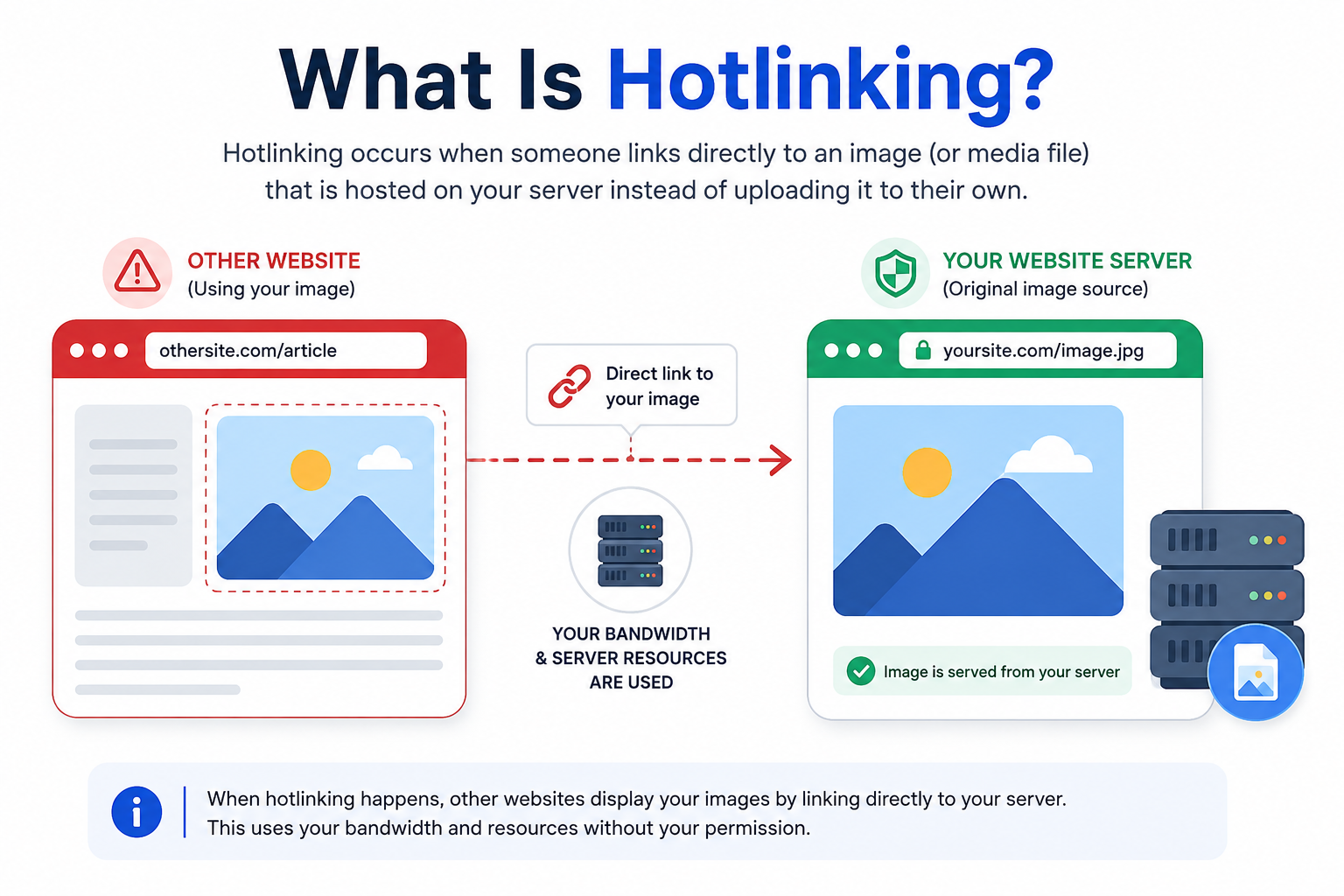
Hotlinking (also called “leeching” or “inline linking”) happens when another website embeds an image, video, or file directly from your server instead of hosting a copy on their own. When a visitor loads that external page, their browser pulls the file straight from your server — using your server’s bandwidth and resources to display content on someone else’s site.
For example, if a blog embeds yoursite.com/images/photo.jpg directly in their article instead of uploading their own copy, every visitor to that blog triggers a request to your server. Your server delivers the file while the other website gets the benefit of displaying it.
How Hotlinking Happens
Hotlinking is rarely a deliberate attack. It usually happens because:
- A user finds an image via search or social media and copies the direct file URL.
- A content scraper pulls media assets along with text content.
- A forum or blog post embeds media using a raw file link instead of downloading it first.
- Automated content-aggregation tools link directly to source files by default.
In most cases, the linking site isn’t trying to harm you — they’re just taking the easiest path to include your media on their page.
Why Is Hotlinking a Problem?
Increased Bandwidth Usage
Every hotlinked file served to another site’s visitors consumes your server’s bandwidth. If a popular site hotlinks one of your images, traffic spikes can be significant, even though none of those visitors ever reach your actual website.
Higher Server Resource Usage
Each hotlinked request still has to be processed by your server, just like any other file request. A large volume of these requests adds measurable load, separate from the bandwidth they consume.
Potential Performance Impact
If hotlinking generates enough requests, it can compete with your own visitors for server resources, resulting in slower load times. A handful of hotlinked images is unlikely to cause noticeable slowdowns, but sustained, high-volume hotlinking can.
Higher Hosting Costs
Many hosting plans charge based on bandwidth or resource consumption. Hotlinking can push you past your plan’s limits, resulting in unexpected charges or throttled performance.
Your Media Can Appear on Unwanted Websites
Hotlinking doesn’t take the file off your server — you still control it there. What you don’t control is where it gets displayed. Your images could end up alongside spammy, low-quality, or offensive content, indirectly associating your brand with it.
How to Detect Hotlinking
Before applying a fix, it helps to confirm hotlinking is actually happening.
Check Server Logs
Server logs showing repeated image or file requests with an external site listed as the “referrer” are the clearest sign. Checking your access logs or referrer reports is usually the fastest way to identify which files are being hotlinked and from where.
Look for Unusual Bandwidth Usage
A sudden, unexplained spike in bandwidth usage or server load — without a matching rise in your own site’s traffic — is another strong indicator. Analytics showing high direct requests to media files with little corresponding page traffic points in the same direction.
How to Prevent Hotlinking
Referrer-based protection isn’t foolproof. The HTTP Referer header can be missing or modified because of browser privacy settings, security software, proxies, or other request behavior. Treat hotlink protection as a practical access-control measure rather than a complete security mechanism.
1. Use .htaccess on Apache
For websites hosted on Apache, adding rewrite rules to your .htaccess file is one of the most common and effective prevention methods. A basic hotlink protection rule checks the referrer header of each request and blocks requests for selected media files unless they come from your domain or another explicitly allowed source.
2. Configure Nginx
If your server runs Nginx instead of Apache, hotlink protection is configured through the valid_referers directive within your server block. The logic is the same — only requests from approved referrers are allowed to load the protected files.
3. Enable Hotlink Protection in Your Hosting Panel
Many hosting control panels include a built-in hotlink protection feature that generates the necessary server rules for you, without requiring you to edit configuration files directly.
4. Enable Hotlink Protection on Your CDN
If your images and media are served through a content delivery network, most CDNs offer built-in hotlink protection settings. This is often the simplest option, since it applies protection at the edge, before requests even reach your origin server.
5. Use CMS or Security-Plugin Controls
If you’re not comfortable editing server configuration files directly, many CMS platforms offer plugins or built-in settings that manage hotlink protection through a simple interface, applying the same referrer-checking logic behind the scenes.
6. Return a Placeholder for Unauthorized Requests
Instead of blocking the request outright, some websites choose to return a lightweight placeholder instead of the original media when a request comes from an unauthorized referrer. This can reduce bandwidth consumption while making the unauthorized embedding less useful — without the unpredictability of deliberately swapping in a different image, which can produce unexpected results if caches or legitimate third-party services also request the file.
Common Hotlinking Prevention Mistakes
- Blocking legitimate sources, such as services you intentionally allow to display your media, which can break integrations you actually want.
- Forgetting to whitelist your own CDN or subdomains, which can accidentally break images on your own site.
- Protecting only some media types, such as covering images while leaving videos, PDFs, or other downloadable files unprotected.
- Relying completely on the Referer header, which can be blocked or altered by browsers, privacy tools, or proxies, letting some hotlinked requests slip through.
- Not testing the configuration after implementation, which can result in broken protection or accidental blocking of real visitors.
Always test hotlink protection rules after implementation to confirm your own site’s media still loads correctly across all pages and devices.
Is Hotlinking Always Bad?
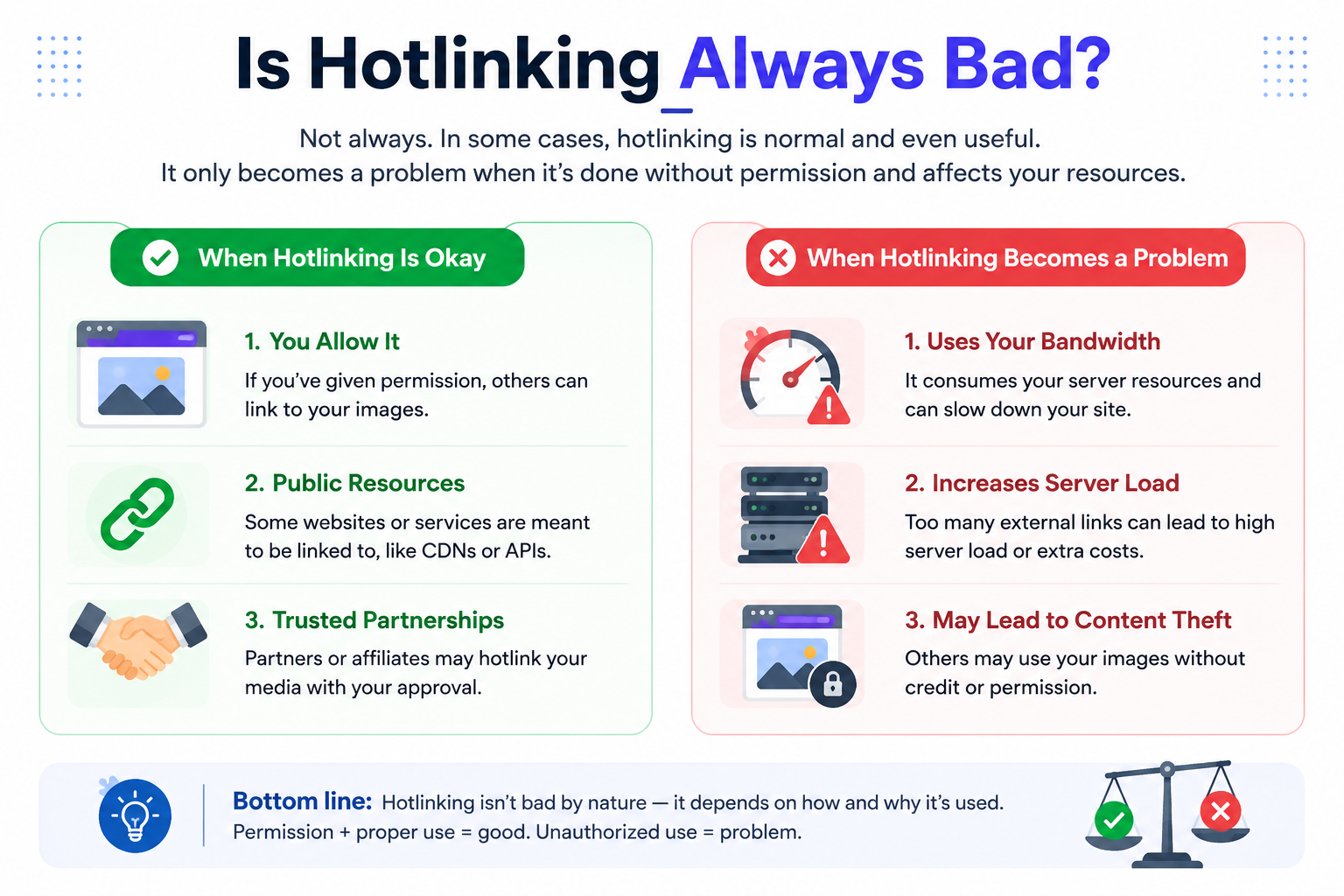
Not every external request for your media is something you need to block. Legitimate services — such as approved partners, embed widgets, or platforms you’ve intentionally integrated with — may request your files as part of normal, sanctioned use.
The key distinction is between unauthorized hotlinking, which consumes your resources without your consent or benefit, and legitimate external embedding, which is resource usage you knowingly allow. Before applying broad protection rules, it’s worth confirming which category the requests you’re seeing actually fall into.
Final Thoughts
Hotlinking might seem like a minor nuisance, but left unchecked, it can quietly consume bandwidth, slow down your site, and inflate hosting costs. Fortunately, prevention is straightforward — whether through server-level rules, CDN settings, or CMS plugins, you can stop unauthorized use of your media without disrupting your own site’s performance or your visitors’ experience.
