

Many website owners choose hosting plans based on giant numbers they don’t fully understand.
“Unlimited bandwidth.”
“100 GB storage.”
“Unmetered resources.”
These terms sound impressive, but they often create more confusion than clarity.
In reality:
- some websites barely use a few gigabytes of storage for years
- others run into bandwidth limitations unexpectedly after a traffic spike
- many users overpay for resources they never actually need
Understanding the difference between disk space and bandwidth helps you choose hosting more intelligently, avoid unnecessary upgrades, and prevent common website resource problems before they affect performance.
This guide explains:
- what disk space really means
- what bandwidth actually measures
- how hosting providers calculate usage
- what realistic websites typically consume
- when you actually need more resources
- the biggest myths surrounding hosting limits
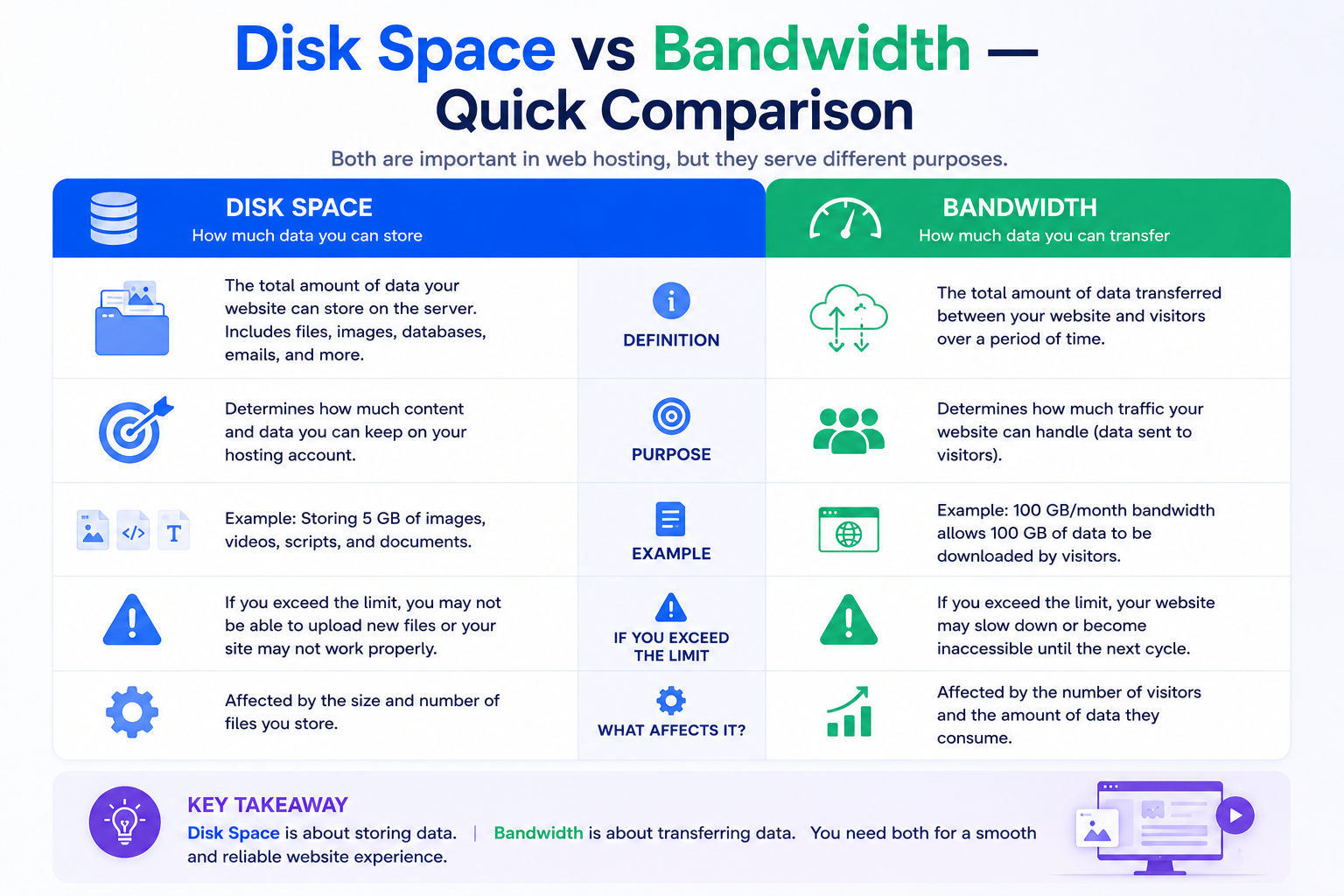
Disk Space vs Bandwidth — Quick Comparison
Resource | What It Measures | Affects |
Disk Space | Stored website files | How much content your hosting account can store |
Bandwidth | Data transferred to visitors | How much traffic your website can deliver |
A simple way to think about it:
- Disk space is storage
- Bandwidth is delivery
Both matter, but they affect websites in completely different ways.
Understanding Disk Space
Disk space refers to the amount of storage your hosting account can use on the server.
This storage includes:
- website files
- images
- videos
- databases
- emails stored on the server
- themes and plugins
- backups
- cache files
- logs
Think of disk space like the storage capacity on your laptop or smartphone. The more files your website stores, the more disk space it consumes.
If your website runs out of disk space:
- uploads may fail
- backups may stop generating
- emails may stop receiving
- databases may become unstable
- updates may fail
- website errors may appear unexpectedly
Disk space controls how much your website can store.
Understanding Bandwidth
Bandwidth measures how much data your website transfers to visitors.
Every time someone:
- opens a webpage
- loads images
- watches a video
- downloads a file
- loads CSS or JavaScript assets
data is transferred from the server to their device.
That transfer counts toward bandwidth usage.
Bandwidth usage depends on:
- number of visitors
- page size
- image optimization
- downloadable files
- video content
- CDN usage
- bot traffic
- traffic spikes
Bandwidth controls how much content your website can deliver.
Important Clarification: Bandwidth Is Not Website Speed
This is one of the most common misconceptions in hosting.
Higher bandwidth does not automatically make websites faster.
Bandwidth measures:
- total volume of transferred data
It does not directly measure:
- server response speed
- page rendering speed
- processing power
- infrastructure quality
A poorly optimized website with huge bandwidth allocation can still load slowly.
Performance usually depends more on:
- server quality
- caching
- optimization
- image compression
- infrastructure stability
- content delivery efficiency
A Simple Real-World Example
Imagine a photography website.
The site stores:
- 8,000 high-resolution images
- client galleries
- downloadable albums
- archived backups
This website needs significant disk space because image files consume storage rapidly.
Now imagine one gallery gets shared on social media and suddenly receives 300,000 visits in a week.
The storage usage barely changes.
But bandwidth usage increases dramatically because thousands of users are loading images repeatedly.
This illustrates the core difference:
- disk space relates to stored content
- bandwidth relates to content delivery
Why Small Websites Sometimes Consume Huge Bandwidth
Many people assume small websites always use minimal resources.
That is not always true.
A lightweight website can still consume enormous bandwidth if:
- traffic goes viral
- pages contain large media files
- downloads are frequent
- bots aggressively crawl the site
Meanwhile, some websites store huge media libraries but receive relatively low traffic.
Actual resource usage depends more on website behavior than website size alone.
What Uses Disk Space the Fastest?
Most website code consumes very little storage.
The largest storage consumers are usually media and server-generated files.
Images and Media Files
High-resolution images are among the biggest storage consumers on modern websites.
Common storage problems include:
- uploading oversized images
- storing original RAW files
- duplicate uploads
- large homepage banners
- uncompressed PNG files
A photography portfolio or ecommerce store can consume gigabytes of storage surprisingly quickly.
Website Backups
Backups quietly become one of the biggest storage consumers on many hosting accounts.
Websites often store:
- daily backups
- weekly backups
- manual backups
- staging copies
- downloadable archives
Without cleanup policies, backup storage can eventually exceed the size of the live website itself.
Emails Stored on Hosting Servers
Email storage is frequently overlooked.
Business email accounts can gradually consume large amounts of storage through:
- attachments
- archived conversations
- spam folders
- sent mail
- old mailbox data
Long-running businesses often discover email storage consuming more space than the website itself.
Cache Files and Temporary Data
Platforms like WordPress generate temporary files for:
- caching
- logging
- debugging
- backups
- plugin operations
Over time, unused files can accumulate significantly.
What Consumes Bandwidth the Most?
Bandwidth usage increases whenever visitors access website content.
Some website elements dramatically increase transfer usage.
Large Unoptimized Images
Heavy images increase:
- page size
- loading time
- monthly bandwidth consumption
A single oversized homepage can transfer several megabytes per visitor.
Multiply that across thousands of users, and bandwidth usage grows rapidly.
Self-Hosted Videos
Video streaming is extremely bandwidth-intensive.
This is why many websites embed videos from platforms like YouTube instead of hosting large video files directly on their servers.
Streaming directly from hosting accounts can quickly create massive transfer usage.
Downloadable Files
PDFs, ZIP archives, software packages, and media downloads can consume large amounts of bandwidth.
Even moderate traffic can generate substantial transfer usage when files are repeatedly downloaded.
Traffic Spikes
Traffic surges dramatically increase bandwidth usage.
This commonly happens after:
- marketing campaigns
- viral social posts
- news mentions
- product launches
- seasonal promotions
A website that normally uses 30 GB monthly bandwidth might suddenly consume hundreds of gigabytes during a major spike.
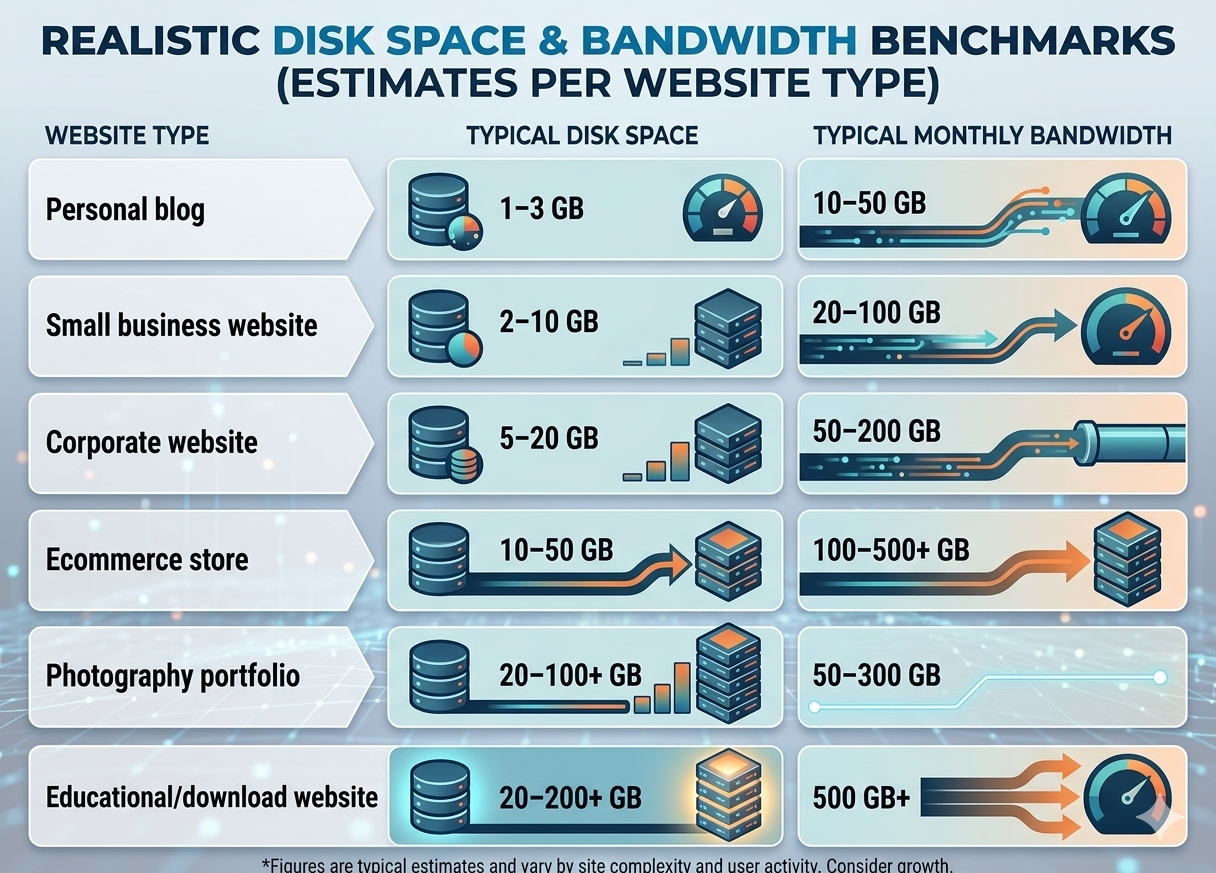
Realistic Disk Space & Bandwidth Benchmarks
Most websites need far fewer resources than marketing pages suggest.
The following ranges reflect realistic usage patterns for properly optimized websites.
Website Type | Typical Disk Space | Typical Monthly Bandwidth |
Personal blog | 1–3 GB | 10–50 GB |
Small business website | 2–10 GB | 20–100 GB |
Corporate website | 5–20 GB | 50–200 GB |
Ecommerce store | 10–50 GB | 100–500+ GB |
Photography portfolio | 20–100+ GB | 50–300 GB |
Educational/download website | 20–200+ GB | 500 GB+ |
These are not strict limits.
Actual usage varies depending on:
- optimization
- traffic patterns
- media usage
- caching
- downloadable content
Real-World Hosting Usage Examples
Example 1: Local Business Website
A service-based business website with:
- 20 pages
- optimized images
- contact forms
- moderate monthly traffic
often uses:
- under 3 GB disk space
- less than 30 GB monthly bandwidth
for years before needing significant upgrades.
Example 2: Ecommerce Store
An online store with:
- 500 products
- multiple product images
- seasonal traffic campaigns
may quickly consume:
- 20–50 GB storage
- hundreds of GB of bandwidth monthly
especially during promotions.
Example 3: Photography Portfolio
A professional photography site storing:
- high-resolution galleries
- downloadable albums
- archived client media
may require:
- large storage allocations
- relatively moderate bandwidth
unless traffic becomes very high.
How Hosting Providers Actually Measure Usage
This is an area many users misunderstand.
Disk Space Is Persistent
Disk space usage remains until files are deleted.
If your website stores:
- backups
- emails
- uploads
- logs
they continue consuming storage every day.
Bandwidth Usually Resets Monthly
Most hosting providers calculate bandwidth on a monthly cycle.
At the beginning of each billing period:
- bandwidth counters reset
- transfer calculations restart
This differs from disk space, which continuously accumulates.
Inodes and File Limits Also Matter
Some hosting providers limit:
- total file count
- inode usage
- simultaneous processes
Even when “unlimited storage” is advertised.
Large numbers of tiny files can still create account limitations.
Temporary Traffic Spikes Are Handled Differently
Some hosting environments tolerate temporary traffic bursts well.
Others may:
- throttle performance
- suspend accounts
- restrict processes
- trigger overuse warnings
even before official bandwidth limits are reached.
Infrastructure quality matters significantly here.
The Biggest Myths About Disk Space and Bandwidth
Myth 1: Unlimited Means Infinite
“Unlimited” hosting rarely means infinite resources.
Most providers still apply:
- fair usage policies
- inode restrictions
- CPU limitations
- database limits
- acceptable use thresholds
Unlimited usually means:
- reasonable usage for normal websites
not unrestricted enterprise-scale resource consumption.
Myth 2: More Bandwidth Makes Websites Faster
Bandwidth capacity does not automatically improve performance.
Website speed depends far more on:
- optimization
- caching
- server response
- image compression
- infrastructure quality
Myth 3: Small Websites Never Need Optimization
Even small websites can consume excessive bandwidth if:
- images are poorly optimized
- pages are oversized
- downloads are large
- bots generate heavy traffic
Optimization matters at every scale.
Myth 4: High Storage Means Better Hosting
Large storage numbers alone do not indicate hosting quality.
Reliable infrastructure, performance consistency, and resource management are often far more important.
How to Estimate Your Disk Space Needs
A practical way to estimate storage requirements is to calculate:
- website media growth
- backup retention
- email storage
- downloadable assets
Most websites grow gradually over time.
This means scalability is usually more important than choosing massive storage immediately.
Simple Storage Planning Guidelines
You likely need higher storage allocation if you:
- upload high-resolution images regularly
- store video files locally
- keep long-term backups
- run many email accounts
- host downloadable media
Otherwise, many websites remain surprisingly lightweight.
How to Estimate Your Bandwidth Needs
Bandwidth estimates depend mainly on:
- average page size
- visitor count
- pages viewed per session
A simplified estimate looks like this:
\text{Bandwidth Usage} = \text{Average Page Size} \times \text{Monthly Visitors} \times \text{Pages Per Visit}
Example:
- Average page size: 3 MB
- Monthly visitors: 20,000
- Average pages per visit: 3
Estimated monthly bandwidth:
- roughly 180 GB
Actual usage varies depending on:
- caching
- CDN usage
- compression
- bot traffic
- downloadable content
Modern Optimization Techniques That Reduce Both Storage and Bandwidth
Modern websites increasingly rely on optimization rather than simply purchasing larger hosting plans.
Modern Image Formats
Formats like:
- WebP
- AVIF
can dramatically reduce:
- storage usage
- bandwidth consumption
- page loading times
compared to traditional formats.
Lazy Loading
Lazy loading delays image loading until users actually scroll to them.
This reduces unnecessary bandwidth usage substantially.
Browser Caching
Browser caching allows returning visitors to reuse previously loaded assets instead of downloading them repeatedly.
This lowers transfer usage significantly.
CDN Integration
A CDN distributes cached content globally and reduces bandwidth pressure on the origin server.
This improves:
- scalability
- traffic handling
- geographic performance
- resource efficiency
especially during traffic spikes.
When You Actually Need More Disk Space or Bandwidth
Many websites upgrade too early.
Others wait too long.
The key is monitoring real usage patterns.
You Probably Need More Disk Space If:
- storage usage remains above 80%
- backups frequently fail
- uploads stop working
- email storage keeps growing rapidly
- database write issues appear
You Probably Need More Bandwidth If:
- traffic spikes cause slowdowns
- hosting overuse notices appear
- websites become unstable during campaigns
- download traffic increases heavily
- monthly transfer limits are repeatedly exceeded
Consistent monitoring is far more reliable than guessing.
Why Optimization Usually Matters More Than Bigger Numbers
One of the most common hosting mistakes is choosing plans based only on giant advertised limits.
Huge storage and bandwidth allocations do not automatically provide:
- better speed
- stronger reliability
- improved scalability
- higher stability
Poorly optimized websites can waste enormous resources unnecessarily.
In many cases:
- optimization
- caching
- image compression
- CDN usage
- infrastructure quality
matter far more than oversized marketing numbers.
Final Thoughts
Disk space and bandwidth solve two entirely different hosting needs.
Disk space determines:
- how much your website can store
Bandwidth determines:
- how much content your website can deliver
Understanding this distinction helps website owners:
- choose hosting more intelligently
- avoid overspending
- prevent resource limitations
- scale infrastructure more efficiently
Most websites do not need massive resources immediately.
What matters more is:
- realistic planning
- proper optimization
- scalable infrastructure
- monitoring actual usage patterns over time
That approach leads to far better long-term hosting decisions than simply choosing the biggest numbers on a pricing page.
