

Introduction
A VPS crash is not a single event—it is a progression of system failure inside a virtualized environment.
When a VPS crashes, it may look like a sudden outage from the outside, but inside the infrastructure, it is usually the result of resource collapse, kernel failure, storage instability, or hypervisor-level intervention.
For businesses, this results in immediate service disruption: websites stop responding, applications freeze, APIs fail, and database operations become unstable.
This article explains the exact lifecycle of a VPS crash, how providers interpret it, what actually fails at system level, and how recovery is performed in real hosting environments.
Primary Intent
Understand the system-level behavior and consequences of a VPS crash, including failure stages, infrastructure response, and recovery model.
Problem Boundary
This article covers:
- VPS crash behavior and system failure stages
- Infrastructure-level crash classification
- Service impact on applications and users
- Provider-side recovery process
- Data integrity outcomes
Excluded Topics (Handled Elsewhere)
- VPS performance tuning and optimization
- CPU/RAM allocation strategy
- Monitoring tools setup
- Security hardening
- Scaling strategies
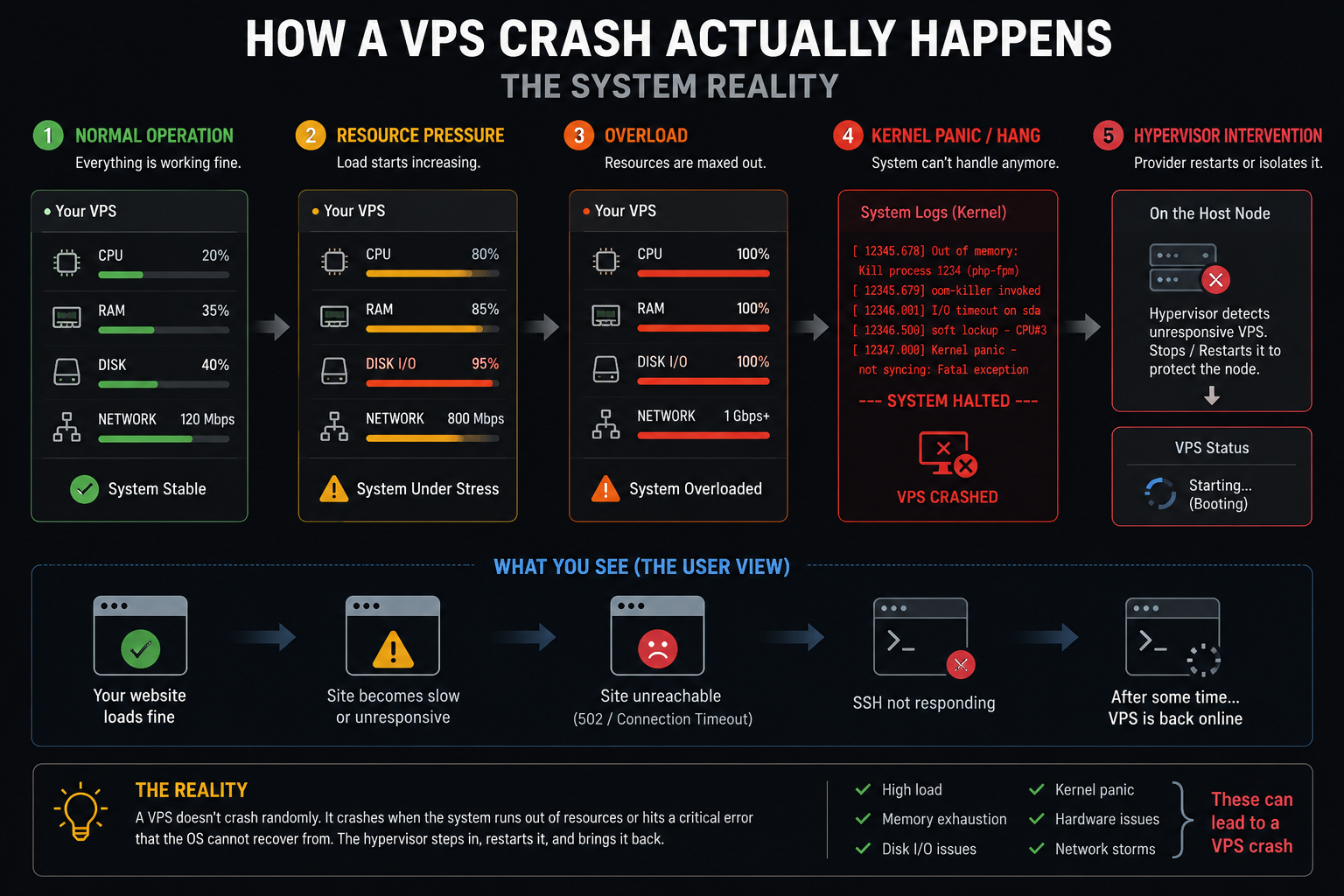
How a VPS Crash Actually Happens (System Reality)
A VPS runs on a shared physical server (node) using virtualization. A crash occurs when the guest operating system or underlying virtualization layer becomes unable to maintain stable execution.
But not all crashes are the same.
Types of VPS Crashes (Crash Taxonomy)
Understanding crash type is critical for accurate diagnosis:
1. Kernel-Level Crash (Hard OS Failure)
The operating system stops functioning due to internal errors such as:
- kernel panic
- corrupted system processes
- driver-level failure inside virtual environment
Result: VPS becomes instantly unresponsive.
2. Resource Exhaustion Freeze
Occurs when system resources are fully consumed:
- memory saturation
- CPU starvation
- process overload
Result: system becomes extremely slow before full freeze.
3. Disk I/O Stall Crash
Storage subsystem becomes the bottleneck:
- high read/write latency
- disk queue overload
- filesystem lock
Result: applications stop responding even if CPU is idle.
4. Hypervisor-Level Node Failure
The physical server hosting VPS instances experiences issues:
- node crash
- hardware failure
- virtualization layer restart
Result: multiple VPS instances go offline simultaneously.
5. Network Isolation Failure
Connectivity layer breaks between VPS and users:
- routing failure
- virtual network disruption
Result: VPS may still be running but appears offline.
How a VPS Crash Unfolds (Timeline Model)
A VPS crash is usually progressive, not instant.
T+0 — Early Instability Phase
- Response time increases
- CPU or RAM spikes
- intermittent timeouts begin
T+30–90 Seconds — Degradation Phase
- web services start failing
- database queries slow down
- SSH becomes unstable
T+2–5 Minutes — Critical Failure
- full request timeout
- services stop responding
- monitoring systems flag downtime
T+5+ Minutes — System Freeze or Isolation
- OS becomes unresponsive
- hypervisor may isolate or pause VM
- provider intervention begins
What Users Experience During a VPS Crash
From the outside perspective:
Website Behavior
- 504 Gateway Timeout
- 500 Internal Server Error
- Connection refused
Application Behavior
- API failures
- login disruptions
- session loss
Database Behavior
- query timeout
- connection drops
- partial transaction failure
Important Reality Check
A VPS crash does NOT always mean full data destruction.
It usually means:
the system is no longer able to process requests—not that data is erased.
What Happens to Data During a VPS Crash
Data That Remains Safe
- stored files (images, code, documents)
- committed database records
- configuration files
Data at Risk
- in-memory sessions
- incomplete transactions
- unsaved application states
- active uploads at crash moment
This is why transactional integrity design matters in VPS-based systems.
Provider-Side Engineering Response (Behind the Scenes)
When a VPS crash occurs, the hosting provider initiates a structured diagnostic workflow.
Step 1: VM State Verification
- Is VM powered on?
- Is it stuck in unresponsive state?
- Is hypervisor reporting errors?
Step 2: Infrastructure Health Check
- node status evaluation
- storage subsystem check
- network layer validation
Step 3: Log and Event Analysis
- system kernel logs
- virtualization logs
- crash timestamps
- resource exhaustion indicators
Step 4: Recovery Decision Path
Depending on severity:
Lightweight Recovery
- restart VPS instance
- restart services
- reinitialize network stack
Medium Recovery
- filesystem repair (fsck/journal replay)
- service rollback
- partial state recovery
Advanced Recovery
- snapshot restoration
- node migration
- hardware-level failover
How Long VPS Recovery Takes
Recovery time depends on crash class:
- Simple restart: minutes
- Service-level recovery: 5–20 minutes
- Filesystem repair: 20–90 minutes
- Snapshot restore: longer depending on data size
- Node-level failure: variable (depends on infrastructure redundancy)
What NOT to Do During a VPS Crash
Many failures worsen due to incorrect user actions.
Avoid:
- repeatedly restarting VPS without diagnosis
- redeploying applications during outage
- deleting logs or system files
- assuming it is an application bug immediately
- making configuration changes mid-recovery
These actions can complicate forensic recovery.
Who Is Responsible During a VPS Crash?
A VPS crash is shared responsibility.
VPS Provider Responsibilities
- hardware stability
- virtualization layer health
- node recovery
- infrastructure monitoring
User Responsibilities
- application stability
- configuration correctness
- backup management
- resource usage control at application level
Shared Responsibility Zone
- uptime monitoring interpretation
- recovery coordination
- incident response timing
Business Impact of a VPS Crash
Even short crashes can cause:
- lost transactions
- downtime revenue loss
- SEO ranking fluctuations (if frequent)
- API disruption for dependent systems
- user trust degradation
This is why VPS environments are often paired with monitoring and disaster recovery systems (covered in related infrastructure guides).
Internal Learning Path (Recommended Next Topics)
To fully understand VPS reliability architecture:
- VPS Monitoring & Failure Detection Systems
- VPS Resource Allocation Behavior
- VPS Backup Strategy Design
- VPS Disaster Recovery Architecture
- VPS Scaling for High Availability
Each of these covers a different layer of system resilience and should not be mixed with crash behavior analysis.
Don’t wait for a VPS crash to disrupt your business—get a fully managed, stable VPS environment with CreativeON today and keep your services online 24/7.
Final Conclusion
A VPS crash is not a single failure—it is a chain reaction inside a virtualized infrastructure system.
Understanding its lifecycle—from early instability to full service interruption—helps businesses respond faster, reduce downtime, and improve system resilience.
The key takeaway is simple:
A VPS crash is recoverable in most cases, but its business impact depends entirely on preparation, not reaction.
