
A VPS snapshot is a point-in-time image of a virtual server’s storage. It gives you a recovery point that can be used to restore or recreate the server, depending on how your hosting provider implements snapshots.
Snapshots are especially useful before making major changes to a VPS. If an update, configuration change, or deployment causes a serious problem, a snapshot can provide a convenient way to return to an earlier state.
However, a VPS snapshot is not automatically a replacement for a proper backup. Understanding how snapshots work and their limitations will help you use them safely.
What Is a VPS Snapshot?
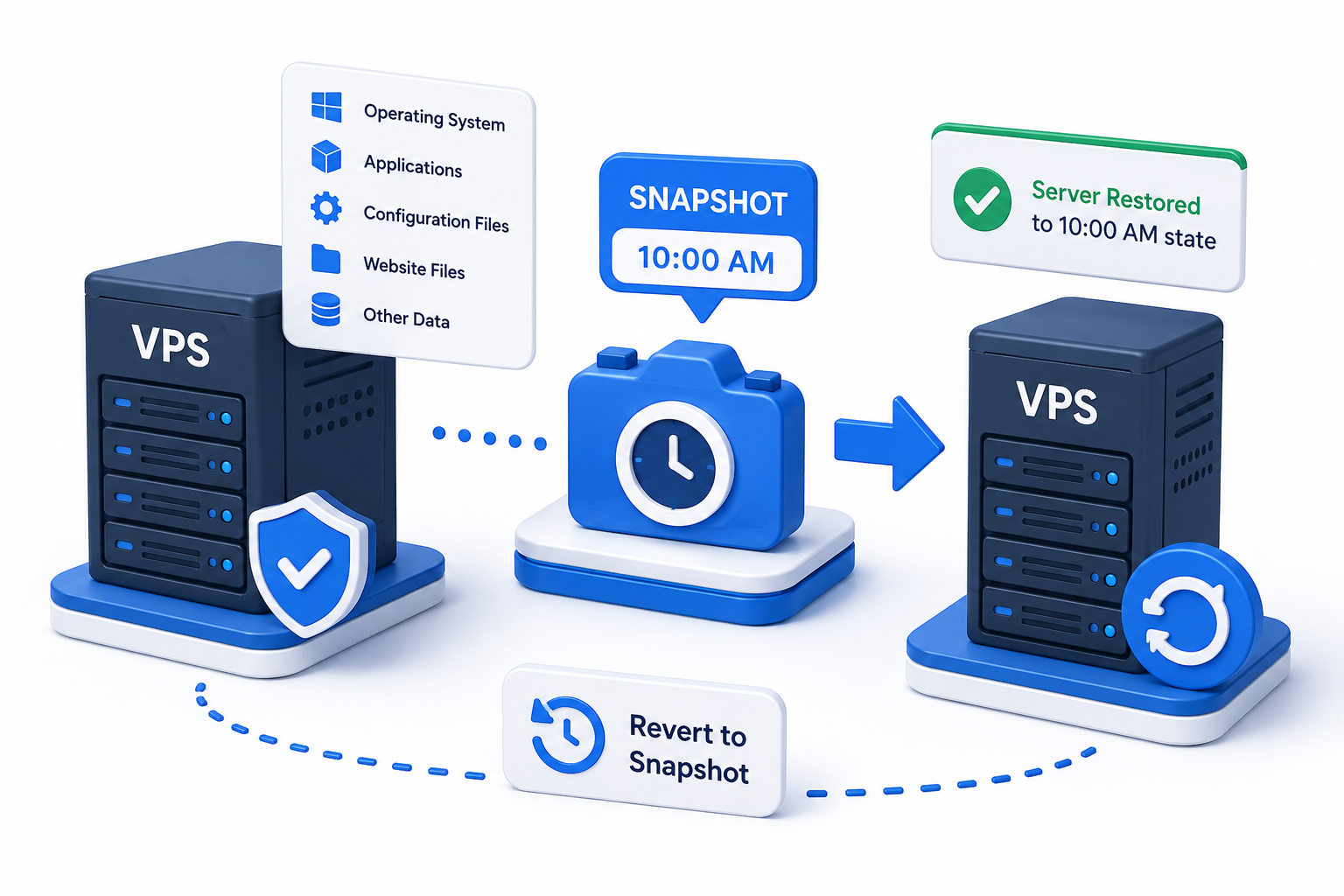
A VPS snapshot captures the contents of a virtual server’s disk at a specific point in time.
Depending on the hosting platform, a snapshot may include the operating system, installed applications, configuration files, website files, and other data stored on the VPS disk.
For example, imagine your VPS is working correctly at 10:00 AM. You create a snapshot and then make several configuration changes. If those changes cause a problem, you may be able to use the 10:00 AM snapshot to return the server to that earlier state.
In simple terms:
A VPS snapshot is a point-in-time recovery image of your server’s storage.
The exact behavior depends on the virtualization and storage platform used by your VPS provider.
How Does a VPS Snapshot Work?
The basic process is straightforward:
- Your VPS is running in its current state.
- You create a snapshot.
- The hosting platform records the server’s disk state at that point.
- You make changes to the VPS.
- If necessary, you use the snapshot to restore or recreate the earlier server state.
Some platforms allow snapshots to be created while the VPS is running, while others may recommend shutting it down first. DigitalOcean, for example, supports both powered-off and live Droplet snapshots. (DigitalOcean)
The important point is that snapshot behavior is provider-specific. Check your hosting provider’s documentation before relying on a snapshot for an important recovery operation.
When Should You Create a VPS Snapshot?
A snapshot is most useful immediately before a change that could potentially affect your server.
Before Software Updates
Create a snapshot before major updates to the operating system, PHP, database software, control panels, or other critical components.
If the update creates compatibility problems, the snapshot can provide a known-good recovery point.
Before Configuration Changes
Changes to web servers, networking, firewall rules, databases, or other system configuration can sometimes cause unexpected problems.
Creating a snapshot first gives you an additional rollback option.
For broader server security, see our VPS Server Hardening Checklist.
Before Application Deployments
A snapshot can be useful before deploying a significant application update or making substantial changes to a production environment.
It is particularly useful when the change affects important files or system configuration.
Before Major Server Changes
If you are preparing to make a significant structural change to your VPS, creating a snapshot first can give you a convenient recovery point.
For migrations specifically, see our Zero Downtime VPS Migration Guide.
Example: Taking a Snapshot Before a PHP Upgrade
Suppose a WordPress website is running on your VPS and you need to upgrade PHP.
A sensible approach is:
- Confirm the website is working correctly.
- Create a VPS snapshot.
- Verify that the snapshot completed successfully.
- Perform the PHP upgrade.
- Test the website and its important functions.
- If the change causes a serious problem, use the snapshot according to your provider’s restoration procedure.
The snapshot does not prevent the problem. It simply gives you a recovery point before making the change.
VPS Snapshot vs VPS Backup
A VPS snapshot and a VPS backup can both help with recovery, but they are not necessarily the same thing.
A snapshot is generally created manually or on demand to capture a particular point in time. Backups may be scheduled and retained according to a backup policy.
For example, a provider may offer automated backups at regular intervals while allowing you to create snapshots whenever you are about to make a major change. DigitalOcean currently documents snapshots as on-demand disk images and backups as automatically created system-level disk images with configurable schedules. (DigitalOcean)
A simple way to think about them is:
|
VPS Snapshot |
VPS Backup |
|
Usually created for a specific recovery point |
Often scheduled automatically |
|
Useful before major changes |
Useful for ongoing data protection |
|
Often used for quick rollback |
Designed for broader recovery needs |
|
Retention depends on the provider |
Usually follows a defined retention policy |
Do not assume that snapshots alone provide complete backup protection.
For long-term protection and disaster recovery, use an appropriate backup strategy in addition to snapshots.
Are VPS Snapshots Consistent?
This is an important consideration when a VPS is running active applications.
A snapshot captures storage at a particular point in time, but that does not automatically mean every application has finished writing its data.
For example, a database may have pending writes or data held in memory when a snapshot is taken. Depending on the platform, this can result in a snapshot that is crash-consistent rather than fully filesystem- or application-consistent.
DigitalOcean’s documentation, for example, notes that block-storage snapshots capture data written to disk but do not guarantee filesystem consistency because the snapshot process does not coordinate with the operating system or applications. It recommends powering down or taking other steps when consistency is important. (DigitalOcean)
For critical databases and applications, follow your VPS provider’s recommended procedure or use an application-aware backup method.
What Are the Limitations of VPS Snapshots?
Snapshots are useful, but they have limitations.
They May Not Capture Application State
A snapshot records storage, but an application may have active processes or pending writes when the snapshot is taken.
They Can Consume Storage
Snapshots require storage resources, and providers may charge for snapshot storage or impose limits.
Restoration Can Remove Later Changes
If you restore a snapshot from yesterday, changes made after that snapshot may no longer be present.
Snapshot Features Differ Between Providers
One provider may allow you to restore an existing VPS directly, while another may primarily use snapshots to create a new server or disk.
For example, DigitalOcean supports both creating new Droplets from snapshots and restoring an existing Droplet to a snapshot. (DigitalOcean)
They Should Not Be Your Only Recovery Method
A snapshot can be an excellent rollback tool, but critical business data should have an appropriate independent backup strategy.
VPS Snapshot Best Practices
Follow these practices to get more value from VPS snapshots:
- Create a snapshot before major changes.
- Use clear names that identify what the snapshot represents.
- Confirm that the snapshot completed successfully.
- Understand what your provider’s snapshot captures.
- Consider application and database consistency.
- Know what data will be lost if you restore it.
- Keep independent backups for important data.
- Delete snapshots you no longer need, especially when storage costs apply.
- Test your recovery process before relying on it for a critical server.
A snapshot is most useful when you already know what it contains and how you would restore from it.
Frequently Asked Questions
