

Introduction
VPS RAM Optimization Techniques (Swap, memory tuning basics) focus on one critical system-level problem: how to keep a VPS stable when memory demand increases beyond available RAM. In real VPS environments, performance issues are often not caused by CPU or disk limits first—they usually begin when memory pressure builds and the system starts relying on fallback mechanisms like swap.
This article is strictly focused on one intent: optimizing RAM behavior inside a VPS to reduce memory pressure, control swap usage, and stabilize application performance under load.
It does NOT cover general VPS performance tuning, CPU optimization, or monitoring systems beyond what is required to understand memory behavior.
Primary Intent and Scope Control
Primary Intent:
Optimize VPS RAM usage using swap behavior control and memory tuning strategies.
Problem Scope:
- RAM saturation under workload spikes
- Excessive swap usage causing latency
- Memory-heavy processes destabilizing the system
- Inefficient OS-level memory handling
Excluded Topics:
- CPU optimization techniques
- Disk I/O performance tuning
- VPS scaling or upgrade decisions
- General monitoring dashboards
For memory detection and tracking workflows, refer to a dedicated VPS resource tracking system (internal link).
How Memory Pressure Actually Builds Inside a VPS
To optimize RAM effectively, you must understand how memory pressure evolves inside a VPS—not just what “low RAM” means.
A VPS does not instantly slow down when RAM fills. Instead, it follows a predictable degradation path:
- Application demand increases memory allocation
- Page cache begins to shrink to free RAM
- Kernel starts reclaiming inactive memory pages
- Swap is triggered to offload memory to disk
- Disk-based memory access begins increasing latency
- Application response time degrades gradually
This sequence is important because VPS performance degradation is rarely sudden—it is a progressive memory pressure lifecycle.
Symptoms of RAM Mismanagement in VPS
When VPS RAM is not optimized, the system exhibits consistent behavioral patterns:
- Applications slow down during traffic spikes
- Database queries become delayed or inconsistent
- Swap usage remains active even after load drops
- Background services are frequently killed due to memory pressure
- System feels “laggy” despite low CPU usage
A key indicator is this contradiction:
👉 CPU remains idle while system performance degrades
This usually confirms a memory-bound VPS state, not a compute-bound one.
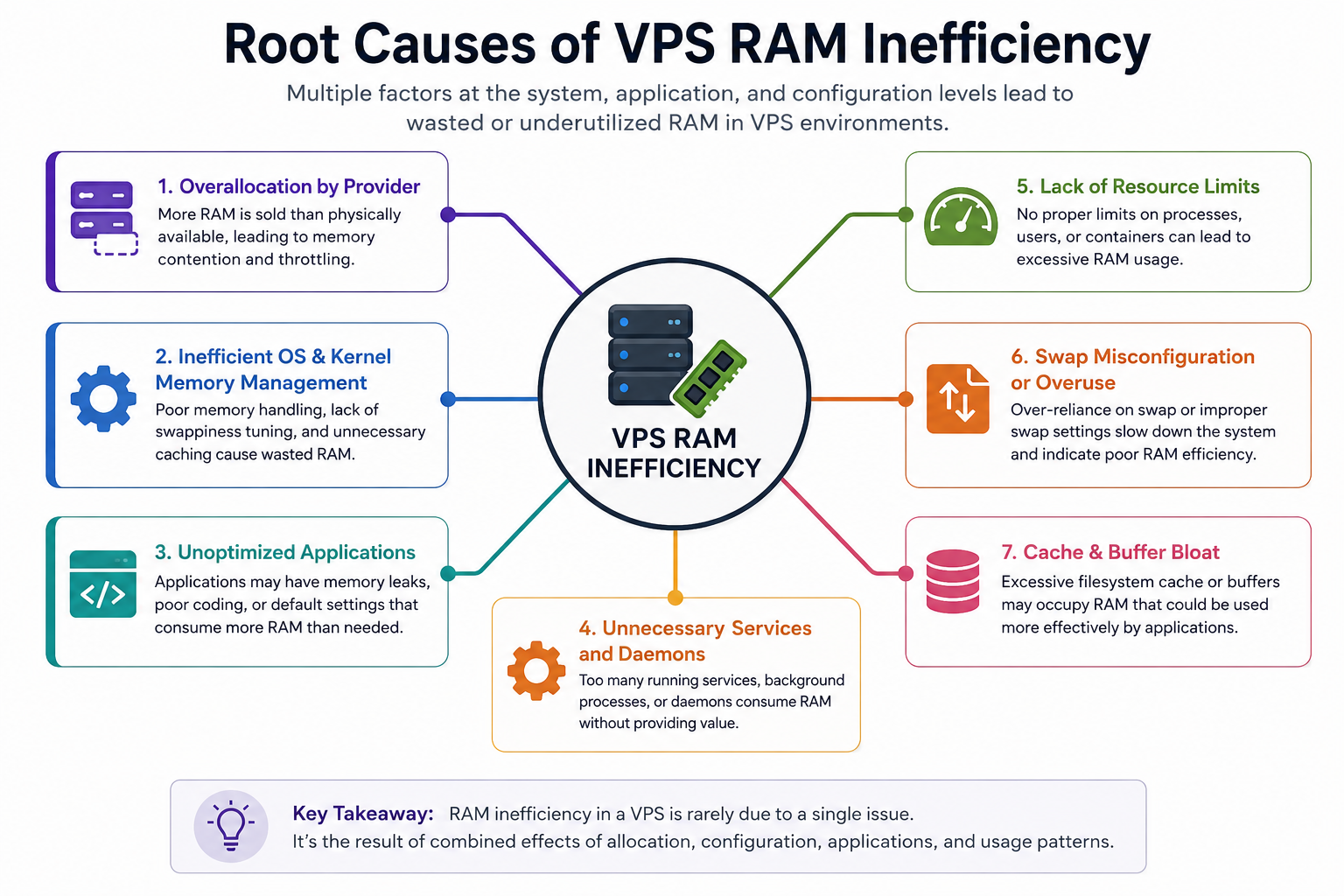
Root Causes of VPS RAM Inefficiency
RAM inefficiency in VPS environments typically comes from system-level imbalance rather than a single misconfiguration.
1. Uncontrolled Process Memory Growth
Certain services (databases, runtime workers, caching layers) expand memory usage dynamically based on demand. Without limits, they gradually consume all available RAM.
2. Improper Swap Strategy
Swap is often misconfigured in two extremes:
- No swap → system instability under spikes
- Excessive swap usage → persistent disk I/O slowdown
Both conditions degrade VPS performance.
3. Virtualization Memory Boundaries
Unlike physical servers, VPS environments operate under:
- Hypervisor memory allocation limits
- Potential node-level oversubscription
- Burst vs guaranteed RAM differences
This means available RAM is not always “fully physical RAM behavior.”
VPS RAM Optimization Techniques (Swap Behavior Control)
Swap is not a performance feature—it is a stability buffer mechanism.
Understanding Swap in VPS Context
In VPS architecture, swap acts as a fallback layer when RAM allocation exceeds the virtual memory boundary. However, swap is significantly slower because it relies on disk I/O instead of physical memory access.
The goal is not to eliminate swap, but to prevent it from becoming the primary memory handler under normal workloads.
Swap Usage Strategy (Correct Behavior Model)
A properly optimized VPS follows this rule:
- RAM handles active workload memory
- Swap handles rare memory spikes
- Disk is never part of steady-state memory execution
If swap becomes continuously active, it indicates a structural memory imbalance, not a temporary spike condition.
Swap Pressure Indicator Logic
Swap is considered healthy only when:
- It activates briefly during peak load
- It deactivates after load normalizes
- It does not remain persistently occupied
If swap remains constantly engaged, optimization must shift to process-level memory control, not swap adjustment.
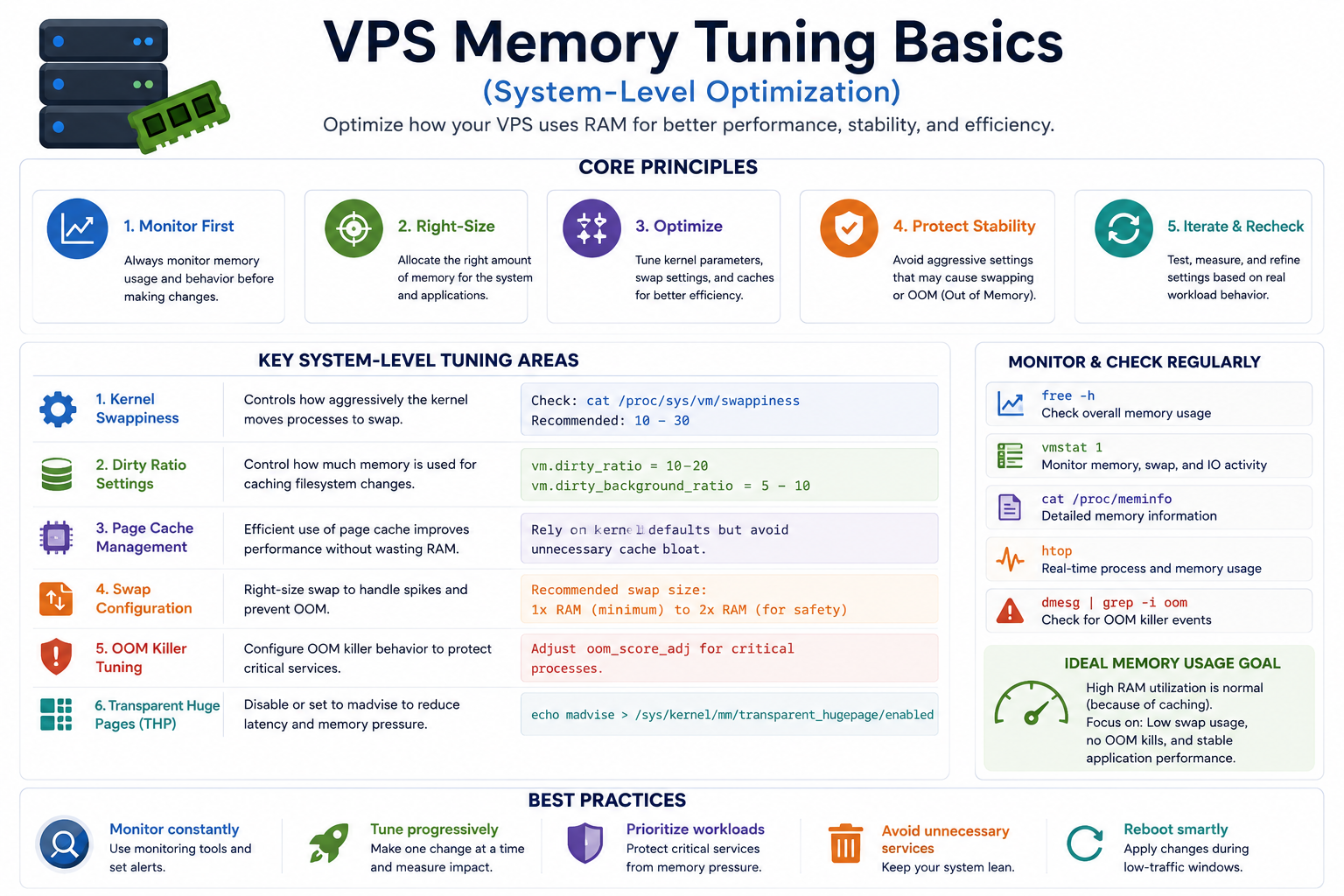
VPS Memory Tuning Basics (System-Level Optimization)
Memory tuning focuses on controlling how the operating system and applications distribute RAM usage.
1. Process-Level Memory Containment
Each memory-intensive service must operate within controlled boundaries. Without limits, one process can gradually consume the entire VPS memory pool, triggering swap dependency.
This is especially critical for:
- Database engines
- Application workers
- Runtime environments (PHP, Node.js, Python services)
2. Cache vs Active Memory Separation
A VPS must maintain balance between:
- Active working memory (applications)
- Cached memory (OS optimization layer)
Poor configuration leads to cache starvation or excessive memory eviction cycles, both of which increase system instability under load.
3. Memory Allocation Stability Principle
A stable VPS does not aim for maximum RAM usage. Instead, it maintains:
- Consistent headroom for burst traffic
- Predictable memory allocation behavior
- Avoidance of sudden memory reclamation cycles
This prevents performance oscillation during traffic variation.
Optimization Priority Stack (Critical Decision Order)
VPS RAM optimization must follow a structured priority model:
Step 1: Identify Memory Pressure Sources
Determine which processes are consuming disproportionate memory.
Step 2: Stabilize Application Memory Behavior
Reduce uncontrolled memory growth at the application layer.
Step 3: Control Swap Dependency
Ensure swap is only used for temporary spikes, not continuous load.
Step 4: Tune OS Memory Behavior
Adjust system-level memory handling to reduce unnecessary swapping cycles.
Step 5: Evaluate Scaling Requirement
Only after optimization, determine whether RAM upgrade is actually needed.
Impact of Proper VPS RAM Optimization
When VPS RAM Optimization Techniques (Swap, memory tuning basics) are correctly implemented, the system behavior changes significantly:
- Swap becomes rare instead of continuous
- Application response time becomes stable under load
- Memory-related crashes are reduced
- Performance becomes predictable during traffic spikes
The most important improvement is not speed—it is system stability under variable memory demand.
Internal Linking Opportunities (Cluster Integration)
This RAM optimization node connects to the broader VPS performance ecosystem:
- VPS resource monitoring system (for detecting memory pressure signals)
- VPS performance troubleshooting framework (for diagnosing latency issues)
- VPS disk I/O optimization guide (for separating memory vs storage bottlenecks)
- VPS scaling strategy framework (for deciding RAM upgrade vs optimization)
- VPS system tuning architecture (for OS-level performance behavior control)
Each of these should be treated as separate semantic nodes and not duplicated inside this article.
Final Engineering Summary
VPS RAM optimization is not about increasing memory—it is about controlling how memory behaves under pressure. Most VPS performance issues labeled as “slow server” are actually memory lifecycle problems caused by swap dependency and uncontrolled process allocation.
A properly optimized VPS maintains:
- Stable RAM usage patterns
- Minimal swap engagement
- Predictable performance under load
Once this balance is achieved, scaling decisions become accurate instead of reactive.
