
When a website becomes slow, most people immediately think the problem is the server. So they upgrade to a VPS (Virtual Private Server) expecting everything to become fast instantly. But after upgrading, many still face delays, slow dashboards, or lag in search and checkout pages.
The surprising truth is this: in most cases, the real problem is not the VPS—it’s the database.
A VPS gives you dedicated resources like CPU, RAM, and storage, which is a big upgrade from shared hosting. But if your database is poorly optimized, those powerful resources still won’t be used efficiently.
Database optimization is what turns a “normal VPS setup” into a high-performance system that loads fast, handles traffic smoothly, and scales with your business.
In simple terms, database optimization means making your data faster to search, easier to manage, and lighter on server resources. Whether you are running a business website, an online store, or a web application, this is one of the most important steps in VPS performance tuning.

What is Database Optimization for VPS?
Database optimization for VPS means improving how your database stores, processes, and retrieves data so it performs efficiently on a virtual private server environment.
Instead of relying on default database settings, optimization customizes the database to match your VPS resources and workload.
Think of your database like a warehouse:
- If everything is randomly stored, finding a product takes time
- If everything is labeled and organized properly, you can find anything instantly
That “organization” in technical terms is called database optimization.
On a VPS, this becomes even more important because:
- You have more control
- You handle more traffic
- Your applications depend heavily on database performance
How Does Database Optimization Work on a VPS?
A VPS gives you dedicated system resources, unlike shared hosting where everything is shared with other users.
Database optimization works by making sure your database uses those dedicated resources efficiently.
It does this by:
- Allocating proper memory (RAM) for queries and caching
- Reducing unnecessary database calls
- Structuring data for faster access
- Minimizing load on CPU during heavy operations
Simple Example:
Without optimization:
- Every page load asks the database multiple repeated questions
- Server works harder → website becomes slow
With optimization:
- Data is stored and retrieved efficiently
- Fewer queries are needed → faster website
Signs Your VPS Database is NOT Optimized
Before fixing anything, it’s important to recognize the problem. A poorly optimized database usually shows these symptoms:
- Website loads slowly even on VPS
- Admin dashboard feels laggy
- High CPU usage without traffic spikes
- Product search or filtering is slow (especially in eCommerce)
- Frequent timeouts or errors
- Backup and restore take too long
If you notice these issues, your VPS is fine—but your database needs tuning.
Key Techniques for Database Optimization on VPS
Now let’s break down the most effective optimization techniques used in real VPS environments.
1. Indexing (Faster Data Search)
y = f(x)
Indexing is one of the most important database optimization techniques.
It works like a book index:
- Instead of reading every page, you jump directly to the correct page
Without indexes:
- The database scans every row (slow process)
With indexes:
- It directly finds the required data (fast process)
Best practice:
- Add indexes to frequently searched columns (like email, product ID, order ID)
- Avoid over-indexing (it can slow down write operations)
2. Query Optimization (Writing Smart Database Requests)
Poorly written queries are one of the biggest causes of slow VPS performance.
Instead of:
- Fetching unnecessary data
- Running repeated queries
- Using complex joins unnecessarily
You should:
- Select only required columns
- Reduce repeated queries using caching
- Simplify joins where possible
Example:
Bad:
- SELECT * FROM users
Good:
- SELECT name, email FROM users
Small changes like this significantly reduce database load.
3. Database Configuration Tuning (Matching VPS Resources)
Every VPS has different CPU and RAM limits. Your database must be tuned accordingly.
Important configuration areas include:
- Memory allocation (buffer size)
- Connection limits
- Cache size
- Query execution limits
If your VPS has more RAM, you can safely increase caching. If it has limited resources, you must keep settings lightweight.
4. Cleaning and Maintenance (Keeping Database Light)
Over time, databases collect unnecessary data that slows everything down.
This includes:
- Old logs
- Spam entries
- Temporary tables
- Unused records
Regular cleanup helps:
- Reduce database size
- Improve query speed
- Lower backup time
Think of it like cleaning a warehouse—less clutter means faster movement.
5. Caching (Avoid Repeating Work)
Caching is one of the most powerful VPS optimization techniques.
Instead of asking the database the same question again and again, caching stores the result temporarily.
Types of caching:
- Query caching
- Object caching
- Application-level caching (like Redis)
Result:
- Faster response time
- Lower database load
- Better user experience
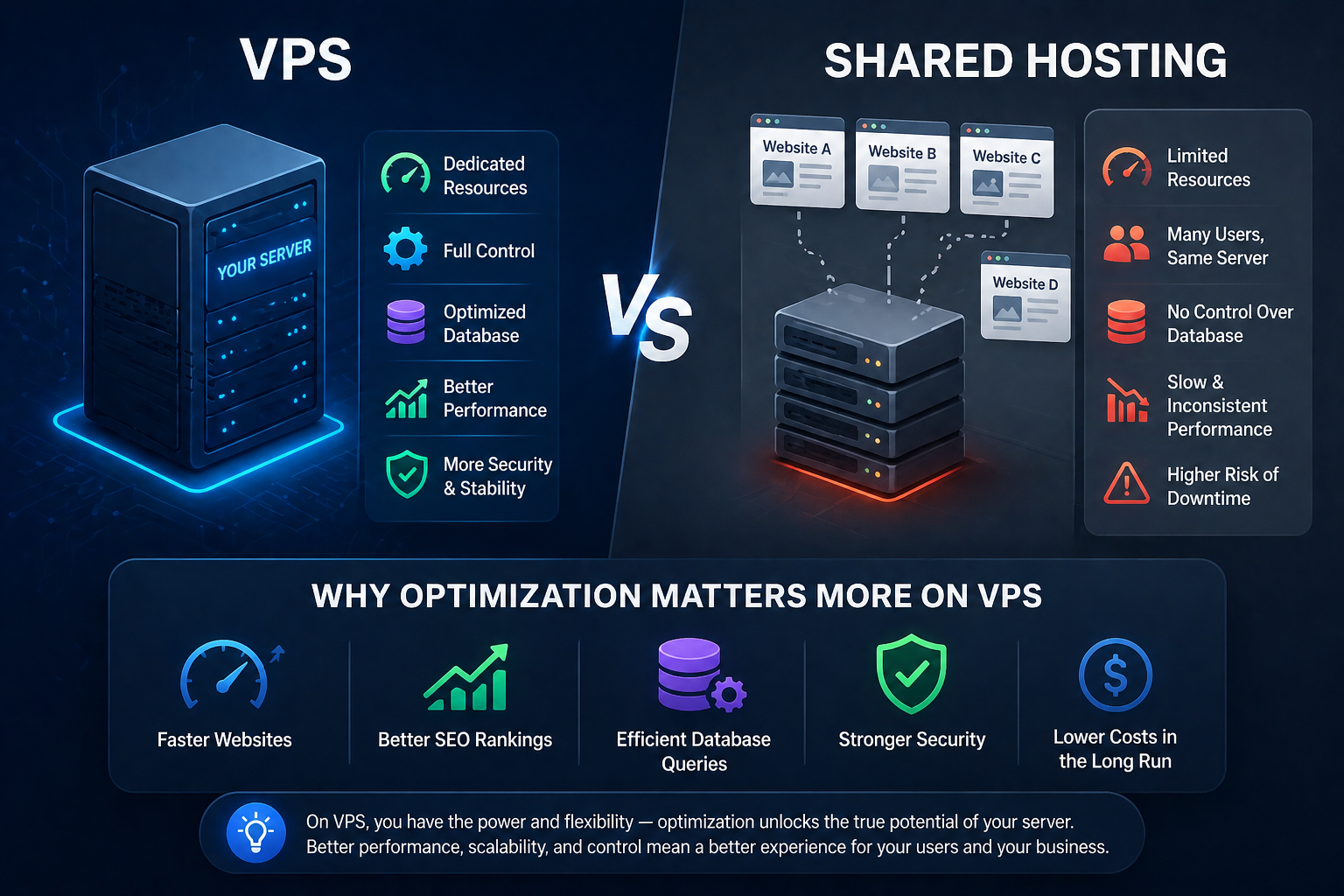
VPS vs Shared Hosting (Why Optimization Matters More on VPS)
Understanding the hosting environment helps you see why database optimization is critical.
Shared Hosting:
- Limited control over database
- Resources shared with other users
- Minimal tuning options
VPS Hosting:
- Full control over database settings
- Dedicated CPU and RAM
- Ability to install caching tools
- Full optimization freedom
Analogy:
- Shared hosting = living in a shared hostel room
- VPS = owning your own apartment with full control
But owning an apartment means you must manage it properly—and that includes your database.
Why Database Optimization is Important for VPS Performance
Database optimization directly affects your business performance.
Faster Website Speed
Optimized queries reduce loading time significantly.
Better SEO Performance
Google prefers fast websites with lower response times.
Improved User Experience
Users stay longer when pages load quickly.
Efficient Resource Usage
Your VPS performs better without needing upgrades.
Scalability
A well-optimized database can handle traffic growth smoothly.
Real-Life Example: Growing Online Store
Imagine an online store hosted on a VPS:
Early Stage:
- Few products
- Low traffic
- Fast performance
Growth Stage:
- Thousands of products
- High daily traffic
- Slow product search and checkout
The problem is not the VPS—it’s the database structure.
After Optimization:
- Product search becomes instant
- Checkout process becomes smooth
- Server load drops significantly
- User experience improves
This is where VPS + database optimization becomes powerful.
When Should You Optimize Your VPS Database?
You should not wait for a complete breakdown. Optimize when you notice:
- Increasing website traffic
- Slow page load times
- High server resource usage
- Frequent database queries
- Moving from shared hosting to VPS
Early optimization always prevents future performance problems.
Managed vs Unmanaged VPS (Impact on Database Optimization)
Your VPS type also determines how much control you have.
Managed VPS
- Hosting provider handles optimization
- Best for beginners
- Less technical effort required
Unmanaged VPS
- Full control over database and server
- Requires technical knowledge
- Maximum optimization flexibility
For business users, managed VPS is often more practical, while developers may prefer unmanaged environments.
Related Concepts You Should Know
Database optimization is part of a larger VPS ecosystem:
Shared Hosting
Basic hosting with limited optimization control.
Cloud Hosting
Scalable infrastructure with distributed resources.
Dedicated Servers
Full physical machine for maximum performance.
DNS & Domain Systems
Your database powers dynamic content behind your domain.
Application Stack (MySQL, PostgreSQL, Redis)
Core tools used for database performance tuning.
Quick Database Optimization Checklist (VPS)
Before finishing, here’s a simple checklist you can follow:
- Add indexes to frequently used columns
- Optimize slow SQL queries
- Enable caching (Redis or application cache)
- Remove unused or old data
- Monitor slow query logs
- Adjust database configuration for VPS resources
- Avoid unnecessary SELECT * queries
Conclusion
Database optimization for VPS is not just a technical task—it is a performance strategy.
A VPS gives you power, but optimization decides how effectively that power is used.
When your database is properly tuned:
- Your website becomes faster
- Your server becomes stable
- Your users get a smoother experience
- Your business scales without technical limits
In simple words:
A powerful VPS without optimization is wasted potential.
A well-optimized database turns that VPS into a high-performance system.
This is what separates a slow website from a fast-growing digital platform.
