
Deploying a new application version directly to every production user can introduce unnecessary risk. A release that works correctly in testing may still cause unexpected errors, slower response times, or compatibility problems under real production conditions.
VPS canary deployment provides a controlled way to release changes. Instead of directing all production traffic to the new version immediately, you expose the new version to a limited portion of traffic, monitor its behavior, and gradually increase traffic if the release performs as expected.
This approach can reduce the impact of failed deployments while giving you an opportunity to validate a release with real production traffic.
What Is VPS Canary Deployment?
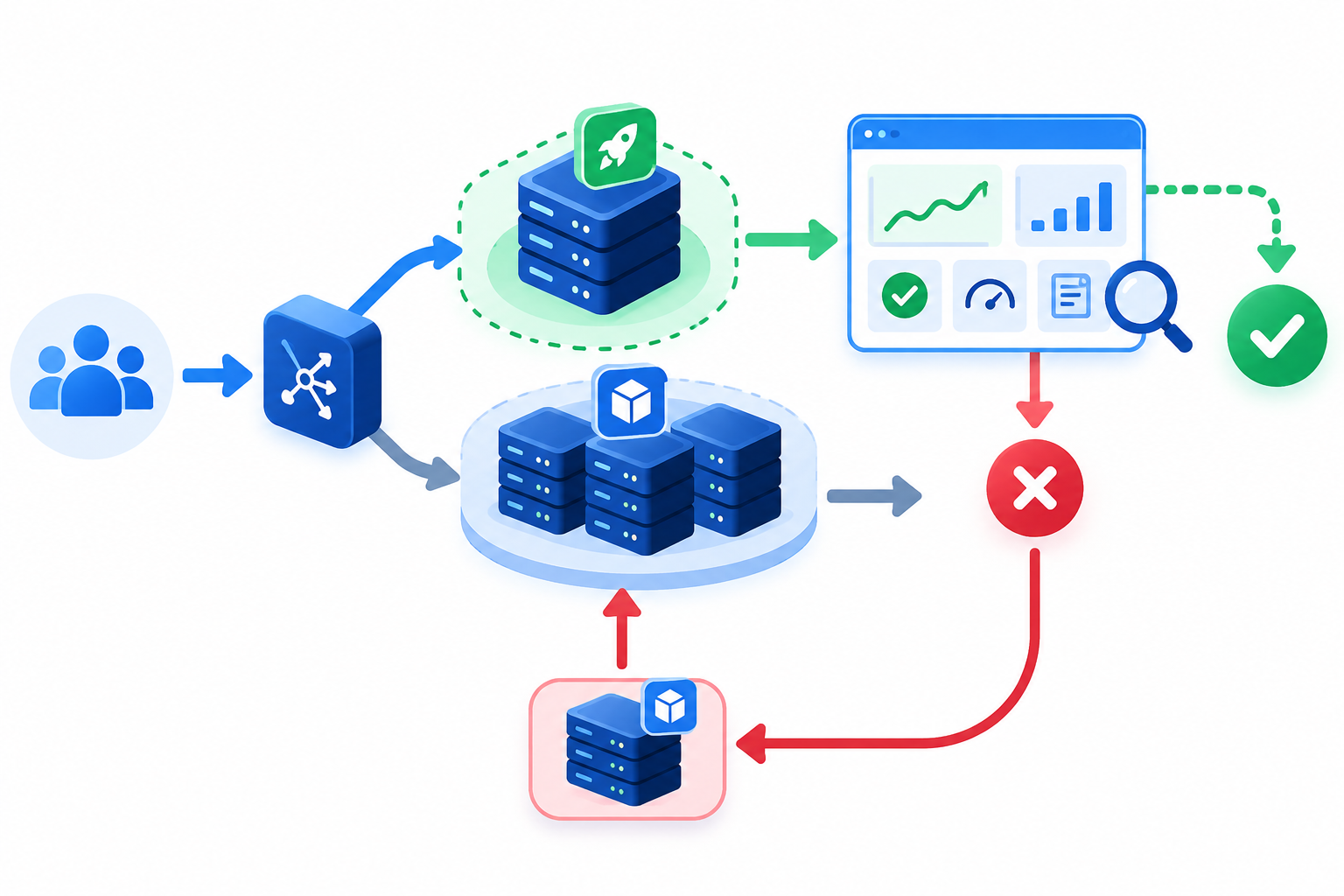
VPS canary deployment is a canary release strategy implemented on VPS infrastructure. It runs a new application version alongside the existing stable version and directs a controlled portion of production traffic to the new version.
For example, suppose an application currently runs version 1.0 and you have prepared version 2.0.
Instead of immediately replacing version 1.0, you can:
- Deploy version 2.0 in a separate environment or application instance.
- Send a small portion of production traffic to version 2.0.
- Monitor errors, performance, logs, and application behavior.
- Increase traffic if the canary remains healthy.
- Complete the rollout once the release has been validated.
- Redirect traffic to the stable version if significant problems appear.
The underlying idea is simple: limit the initial blast radius of a new release, learn from real production traffic, and expand the rollout only when the evidence supports it. Kubernetes and AWS both describe canary deployments using this general pattern of running versions alongside each other, shifting limited traffic, monitoring, and then promoting or rolling back the release.
Why Use Canary Deployment on a VPS?
A conventional deployment can expose every user to a new release immediately. If the update introduces a serious problem, the entire application may be affected.
A canary release creates an additional validation stage between testing and full production rollout.
It can help with:
- Reducing deployment risk: Problems can be detected while exposure is limited.
- Production validation: The new version can be evaluated with real production traffic.
- Controlled application updates: Existing users can continue using the stable version while the new version is evaluated.
- Faster rollback: Traffic can be returned to the stable version when problems are detected.
- Performance validation: CPU, memory, response time, application errors, and other metrics can be compared during the rollout.
Canary deployment is particularly useful for applications where a failed release could affect customers, transactions, or business operations.
How VPS Canary Deployment Works
A typical setup keeps the stable and canary versions available at the same time.
For example:
Stable version
Most users → Stable Version
Canary version
Small percentage of users → Canary Version
Traffic can then be increased progressively as confidence in the new release grows.
A rollout might look like:
|
Stage |
Stable |
Canary |
|
Initial |
95% |
5% |
|
Stage 2 |
80% |
20% |
|
Stage 3 |
50% |
50% |
|
Final |
0% |
100% |
These percentages are illustrative, not a fixed canary formula.
The actual traffic distribution depends on how your routing layer works. A load balancer, reverse proxy, gateway, or application router may support explicit traffic weights. In other architectures, traffic may be distributed approximately according to the number of active instances or replicas. Kubernetes, for example, notes that replica-based distribution can be approximate, while Gateway API can provide explicit traffic weights.
The important principle is that the new version should receive increasing exposure only after it passes your predefined checks.
What Do You Need for a VPS Canary Deployment?
Canary deployment is a release strategy, not a VPS-specific technology. You do not necessarily need two physical VPS servers, and you do not need Kubernetes to use the basic concept.
Depending on your infrastructure, the stable and canary versions can run on separate VPS instances, isolated application instances, containers, or another suitable environment.
The key requirements are version isolation, traffic control, monitoring, and rollback capability.
Separate Application Environments
The stable and canary versions should be sufficiently isolated so that a problem in the new release does not immediately disrupt the stable version.
The exact implementation depends on your architecture.
For example, you might use:
- Separate VPS instances
- Separate application processes
- Containers
- Separate application environments
The closer the canary environment is to actual production, the more useful the test results are likely to be.
Traffic Routing
You need a way to control which version receives production traffic.
Depending on your setup, this may involve:
- Reverse proxies
- Load balancers
- Gateways or ingress layers
- Application-level routing
- Container or service routing
DNS-based routing can also be used in some architectures, but it is less precise for rapid traffic adjustments because DNS caching can delay changes.
For detailed reverse-proxy configuration, use a dedicated VPS Reverse Proxy Setup Guide rather than turning this article into a configuration tutorial.
Monitoring
Monitoring is essential because the purpose of a canary release is to observe how the new version behaves under real conditions.
Useful signals include:
- HTTP error rates
- Response time
- CPU usage
- Memory usage
- Application exceptions
- Database errors
- Service availability
- Application logs
- Important business or transaction metrics
See the VPS Monitoring Guide for detailed monitoring practices.
A Practical VPS Canary Deployment Process
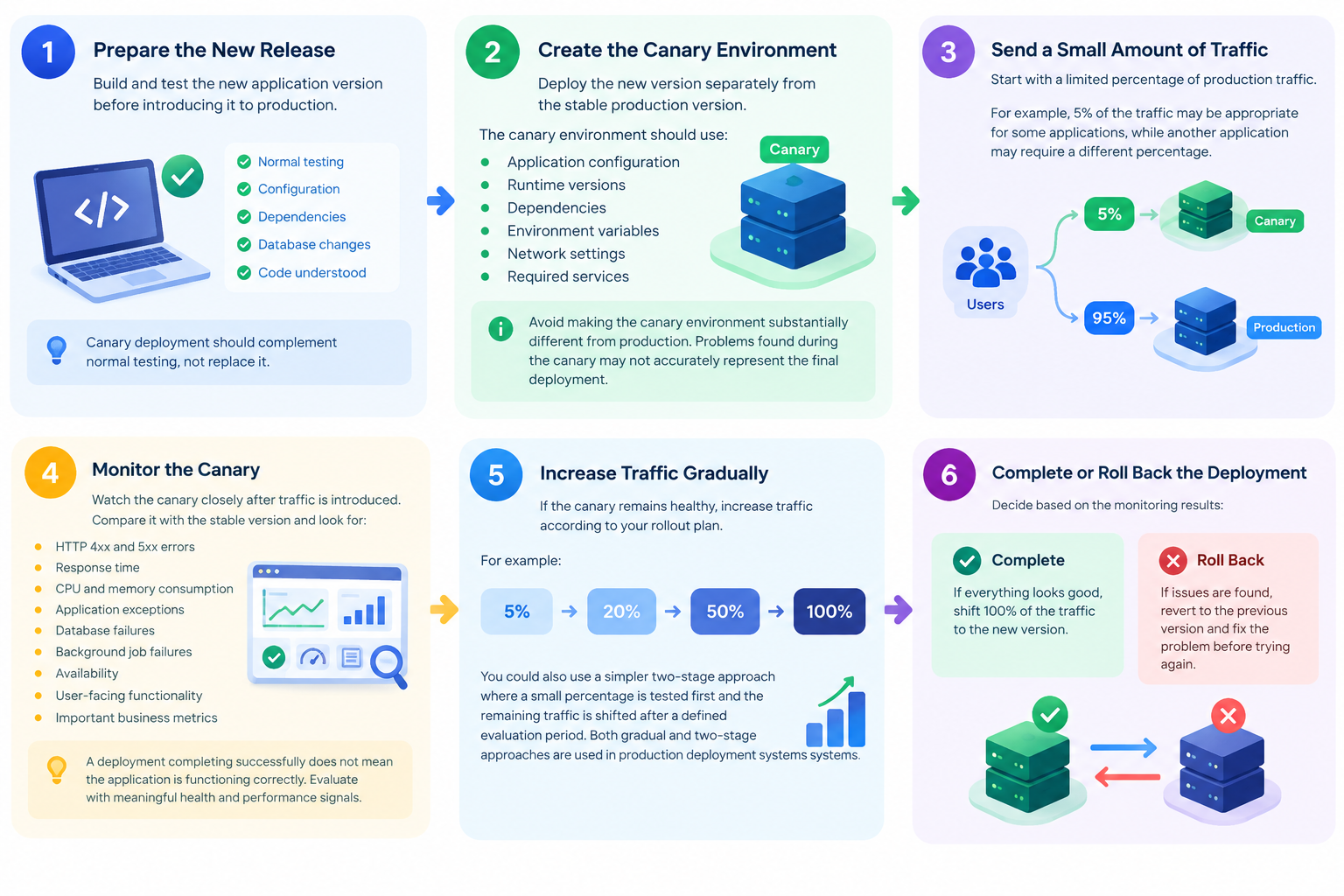
A controlled rollout can be organized into the following stages.
1. Prepare the New Release
Build and test the new application version before introducing it to production.
Confirm that the release has passed your normal testing process and that configuration, dependencies, runtime requirements, and database changes are understood.
Canary deployment should complement normal testing, not replace it.
2. Create the Canary Environment
Deploy the new version separately from the stable production version.
The canary environment should use compatible:
- Application configuration
- Runtime versions
- Dependencies
- Environment variables
- Network settings
- Required services
Avoid making the canary environment substantially different from production. Otherwise, problems found—or not found—during the canary may not accurately represent the final deployment.
3. Send a Small Amount of Traffic
Start with a limited percentage of production traffic.
For example, an initial 5% canary may be appropriate for some applications, while another application may require a different percentage.
The correct starting point depends on traffic volume, application risk, monitoring capabilities, and how quickly you can respond to problems.
4. Monitor the Canary
Watch the canary closely after traffic is introduced.
Compare it with the stable version and look for meaningful differences in:
- HTTP 4xx and 5xx errors
- Response time
- CPU and memory consumption
- Application exceptions
- Database failures
- Background-job failures
- Availability
- User-facing functionality
- Important business metrics
A deployment completing successfully does not mean the application is functioning correctly. The canary must be evaluated using meaningful health and performance signals.
5. Increase Traffic Gradually
If the canary remains healthy, increase its traffic according to your rollout plan.
For example:
5% → 20% → 50% → 100%
You could also use a simpler two-stage approach where a small percentage is tested first and the remaining traffic is shifted after a defined evaluation period. Both gradual and two-stage canary approaches are used in production deployment systems.
Do not increase traffic simply because a predetermined amount of time has passed. The decision should also consider the monitoring results.
6. Complete or Roll Back the Deployment
If the canary meets your predefined success criteria, complete the rollout.
If significant problems appear:
- Stop increasing canary traffic.
- Redirect traffic back to the stable version.
- Preserve the canary environment long enough to investigate the problem.
- Review logs and monitoring data.
- Correct the release before attempting another rollout.
A rollback plan should exist before the deployment begins. AWS guidance similarly recommends testing rollback procedures and defining appropriate health checks and monitoring for canary releases.
What Should You Monitor During a Canary Release?
The most important question is not simply whether the new version is running. It is whether it is behaving correctly under real production conditions.
Before deployment, define measurable success and failure criteria.
|
Metric |
What to Watch |
|
HTTP errors |
Unexpected increase in 4xx/5xx responses |
|
Response time |
Significant increase in latency |
|
CPU usage |
Unusual or sustained resource consumption |
|
Memory |
Memory growth or exhaustion |
|
Application logs |
New or repeated exceptions |
|
Database |
Failed queries or connection problems |
|
Availability |
Service interruptions |
|
User behavior |
Broken or degraded functionality |
|
Business metrics |
Unexpected changes in important transactions or actions |
Compare the canary with the stable version whenever possible.
A small increase in resource usage may be acceptable for one application but problematic for another. Your normal production baseline provides the context needed to interpret the results.
Be Careful With Database Changes
Database changes deserve special attention during a canary deployment.
For part of the rollout, both the stable and canary application versions may be running at the same time. If the new version changes the database schema in a way that the old version cannot understand, simply redirecting traffic back to the stable version may not restore normal operation.
Where possible, design database changes so they remain compatible with both versions during the transition.
For example, a safer migration may follow this general sequence:
Expand → deploy compatible application changes → migrate usage → contract
The exact database migration strategy depends on the application and database system, so detailed migration procedures should remain in a dedicated database deployment guide.
Common VPS Canary Deployment Mistakes
Canary deployment reduces risk, but it does not automatically make a deployment safe.
Making the Canary Environment Too Different
If the canary uses substantially different software, configuration, dependencies, or infrastructure, its behavior may not accurately represent the final production release.
Sending Too Much Traffic Too Quickly
Sending most of your users to the new release immediately reduces the protection provided by the canary strategy.
Monitoring the Wrong Metrics
Server CPU and memory alone may not reveal an application problem. Monitor application errors, latency, availability, and important user or business actions as well.
Ignoring Database Compatibility
Running two application versions against an incompatible database schema can make rollback difficult or unsafe.
Having No Rollback Plan
If something goes wrong, you should already know how to return traffic to the stable version.
Do not design the rollback process for the first time after the deployment has failed.
VPS Canary Deployment vs. Rolling Deployment
Canary and rolling deployments are related but are not exactly the same.
A rolling deployment gradually replaces instances running the old version with instances running the new version. The focus is on replacing the application fleet in stages.
A canary deployment deliberately exposes the new version to a controlled subset of production traffic so its behavior can be evaluated before wider rollout.
In simple terms:
Rolling deployment
Old instances → gradually replaced by new instances
Canary deployment
Stable version + canary version → controlled traffic → validation → wider rollout
Some deployment systems combine aspects of both approaches, so the exact implementation can vary. AWS documentation similarly distinguishes rolling deployments from canary strategies while noting that canary releases can be treated as a variation of staged deployment.
VPS Canary Deployment Best Practices
For a reliable rollout:
- Keep the canary environment as close to production as practical.
- Start with a limited percentage of traffic.
- Define success and failure criteria before deployment.
- Monitor the canary against the stable version.
- Use application-level as well as infrastructure-level metrics.
- Increase traffic gradually when the results support promotion.
- Keep the stable release available during the rollout.
- Test the rollback process before production deployment.
- Check database compatibility before running multiple application versions.
- Maintain appropriate VPS backups before significant releases.
- Record deployment and rollback procedures so the process is repeatable.
A canary deployment is most effective when it is treated as a controlled operational process rather than simply running two application versions at the same time.
When Is VPS Canary Deployment Useful?
Canary deployment is particularly useful when releasing changes to applications where a failed update could affect users or business operations.
Common examples include:
- Customer-facing web applications
- E-commerce platforms
- SaaS applications
- APIs
- High-traffic websites
- Frequently updated applications
- Systems where downtime or failed releases have a business impact
For a small website with infrequent updates, the operational overhead of a canary process may not be justified. The appropriate deployment strategy depends on the application’s complexity, traffic, architecture, and risk profile.
Frequently Asked Questions
