
Why You’re in Good Hands with CreativeON
CreativeON has been providing hosting services in Pakistan for over two decades, supporting everything from small business websites to large-scale platforms.
Over the years, we’ve worked with organizations and media networks such as City42, Channel 24, QTV, Chughtai Lab, Alkhair Group, Daewoo Pakistan, and the Orange Line Metro. This hands-on experience helps us understand real-world server challenges—and how to solve them properly.
Whether you’re using a VPS or a dedicated server, the steps below apply in most WHM-based environments.
Why You Might Need to Restart Your Server
Think of your server like someone who’s been working nonstop without rest. Over time, things can slow down or behave unexpectedly.
Restarting your server can help:
- Apply important system or security updates
- Clear temporary files and free up memory
- Fix small issues affecting website or email performance
For VPS and dedicated server users, an occasional reboot is a normal part of basic server maintenance.
Before You Restart (Quick Safety Check)
Before clicking the reboot button, take a moment to:
- Make sure you have a recent backup
- Inform users about a few minutes of downtime
- Try a graceful reboot first whenever possible
These small steps can save you from unnecessary headaches later.
Two Ways to Restart Your Server in WHM
When you open WHM, you’ll notice two reboot options. Knowing the difference is important.
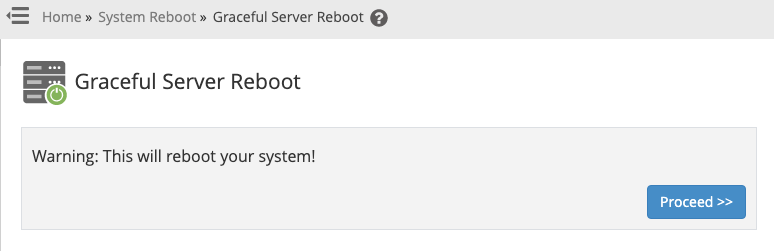
1. Graceful Reboot (Recommended)
A graceful reboot allows the server to finish ongoing tasks, save data, and shut down safely before restarting.
This should always be your first choice. It helps prevent data loss and keeps services running smoothly.
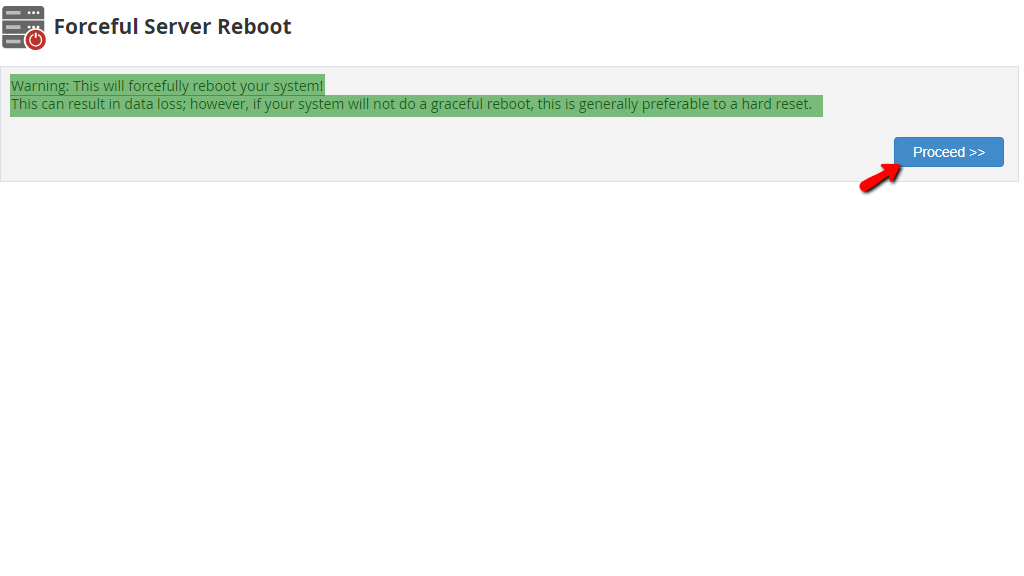
2. Forceful Reboot (Emergency Only)
A forceful reboot stops everything immediately—similar to pulling the power plug.
Use this only if:
- The server is completely unresponsive
- The graceful reboot fails
Because running processes don’t get time to save, there’s a small risk of data corruption.
Step-by-Step: How to Restart Your Server Using WHM
Restarting your server through WHM is easier than it sounds. Just follow these steps:
Step 1: Log in to WHM
Open your browser and log in to your WHM dashboard.
Step 2: Search for Reboot
On the left-hand side, use the search box and type “Reboot”.
Click on System Reboot when it appears.
Step 3: Choose the Reboot Type
You’ll see two main options:
- Graceful Server Reboot (recommended)
- Forceful Server Reboot (use only if necessary)
Step 4: Confirm the Action
WHM will ask for confirmation. Click Proceed, and the reboot will begin.
Your server will go offline briefly and come back online once the restart is complete.
How Long Does a Reboot Take?
In most cases, a reboot takes 2 to 5 minutes.
If it takes longer than expected, it’s best to contact your hosting support team for assistance.
VPS vs Dedicated Server: Is the Process Different?
Mostly, no. Whether you’re using a VPS or a dedicated server with WHM, the reboot process is very similar.
The main difference is scale—dedicated servers may take slightly longer to restart due to higher resource usage.
Why Many Users Choose CreativeON
If you’re exploring VPS or dedicated hosting options in Pakistan, CreativeON provides a complete ecosystem—from domains to hosting and business tools.
We are:
- An Official Google Workspace Partner and Reseller in Pakistan
- A PKNIC Gold Partner for .PK domain registration
This allows us to support businesses with reliable infrastructure and straightforward guidance, not just servers.
Summary
Restarting your server is a simple but powerful skill. Just remember:
- Always try a graceful reboot first
- Use a forceful reboot only in emergencies
- Expect a few minutes of downtime during the restart
You now know how to safely restart your VPS or dedicated server using WHM—like a pro.
If you ever feel unsure or need help, the CreativeON team is always ready to support you.