
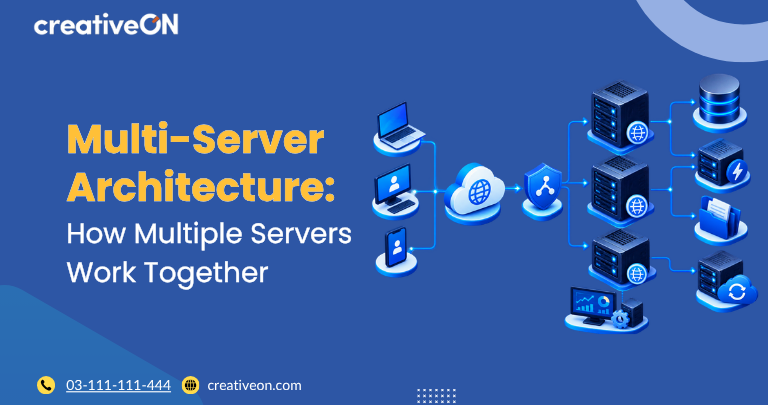
Multi-server architecture uses two or more servers to run different parts of an application or distribute the same workload across multiple machines. Businesses use this approach to separate workloads, scale applications, improve resource management, and, when designed with redundancy, reduce the impact of individual server failures.
Instead of running a website, application, database, and other services on one machine, a multi-server setup allows these workloads to be distributed according to their resource and operational requirements.
This can make infrastructure more flexible as a website or application grows. However, using multiple servers does not automatically create high availability or fault tolerance. Those benefits depend on how the servers and their dependencies are designed.
What Is Multi-Server Architecture?
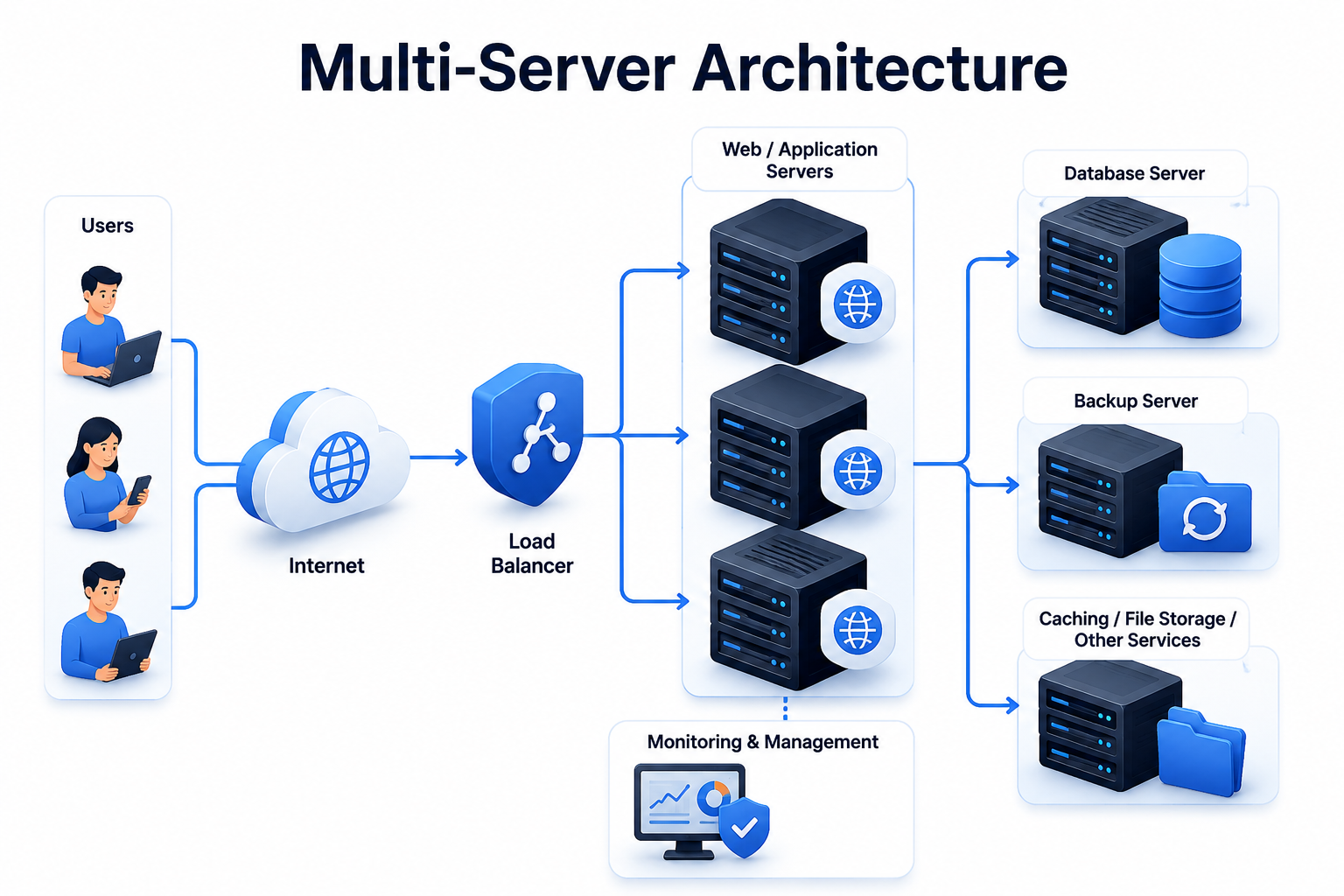
Multi-server architecture is an infrastructure design in which multiple servers work together to deliver an application, website, or service.
Servers may perform different roles or share the same workload. For example, one server might handle web requests while another manages the database. Alternatively, several application servers may handle incoming traffic simultaneously.
A basic multi-server environment could include:
- A web or application server
- A database server
- A separate backup server or backup destination
A larger environment may also include servers for caching, file storage, background processing, monitoring, or traffic management.
The important point is that multi-server architecture is an umbrella term. A multi-server setup can be designed primarily for workload separation, scalability, redundancy, or a combination of these.
Why Use a Multi-Server Setup?
A single-server environment is simple to deploy and manage, but all workloads depend on the same machine. If that server becomes overloaded or unavailable, multiple services can be affected at the same time.
A multi-server environment can address some of these limitations.
Better Scalability
Multi-server architecture can support horizontal scaling, where additional servers are added to handle increasing workloads.
For example, instead of continually upgrading one application server, an organization can add additional application servers and distribute incoming requests between them.
This differs from vertical scaling, which increases the CPU, RAM, or storage resources of an existing server.
Not every multi-server environment is designed for horizontal scaling, but separating workloads across servers can make independent scaling easier.
Workload Separation
Different services often have different resource requirements.
A database may require substantial memory and fast storage, while an application server may require more CPU resources when processing requests.
Placing these workloads on separate servers allows resources to be allocated according to the needs of each service.
For example:
Web/Application Server → Database Server
The application handles requests while the database server manages database operations.
Improved Resource Management
When workloads are separated, it becomes easier to identify which component is consuming resources.
If database activity is affecting application performance, the database server can be investigated or upgraded independently rather than changing the entire infrastructure.
Potentially Better Fault Tolerance
Multiple servers can reduce the impact of individual server failures when redundancy and failover are properly designed.
For example, if several application servers are available behind a load balancer, traffic may be redirected to healthy servers when one application server fails.
However, simply adding more servers does not guarantee fault tolerance. A shared database, load balancer, storage system, or network component can still become a single point of failure.
Multi-Server Architecture vs. High Availability
These terms are related but should not be treated as synonyms.
|
Concept |
Meaning |
|
Multi-server architecture |
Uses multiple servers within an application or infrastructure |
|
Load balancing |
Distributes incoming traffic across multiple servers |
|
Redundancy |
Provides additional resources that can take over when another resource fails |
|
High availability |
Designs a system to remain available despite certain component failures |
|
Disaster recovery |
Provides processes and resources for recovering from major failures or data loss |
A system can therefore use multiple servers without being highly available.
For example, separating a web server and database server creates a multi-server architecture, but if the database server fails and there is no redundant database system, the application may still become unavailable.
Common Multi-Server Architecture Models
There is no single design that fits every application. The appropriate multi-server setup depends on the workload and business requirements.
Web Server and Database Server
One of the simplest designs separates the web application from the database.
Server 1: Web or application server
Server 2: Database server
The web server processes application requests, while the database server stores and retrieves application data.
This arrangement can be useful when database activity consumes significant resources on the same server as the website.
Multiple Application Servers
Applications receiving high or variable traffic can use multiple application servers.
A load balancer or a reverse proxy configured for load balancing receives incoming requests and distributes them between backend servers.
For example:
Users → Load Balancer → Application Server 1 / Application Server 2 / Application Server 3
Health checks can help identify unavailable servers so traffic can be directed toward healthy backend resources.
The application must also be designed to work correctly when requests can reach different servers. Sessions, uploaded files, cached data, and other shared application state may require additional consideration.
Web, Application, and Database Servers
A larger application may separate its infrastructure into several layers:
- Web or reverse-proxy server
- Application servers
- Database server
- Cache or supporting services
- File or object storage
- Backup infrastructure
This design allows individual components to be scaled or managed according to their specific requirements.
The architecture should still remain as simple as practical. Adding more components increases management and troubleshooting requirements.
How Multi-Server Architecture Handles Traffic
Traffic distribution is an important part of many multi-server environments.
A load balancer receives incoming connections and determines which backend server should process each request.
Depending on the technology and configuration, traffic decisions can consider factors such as:
- Server availability
- Health-check status
- Current connections
- Distribution rules
- Backend capacity
The objective is to prevent a single application server from becoming a bottleneck while other servers have available capacity.
Load balancing can also contribute to availability when redundant backend servers are available. However, the load balancer itself must be appropriately designed if it is part of the application’s availability strategy.
Multi-Server Architecture and VPS Hosting
A VPS multi-server architecture can be built by assigning different workloads to separate VPS servers.
For example:
- VPS 1 for the web server
- VPS 2 for the application
- VPS 3 for the database
- Separate infrastructure for backups
VPS servers can be useful for this type of environment because individual workloads can be placed on separate virtual machines and allocated resources according to their requirements.
Businesses can also combine VPS servers with dedicated or cloud infrastructure when a particular workload requires different levels of resources or performance.
The right design depends on application requirements, resource consumption, expected traffic, availability goals, and operational complexity.
When Should You Use Multi-Server Architecture?
A multi-server architecture may be worth considering when:
- A single server consistently reaches its resource limits.
- Application or website traffic is increasing.
- Database workloads affect application performance.
- Different services require significantly different resources.
- Individual workloads need to scale independently.
- A single server has become a clear performance bottleneck.
- Redundancy is required for important application components.
- Downtime has a significant business impact.
A small website does not necessarily need multiple servers. A properly configured single VPS may remain the simpler and more cost-effective solution for smaller workloads.
The decision should be based on measured requirements rather than simply adding servers because an application is growing.
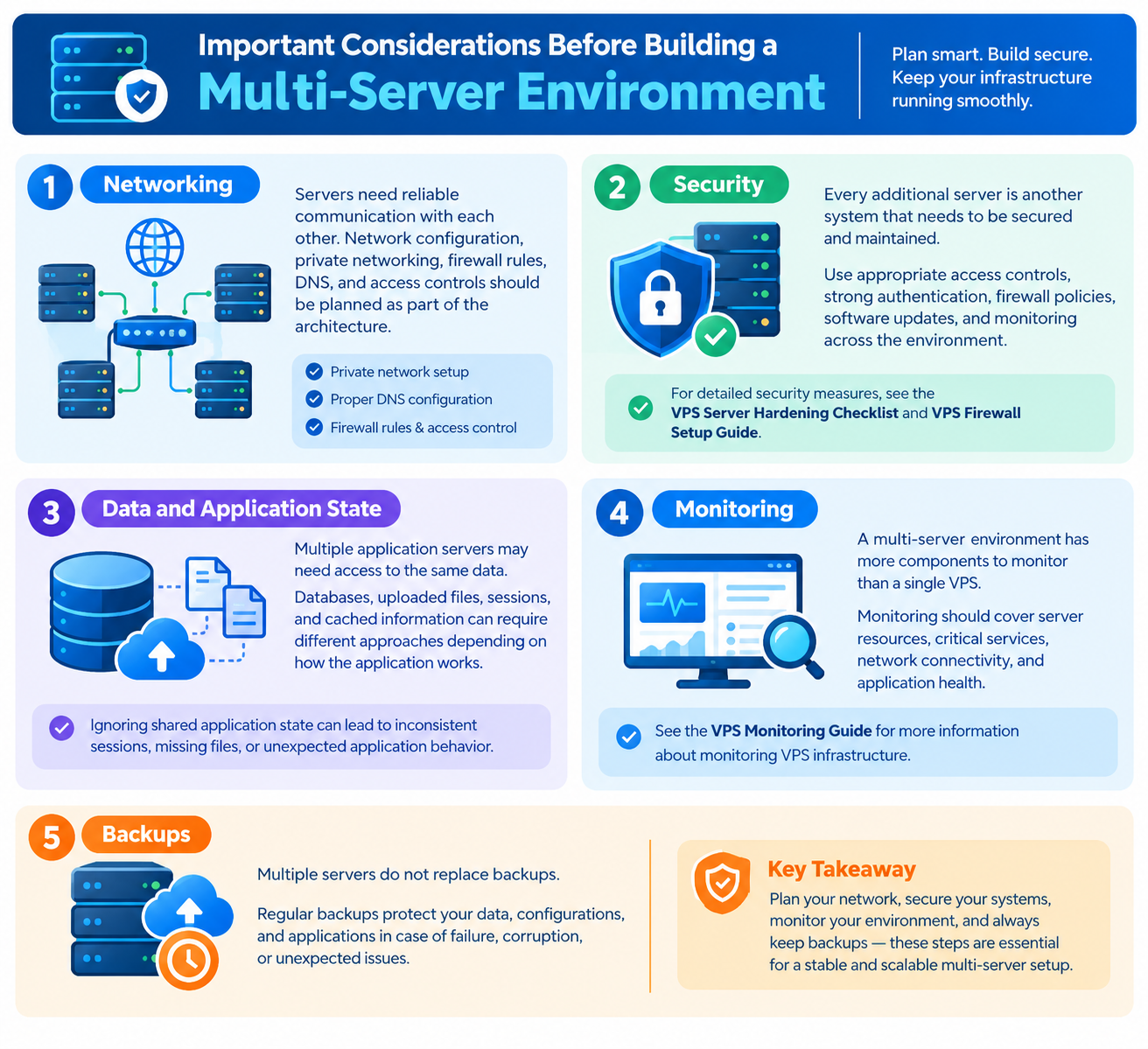
Important Considerations Before Building a Multi-Server Environment
Adding servers introduces additional infrastructure that must be managed correctly.
Networking
Servers need reliable communication with each other. Network configuration, private networking, firewall rules, DNS, and access controls should be planned as part of the architecture.
Security
Every additional server is another system that needs to be secured and maintained.
Use appropriate access controls, strong authentication, firewall policies, software updates, and monitoring across the environment.
For detailed security measures, see the VPS Server Hardening Checklist and VPS Firewall Setup Guide.
Data and Application State
Multiple application servers may need access to the same data.
Databases, uploaded files, sessions, and cached information can require different approaches depending on how the application works.
Ignoring shared application state can lead to inconsistent sessions, missing files, or unexpected application behavior.
Monitoring
A multi-server environment has more components to monitor than a single VPS.
Monitoring should cover server resources, critical services, network connectivity, and application health.
See the VPS Monitoring Guide for more information about monitoring VPS infrastructure.
Backups
Multiple servers do not replace backups.
Critical data should have an appropriate backup and recovery strategy, with suitable retention and restoration procedures.
For detailed backup planning, see the VPS Backup & Disaster Recovery Guide.
Common Multi-Server Architecture Mistakes
Adding servers without properly designing the architecture can create new problems.
Adding Servers Without Identifying the Bottleneck
More servers do not automatically make an application faster.
If the database is the main bottleneck, adding application servers may provide little improvement. Identify the limiting resource before expanding the infrastructure.
Creating a Single Point of Failure
An environment may have several application servers but still depend on one database, storage system, load balancer, or network component.
That component can remain a single point of failure.
Ignoring Shared Application Data
Multiple application servers need reliable access to the data they require.
If an application stores important files or sessions locally on one server, requests reaching another server may produce unexpected results.
Making the Architecture Too Complex
A larger infrastructure is not always a better infrastructure.
Every additional server increases operational requirements, monitoring needs, security responsibilities, and potential troubleshooting points.
Build the simplest architecture that satisfies the application’s actual requirements.
Multi-Server Architecture Best Practices
A practical multi-server strategy should focus on both scalability and reliability.
- Identify the bottleneck before adding servers.
- Give each server a clearly defined role.
- Use load balancing when multiple servers handle the same application workload.
- Design redundancy for components where downtime has a significant impact.
- Avoid unnecessary single points of failure.
- Secure every server individually.
- Monitor all servers and critical services.
- Maintain appropriate backups and test restoration procedures.
- Scale individual components according to their actual resource requirements.
- Keep the architecture as simple as the business requirements allow.
Multi-Server Architecture for Growing Businesses
A multi-server setup becomes useful when a business depends heavily on its website or application and a single server is becoming a performance, scalability, or availability limitation.
For example, an ecommerce platform may separate its web application, database, and background processing workloads. As demand increases, application resources can be increased independently from database resources.
This provides greater flexibility than continually placing every workload on one machine.
However, architecture should follow business requirements. A small WordPress website may not benefit enough from a multi-server environment to justify the additional cost and complexity.
For WordPress-specific infrastructure considerations, see the Best VPS Hosting for WordPress guide.
Frequently Asked Questions
