

If you want to build fast, modern PHP applications, Laravel + Ubuntu + Apache is one of the best combinations you can choose. And the good news? Setting it up is not complicated — especially if you’re using a VPS in Pakistan or planning to buy VPS Hosting in Pakistan for your next project.
In this step-by-step guide, you’ll learn exactly how to install Laravel on Ubuntu (Apache + PHP 8 + MariaDB), even if you’re a beginner. We’ll walk through every command and explain what it does, so you never feel lost.
Let’s begin.
Who Should Use This Guide?
This guide is perfect for you if:
- You’re using or considering VPS Hosting in Pakistan for your website or application.
- You want a simple, beginner-friendly explanation of how to run Laravel on Ubuntu.
- You want to understand what a VPS in Pakistan is and how it helps your Laravel projects.
- You host with CreativeON (or plan to), and you want a clean installation process.
Before We Install Anything — Quick Intro
Here’s a simple, non-technical explanation of everything involved.
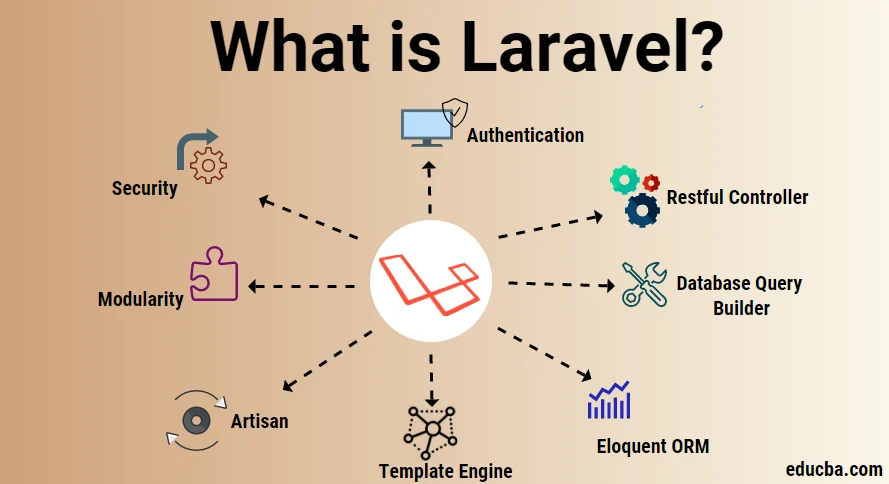
What is Laravel?
Laravel is a PHP framework — a professional toolkit for building web apps with:
- Built-in login system
- Routing
- Database tools
- Built-in security features
- Organized folder structure
Perfect for building fast, modern web applications.
What is Ubuntu?
Ubuntu is a Linux-based operating system commonly used on VPS servers.
Most Linux VPS in Pakistan run on Ubuntu because it’s secure, stable, and developer-friendly.

What is Apache?
Apache is a web server.
Think of it as a digital waiter — when a visitor requests a page, Apache fetches it and displays it.
What is VPS Hosting in Pakistan?
VPS = Virtual Private Server.
It behaves like your own personal server with:
- Dedicated CPU
- Dedicated RAM
- Private storage
- Full control
When you hear terms like:
- VPS in Pakistan
- Cheap VPS hosting in Pakistan
- Linux VPS in Pakistan
- Windows VPS in Pakistan
These are all virtual private servers hosted for Pakistani users.
CreativeON provides one of the most popular VPS Hosting in Pakistan options for Laravel developers.
Requirements Before You Begin
Make sure you have:
- Ubuntu 22.04+ server (local or remote VPS)
- SSH access
- A sudo-enabled user
- Optional: domain name (CreativeON is a PKNIC Gold Partner for .PK domains)
If you do not have a server yet, you can get a cheap VPS in Pakistan from CreativeON.
Step 1 — Connect to Your VPS via SSH
Use SSH to log in:
ssh username@your_server_ip
Replace:
- username → root or your sudo user
- your_server_ip → The IP of your VPS in Pakistan
If you see a welcome screen — you’re inside your server!
Step 2 — Install Apache Web Server
Update packages:
sudo apt update
Install Apache:
sudo apt install apache2 -y
Check if Apache is running:
sudo systemctl status apache2
If you use UFW firewall:
sudo ufw allow “Apache Full”
Visit:
http://your_server_ip
Apache is working if you see its default page.
Step 3 — Install PHP 8 + Required Extensions
Laravel needs PHP 8 and several extensions.
Install them:
sudo apt install php libapache2-mod-php php-mbstring php-xmlrpc php-soap php-gd php-xml php-cli php-zip php-bcmath php-json php-pear -y
Check PHP version:
php -v
You should see PHP 8.x.
Step 4 — Test PHP
Create a test page:
sudo nano /var/www/html/test.php
Add:
<?php phpinfo(); ?>
Open:
http://your_server_ip/test.php
If you see the PHP info page, PHP is installed correctly.
Delete the file later:
sudo rm /var/www/html/test.php
Step 5 — Install MariaDB (Database Server)
Install:
sudo apt install mariadb-server -y
Secure it:
sudo mysql_secure_installation
Recommended answers:
- Remove anonymous users → Y
- Disallow remote root login → N (or Y if you prefer)
- Remove test DB → Y
- Reload → Y
Create database + user:
sudo mysql
Inside MariaDB:
CREATE DATABASE laravel_app;
CREATE USER ‘laravel_user’@’localhost’ IDENTIFIED BY ‘StrongPasswordHere’;
GRANT ALL PRIVILEGES ON laravel_app.* TO ‘laravel_user’@’localhost’;
FLUSH PRIVILEGES;
EXIT;
Step 6 — Install Composer (Required for Laravel)
Download:
curl -sS https://getcomposer.org/installer | php
Move globally:
sudo mv composer.phar /usr/local/bin/composer
sudo chmod +x /usr/local/bin/composer
Check:
composer –version
Step 7 — Install Laravel
Run:
cd ~
composer create-project –prefer-dist laravel/laravel example
Replace example with your project name.
Step 8 — Move Laravel to Apache Web Root
Move:
sudo mv example /var/www/html/
Set permissions:
sudo chgrp -R www-data /var/www/html/example/
sudo chmod -R 775 /var/www/html/example/storage
Step 9 — Create Apache Virtual Host
Go to Apache config folder:
cd /etc/apache2/sites-available
Create config:
sudo nano laravel_project.conf
Paste:
<VirtualHost *:80>
ServerName yourdomain.com
DocumentRoot /var/www/html/example/public
<Directory /var/www/html/example>
AllowOverride All
Require all granted
</Directory>
ErrorLog ${APACHE_LOG_DIR}/laravel_error.log
CustomLog ${APACHE_LOG_DIR}/laravel_access.log combined
</VirtualHost>
Replace yourdomain.com with your domain or IP.
Disable default site:
sudo a2dissite 000-default.conf
Enable your site:
sudo a2ensite laravel_project
Enable rewrite module:
sudo a2enmod rewrite
Restart Apache:
sudo systemctl restart apache2
Visit:
http://yourdomain.com
If you see the Laravel welcome screen — success!
Step 10 — Configure .env and Run Migrations
Go to project:
cd /var/www/html/example
Copy env file:
cp .env.example .env
Generate key:
php artisan key:generate
Edit database settings:
nano .env
Set:
DB_DATABASE=laravel_app
DB_USERNAME=laravel_user
DB_PASSWORD=StrongPasswordHere
Run migrations:
php artisan migrate
Done!
Optional — Install Desktop Environment on Ubuntu VPS
If you want a graphical UI on your VPS in Pakistan, install XFCE + xRDP.
Install XFCE:
sudo apt install xfce4 xfce4-goodies -y
Install xRDP:
sudo apt install xrdp -y
sudo systemctl enable xrdp
sudo systemctl start xrdp
Allow RDP:
sudo ufw allow 3389/tcp
Connect using mstsc from Windows.
FAQ — Laravel on VPS Hosting in Pakistan
