
Introduction
A VPS can have sufficient CPU resources and plenty of available memory yet still perform poorly. Websites may load slowly, databases may respond sluggishly, backups may take much longer than expected, and applications can feel unresponsive.
When this happens, many administrators immediately suspect CPU limitations or memory shortages. However, the real culprit is often a disk I/O bottleneck.
Disk I/O (Input/Output) represents the speed at which a VPS can read data from storage and write data back to storage. Since almost every server operation relies on storage access, disk performance plays a critical role in overall VPS responsiveness.
Understanding disk I/O bottlenecks helps administrators identify hidden performance limitations before they affect website visitors, application users, and business operations.
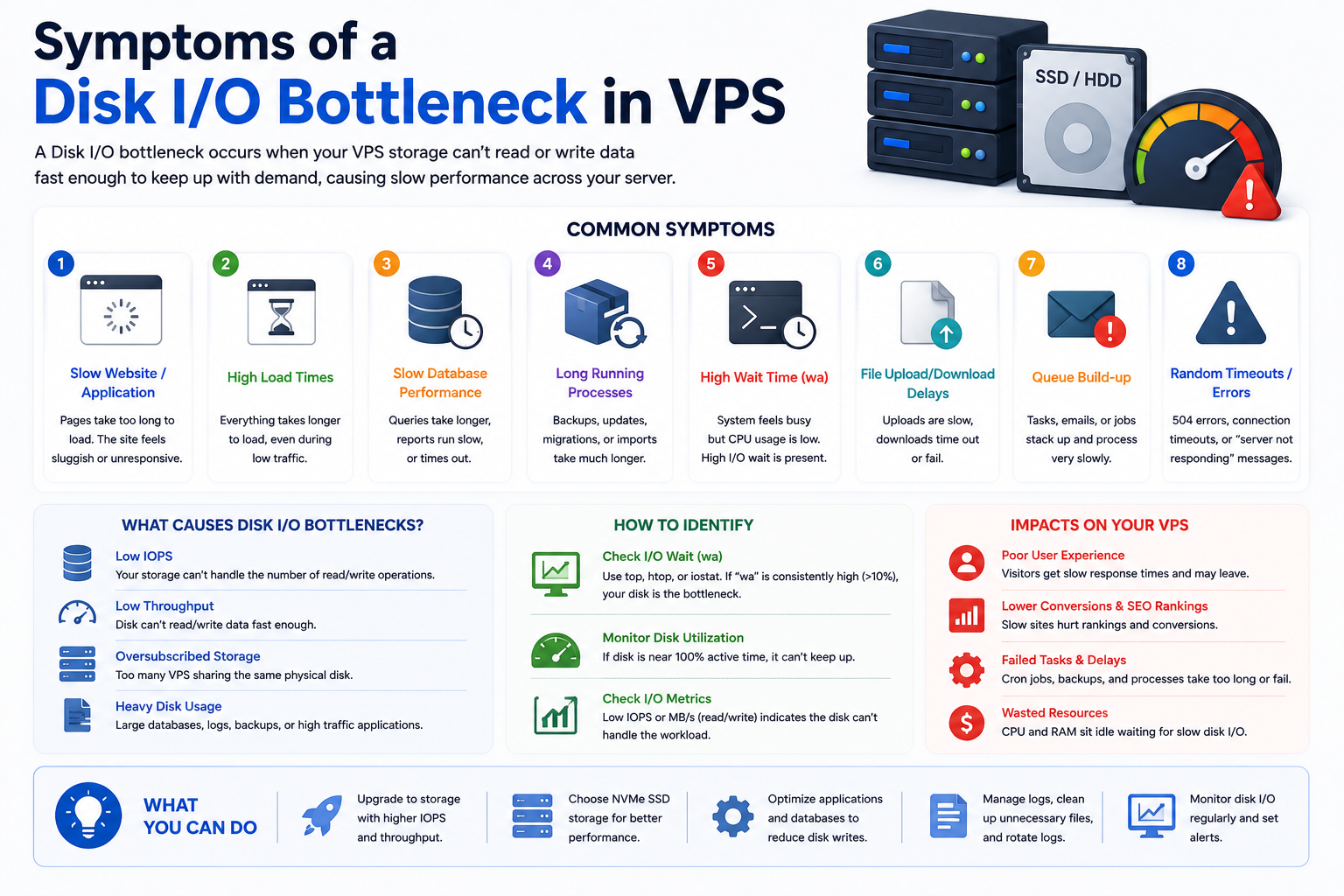
Symptoms of a Disk I/O Bottleneck
Storage-related performance problems often appear gradually rather than causing an immediate outage.
Slow Website Loading Despite Normal CPU Usage
A common symptom occurs when websites become noticeably slower while CPU utilization remains relatively low.
Pages may spend more time waiting for files, database records, templates, images, or configuration data to be retrieved from storage.
Database Queries Become Sluggish
Database-driven applications are heavily dependent on storage performance.
Symptoms may include:
- Slow query execution
- Delayed transactions
- Longer report generation times
- Increased application response delays
- Slow admin panel performance
Even a well-optimized database can struggle when storage performance becomes constrained.
Backup Jobs Take Excessively Long
Backups generate significant storage activity.
Signs include:
- Longer backup windows
- Slow snapshot creation
- Increased server load during backups
- Delayed restore operations
Slow File Operations
Applications that process files frequently may experience:
- Delayed uploads
- Slow downloads
- Slower media processing
- Extended file synchronization times
Intermittent Application Freezes
Applications may appear to pause briefly while waiting for storage operations to complete.
Users often describe this as:
- Random lag
- Delayed page responses
- Inconsistent application speed
- Occasional hanging processes
Understanding How Disk I/O Works in a VPS Environment
Unlike dedicated servers, VPS environments introduce additional layers between applications and physical storage.
A typical storage request follows this path:
Application
→ Guest Operating System
→ Virtualization Layer
→ Storage Controller
→ Physical Storage Device
Every layer adds some processing overhead.
When storage requests begin accumulating faster than they can be completed, bottlenecks develop and response times increase.
This is why storage performance issues can occur even when CPU and RAM usage appear healthy.
Key Disk I/O Metrics Every VPS Administrator Should Know
Understanding a few storage metrics can make troubleshooting significantly easier.
IOPS (Input/Output Operations Per Second)
IOPS measures how many storage operations can be processed each second.
Higher IOPS values are particularly important for:
- Databases
- Ecommerce platforms
- CRM systems
- High-traffic websites
Applications performing thousands of small storage operations rely heavily on strong IOPS performance.
Throughput
Throughput measures how much data can be transferred during a specific period.
Typically measured in:
- MB/s
- GB/s
Throughput becomes especially important for:
- Backup systems
- Large file transfers
- Media hosting
- Data exports
Storage Latency
Latency measures the delay between a storage request and the response.
For websites and applications, latency often affects user experience more than raw throughput.
Even powerful storage systems can feel slow if latency becomes excessive.
Common Causes of Disk I/O Bottlenecks
High Database Activity
Databases constantly read and write data.
Applications such as:
- WooCommerce stores
- ERP platforms
- Membership websites
- Customer portals
can generate thousands of storage requests every minute.
As demand increases, storage queues can grow and response times can suffer.
Excessive Logging
Applications frequently generate logs for troubleshooting and auditing purposes.
Common examples include:
- Web server logs
- Error logs
- Security logs
- Debugging logs
When logging becomes excessive, storage resources may be consumed unnecessarily.
Large Backup Operations
Backups often create intensive read and write activity.
Running backups during peak traffic hours can cause noticeable performance degradation for active users.
Shared Storage Resource Contention
Many VPS platforms use shared storage infrastructure.
When multiple VPS instances generate heavy storage activity simultaneously, available I/O resources can become saturated.
This can affect otherwise healthy VPS environments.
Poor Application Storage Behavior
Some applications perform inefficient storage operations, including:
- Excessive file reads
- Frequent writes
- Poor database indexing
- Inefficient caching configurations
Over time these behaviors can increase storage pressure.
The Noisy Neighbor Effect
One of the most common VPS-specific performance issues is the noisy neighbor effect.
In shared virtualization environments, another VPS on the same infrastructure may consume large amounts of storage resources.
This can lead to:
- Sudden latency spikes
- Slower application response times
- Inconsistent website performance
- Storage delays during peak periods
The challenge is that your VPS may appear healthy while underlying storage resources are being heavily utilized by neighboring workloads.
This is one reason why infrastructure quality matters when selecting a VPS provider.
Storage Technology Matters
Not all storage systems deliver the same performance.
HDD Storage
Traditional hard drives provide the lowest I/O performance and highest latency.
Suitable primarily for archival or low-demand workloads.
SATA SSD Storage
SATA SSDs significantly improve performance over HDDs and remain common in entry-level VPS environments.
Enterprise SSD Storage
Enterprise-grade SSDs typically provide better consistency, durability, and higher IOPS than consumer-grade drives.
NVMe Storage
NVMe storage offers substantially lower latency and significantly higher throughput.
For modern databases, ecommerce websites, and business applications, NVMe storage often delivers the best user experience.
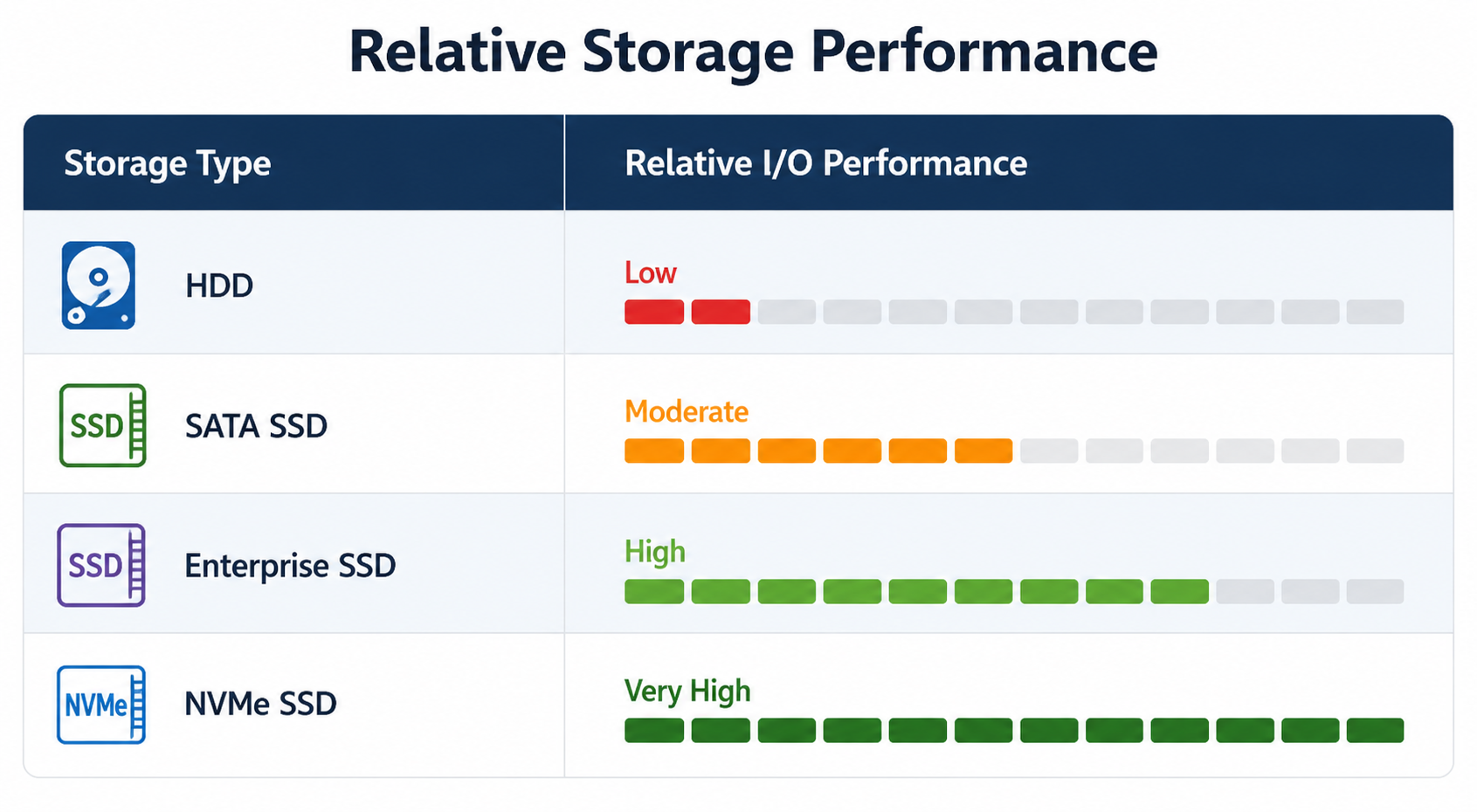
Relative Storage Performance
| Storage Type | Relative I/O Performance |
| HDD | Low |
| SATA SSD | Moderate |
| Enterprise SSD | High |
| NVMe SSD | Very High |
Real-World VPS Scenario
Consider an ecommerce website running on a VPS.
A customer searches for products.
The application may need to:
- Read product records
- Retrieve inventory data
- Load pricing information
- Access product images
- Process search indexes
Even if CPU utilization remains below 30%, storage latency can increase dramatically when hundreds of concurrent users generate similar requests.
The result is a slower website despite apparently healthy processor and memory statistics.
This scenario is extremely common in database-driven applications.
How Disk I/O Bottlenecks Impact Different Workloads
Content Management Systems
Platforms such as WordPress frequently access:
- Themes
- Plugins
- Media files
- Configuration data
- Cache files
Storage delays can directly impact page generation speed.
Database-Driven Applications
Applications relying heavily on databases often experience:
- Slower transactions
- Delayed searches
- Longer processing times
- Reduced responsiveness
File Storage Applications
File-intensive workloads may suffer from:
- Slow uploads
- Delayed downloads
- Longer synchronization times
- Reduced processing efficiency
Email Servers
Mail services continuously read and write data.
Storage congestion can lead to:
- Slower email delivery
- Delayed mailbox synchronization
- Reduced server responsiveness
Diagnosing Disk I/O Bottlenecks
Identifying storage issues requires observing system behavior during performance degradation.
Compare Resource Usage
A common pattern appears when:
- CPU utilization remains moderate
- Memory availability looks healthy
- Applications remain slow
This often points toward storage-related limitations.
Monitor Peak Activity Periods
Storage bottlenecks frequently emerge during:
- Traffic spikes
- Backup operations
- Large imports
- Data migrations
Performance monitoring during these periods often reveals the root cause.
Review VPS Provider Metrics
Many VPS providers expose storage performance statistics through management portals.
Reviewing these metrics can help identify persistent storage pressure.
Common Linux Commands for Diagnosing Disk I/O
Linux provides several tools that can assist with storage troubleshooting.
Check Detailed Storage Statistics
iostat -x 1
Useful for identifying storage utilization, wait times, and bottlenecks.
View Processes Generating Disk Activity
iotop
Helps identify applications consuming significant storage resources.
Review System Wait Activity
vmstat 1
Useful for spotting excessive I/O wait conditions.
Verify Storage Capacity
df -h
Confirms available disk space and storage utilization.
These tools provide valuable insight when investigating VPS performance issues.
How to Reduce Disk I/O Bottlenecks
Reduce Unnecessary Storage Operations
Review applications for:
- Excessive logging
- Redundant writes
- Unused plugins
- Obsolete files
Reducing unnecessary disk activity lowers storage demand.
Optimize Database Workloads
Databases are often the largest storage consumers.
Improving query efficiency and reducing unnecessary database activity can significantly lower I/O pressure.
For database-specific tuning strategies, see our guide on VPS Database Optimization.
Schedule Heavy Tasks During Off-Peak Hours
Maintenance tasks such as:
- Backups
- Imports
- Exports
- Batch processing
should ideally run when user activity is lowest.
Use Higher Performance Storage
Modern NVMe infrastructure can substantially reduce latency and improve responsiveness compared to older storage technologies.
Upgrade Infrastructure When Necessary
If storage demand consistently approaches resource limits, upgrading VPS resources may become necessary.
Our VPS Resource Upgrade Guide explains when scaling becomes the right solution.
When Disk I/O Is NOT the Problem
Not every VPS performance issue originates from storage.
If you observe:
- Sustained CPU utilization near 100%
- Processor throttling
- Memory exhaustion
- Out-of-memory events
the root cause may belong elsewhere.
For those scenarios, see:
- CPU Throttling in VPS Hosting
- RAM Exhaustion in VPS Hosting
- VPS Performance Monitoring Guide
This helps ensure that troubleshooting remains focused on the actual bottleneck.
CreativeON Operational Insight
At CreativeON, we frequently encounter situations where customers assume processor upgrades will solve performance problems.
However, investigation often reveals that storage latency caused by database-heavy workloads, backup operations, or inefficient application behavior is the true source of the slowdown.
In many cases, resolving storage bottlenecks delivers significantly greater performance improvements than simply adding more CPU resources.
This highlights the importance of diagnosing the correct bottleneck before investing in infrastructure upgrades.
Internal Linking Opportunities
VPS Performance Cluster
- CPU Throttling in VPS Hosting
- RAM Exhaustion in VPS Hosting
- Node Overloading in VPS Hosting
VPS Monitoring Cluster
- VPS Performance Monitoring Guide
- VPS Resource Tracking Guide
VPS Optimization Cluster
- VPS Database Optimization
- VPS Caching Strategies
VPS Scaling Cluster
- VPS Resource Upgrade Guide
- Vertical vs Horizontal VPS Scaling
Frequently Asked Questions
