
Hey there! Is your website slower than it should be?
Let me ask you something…
Have you ever opened your website and thought:
“Why is this taking forever to load?”
Even after you’ve invested in a VPS server, things still don’t feel fast enough.
Guess what?
👉 You’re not doing anything wrong.
This happens to a lot of people.
Here’s the simple truth:
A VPS Hosting setup alone is not always enough—especially when your visitors come from different cities or countries.
But don’t worry. There’s a powerful (and surprisingly simple) solution:
👉 Using a CDN (Content Delivery Network)
In this guide, I’ll explain everything in a simple, friendly way—just like we’re chatting over tea ☕—so you can speed up your VPS, improve user experience, and even help your SEO.
What is a CDN? (Simple Explanation)
Let’s keep it super easy.
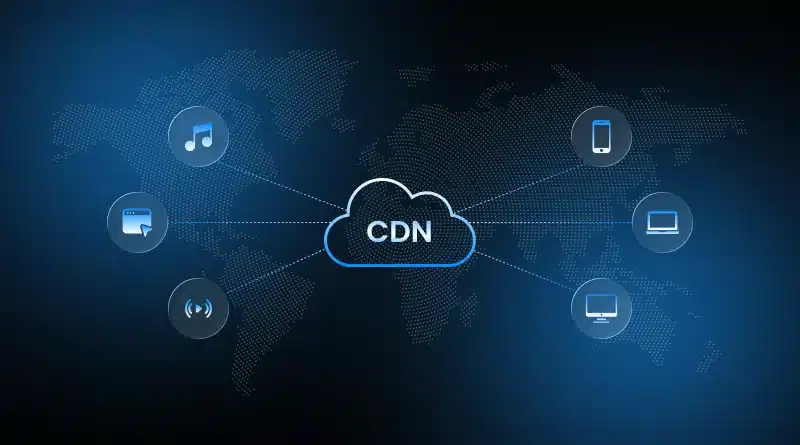
A CDN (Content Delivery Network) is a network of servers placed in different locations around the world.
Instead of your website loading from just one VPS location, a CDN:
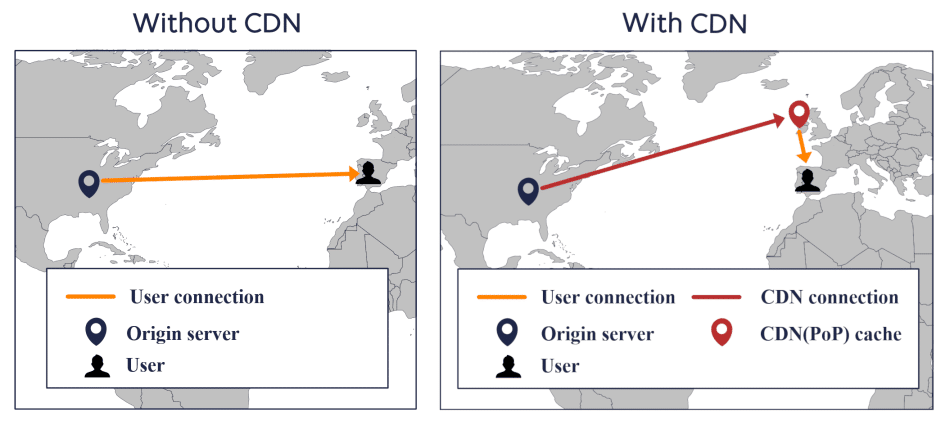
👉 delivers your content from the nearest server to the user
Real-Life Example
- Your VPS server is in Lahore 🇵🇰
- A visitor opens your site from Dubai 🇦🇪
Without CDN:
👉 Data travels from Lahore → Dubai (longer time)
With CDN:
👉 Data comes from a nearby UAE server (much faster)
Isn’t that neat?
Why Your VPS Might Still Feel Slow
A VPS is powerful, flexible, and much better than shared hosting.
But it has one limitation:
👉 It usually runs from one physical location
So:
- Local users → fast
- International users → slower
Also, your VPS has to:
- Serve every visitor
- Load images and files
- Handle traffic spikes
👉 This creates load pressure
How CDNs Boost VPS Speed (Step by Step)
Let’s break this down into simple benefits.
1. Faster Load Times for Everyone
CDNs store copies of:
- Images
- CSS files
- JavaScript
- Videos
on multiple servers worldwide.
👉 So users always get data from the closest location.
2. Lower Load on Your VPS Server
Without CDN:
👉 Your VPS handles everything
With CDN:
👉 CDN handles static files
👉 VPS focuses on core tasks
Result:
✔ Faster response
✔ Better stability
3. Better Performance During Traffic Spikes
Imagine your site goes viral.
Without CDN:
👉 Your VPS may slow down or crash
With CDN:
👉 Traffic is distributed across many servers
4. Improved Security
Most CDNs offer:
- DDoS protection
- Basic firewall
- Bot filtering
👉 Your VPS stays safer.
5. Reduced Latency (Less Waiting Time)
Latency = delay before loading starts.
CDNs reduce latency by:
👉 Bringing content closer to the user
CDN vs No CDN (Simple Comparison)
Feature | Without CDN | With CDN |
Speed | Depends on server location | Fast globally |
Server Load | High | Reduced |
Traffic Handling | Limited | Scalable |
Security | Basic | Improved |
User Experience | Average | Smooth |
👉 In many cases, websites become 40–60% faster with a CDN.
Here’s something important.
Google prefers fast websites.
When you use a CDN:
- Pages load faster
- Bounce rate decreases
- User experience improves
👉 This helps your rankings.
Core Web Vitals Improvement
CDNs help improve:
- LCP (Largest Contentful Paint)
- TTFB (Time to First Byte)
These are important for SEO.
Real-Life Example (From Experience)
Let’s keep it real.
One website hosted on a VPS server had:
- Load time: 5.1 seconds
After enabling CDN:
- Load time dropped to: 2.2 seconds
👉 That’s more than 50% improvement
Best CDN Providers for VPS (2026)
Here are some popular choices:
1. Cloudflare
- Free plan available
- Easy setup
- Good security
👉 Best for beginners
2. BunnyCDN
- Affordable
- Fast performance
- Pay-as-you-go
👉 Great for growing websites
3. AWS CloudFront
- Highly scalable
- Advanced features
👉 Better for large projects
Step-by-Step: How to Set Up a CDN on Your VPS
Don’t worry—it’s easier than it sounds.
Step 1: Choose a CDN Provider
Pick one based on:
- Budget
- Ease of use
Step 2: Add Your Website
- Enter your domain
- Verify ownership
Step 3: Update DNS Settings
- Point your domain to CDN
- This connects everything
Step 4: Enable Caching
Tell CDN:
👉 “Store my static files”
Step 5: Test Your Website
Use tools like:
- GTmetrix
- PageSpeed Insights
Common CDN Mistakes to Avoid
Let’s save you from headaches.
Caching Dynamic Pages
Don’t cache:
- Login pages
- Dashboards
Wrong DNS Setup
A small mistake here can:
👉 Break your website
Not Clearing Cache
After updates:
👉 Clear CDN cache
Ignoring Image Optimization
Even with CDN:
👉 Heavy images = slow site
Using CDN with VPS Automation (OpenClaw Example)
Now here’s where things get interesting.
If you’re running:
- OpenClaw automation
- Scripts
- Dashboards
- APIs
on your VPS Hosting
Without CDN:
- Slower dashboard loading
- More server load
- Delays in response
With CDN:
- Faster UI loading
- Better user experience
- Balanced server load
Ever wished your system could run smoothly without slowing down?
👉 This is one way to do it.
CDN + Windows VPS (Does It Work?)
Yes—100%.
If you’re using a Windows VPS, CDN works perfectly.
It doesn’t matter if your server is:
- Windows-based
- Linux-based
👉 CDN works at the network level.
Who Should Use CDN with VPS?
You should definitely use CDN if you run:
- Business websites
- eCommerce stores
- Blogs
- SaaS tools
- Automation tools (like OpenClaw)
- APIs
Choosing the Best VPS in Pakistan (Important Tip)
CDN helps—but your base matters.
If your VPS is slow:
👉 CDN can’t fix everything
What to Look for in VPS Hosting
- SSD storage
- Good RAM
- Reliable uptime
- Local support
Why CreativeON is a Smart Choice
At CreativeON, we provide:
in Pakistan and the UAE.
Trusted by Leading Brands
We’ve worked with:
- City42
- Channel 24
- QTV
- Chughtai Lab
- Daewoo Pakistan
- Orange Line Metro
20+ Years of Experience
We’ve been in this field for over two decades.
👉 That means real-world experience—not just theory.
Affordable Pricing (Honest Reason)
You might be wondering:
“Why is this cheaper than others?”
Here’s the simple answer:
👉 We are an Official Google Workspace Partner and Reseller
👉 Sometimes we reduce our profit margin
So:
- Students can learn
- Startups can grow
- Businesses can scale
Cheap VPS in Pakistan – What You Should Know
Cheap doesn’t always mean bad.
But make sure:
- You’re getting real resources
- Support is available
- Performance is stable
👉 That’s what matters.
Tools to Test CDN Performance
After setup, always test.
1. GTmetrix
Check:
- Load time
- Page size
2. Google PageSpeed Insights
Check:
- Performance score
- Core Web Vitals
3. Pingdom
Check:
- Global performance
Quick FAQs
