
Choosing between AWS and VPS hosting can be confusing because both can provide virtual computing resources, administrative control, and infrastructure for websites and applications.
However, there is an important distinction: VPS hosting is a type of virtual server hosting, while AWS is a broad cloud services platform.
When people compare AWS with a traditional VPS, the more direct comparison is usually between a VPS and Amazon EC2. An EC2 instance is a virtual server in the AWS Cloud, with selectable operating systems and different combinations of compute, memory, storage, and networking resources.
The right option depends on your workload, budget, scalability requirements, management needs, and the complexity of the infrastructure you want to operate.
AWS vs VPS Hosting: Key Differences
| Factor | VPS Hosting | AWS / Amazon EC2 |
| What you’re buying | A virtual private server | Cloud infrastructure and services |
| Closest comparison | — | Amazon EC2 |
| Resource selection | Usually based on VPS plan | Based on instance type and selected services |
| Pricing | Often a fixed monthly plan | Primarily usage-based, with multiple purchasing options |
| Management | Depends on whether VPS is managed or unmanaged | Customer manages the EC2 environment and guest OS |
| Scalability | Usually upgrade resources or add servers | Broad options for scaling infrastructure |
| Infrastructure complexity | Generally lower | Can be higher, especially with multiple AWS services |
| Additional services | Depends on hosting provider | Large ecosystem of cloud services |
| Cost predictability | Usually easier to estimate | Requires tracking usage and services |
| Common use cases | Websites, WordPress, applications and business servers | Cloud applications and more complex infrastructure |
The key point is that AWS and VPS hosting are not exact equivalents. A VPS is generally presented as a server product, whereas AWS provides a collection of infrastructure services that can be combined in different ways.
VPS Hosting: How It Works
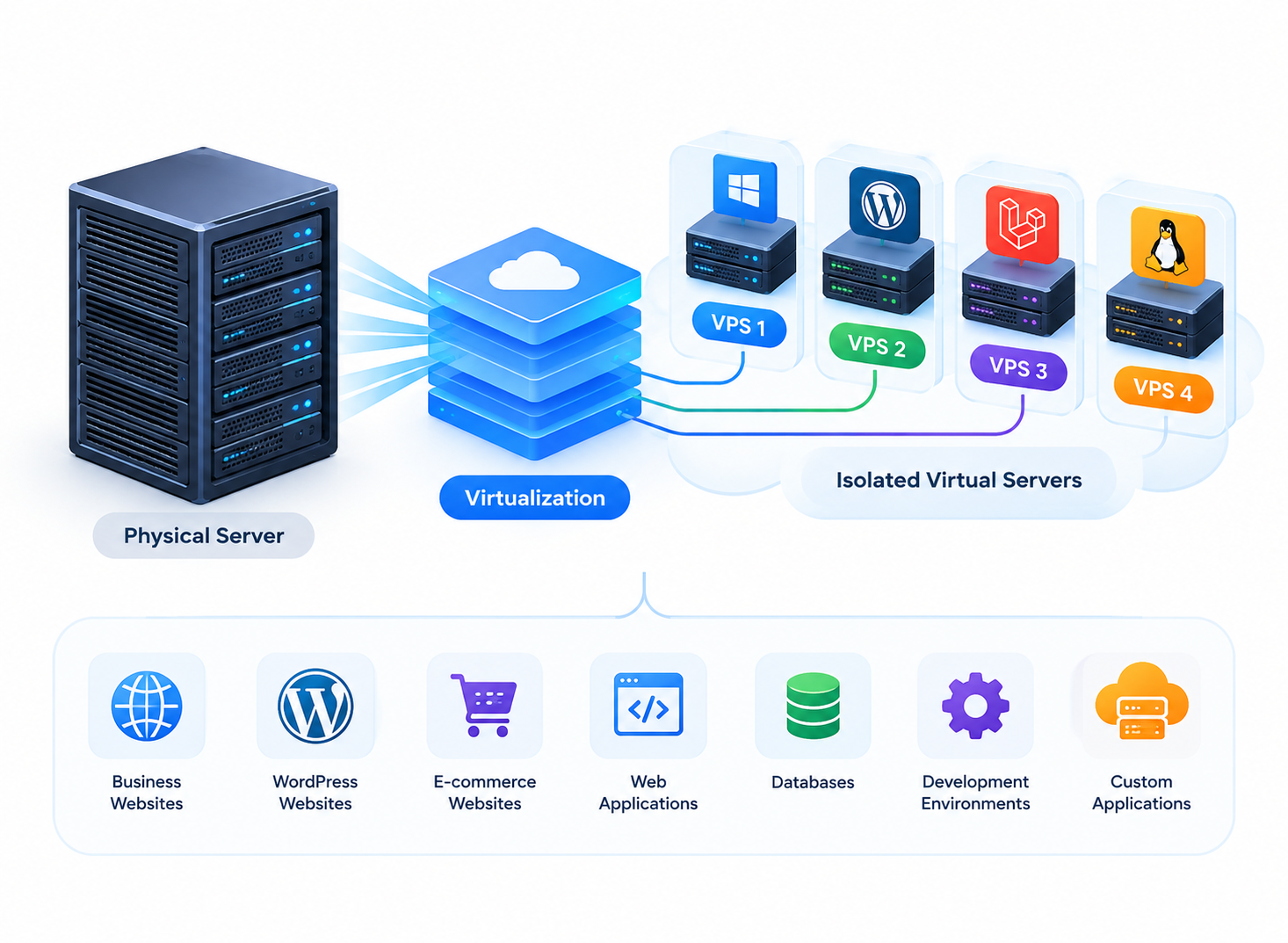
A VPS uses virtualization to create an isolated virtual server environment on a physical server.
Your VPS is allocated resources such as CPU, RAM and storage, and you can normally install an operating system, applications and other software according to your requirements.
Depending on the provider and plan, a VPS may be managed or unmanaged.
Common VPS use cases include:
- Business websites
- WordPress websites
- E-commerce websites
- Web applications
- APIs
- Databases
- Development environments
- Custom applications
- Hosting multiple websites
A VPS is often useful when shared hosting no longer provides the control or resources your application requires.
For a broader explanation of VPS infrastructure, see the VPS Hosting Guide.
AWS and Amazon EC2: How They Differ
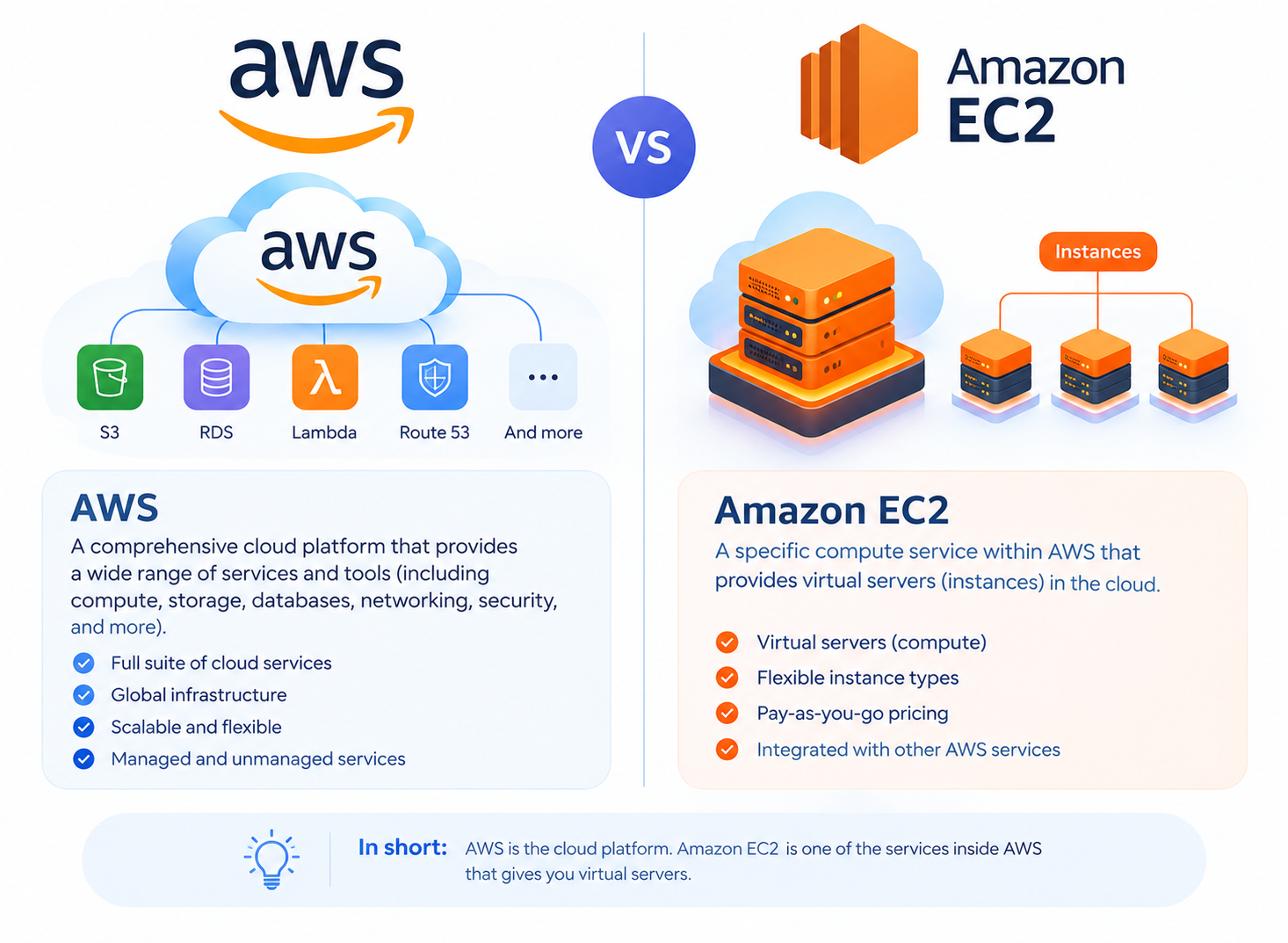
AWS is much broader than a single virtual server.
Amazon EC2 is the AWS service that most closely resembles a conventional VPS because an EC2 instance functions as a virtual server. AWS provides different EC2 instance types with different combinations of CPU, memory, storage and network capabilities.
Around EC2, AWS also provides services for areas such as:
- Storage
- Databases
- Networking
- Load balancing
- Monitoring
- Security
- Content delivery
- Application deployment
AWS therefore allows an organization to build infrastructure that goes well beyond a single server.
This flexibility can be useful, but it can also introduce additional configuration and management requirements.
AWS EC2 vs VPS: The More Direct Comparison
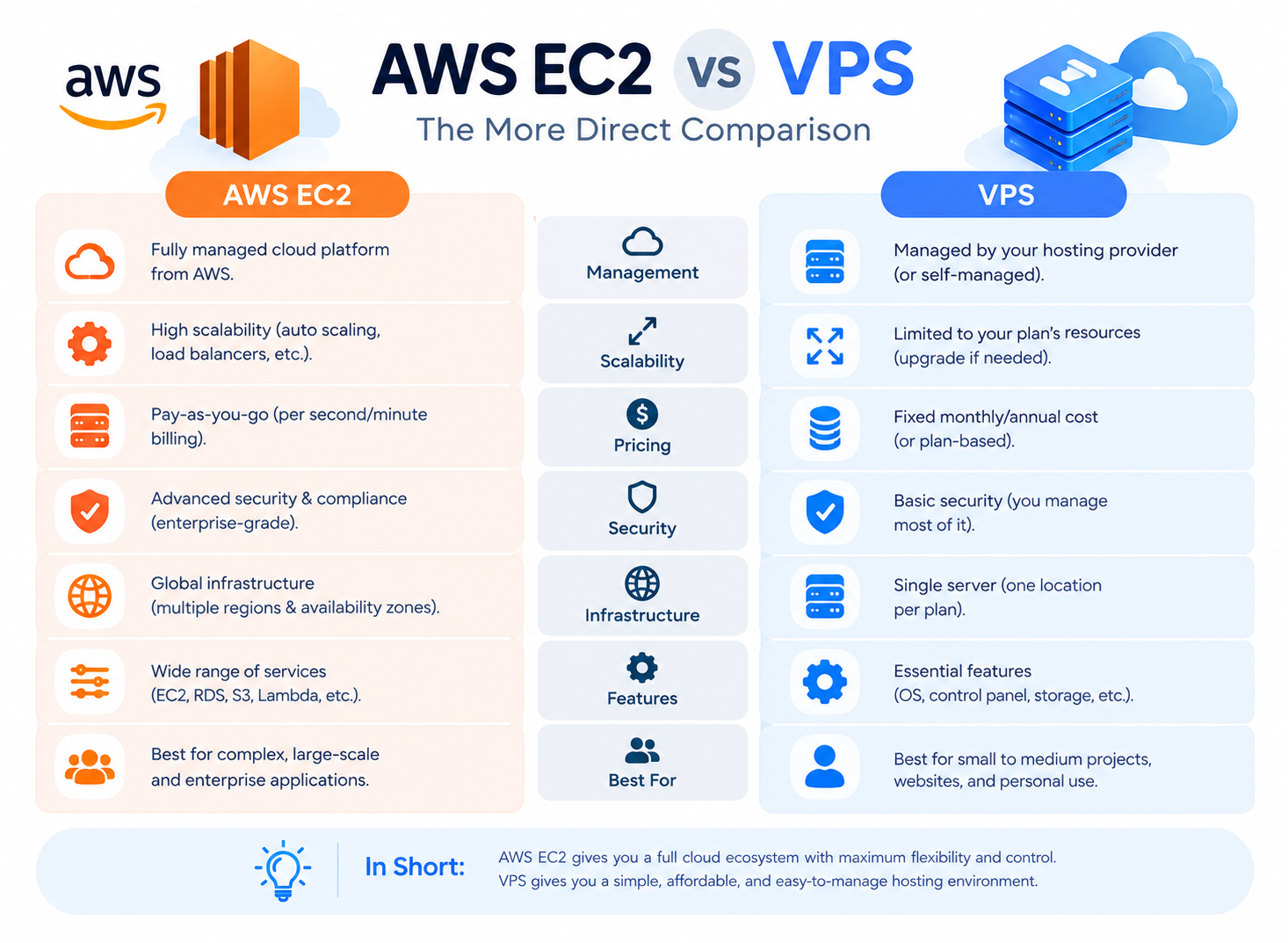
If you’re deciding between a traditional VPS and AWS, VPS vs Amazon EC2 is a more direct comparison than VPS vs the entire AWS platform.
Both can provide a virtual server environment where you can select an operating system, install applications and configure your workload.
The difference is mainly in the surrounding infrastructure and service model.
A conventional VPS is usually purchased as a packaged server with a defined amount of resources. With EC2, you select an instance type and can connect the instance with other AWS services according to your architecture. AWS also provides multiple purchasing options for EC2, allowing customers to balance cost, commitment and flexibility.
This means EC2 can behave much like a VPS for a simple application, while also providing a path toward a much broader cloud architecture.
AWS vs VPS Hosting: Cost
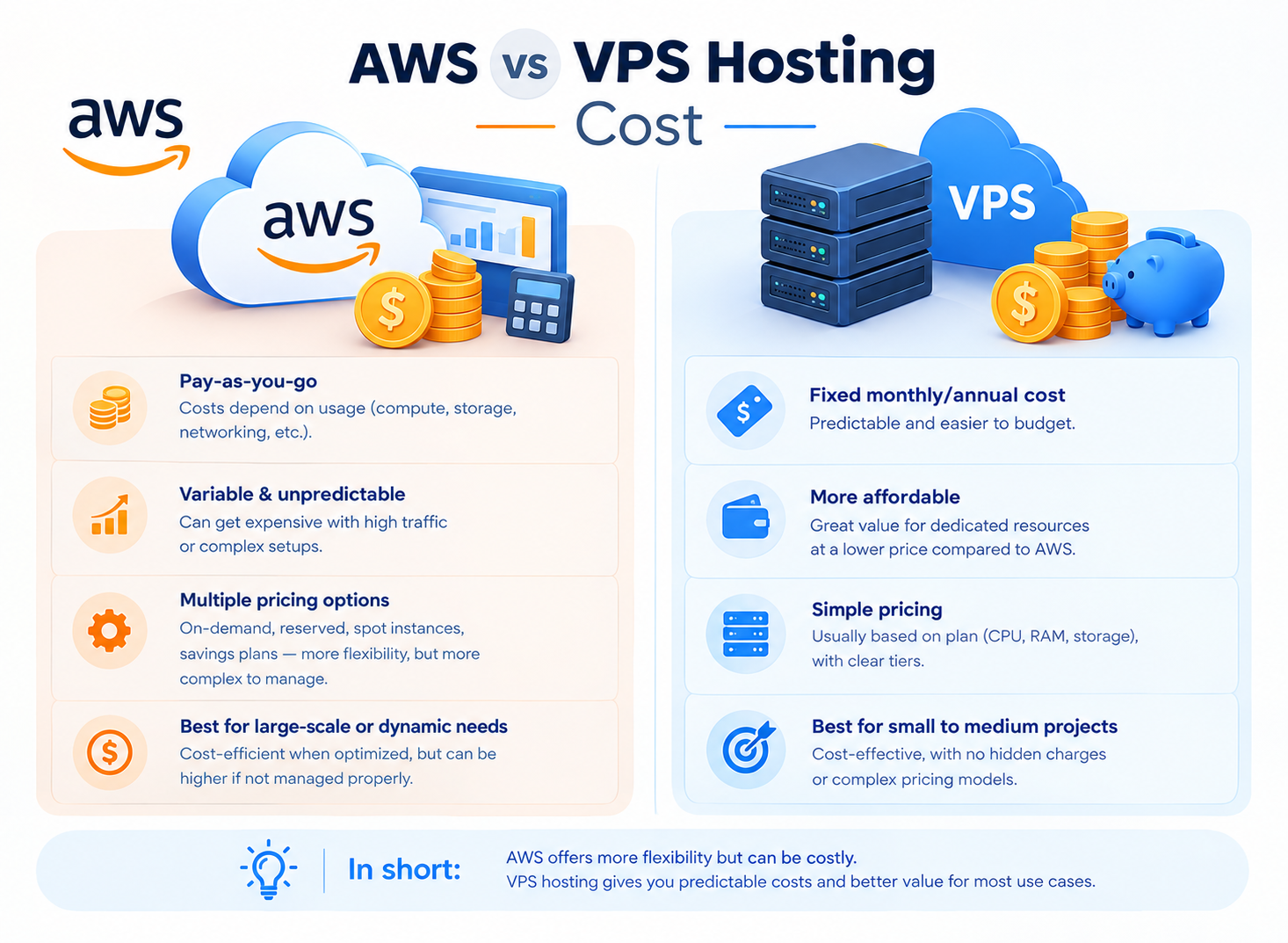
Cost is an important difference between AWS and traditional VPS hosting.
A VPS commonly uses a straightforward plan-based model. You select a package with a particular amount of CPU, RAM, storage and other included resources and pay a recurring amount according to the provider’s pricing.
AWS uses several pricing models. EC2 can be billed according to usage, while AWS also offers options such as Savings Plans, Reserved Instances and Spot Instances for particular workloads.
The total cost of an AWS environment can also include services and resources beyond the EC2 instance itself.
Depending on your architecture, costs may involve:
- EC2 compute
- Storage
- Data transfer
- Public IPv4 addresses
- Backups or snapshots
- Load balancing
- Databases
- Other AWS services
AWS documentation, for example, identifies charges associated with EC2 resources, data transfer and public IPv4 addresses in relevant configurations.
This does not mean AWS is always more expensive or that VPS hosting is always cheaper. The actual cost depends on the workload, configuration and provider.
However, a VPS can be easier to budget when the required resources are bundled into one recurring hosting plan.
AWS vs VPS Hosting: Performance
Neither AWS nor VPS hosting is automatically faster.
Performance depends on the resources assigned to the workload and how the application is configured.
Important factors include:
- CPU performance
- RAM
- Storage performance
- Network capacity
- Database workload
- Application architecture
- Caching
- Software configuration
Amazon EC2 provides different instance types designed around different combinations of compute, memory, storage and networking requirements.
A properly sized VPS can perform very well for websites and applications that fit its resource profile.
Likewise, an EC2 environment can provide strong performance when the instance type and surrounding architecture are properly selected.
The important question is therefore not “Is AWS faster than VPS?” but “Which configuration provides the resources my workload requires?”
AWS vs VPS Hosting: Management
Management requirements depend heavily on the type of VPS and AWS service being used.
With an unmanaged VPS, the customer may be responsible for:
- Operating system updates
- Security configuration
- Firewall configuration
- Application installation
- Monitoring
- Backups
- Troubleshooting
A managed VPS may include some of these tasks as part of the hosting service.
With Amazon EC2, AWS manages the underlying cloud infrastructure, but the customer remains responsible for the guest operating system and applications running on the instance. AWS specifically identifies operating-system updates, security patches, application software and security-group configuration as customer responsibilities for EC2.
Therefore, it would be inaccurate to say that AWS completely removes server administration.
The actual management workload depends on the AWS services you choose and how your infrastructure is designed.
AWS vs VPS Hosting: Security Responsibilities
Neither AWS nor VPS hosting automatically makes an application secure.
With AWS, security follows a shared responsibility model. AWS is responsible for security of its underlying cloud infrastructure, while customers remain responsible for security within the services they use. For EC2, this includes the guest operating system, installed applications and relevant security-group configuration.
With VPS hosting, responsibilities depend on whether the server is managed or unmanaged and on the services provided by the hosting company.
Before choosing a hosting environment, determine who will handle:
- Operating system updates
- Firewall configuration
- Security patches
- Malware protection
- Backups
- Monitoring
- Application security
For VPS-specific security practices, use a dedicated VPS Server Hardening Checklist rather than treating server security as part of this comparison.
AWS vs VPS Hosting: Scalability
Scalability is another major difference.
A VPS can normally be scaled by upgrading to a larger plan with additional CPU, RAM or storage. Depending on the provider and architecture, you can also deploy additional VPS servers.
AWS provides a broader range of scaling options. EC2 supports different instance types and AWS provides mechanisms for adjusting computing capacity according to workload requirements.
However, AWS does not automatically make an application scalable.
The application and infrastructure still need to be designed and configured to use scaling capabilities effectively.
For a website with relatively predictable traffic, a single VPS may provide all the scalability required.
For an application with changing workloads, multiple services or distributed infrastructure requirements, AWS can provide more infrastructure options.
VPS vs AWS for Website Hosting
For many websites, a VPS can provide sufficient resources without requiring a complex cloud architecture.
A VPS can be suitable for:
- Business websites
- WordPress websites
- E-commerce stores
- Agencies hosting multiple websites
- Web applications
- Websites that have outgrown shared hosting
AWS can also host websites and applications, but its wider ecosystem may provide more infrastructure than a straightforward website needs.
For WordPress, for example, the decision should consider server resources, caching, database performance, backups, security and expected traffic rather than simply choosing a platform based on its brand.
If WordPress is your primary workload, see the WordPress VPS Hosting Guide for more specific information.
When Should You Choose VPS Hosting?
A VPS may be a suitable option when you need:
- A straightforward virtual server
- Allocated CPU, RAM and storage
- Administrative or root access
- More control than shared hosting
- A predictable server environment
- A relatively simple infrastructure
- The ability to install custom software
- Hosting for websites or conventional applications
A VPS can be particularly practical when your application fits comfortably within one server environment and you don’t need a large collection of cloud services.
When Should You Consider AWS?
AWS may be worth considering when your application requires a broader cloud infrastructure.
Examples include workloads that need:
- Multiple cloud services
- Distributed infrastructure
- Flexible resource scaling
- AWS-specific integrations
- Advanced networking
- Multiple storage or database services
- Cloud-based application architecture
The important point is that you should choose AWS because your requirements benefit from its cloud infrastructure, not simply because it is a well-known cloud platform.
Common Mistakes When Comparing AWS and VPS
Comparing VPS With the Entire AWS Platform
A conventional VPS is closer to Amazon EC2 than to AWS as a whole.
Make the comparison at the same infrastructure level whenever possible.
Assuming AWS Is Automatically More Expensive
AWS costs depend on usage, configuration, purchasing options and the services involved.
Likewise, VPS pricing varies between providers.
Compare the complete infrastructure cost rather than the headline price of one resource.
Assuming AWS Is Automatically Faster
Performance depends on the selected resources and application architecture.
A well-configured VPS may perform very well for its intended workload.
Assuming AWS Eliminates Server Administration
For EC2, customers still manage important parts of the guest environment, including the operating system, patches, applications and security configuration.
Choosing Based Only on Future Scalability
More scalability is not automatically useful if your application does not need it.
Start with the workload you have today and consider realistic future requirements.
AWS vs VPS: Which Fits Your Requirements?
Instead of asking which platform is universally better, match the infrastructure to your requirements.
| If you need… | Consider |
| A straightforward virtual server | VPS |
| Predictable monthly hosting | VPS |
| Website or WordPress hosting | VPS |
| Administrative server access | VPS or EC2 |
| A simple server architecture | VPS |
| Multiple AWS services | AWS |
| AWS-native integrations | AWS |
| More complex cloud architecture | AWS |
| Distributed infrastructure | AWS |
| Flexible cloud infrastructure | AWS |
This approach avoids choosing a platform based solely on brand, price or a single performance specification.
AWS vs VPS Hosting: Questions to Ask Before Choosing
Before selecting a hosting environment, answer these questions:
- How much CPU and RAM does the application need?
- Is the traffic predictable or highly variable?
- Does the application need multiple infrastructure services?
- Who will manage the server and security updates?
- Is predictable monthly pricing important?
- Do you need AWS-specific services or integrations?
- Can the application run comfortably on one server?
- How will backups and disaster recovery be handled?
Answering these questions usually makes the choice much clearer.
Frequently Asked Questions
