
Managing a medical practice involves more than seeing patients. Doctors, receptionists, nurses, and clinic managers must coordinate schedules, handle administrative documents, communicate with staff, and protect confidential information. Google Workspace can help organize these tasks using a set of cloud-based business tools.
For medical practices in Pakistan and the UAE, Google Workspace provides business email, shared calendars, document collaboration, and online meetings. When configured appropriately, these tools can support daily clinic operations while allowing healthcare professionals to focus on their work.
However, Google Workspace is not a complete medical practice management system. Clinics must also consider patient privacy, healthcare regulations, and the need for dedicated medical software.
How Google Workspace Helps Manage a Medical Practice
Google Workspace brings several business applications together under one platform. Instead of relying on separate email accounts, scattered documents, and manual coordination, a clinic can use these tools to organize its administrative work.
For example, a clinic manager can use Google Calendar for staff schedules, Gmail for business communication, and Google Drive for approved administrative documents.
Doctors and other authorized staff can access the information they need according to their assigned permissions.
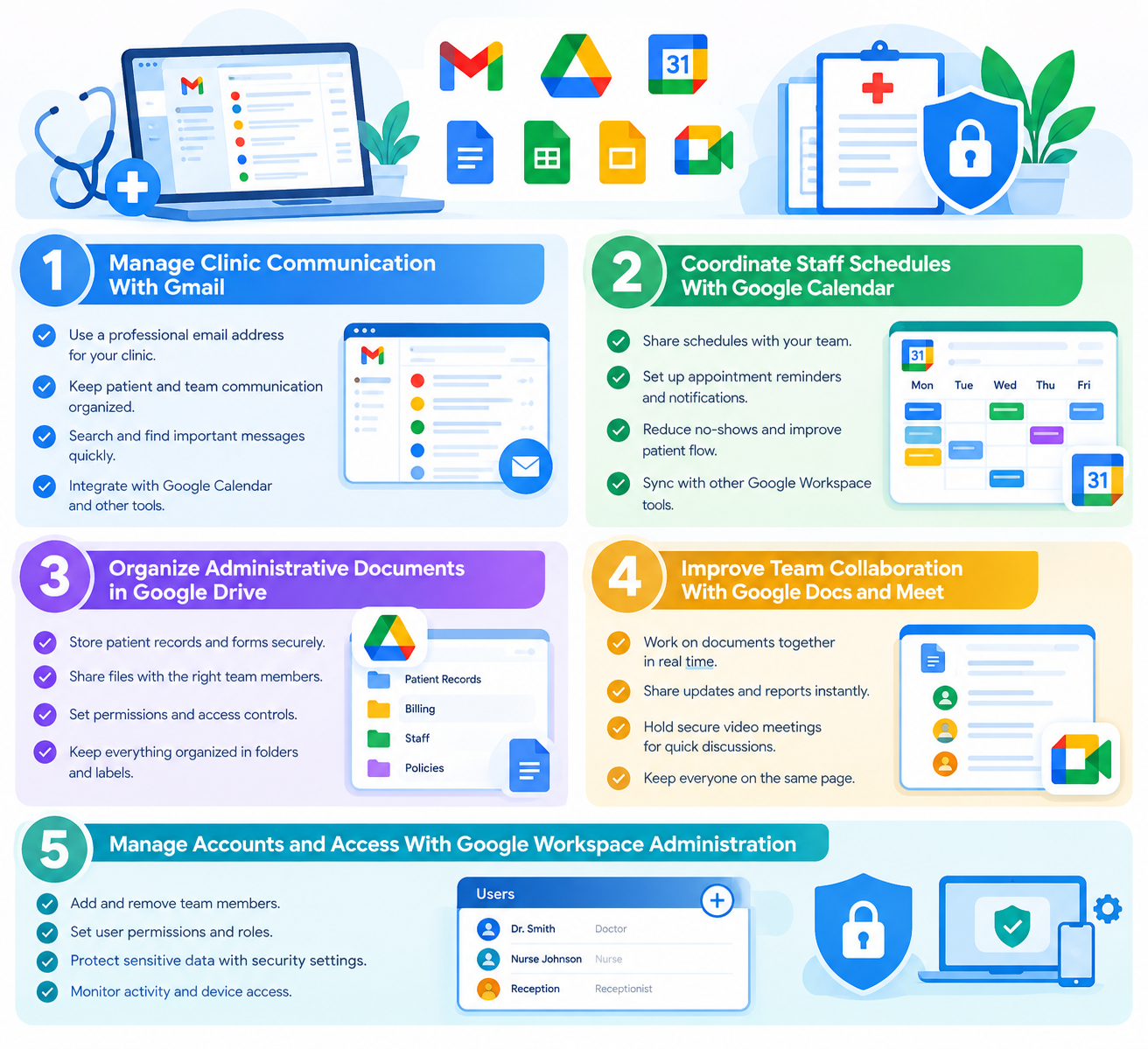
5 Ways to Organize a Medical Practice With Google Workspace
1. Manage Clinic Communication With Gmail
Professional business email helps doctors and clinic staff communicate with patients, suppliers, laboratories, and other authorized contacts.
Using Gmail with your clinic’s domain also creates a consistent professional identity. For example, a practice could use [email protected] for general appointment inquiries and separate accounts for administrative responsibilities.
To manage clinic email effectively:
- Create individual accounts for staff members.
- Assign clear responsibilities for incoming messages.
- Use appropriate labels and filters to organize routine communication.
- Establish rules for responding to inquiries and forwarding messages.
- Avoid sharing sensitive patient information through unapproved communication channels.
Use individual accounts rather than shared passwords. If multiple employees need access to a common mailbox, consider an appropriate delegated or shared communication arrangement.
2. Coordinate Staff Schedules With Google Calendar
Google Calendar helps doctors, receptionists, nurses, and administrators coordinate their working schedules.
A clinic can use separate calendars for staff meetings, training sessions, equipment maintenance, and administrative deadlines.
For example, a practice manager can publish a staff schedule so authorized team members know when meetings or training sessions are planned.
To keep calendars useful and secure:
- Assign access according to staff responsibilities.
- Keep event titles and descriptions free of unnecessary patient information.
- Review calendar permissions when staff roles change.
- Use a suitable appointment booking system when patient-facing scheduling requires additional features.
Google Calendar can support scheduling, but it does not automatically provide all the functions of a medical appointment management system.
3. Organize Administrative Documents in Google Drive
Google Drive provides a central location for approved clinic documents. Authorized staff can access current files without repeatedly exchanging email attachments.
Useful documents may include:
- Clinic policies and standard operating procedures
- Staff training materials
- Supplier contracts and administrative forms
- Equipment maintenance records
- General inventory and operational reports
Create folders based on departments or responsibilities, and give each employee access only to the files needed for their role.
Google Docs and Google Sheets can also help staff prepare and update policies, checklists, rosters, and non-sensitive administrative records.
Important: Do not assume that Google Drive is automatically suitable for storing patient records. Before using it to process identifiable health information, verify the applicable Google service terms, contractual requirements, security configuration, and healthcare privacy rules.
4. Improve Team Collaboration With Google Docs and Meet
Doctors and clinic administrators often need to update procedures, prepare staff instructions, or discuss operational issues.
Google Docs allows authorized users to work on the same document, reducing confusion caused by multiple file versions. Google Meet supports remote staff meetings and training sessions.
For example, a clinic manager can prepare an updated reception procedure in Google Docs and discuss the changes with staff through Google Meet.
These tools can help teams work together when staff members are in different locations or cannot attend the same meeting.
For patient consultations, first confirm that the chosen service, configuration, consent process, and communication arrangements are appropriate for the intended healthcare use. A video meeting tool alone does not establish regulatory compliance.
5. Manage Accounts and Access With Google Workspace Administration
A clinic’s information should not be available to every employee by default. Receptionists, doctors, administrators, and external contractors may need different levels of access.
Google Workspace administration tools can help authorized administrators manage user accounts and apply supported security settings.
Good account management practices include:
- Enabling two-step verification.
- Assigning each employee an individual account.
- Applying suitable access and sharing permissions.
- Removing access promptly when employees leave.
- Reviewing accounts and permissions regularly.
- Establishing rules for lost devices and suspected account compromise.
These controls help reduce the risk of unauthorized access to clinic information.
A Practical Example: Using Google Workspace in a Small Clinic
Consider a private clinic in Lahore or Dubai with several doctors, reception staff, and an administrator.
The clinic could organize its routine administrative work as follows:
| Clinic task | Google Workspace tool | Example use |
| General inquiries | Gmail | Receive and assign administrative messages |
| Staff schedules | Google Calendar | Coordinate shifts and internal meetings |
| Clinic policies | Google Drive and Docs | Store approved procedures |
| Inventory records | Google Sheets | Track supplies and equipment |
| Staff training | Google Meet | Hold remote training sessions |
| Account security | Google Admin console | Manage users and supported security settings |
This arrangement can reduce scattered communication and make administrative responsibilities clearer.
The clinic should use a dedicated clinical system for patient records, treatment history, prescriptions, and other clinical functions when required. Patient information should only be handled through services and workflows that have been assessed and approved for that purpose.
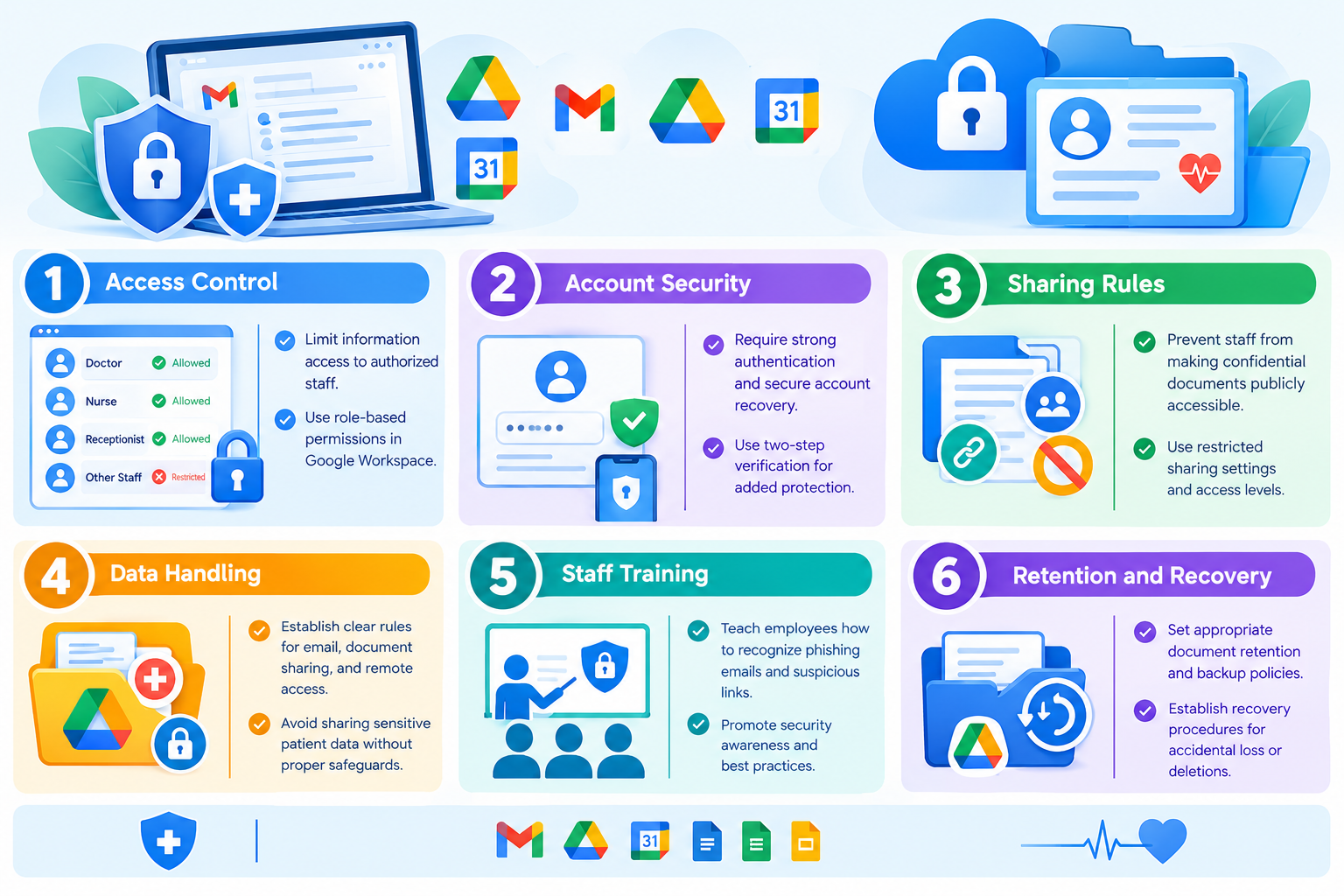
How to Protect Patient Privacy When Using Google Workspace
Patient confidentiality is essential for every medical practice. Using cloud applications does not remove the clinic’s responsibility to protect health information.
Before introducing Google Workspace into your clinic, consider the following safeguards:
- Access control: Limit information access to authorized staff.
- Account security: Require strong authentication and secure account recovery.
- Sharing rules: Prevent staff from making confidential documents publicly accessible.
- Data handling: Establish clear rules for email, document sharing, and remote access.
- Staff training: Teach employees how to recognize phishing emails and suspicious links.
- Retention and recovery: Establish appropriate document retention, backup, and recovery arrangements.
- Compliance review: Confirm the legal and contractual requirements that apply to your clinic.
Google provides specific compliance resources and contractual arrangements for certain regulated uses. For example, organizations subject to HIPAA must review Google’s applicable requirements, eligible services, and Business Associate Amendment before using covered services to handle protected health information. A contract alone does not make the entire clinic’s operation compliant.
Clinics in Pakistan should assess the laws, professional requirements, and confidentiality obligations applicable to their practice. Clinics in the UAE must also consider applicable health information and data protection requirements, including relevant federal and emirate-level rules.
Review Google’s official healthcare compliance guidance before planning any use involving sensitive patient information.
Is Google Workspace Enough to Run a Medical Practice?
Google Workspace can support administrative work, but it is not designed to replace every clinical application.
Depending on the clinic’s needs, dedicated medical practice software may be required for:
- Electronic medical records and patient histories
- Clinical notes and treatment plans
- Prescriptions and laboratory integrations
- Patient appointment booking and reminders
- Billing, insurance claims, and payment records
- Clinical reporting and healthcare workflows
The best arrangement may combine Google Workspace for business communication and collaboration with a dedicated medical system for clinical operations.
Before connecting the two systems, assess data sharing, access permissions, security, and regulatory requirements.
Choosing Google Workspace for Clinics in Pakistan and the UAE
The right Google Workspace plan depends on the number of staff members, business email requirements, storage needs, collaboration features, and administration controls.
When comparing Google Workspace plans in Pakistan and the UAE, consider:
- How many staff accounts you need.
- Whether you require professional email using your clinic’s domain.
- How much storage your administrative documents require.
- Which security and administrative features your organization needs.
- Whether the intended handling of health information is supported by the applicable services and agreements.
Do not choose a plan based on price alone when sensitive healthcare information is involved. Confirm the available features and relevant terms before making a decision.
CreativeON is an official Google Workspace Partner and Reseller serving businesses in Pakistan and the UAE. We can help clinics explore available plans, set up professional business email, and configure user accounts.
You can explore our Google Workspace services in Pakistan and the UAE or ask about available pricing and business email setup.
Frequently Asked Questions
