

When you start building a website, two terms come up again and again: domain and URL. Many people use them like they mean the same thing — but in reality, they serve different roles.
If you’re running a business website in Pakistan or targeting a global audience, understanding this difference isn’t just technical knowledge — it helps you make smarter decisions about branding, SEO, and how your website is structured.
A simple way to think about it:
A domain is like the name of a place, while a URL is the full address that takes you to a specific location inside it.
Let’s break this down in a clear and practical way.
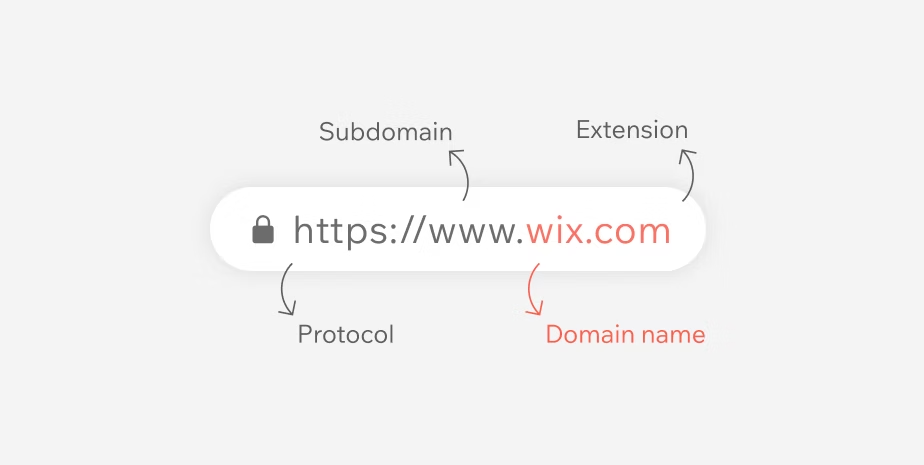
What Is a Domain?
A domain name is the main identity of your website on the internet. It’s what people type into their browser to find you.
Examples include:
- creativeon.com
- creativeon.pk
- google.com
This is your online brand name — simple, memorable, and easy to share.
Every domain is made up of two key parts:
- Second-Level Domain (SLD): Your chosen name (e.g., creativeon)
- Top-Level Domain (TLD): The extension (e.g., .com, .pk, .net)
So in creativeon.pk, “creativeon” is your brand, and “.pk” shows a local Pakistan presence.
Behind the scenes, every website actually runs on an IP address (numbers like 192.168.x.x). The domain replaces that with something humans can easily remember.
What Is a URL?
A URL (Uniform Resource Locator) is the complete web address used to open a specific page, file, or resource on a website.
Unlike a domain, a URL gives full instructions to the browser.
Example:
https://www.creativeon.com/web-hosting/vps-hosting
Here’s what each part means:
- https:// → Secure connection protocol
- www → Subdomain
- creativeon.com → Domain name
- /web-hosting/vps-hosting → Specific page path
So while the domain points to the website, the URL tells the browser exactly where to go inside that website.
Domain vs URL: Quick Comparison
Feature | Domain | URL |
Meaning | Website name | Full web address |
Example | creativeon.com | |
Includes protocol? | ❌ No | ✅ Yes |
Includes page path? | ❌ No | ✅ Yes |
Purpose | Branding | Page access |
Usage | Shared as identity | Used for linking |
👉 In short:
A domain is part of a URL — but a URL gives the complete path.
How Domains and URLs Work Together
When someone visits your website, a few things happen instantly:
- They enter a URL (like https://creativeon.com/contact)
- The browser extracts the domain (creativeon.com)
- It connects to the DNS to find the server
- The server checks the requested path (/contact)
- The correct page is displayed
Think of it like giving directions:
- The domain tells which place
- The URL tells exactly where inside that place
Why This Difference Matters for Your Website
Understanding domain vs URL isn’t just theory — it directly affects how your website performs.
1. Strong Branding
Your domain is your identity. A clean name like creativeon.com builds trust and credibility.
2. Better SEO Results
Search engines rank pages (URLs), not just domains. That’s why each page needs a clean and meaningful URL.
3. Website Security
If your URL starts with https://, it means your site is secure. This is essential for user trust and rankings.
4. Marketing & Tracking
Different URLs help track campaigns, ads, and user behavior — even though the domain stays the same.
👉 At CreativeON, we help businesses set up domains, hosting, and proper URL structures so everything works smoothly from day one.
Simple Analogy to Understand It Better
Imagine your website as a shopping mall:
- The domain is the mall name
- The URL is the exact shop location inside
You can’t find a specific store without the full directions — just like you can’t open a page without a full URL.
Common Mistakes People Make
“Domain and URL are the same thing”
They’re connected, but not identical. A URL always includes a domain — plus extra details.
“My website only has one URL”
No — every page has its own unique URL.
“Changing domain doesn’t affect anything”
Changing your domain means all URLs change too — which impacts SEO and traffic.
“HTTPS is part of the domain”
It’s not. It’s part of the URL and represents a secure connection.
Related Terms You Should Know
Once you understand this topic, these terms become easier:
- DNS: Connects domain to server IP
- Web Hosting: Stores your website files
- Subdomain: Example: blog.creativeon.com
- TLD & SLD: Domain structure components
- SSL Certificate: Enables secure HTTPS URLs
FAQs
