
RAID is a storage technology used in dedicated servers to improve disk performance and protect data against certain drive failures. However, different RAID configurations offer different levels of performance, storage capacity, and redundancy.
RAID 0, RAID 1, RAID 5, and RAID 10 are four commonly used RAID levels. Some prioritize speed, while others focus on data protection or balance both requirements.
Understanding how these RAID configurations work can help you choose the right storage arrangement for your dedicated server, database, or business application.
What Is RAID?
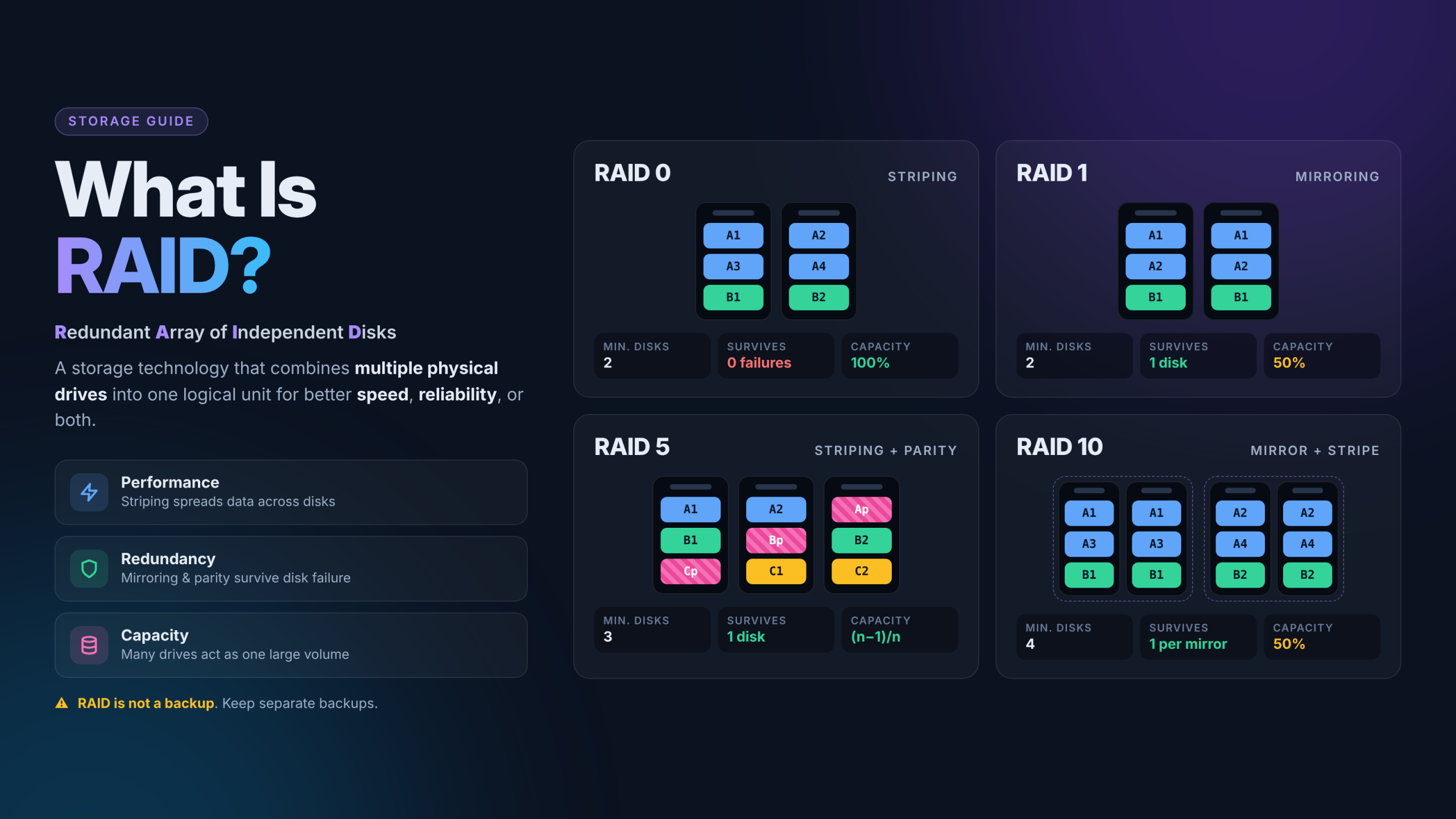
RAID stands for Redundant Array of Independent Disks. It combines multiple physical drives into a logical storage unit that the operating system can use as a single drive.
Depending on the RAID level, data is distributed, duplicated, or protected using parity information across multiple drives.
RAID uses three main techniques:
- Striping: Divides data into blocks and distributes them across multiple drives to improve performance.
- Mirroring: Stores identical copies of data on separate drives to provide redundancy.
- Parity: Stores additional information that can help reconstruct data if a drive fails.
These techniques form the foundation of different RAID configurations.
RAID 0 Explained: Performance Through Striping
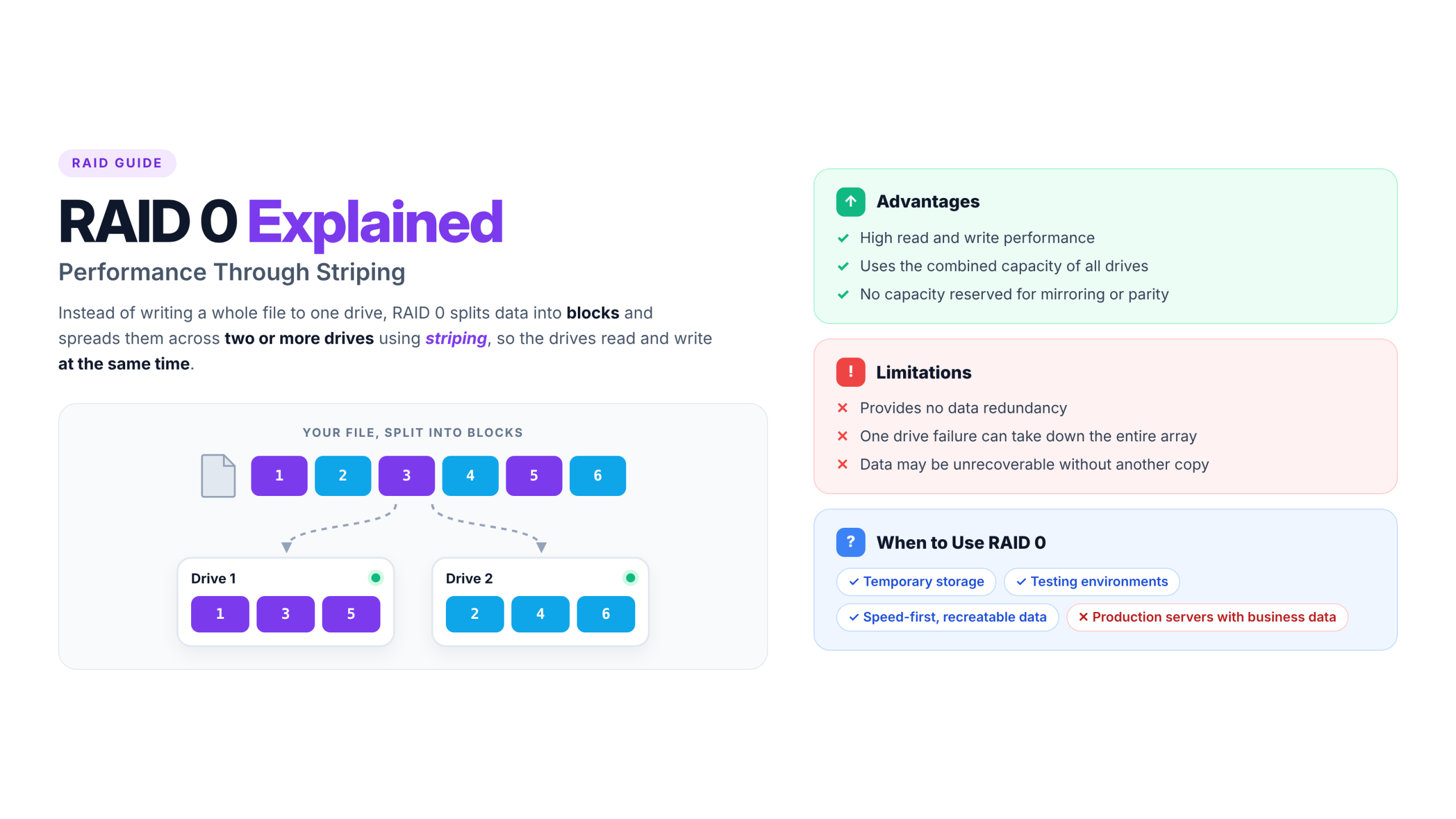
RAID 0 distributes data across two or more drives using a technique called striping. Instead of writing an entire file to one drive, it divides the data into blocks and distributes them across the available drives.
Multiple drives can then handle read and write operations simultaneously, potentially improving storage performance.
Advantages of RAID 0:
- High read and write performance.
- Uses the combined capacity of all drives.
- No capacity is reserved for mirroring or parity.
Limitations:
- Provides no data redundancy.
- Failure of any single drive can make the entire array unavailable.
- Recovery of the array’s data may not be possible without another copy.
When to use RAID 0:
RAID 0 may be suitable for temporary storage, testing environments, and workloads where performance is the priority and data can be recreated.
It is generally unsuitable for production servers storing important business data.
RAID 1 Explained: Data Protection Through Mirroring
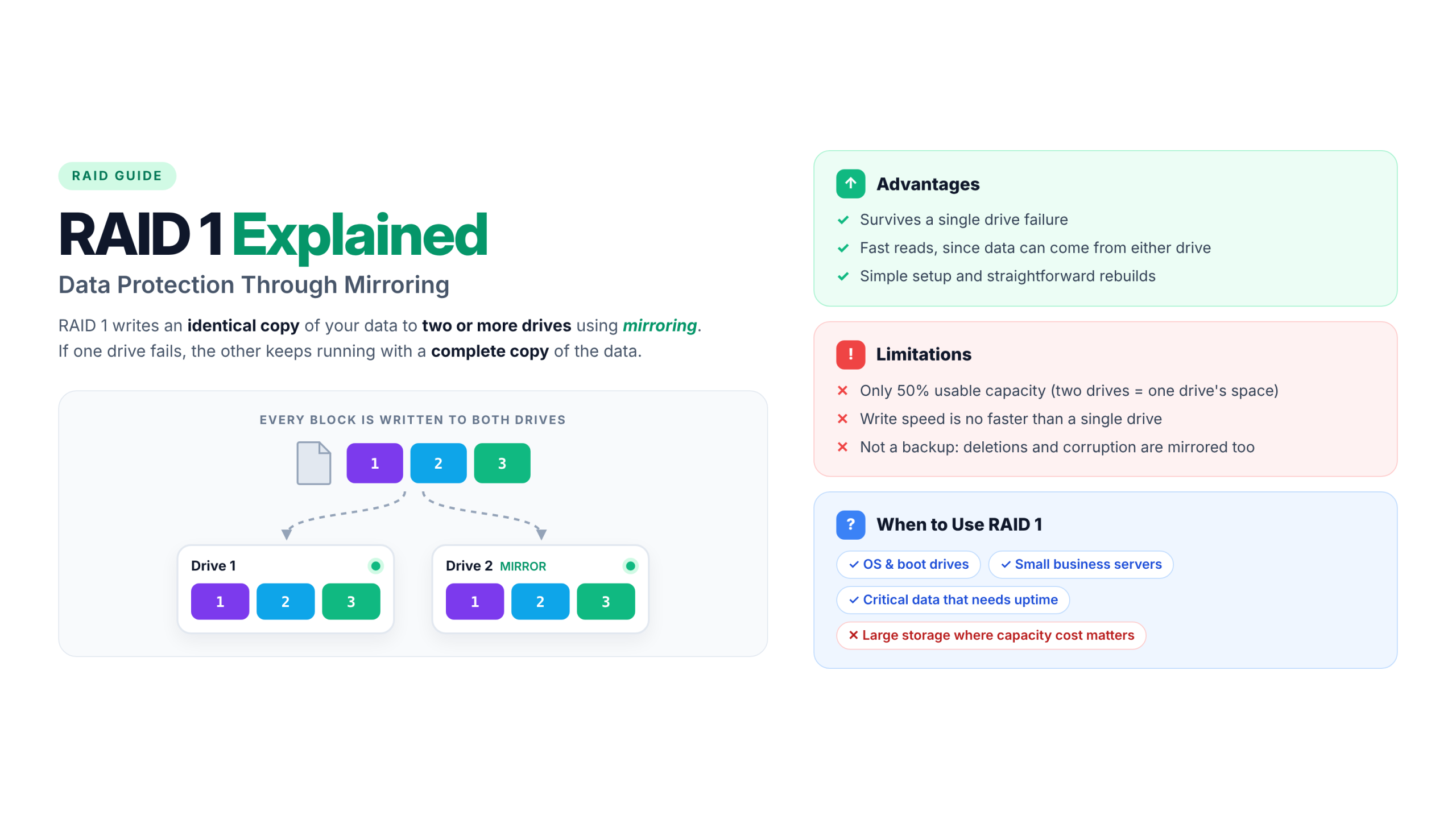
RAID 1 uses mirroring to maintain identical copies of data on two or more drives.
When information is written to the array, it is also written to the mirrored drive. If one drive fails, the system can continue operating using the surviving copy.
Advantages of RAID 1:
- Protects against a single drive failure in a two-drive mirror.
- Provides good read performance in many implementations.
- Offers straightforward redundancy.
- Allows the server to continue operating while a failed drive is replaced.
Limitations:
- Uses approximately 50% of the combined capacity in a two-drive mirror.
- Write performance is generally comparable to a single drive.
- Requires additional drives to maintain mirrored copies.
When to use RAID 1:
RAID 1 is suitable for operating system storage, smaller databases, and dedicated servers where drive redundancy is more important than maximizing usable capacity.
For example, two 1 TB drives in RAID 1 provide approximately 1 TB of usable storage because both drives contain the same data.
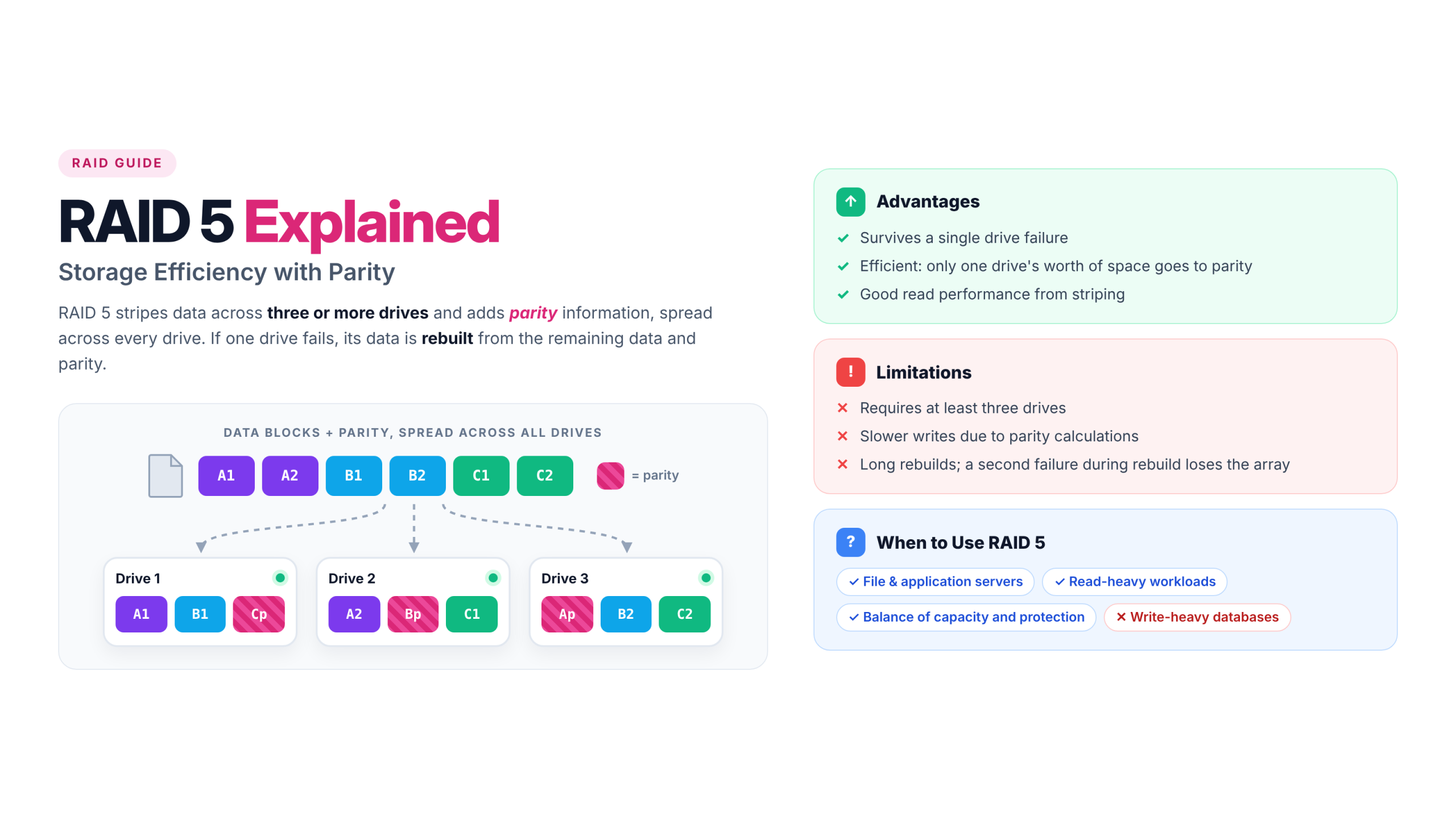
RAID 5 Explained: Storage Efficiency with Parity
RAID 5 combines data striping with distributed parity. It requires at least three drives and distributes both data and parity information across the array.
Parity information allows the RAID controller or software RAID implementation to reconstruct missing data if one drive fails.
Advantages of RAID 5:
- Can tolerate one drive failure.
- Provides better storage efficiency than RAID 1.
- Offers good read performance for many workloads.
- Distributes parity information across the drives.
Limitations:
- Write operations involve additional parity processing.
- Write performance can be lower than RAID 10.
- Rebuilding a failed drive can take considerable time.
- The array remains vulnerable to another drive failure during rebuilding.
When to use RAID 5:
RAID 5 can be suitable for file servers and read-heavy workloads where storage efficiency and protection against one drive failure are important.
However, consider drive capacity, workload, rebuild duration, and recovery requirements before choosing RAID 5 for production servers.
During rebuilding, the array reads surviving data and parity information to reconstruct the missing information on a replacement drive. Until rebuilding finishes, the array has reduced fault tolerance.
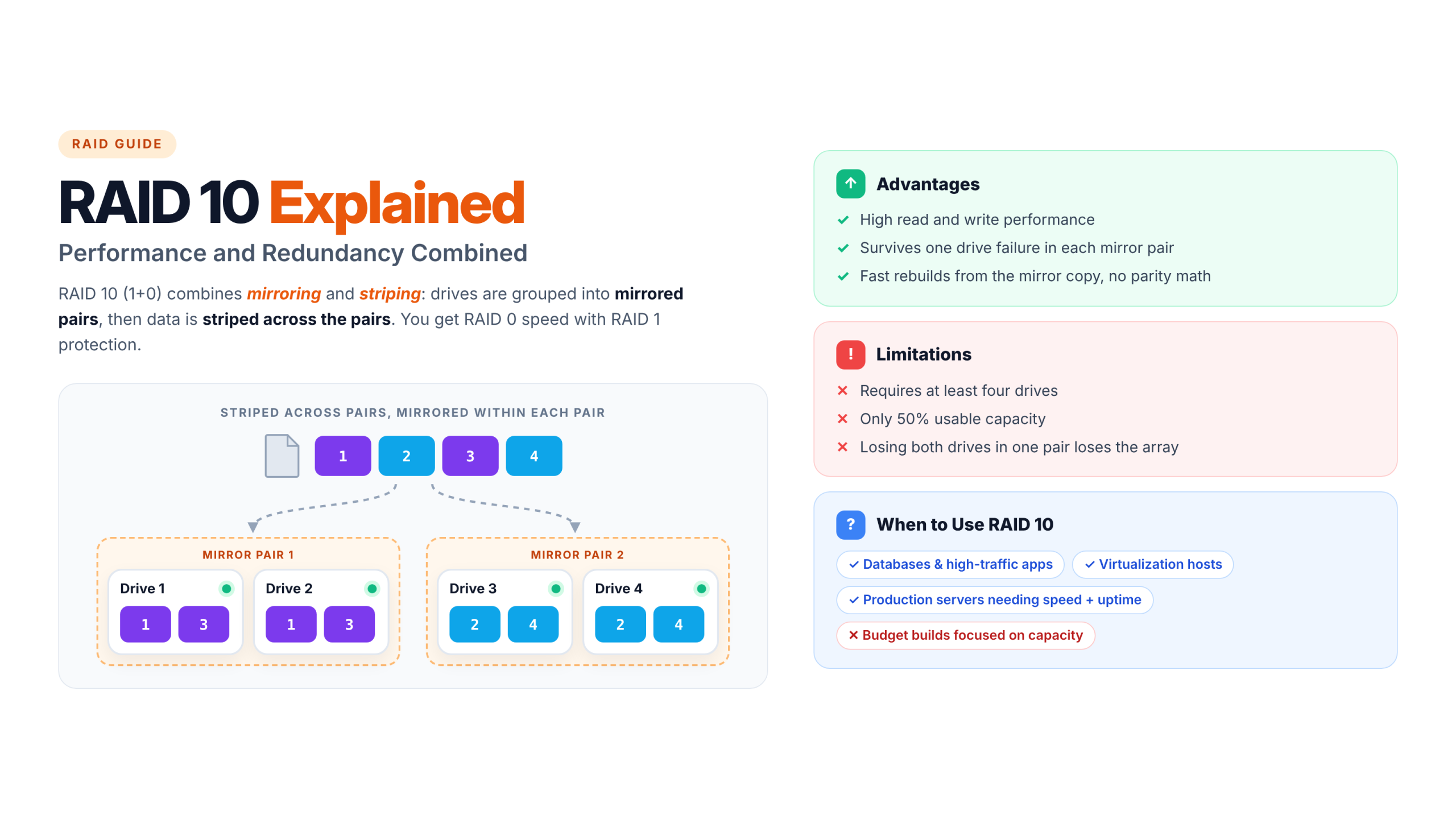
RAID 10 Explained: Performance and Redundancy Combined
RAID 10, also written as RAID 1+0, combines mirroring and striping.
It requires at least four drives in the conventional configuration. The drives are arranged into mirrored pairs, and data is striped across those pairs.
This arrangement provides good read and write performance while maintaining drive-failure protection.
Advantages of RAID 10:
- Good read and write performance.
- Can tolerate multiple drive failures if they occur in different mirrored pairs.
- Avoids the parity calculation overhead associated with RAID 5.
- Generally offers simpler rebuild operations than parity-based RAID configurations.
Limitations:
- Requires at least four drives.
- Approximately 50% of raw capacity is usable.
- More expensive because half of the drive capacity is used for mirroring.
When to use RAID 10:
RAID 10 is commonly suitable for:
- Database servers.
- Virtualization platforms.
- Busy websites and applications.
- Business-critical systems with demanding storage workloads.
For example, four 1 TB SSDs in RAID 10 provide approximately 2 TB of usable storage.
If one drive fails, its mirrored counterpart can continue providing the data. Two drives can fail without losing the array if they belong to different mirrored pairs. However, losing both drives in the same mirrored pair causes the array to fail.
RAID 0 vs RAID 1 vs RAID 5 vs RAID 10: Comparison
The following table summarizes the differences between these RAID configurations.
| Feature | RAID 0 | RAID 1 | RAID 5 | RAID 10 |
| Minimum drives | 2 | 2 | 3 | 4 |
| Storage method | Striping | Mirroring | Striping + parity | Mirroring + striping |
| Fault tolerance | None | 1 drive | 1 drive | 1 per mirrored pair |
| Usable capacity | 100% | 50% (two drives) | (N-1)/N | 50% |
| Read performance | High | Good | Good | High |
| Write performance | High | Generally similar to one drive | Parity overhead | Good |
| Main advantage | Performance | Redundancy | Storage efficiency | Performance and redundancy |
Performance descriptions are general guidelines, not guaranteed benchmarks. Actual results depend on drive technology, controller, cache, and workload.
RAID Storage Capacity Examples
To understand how much storage each configuration provides, consider these examples using equal-sized 1 TB drives.
| RAID level | Drive configuration | Raw capacity | Usable capacity |
| RAID 0 | 2 × 1 TB | 2 TB | 2 TB |
| RAID 1 | 2 × 1 TB | 2 TB | 1 TB |
| RAID 5 | 3 × 1 TB | 3 TB | 2 TB |
| RAID 10 | 4 × 1 TB | 4 TB | 2 TB |
These are nominal capacities before filesystem and formatting overhead. RAID 5 reserves the equivalent capacity of one drive for distributed parity, while RAID 10 uses approximately half of its raw capacity for mirrored copies.
Which RAID Level Should You Choose for a Dedicated Server?
The right RAID configuration depends on your application’s workload, storage requirements, performance expectations, and acceptable downtime.
Here are some general recommendations:
| Server workload | RAID consideration |
| Temporary data processing | RAID 0, if data loss is acceptable |
| Operating system storage | RAID 1 |
| File server | RAID 5 or RAID 10, depending on workload |
| Database server | RAID 10 |
| Virtualization server | RAID 10 |
| Business-critical applications | RAID 10 with independent backups |
These are starting points rather than universal rules. Consider the number of drives, storage capacity, workload characteristics, and recovery requirements before selecting a configuration.
Hardware RAID vs Software RAID
RAID can be implemented using a dedicated hardware RAID controller or software managed by the operating system.
- Hardware RAID: Uses a dedicated controller to manage the storage array and present it as a logical drive.
- Software RAID: Uses operating system resources and software to manage the array.
The appropriate option depends on server hardware, operating system support, management requirements, and available controller features.
Is RAID a Replacement for Server Backups?
No. RAID is not a replacement for backups.
RAID helps protect against certain physical drive failures, but it does not protect against accidental deletion, ransomware, malware, filesystem corruption, or other events that can affect the entire array.
For better data protection, combine RAID with:
- Regular server backups.
- Geographically separate or offsite backup storage.
- Appropriate backup retention policies.
- Periodic backup verification and restore testing.
A reliable backup strategy provides an additional layer of protection beyond RAID redundancy.
Frequently Asked Questions
