

Choosing between managed and unmanaged dedicated server hosting involves more than comparing monthly prices. It determines who is responsible for server maintenance, security updates, monitoring, troubleshooting, and other administrative tasks.
For businesses considering dedicated server hosting in Pakistan, the right choice depends on technical expertise, available IT resources, budget, and the importance of reliable server operations.
With managed dedicated server hosting, the provider handles agreed administration tasks. With unmanaged dedicated server hosting, your business takes responsibility for most server-level maintenance and troubleshooting.
Understanding these differences will help you select a hosting arrangement that meets your operational needs without paying for services you do not require or leaving important responsibilities uncovered.

What Is Managed Dedicated Server Hosting?
Managed dedicated server hosting is a service in which the hosting provider performs specified server administration and maintenance tasks on behalf of the customer.
Instead of handling every technical responsibility internally, your business can rely on the provider for agreed services such as operating system maintenance, server monitoring, security updates, and technical troubleshooting.
The level of management depends on the provider’s service agreement. Some packages cover routine maintenance, while others offer more extensive administration and support.
What Can Managed Dedicated Server Hosting Include?
Depending on the package, managed dedicated server hosting may include:
- Server configuration: Initial operating system installation and agreed server settings.
- Operating system maintenance: Applying supported updates and security patches.
- Server monitoring: Monitoring specified services, resource usage, and system health.
- Security maintenance: Managing agreed firewall settings and other server-level security controls.
- Technical troubleshooting: Investigating covered operating system and server service problems.
- Backup assistance: Configuring or managing backups if included in the service.
- Performance investigation: Identifying server-level resource bottlenecks and configuration issues.
These services should not be assumed to be included automatically. Before choosing a managed dedicated server, confirm the provider’s responsibilities, support availability, exclusions, and charges for additional work.
Managed hosting can reduce your internal administration workload, but it does not necessarily remove every technical responsibility from your business.

What Is Unmanaged Dedicated Server Hosting?
Unmanaged dedicated server hosting provides a dedicated physical server while leaving most operating system and software administration to the customer.
The hosting provider typically maintains the underlying hardware and network infrastructure according to its service agreement. Your business is responsible for managing the server environment, installing software, maintaining security, and resolving most software-level problems.
This model is often suitable for organizations with experienced system administrators or an established external server management team.
What Are Your Responsibilities With an Unmanaged Dedicated Server?
With unmanaged dedicated server hosting, your team will generally be responsible for:
- Operating system maintenance: Applying updates and managing upgrades.
- Security configuration: Maintaining firewalls, access controls, and security patches.
- Software administration: Installing and updating web servers, databases, and other applications.
- Resource monitoring: Tracking CPU usage, RAM consumption, disk capacity, and service availability.
- Backup and recovery: Arranging backup storage, retention, restoration, and recovery testing.
- Troubleshooting: Diagnosing operating system errors, service failures, and configuration issues.
- Disaster recovery: Preparing procedures for recovering from hardware failures, data loss, or other incidents.
The provider may still offer hardware replacement, network troubleshooting, remote console access, and basic infrastructure support. However, resolving software and configuration problems may be your responsibility.
Unmanaged hosting does not mean that no support is available. It means you must understand which responsibilities belong to the provider and which remain with your organization.
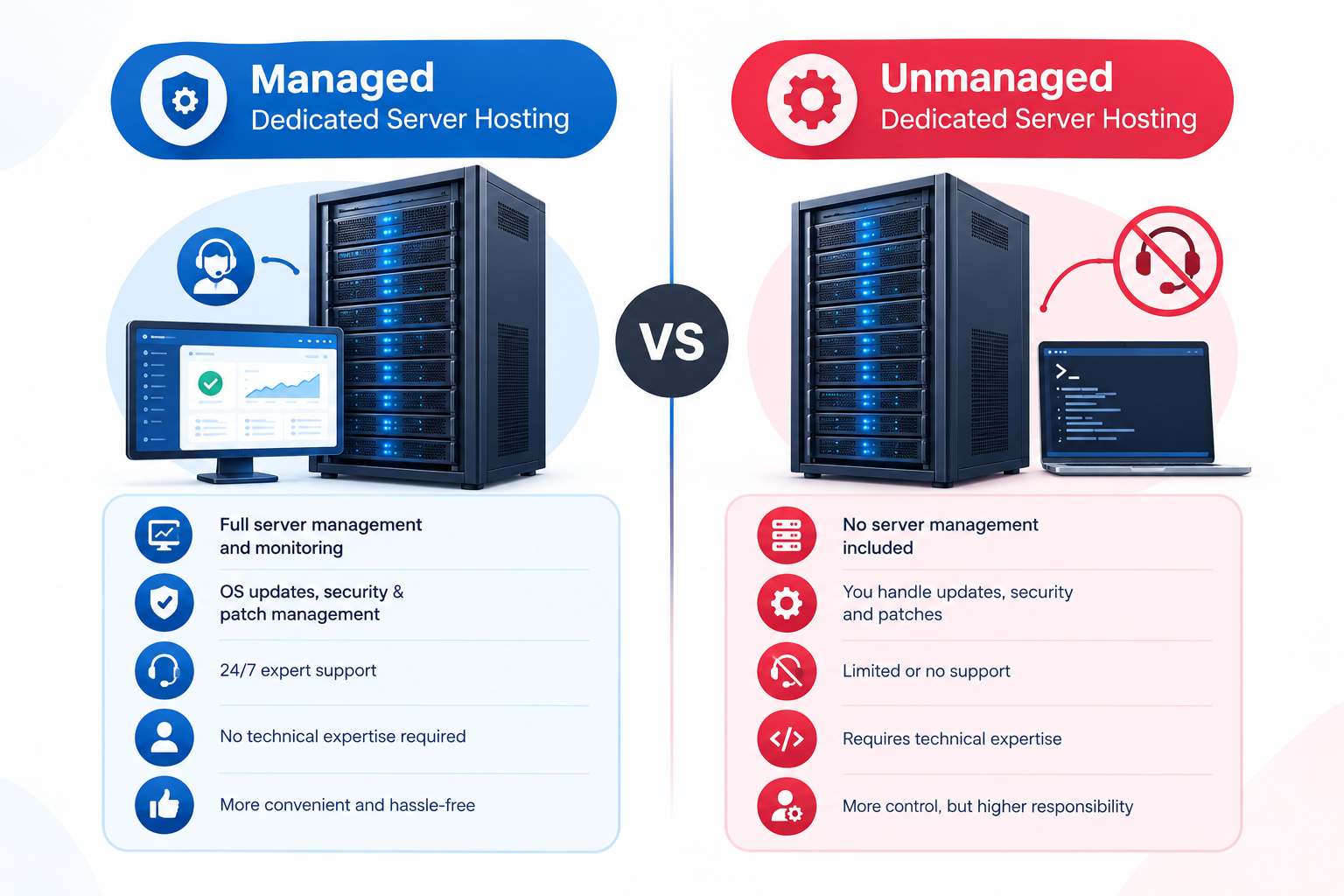
Managed vs Unmanaged Dedicated Server Hosting: Key Differences
The main difference between managed and unmanaged dedicated server hosting is who performs the ongoing administrative work.
Both options can provide dedicated hardware, substantial configuration flexibility, and resources reserved for your workloads. The management arrangement determines how much responsibility your team retains.
Decision factor | Managed dedicated server | Unmanaged dedicated server |
Server administration | Provider handles agreed tasks | Customer handles most administration |
Operating system updates | Included according to service scope | Typically managed by the customer |
Application management | Depends on the agreement | Typically managed by the customer |
Security maintenance | Provider maintains specified controls | Customer manages security controls |
Monitoring and alerts | Scope and response vary | Customer arranges monitoring |
Backups and recovery | Included only if specified | Customer arranges and tests recovery |
Administrative access | Depends on provider policy | Commonly provides broad administrative control |
Internal technical staffing | May reduce administration requirements | Requires qualified administration |
Hosting fee | Often higher due to management services | Often lower before administration costs |
Best suited for | Businesses seeking administration support | Businesses with experienced technical teams |
Important: These are typical arrangements, not universal rules. Actual responsibilities depend on the hosting package and service agreement.
Does Managed Hosting Restrict Root or Administrator Access?
Not necessarily. Management level and administrative access are two separate considerations.
Some managed dedicated server plans provide root access on Linux or administrator access on Windows Server. Others restrict certain permissions or require provider approval for specific configuration changes.
Unmanaged plans commonly provide broad administrative access, but this also depends on the provider’s policies.
Before ordering, confirm:
- Whether you receive root or administrator access.
- Which configuration changes you can make independently.
- Which tasks the provider performs or controls.
- Whether provider-managed changes require approval or scheduled maintenance.
This distinction is important for businesses that need custom software, specialized configurations, or direct control over their server environment.
Managed vs Unmanaged Dedicated Server Hosting: Which Is More Secure?
Neither management model is automatically more secure. Server security depends on the quality of configuration, maintenance, access controls, monitoring, and incident response.
The difference is who is responsible for carrying out these tasks.
Security in Managed Dedicated Server Hosting
Managed hosting can help reduce security risks when the provider consistently performs the agreed maintenance and security work.
Potential benefits include:
- Timely operating system and security updates.
- Assistance with server configuration and maintenance.
- Monitoring of specified services and system conditions.
- Support for investigating covered server-level problems.
- Help with security maintenance and recovery procedures when included.
However, managed hosting does not eliminate every security risk. Your business may still be responsible for application vulnerabilities, website code, user permissions, account security, and other tasks outside the agreement.
Security in Unmanaged Dedicated Server Hosting
With an unmanaged server, your administrator must implement and maintain the required security controls.
This arrangement provides flexibility, but missed patches, weak access controls, exposed services, or poorly configured software can leave the server vulnerable.
A responsible maintenance process should include:
- Applying security patches promptly.
- Restricting SSH and other administrative access.
- Configuring firewalls and disabling unnecessary services.
- Monitoring suspicious activity and failed login attempts.
- Maintaining secure backups separate from the production server.
- Testing recovery procedures periodically.
Before selecting managed hosting for security reasons, confirm which controls the provider maintains, how vulnerabilities are handled, who responds to security incidents, and which responsibilities remain with your business.
For more detailed security guidance, see the Dedicated Server Hardening Checklist and Dedicated Server Firewall Setup Guide, where available.
Managed vs Unmanaged Dedicated Server Hosting: Cost Comparison
Unmanaged dedicated server hosting often has a lower advertised hosting fee because fewer administration services are included. Managed hosting generally costs more because the provider performs additional technical work.
However, the advertised monthly price does not represent the full cost of operating a server.
Understanding the Total Cost of Ownership
A practical way to compare the two options is:
Total monthly operating cost = Hosting fee + Additional management + Tools and licences + Staffing
Count each expense only once. For example, do not add a separate management fee if the required service is already included in the hosting package.
Costs of Managed Dedicated Server Hosting
Depending on the package, your costs may include:
- Monthly dedicated server rental and management fees.
- Additional software or control panel licences.
- Backup storage or monitoring services not included in the package.
- Charges for work outside the agreed management scope.
- Internal staff time for application and business-level administration.
Costs of Unmanaged Dedicated Server Hosting
Your business may need to budget for:
- Monthly dedicated server rental.
- Salaries or contracts for qualified system administrators.
- Monitoring and security tools.
- Backup storage and recovery arrangements.
- Software licences and maintenance.
- Emergency troubleshooting and recovery work.
For example, an ecommerce business may choose an unmanaged server because its monthly rental is lower. If the business must hire an external administrator to maintain security, apply updates, and resolve server problems, the combined cost could exceed that of a suitable managed plan.
The best option is the one that provides the required technical coverage at a sustainable overall cost.
Which Option Should Your Business Choose?
The right choice depends on who will manage the server and whether your organization can reliably handle its responsibilities.
Choose Managed Dedicated Server Hosting If:
- Your business does not employ a qualified server administrator.
- You want the provider to handle agreed maintenance and troubleshooting tasks.
- Your internal team needs to focus on applications, customers, and business operations.
- You lack the resources to maintain server security and monitoring consistently.
- You prefer a clearly defined support arrangement for server-level problems.
For example, a growing ecommerce company may need dedicated computing resources but lack an internal infrastructure team. A suitable managed plan can reduce the administration burden, provided the required maintenance and support services are included.
Choose Unmanaged Dedicated Server Hosting If:
- You employ experienced Linux or Windows server administrators.
- Your team needs broad control over server configuration.
- You run custom applications that require specialized environments.
- You already have established monitoring, security, and backup procedures.
- You can manage routine maintenance and respond to technical incidents.
For example, a software development company with an experienced infrastructure team may prefer an unmanaged bare metal server to maintain customized application environments and deployment processes.
What If Your Business Has Some Technical Expertise?
You do not necessarily need to choose between managing everything internally and outsourcing every server administration task.
Some providers offer different levels of management or separately priced administration services. If available, these may suit businesses that have technical staff but need assistance with selected responsibilities.
Confirm that the provider can support your operating system, applications, required access permissions, and expected support workload before selecting this arrangement.
Five Things to Confirm Before Purchasing
Before choosing a dedicated server plan, clarify the practical responsibilities covered by the service agreement.
1. Who Will Maintain the Server?
Identify who will apply operating system updates, configure security controls, monitor system health, and investigate service failures.
If your team cannot cover these tasks reliably, a managed plan may be more appropriate.
2. What Does the Management Service Include?
Ask the provider to specify whether the package covers:
- Operating system updates and security patches.
- Firewall maintenance and configuration.
- Server monitoring and alert handling.
- Software installation and troubleshooting.
- Backup configuration and restoration assistance.
- Emergency support and incident handling.
Do not assume that every task is covered simply because a plan is described as managed.
3. What Happens When a Problem Occurs?
Confirm which problems the provider handles, including hardware failures, network issues, operating system problems, and application-level errors.
Check support hours, response commitments, escalation procedures, and additional charges for work outside the service scope.
4. Who Is Responsible for Backups and Recovery?
Establish whether backup services are included, where the copies are stored, how long they are retained, and whether the provider assists with restoration.
A backup arrangement should be tested rather than assumed to work. For more detail, refer to the Dedicated Server Backup and Disaster Recovery Guide, where available.
5. What Is the Full Operating Cost?
Compare the hosting fee with all additional administration, staffing, licence, security, and backup expenses.
Consider the technical workload, support requirements, business importance of the server, and potential consequences of extended downtime.
Can You Switch From Unmanaged to Managed Dedicated Server Hosting?
In many cases, a business can move from unmanaged to managed hosting, but the process depends on the provider and the existing server environment.
The provider may be able to add management services to an existing server or recommend migrating to a supported configuration.
Before making the change, confirm:
- Whether the existing operating system and configuration are supported.
- Whether your installed applications fall within the management scope.
- Which security and maintenance responsibilities will transfer.
- Whether migration, reconfiguration, or an operating system reinstall is necessary.
- How backups and recovery will be handled during the transition.
- Whether the new arrangement affects administrative access, licences, or costs.
Do not assume that adding management services automatically transfers every operational responsibility. Agree on the scope in writing before proceeding.
Frequently Asked Questions
