
Choosing between a dedicated server and cloud hosting depends on your workload, performance requirements, budget, and plans for growth. Both hosting solutions can support business websites, ecommerce stores, databases, and demanding applications, but they differ in resource allocation, scalability, infrastructure control, and pricing.
A dedicated server is generally a strong choice for workloads that need exclusive access to physical hardware and consistent computing resources. Cloud hosting is often better suited to applications that need flexible resource allocation, rapid provisioning, or the ability to scale across multiple instances.
In this guide, we compare dedicated server vs cloud hosting to help businesses choose the right infrastructure for their requirements.
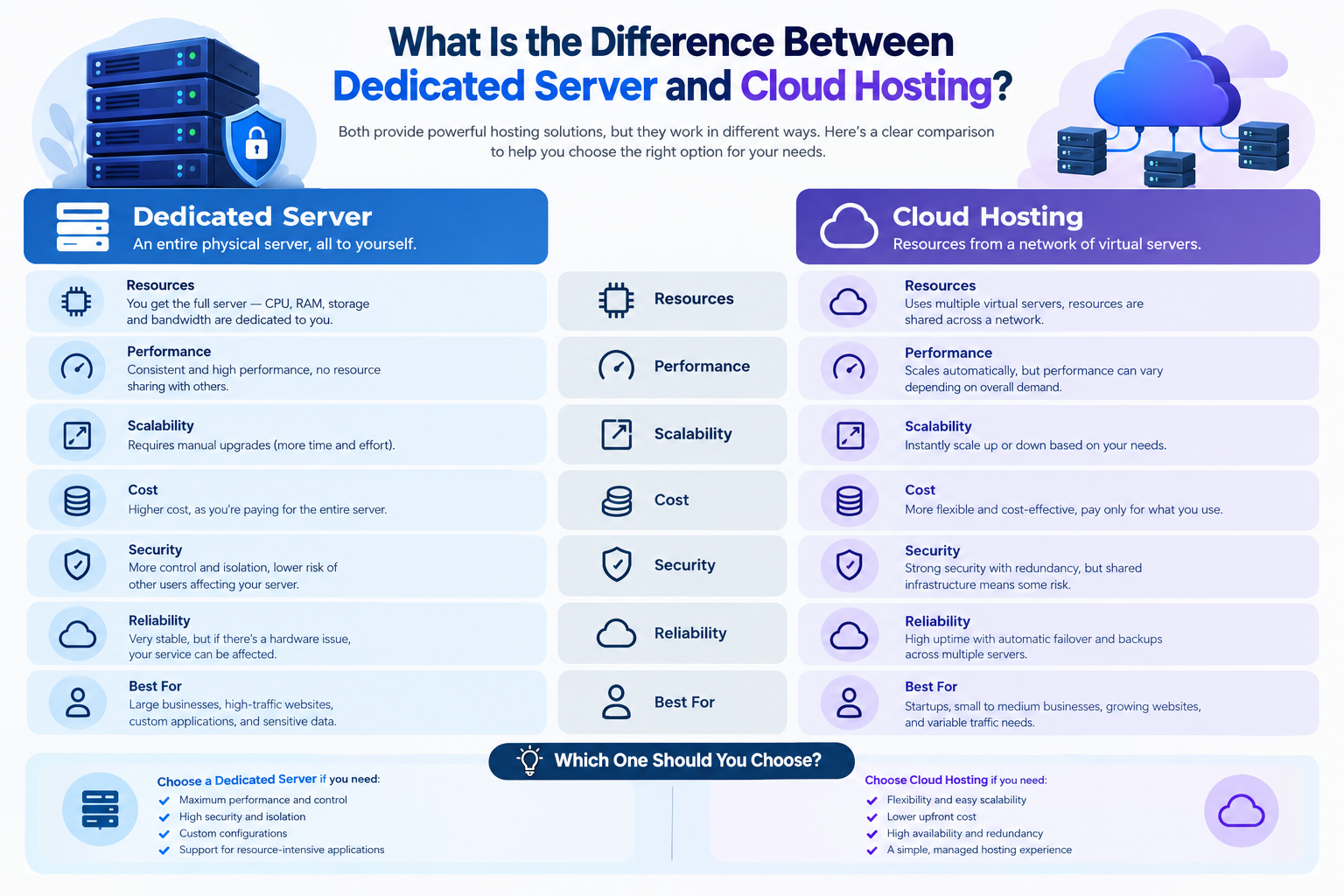
What Is the Difference Between Dedicated Server and Cloud Hosting?
A dedicated server is a physical machine assigned exclusively to one customer. Its CPU, RAM, storage, and other hardware resources are available to that customer’s workloads.
Cloud hosting provides computing resources through cloud infrastructure, commonly using virtual machines or other cloud services. Depending on the platform, resources may run on shared physical infrastructure or dedicated hardware.
The main distinction is that traditional dedicated server hosting provides exclusive access to a physical server, while cloud hosting emphasizes flexible resource provisioning and integration with cloud services.
Cloud hosting does not always mean multiple servers are working together. A cloud service may run on a single virtual machine, while a more advanced deployment may use multiple instances, load balancing, and redundant infrastructure.
It is also possible to use dedicated physical servers within a cloud environment. Therefore, the comparison below focuses on traditional dedicated server hosting versus typical virtualized cloud hosting.
Dedicated Server vs Cloud Hosting: Key Differences
| Feature | Dedicated Server Hosting | Cloud Hosting |
| Infrastructure | A physical server dedicated to one customer | Virtualized resources or other cloud services |
| Resource isolation | Exclusive access to the physical server | Depends on the service; dedicated hardware may be available |
| Performance | Predictable hardware resources when properly configured | Depends on instance size, underlying infrastructure, and configuration |
| Scalability | Usually requires hardware upgrades or additional servers | Often supports easier resizing or adding instances |
| High availability | Requires suitable redundancy and failover planning | Can support distributed redundancy when properly configured |
| Pricing | Commonly a fixed monthly rental | Fixed plans, usage-based billing, or a combination |
| Management | Managed and unmanaged options | Responsibilities vary by service and management level |
| Best suited for | Sustained, resource-intensive workloads | Workloads that benefit from flexibility and scalable infrastructure |
Neither solution is automatically faster, cheaper, more secure, or more reliable. The best option depends on the actual infrastructure, configuration, workload, and services included.
1. Performance: Which Hosting Solution Is Faster?
Performance matters when hosting high-traffic websites, online stores, databases, and business applications.
Dedicated Server Performance
A dedicated server provides exclusive access to the physical machine’s computing resources. This can deliver predictable performance when the server is appropriately sized and maintained.
Dedicated servers are often suitable for:
- High-traffic websites with sustained resource requirements.
- Ecommerce platforms and large databases.
- Resource-intensive business applications.
- Workloads requiring specific hardware or software configurations.
- Applications that benefit from consistent CPU, memory, and storage capacity.
However, a dedicated server can still become slow if its CPU, RAM, storage, or network capacity is insufficient. Poor application configuration can also affect performance.
Cloud Hosting Performance
Cloud hosting can provide excellent performance through appropriately sized virtual machines, fast storage, and suitable network infrastructure.
Depending on the platform, businesses may also benefit from:
- Adjusting computing resources as demand changes.
- Running additional instances to distribute workloads.
- Using load balancing to distribute incoming requests.
- Deploying workloads in locations closer to target users.
- Integrating managed databases and other cloud services.
Cloud performance depends on the selected service and configuration. A powerful dedicated server may outperform a smaller cloud instance for a sustained workload, while a distributed cloud deployment may handle changing traffic more effectively.
Which should you choose? Consider a dedicated server when consistent access to powerful physical hardware is important. Choose cloud hosting when your application benefits from flexible resources or a distributed architecture.
2. Scalability: Dedicated Server vs Cloud Hosting
Scalability determines how easily your infrastructure can handle growing traffic, increasing data volumes, or changing computing requirements.
Scaling a Dedicated Server
A dedicated server has a defined hardware capacity. Depending on the server model and provider, you may be able to upgrade RAM, storage, or other components.
When the existing server reaches its limits, you may need to:
- Upgrade to a more powerful server.
- Add another physical server.
- Distribute application workloads across multiple machines.
- Introduce load balancing or other infrastructure components.
These changes can involve additional costs, migration planning, and potential service interruptions.
Scaling Cloud Hosting
Cloud hosting often makes it easier to increase resources or deploy additional instances.
Depending on the service, you may be able to resize a virtual machine, increase storage, or add instances to handle higher demand. Automatic scaling may also be available, but it requires suitable platform features and configuration.
Applications must also be designed to use additional resources effectively. Increasing the number of instances does not automatically improve every application, especially when the database or another component remains a bottleneck.
Which should you choose? Cloud hosting is often more convenient for variable workloads and rapid expansion. Dedicated servers remain a practical option when capacity can be planned and expanded in advance.
3. Reliability and High Availability
Reliability is important for business websites, ecommerce stores, customer portals, and applications that must remain accessible.
Neither dedicated server hosting nor cloud hosting guarantees uninterrupted service. Reliability depends on hardware, network connectivity, redundancy, monitoring, maintenance, and recovery planning.
Dedicated Server Reliability
A single dedicated server can provide stable service, but a hardware failure may interrupt applications running on that machine.
Businesses can reduce the risk of prolonged downtime through:
- Regular hardware and service monitoring.
- Appropriate storage redundancy.
- Independent backups stored outside the primary server.
- Replacement arrangements for failed hardware.
- A secondary server and tested failover procedures where required.
RAID storage can help protect against certain disk failures, but it does not replace independent backups.
Cloud Hosting Reliability
Cloud hosting can support high availability through redundant instances, load balancing, and deployment across separate availability zones or other independent infrastructure components.
For example, an application deployed across multiple instances may continue serving requests if one instance fails, provided the remaining infrastructure has enough capacity and the architecture supports failover.
However, a single cloud virtual machine can still be a single point of failure. Cloud hosting alone does not guarantee redundancy or disaster recovery.
Which should you choose? Compare the actual service architecture, service-level agreement, backup arrangements, recovery procedures, and failover capabilities. Both hosting models can support reliable environments when designed appropriately.
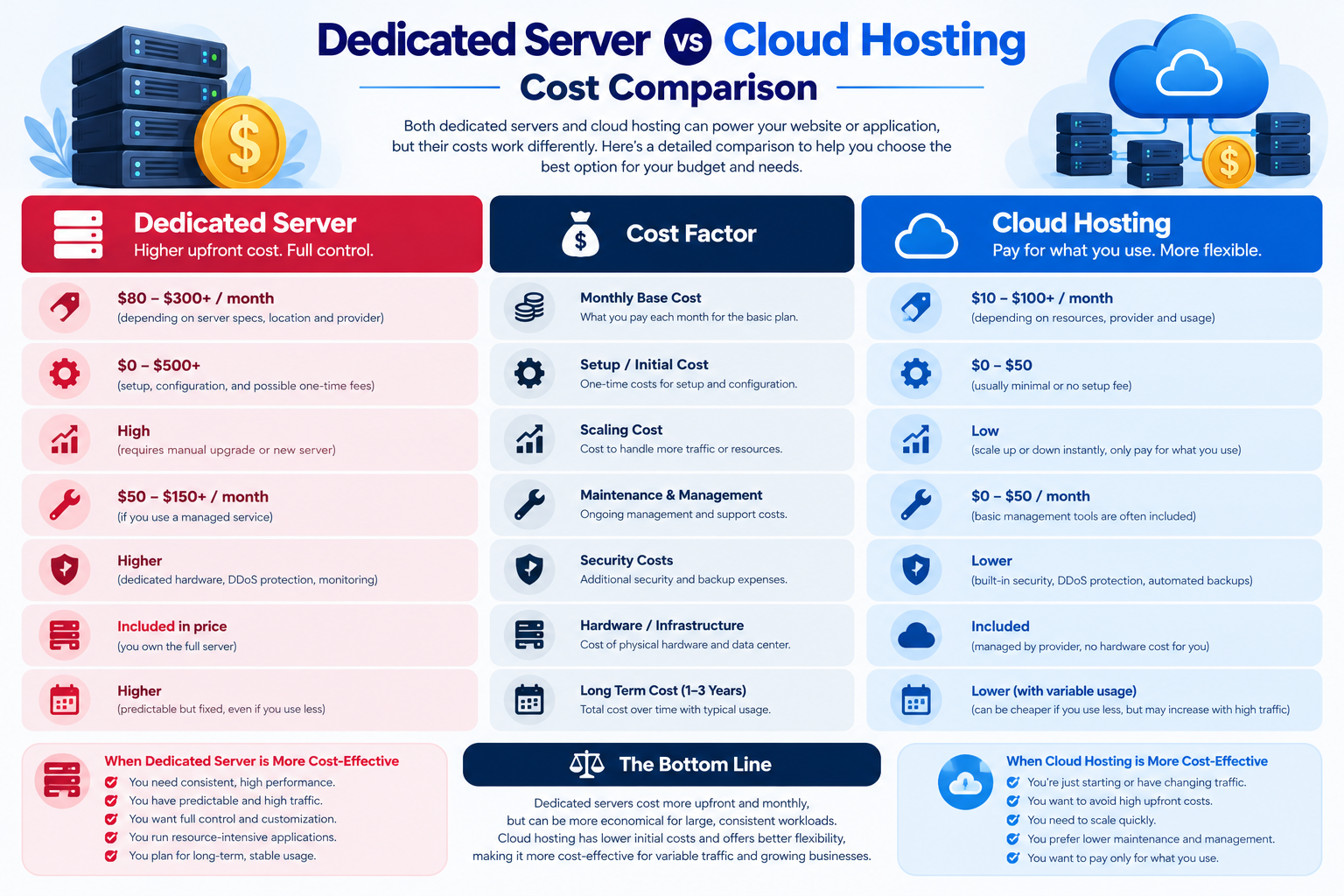
4. Dedicated Server vs Cloud Hosting: Cost Comparison
Hosting costs include more than the advertised server or instance price. Hardware requirements, bandwidth, storage, management, licences, backups, and availability arrangements can all affect the total cost.
Dedicated Server Costs
Dedicated server hosting commonly uses a fixed monthly rental, which can make recurring infrastructure costs easier to forecast.
Depending on the package, additional costs may include:
- Operating system and software licences.
- Managed server administration.
- Additional storage or bandwidth.
- Backup storage and disaster recovery.
- Hardware upgrades or additional servers.
Dedicated servers can offer good value when a workload consistently uses substantial computing resources.
Cloud Hosting Costs
Cloud hosting may use fixed monthly plans, pay-as-you-go pricing, or a combination of billing models.
Costs can vary according to:
- CPU, RAM, and instance usage.
- Storage capacity and performance.
- Data transfer and network traffic.
- Load balancers and additional cloud services.
- Backup storage and retention.
- Managed databases, monitoring, and support.
Cloud hosting can be cost-effective for variable workloads, but unplanned resource usage and additional service charges may increase the bill.
How to Compare the Total Cost
Use the following checklist when comparing dedicated server and cloud hosting quotations.
| Cost factor | What to compare |
| Computing resources | CPU capacity, RAM, and expected workload |
| Storage | Capacity, performance, and included storage |
| Bandwidth | Included traffic, transfer limits, and overage charges |
| Backups | Backup frequency, retention, storage, and restoration costs |
| Management | Administration, security updates, and technical support |
| Availability | Redundancy, failover, and recovery requirements |
| Licensing | Operating systems, control panels, databases, and other software |
For businesses comparing dedicated server hosting in Pakistan, request a complete quotation and compare equivalent resources and services rather than looking at the monthly rental alone.
Which is cheaper? Neither solution is universally cheaper. Dedicated servers may provide predictable costs for sustained workloads, while cloud hosting may suit variable demand. The total cost depends on how the infrastructure is used.
5. Security and Infrastructure Control
Both dedicated servers and cloud hosting can support strong security. The differences lie in hardware isolation, available security controls, and the responsibilities of the customer and provider.
Dedicated Server Security
A dedicated server provides exclusive access to the physical machine, which may be useful for workloads that require dedicated hardware or specific infrastructure configurations.
Depending on the provider, you may have substantial control over:
- Operating system and software installation.
- Firewall rules and network configuration.
- User accounts and access permissions.
- Security updates and application settings.
- Storage and backup arrangements.
However, dedicated hardware does not automatically make a server secure. Vulnerable software, weak credentials, unpatched systems, and misconfigured services can still expose applications to attacks.
Cloud Hosting Security
Cloud platforms may provide integrated tools for access control, encryption, network isolation, monitoring, and security policy management.
Available features vary by provider and service. Customers generally remain responsible for securing their applications, managing credentials, and configuring resources according to the platform’s shared-responsibility model.
Which should you choose? Dedicated hosting may suit organizations that require exclusive physical hardware and extensive configuration control. Cloud hosting may suit businesses that benefit from integrated cloud security services. Evaluate the actual security requirements rather than assuming one model is inherently safer.
6. Management and Technical Support
Your team’s technical skills and available resources should influence your hosting decision.
With an unmanaged dedicated server, you may be responsible for operating system maintenance, security patches, monitoring, backup configuration, and troubleshooting. Managed dedicated server hosting can shift some of these responsibilities to the provider, depending on the service agreement.
Cloud hosting also varies in management requirements. A managed cloud service may reduce administrative work, while a self-managed virtual machine can require many of the same tasks as a dedicated server.
Before choosing a provider, confirm whether the package includes:
- Operating system installation and maintenance.
- Security patching and monitoring.
- Backup configuration and restoration assistance.
- Hardware or infrastructure support.
- Application-level troubleshooting.
The word “managed” should be checked carefully. Providers may include different levels of administration, monitoring, and support.
Dedicated Server vs Cloud Hosting: Which Should You Choose?
The following decision guide can help narrow your options.
| Your requirement | Option to consider |
| Sustained, resource-intensive workloads | Dedicated server |
| Exclusive access to physical hardware | Dedicated server |
| Specialized hardware or low-level configuration control | Dedicated server |
| Traffic that changes significantly over time | Cloud hosting |
| Rapid resource adjustments | Cloud hosting |
| Applications distributed across multiple instances | Cloud hosting |
| Predictable infrastructure spending | Either, after comparing total costs |
| High availability across independent infrastructure components | A properly designed cloud or dedicated environment |
These are starting points, not absolute rules. Cloud providers offer dedicated hardware options, and dedicated servers can form part of a multi-server or hybrid infrastructure.
Five Questions to Ask Before Choosing
Before making a final decision, ask:
- What resources does my workload need? Estimate CPU, RAM, storage, bandwidth, and database requirements.
- How predictable is my traffic? Stable workloads may suit fixed-capacity infrastructure, while variable workloads may benefit from cloud flexibility.
- What happens if a server fails? Define your availability, backup, and recovery requirements.
- What is the total monthly cost? Include management, licences, storage, bandwidth, backups, and additional services.
- Who will manage the infrastructure? Confirm which responsibilities belong to your team and which are included in the provider’s service.
Answering these questions is more useful than selecting a hosting model based on price or advertised specifications alone.
Can You Combine Dedicated Servers and Cloud Hosting?
Yes. A hybrid infrastructure can combine dedicated physical servers with cloud services when different workloads have different requirements.
For example, an ecommerce business might run a database on dedicated hardware while using cloud instances to handle variable application traffic. Another business might use a dedicated server for its primary application and separate cloud storage for additional backup copies.
A hybrid approach can balance performance, flexibility, and control, but it may introduce additional networking, security, data transfer, and management requirements.
It is most useful when the benefits justify the extra complexity. Smaller businesses with straightforward workloads may find a single hosting solution easier to operate.
Frequently Asked Questions
