
Introduction
The hardware behind a dedicated server plays an important role in determining how efficiently it handles websites, databases, business applications, and other workloads. However, choosing a dedicated server involves more than comparing processor models, RAM capacity, or storage space.
Understanding dedicated server hardware helps you evaluate whether a server has the resources required for your applications. Four components deserve particular attention: the CPU, RAM, storage, and network connectivity.
Each component performs a different function. The CPU processes instructions, RAM holds actively used data, storage keeps files and databases, and network connectivity allows the server to communicate with users and external systems.
These components work together to deliver server performance. If one component becomes a bottleneck, the entire system can be affected.
In this guide, we explain the main dedicated server hardware components, their specifications, and how they influence overall performance.
What Are the Main Dedicated Server Hardware Components?
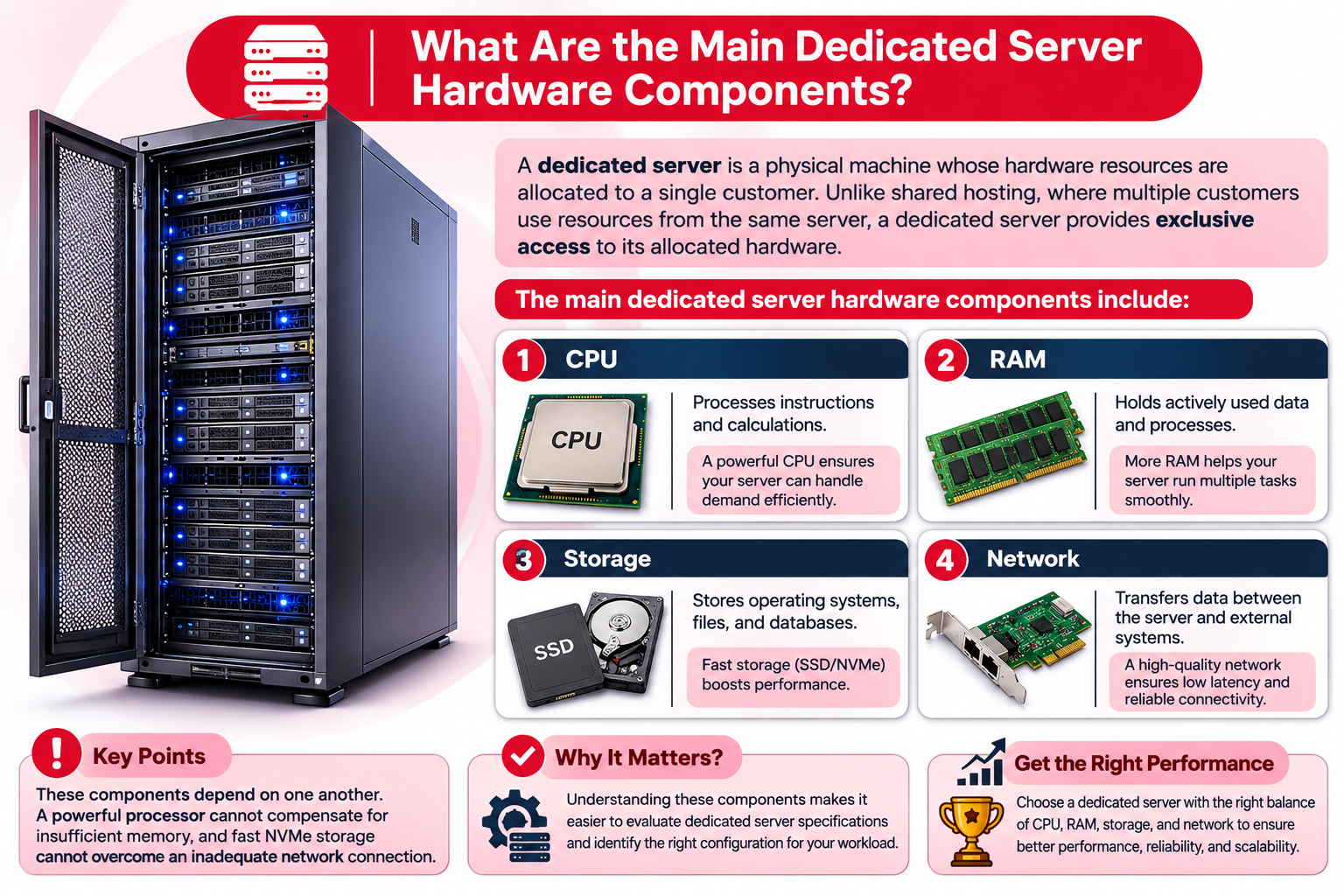
A dedicated server is a physical machine whose hardware resources are allocated to a single customer. Unlike shared hosting, where multiple customers use resources from the same server, a dedicated server provides exclusive access to its allocated hardware.
The main dedicated server hardware components include:
| Hardware Component | Primary Function | Performance Impact |
| CPU | Processes instructions and calculations | Application processing speed |
| RAM | Holds actively used data and processes | Multitasking and application responsiveness |
| Storage | Stores operating systems, files, and databases | Data access and loading speed |
| Network | Transfers data between the server and external systems | Connectivity, throughput, and latency |
These components depend on one another. A powerful processor cannot compensate for insufficient memory, and fast NVMe storage cannot overcome an inadequate network connection.
Understanding their individual functions makes it easier to evaluate dedicated server specifications and identify the right configuration for your workload.
1. Dedicated Server CPU: Cores, Threads and Clock Speed
The Central Processing Unit (CPU) is the processing unit of a dedicated server. It executes instructions, performs calculations, and manages the processing requirements of applications running on the machine.
The CPU influences how efficiently a server handles website requests, database queries, virtualization, and other computing tasks.
CPU Cores and Threads
Modern server processors contain multiple physical cores. Each core can execute instructions independently, allowing the processor to handle several processing tasks simultaneously.
Threads represent execution paths that allow software to organize work for processing. Technologies such as Simultaneous Multithreading (SMT) enable a physical CPU core to handle more than one hardware thread.
For example, a processor with 16 physical cores and 32 threads can support 32 hardware threads. However, 32 threads do not provide the same processing capacity as 32 physical cores.
More cores can benefit workloads that perform multiple operations in parallel, including:
- Websites receiving high volumes of concurrent requests.
- Database servers processing multiple queries.
- Virtualization environments running several virtual machines.
- Rendering and data-processing applications.
- Business systems handling simultaneous operations.
However, additional cores do not automatically guarantee better performance. Some applications rely more heavily on individual core performance and cannot efficiently distribute their work across multiple cores.
CPU Clock Speed
CPU clock speed, measured in gigahertz (GHz), indicates the processor’s operating frequency.
A higher clock speed can benefit applications that depend heavily on single-core performance. However, clock speed alone does not determine how powerful a processor is.
Other important factors include:
- CPU architecture and processor generation.
- Number of physical cores.
- Cache size.
- Memory bandwidth.
- Power and thermal limits.
- Workload optimization.
For example, a newer processor operating at a lower clock speed may outperform an older processor with a higher advertised frequency.
When comparing dedicated server CPUs, consider the complete processor model, generation, core count, and workload requirements instead of selecting a processor based only on its GHz rating.
Choosing the Right Dedicated Server CPU
Different workloads place different demands on the processor.
| Workload | Important CPU Considerations |
| Business websites | Balanced core count and clock speed |
| High-traffic websites | Multi-core processing capacity |
| Database applications | Strong single-core and multi-core performance |
| Virtualization | Higher core and thread capacity |
| Rendering and processing | Parallel processing capability |
The right CPU configuration should provide sufficient processing capacity without paying for resources your applications cannot use effectively.
2. Dedicated Server RAM: Capacity, ECC and Memory Bandwidth
Random Access Memory (RAM) is the temporary working memory of a dedicated server. It stores data and instructions that applications need to access quickly while running.
Unlike storage drives, RAM is volatile, meaning its contents are lost when power is removed.
Sufficient memory allows a server to manage active processes, databases, and applications without excessive reliance on slower storage.
How Much RAM Does a Dedicated Server Need?
RAM requirements depend on the operating system, applications, databases, and number of concurrent users.
For example:
- A business website with moderate traffic may operate comfortably with a relatively small memory allocation.
- A large WordPress installation with multiple plugins, caching, and database activity may require more RAM.
- A database server handling large datasets may benefit from substantial memory.
- A virtualization server needs enough memory for the operating system and its virtual machines.
There is no universal RAM requirement for every dedicated server. The correct capacity depends on actual application usage and expected growth.
ECC RAM vs Standard RAM
Enterprise server hardware commonly uses Error-Correcting Code (ECC) memory.
ECC RAM can detect and correct certain memory errors, helping improve data integrity and system stability.
This is particularly useful for:
- Database servers.
- Enterprise applications.
- Virtualization platforms.
- Business-critical workloads.
- Systems expected to operate continuously.
Standard non-ECC memory does not provide the same error-correction capabilities.
Some server platforms also support Registered ECC memory, commonly called RDIMM.
RDIMM includes a register that helps manage electrical loading on the memory interface. It is commonly used in server configurations that require higher memory capacities.
However, RDIMM and UDIMM memory are not interchangeable in every system. Compatibility depends on the processor and motherboard.
DDR4 vs DDR5 Server Memory
DDR4 and DDR5 are generations of memory technology.
DDR5 generally provides higher memory bandwidth and improved power-management features compared with DDR4.
However, the actual performance difference depends on the processor, motherboard, supported memory speed, and workload.
When evaluating dedicated server RAM, check:
- Total memory capacity.
- DDR generation.
- ECC support.
- RDIMM or UDIMM compatibility.
- Supported memory speed.
- Number of memory channels.
- Available expansion slots.
Understanding Memory Channels
Memory channels provide communication paths between the processor and RAM.
A processor with multiple memory channels can access memory through several independent channels, increasing available memory bandwidth when the configuration is populated correctly.
This matters for workloads involving large databases, virtualization, and memory-intensive applications.
Installing additional RAM does not automatically guarantee maximum memory bandwidth. The number and placement of memory modules must follow the server manufacturer’s supported configuration.
Choosing a dedicated server with sufficient memory and room for future expansion can help accommodate growing application requirements.
3. Dedicated Server Storage: HDD, SATA SSD and NVMe
Storage is responsible for keeping the operating system, applications, website files, databases, backups, and other information.
The type of storage installed in a dedicated server can significantly affect application responsiveness, database performance, and file access speed.
Three common storage technologies are HDD, SATA SSD, and NVMe SSD.
HDD vs SATA SSD vs NVMe SSD
| Storage Type | Technology | Main Characteristics |
| HDD | Magnetic disk | High capacity, mechanical moving parts |
| SATA SSD | Flash memory using SATA interface | Faster access than HDD |
| NVMe SSD | Flash memory using NVMe protocol over PCIe | High throughput and low latency |
HDD (Hard Disk Drive)
HDDs use rotating magnetic disks to store information.
They are generally useful when large storage capacity is more important than access speed.
Common applications include archival storage and workloads with less demanding performance requirements.
SATA SSD (Solid State Drive)
SATA SSDs use flash memory and have no mechanical moving parts.
They offer faster data access than traditional HDDs and can be suitable for websites, business applications, and general server workloads.
NVMe SSD (Non-Volatile Memory Express)
NVMe is a storage protocol designed for non-volatile memory devices. NVMe SSDs commonly connect through the PCIe interface.
They can deliver high throughput and low latency, making them particularly useful for:
- High-traffic websites.
- Large database operations.
- Frequently accessed files.
- Virtualization environments.
- Applications with intensive storage operations.
Actual NVMe performance depends on the drive model, PCIe generation, controller, and workload. Not every NVMe drive delivers the same performance.
Understanding RAID in Dedicated Server Storage
RAID stands for Redundant Array of Independent Disks. It combines multiple physical drives into a logical storage configuration.
Different RAID levels provide different combinations of performance, usable capacity, and redundancy.
| RAID Level | Minimum Drives | Main Purpose | Drive Failure Tolerance |
| RAID 0 | 2 | Performance and combined capacity | None |
| RAID 1 | 2 | Data mirroring | One drive in a two-drive mirror |
| RAID 5 | 3 | Striping with distributed parity | One drive |
| RAID 6 | 4 | Striping with dual parity | Two drives |
| RAID 10 | 4 | Mirroring and striping | Depends on which drives fail |
The appropriate RAID configuration depends on the application’s performance, capacity, and redundancy requirements.
For example:
- RAID 0 combines storage capacity and performance but provides no redundancy.
- RAID 1 mirrors data across drives, allowing continued operation if one drive in a two-drive mirror fails.
- RAID 5 provides redundancy through distributed parity but involves parity-related write overhead.
- RAID 6 provides additional protection by maintaining dual parity.
- RAID 10 combines mirrored drive pairs with striping, offering a balance of performance and redundancy.
RAID 5 and RAID 6 can also involve additional recovery time and performance considerations during rebuilding.
Important: RAID is not a backup solution. It can help maintain availability during certain drive failures, but it does not protect against accidental deletion, ransomware, corruption, or every type of hardware failure.
Maintain independent backups to protect important server data.
4. Dedicated Server Network: Port Speed, Bandwidth and Latency
Network connectivity determines how efficiently a dedicated server communicates with users, applications, databases, and external systems.
Even a powerful server with fast storage can deliver a poor user experience if its network connection is inadequate.
Four important network concepts are port speed, bandwidth, throughput, and latency.
Network Port Speed
Network port speed describes the maximum link speed supported by the server’s network interface card (NIC).
Common dedicated server network configurations include:
- 1 Gbps network port.
- 10 Gbps network port.
- Higher-speed enterprise connectivity.
A 1 Gbps connection can theoretically transfer data at up to 1 gigabit per second.
However, actual throughput is usually lower because of protocol overhead, network congestion, and other infrastructure limitations.
A 10 Gbps network port does not automatically mean that the hosting provider guarantees 10 Gbps of internet throughput at all times.
Network Bandwidth
Bandwidth refers to the data-carrying capacity of a network connection.
A dedicated server provider may offer bandwidth allowances or transfer limits depending on the hosting package.
The available capacity and the provider’s network policies determine how much data the server can transfer.
Monthly Data Transfer
Monthly data transfer describes the total volume of data transferred during a billing period.
For example, a dedicated server package might include 20 TB of monthly data transfer.
This is an illustrative package specification, not a universal dedicated server allowance.
Monthly transfer requirements depend on:
- Website visitor traffic.
- Downloadable files.
- Video and media delivery.
- API requests.
- Application data transfers.
- Number of concurrent users.
A website serving mostly text pages will generally have different data transfer requirements from a platform delivering large media files.
Network Throughput
Throughput is the actual amount of data successfully transferred over a network within a given period.
It is affected by:
- Available bandwidth.
- Network congestion.
- Server hardware.
- Routing and network configuration.
- Protocol overhead.
- Connection limitations.
This is why advertised port speed should not be confused with guaranteed real-world throughput.
Network Latency
Latency is the time required for data to travel between two points across a network.
It is generally measured in milliseconds (ms).
Lower latency can improve responsiveness for:
- Interactive websites.
- Online applications.
- Gaming platforms.
- Remote database access.
- Real-time communication systems.
Server location, routing, network congestion, and the user’s geographical location can all affect latency.
For businesses serving customers in Pakistan, selecting a suitable server location and network route can help improve connectivity for local visitors.
How Dedicated Server Hardware Components Work Together
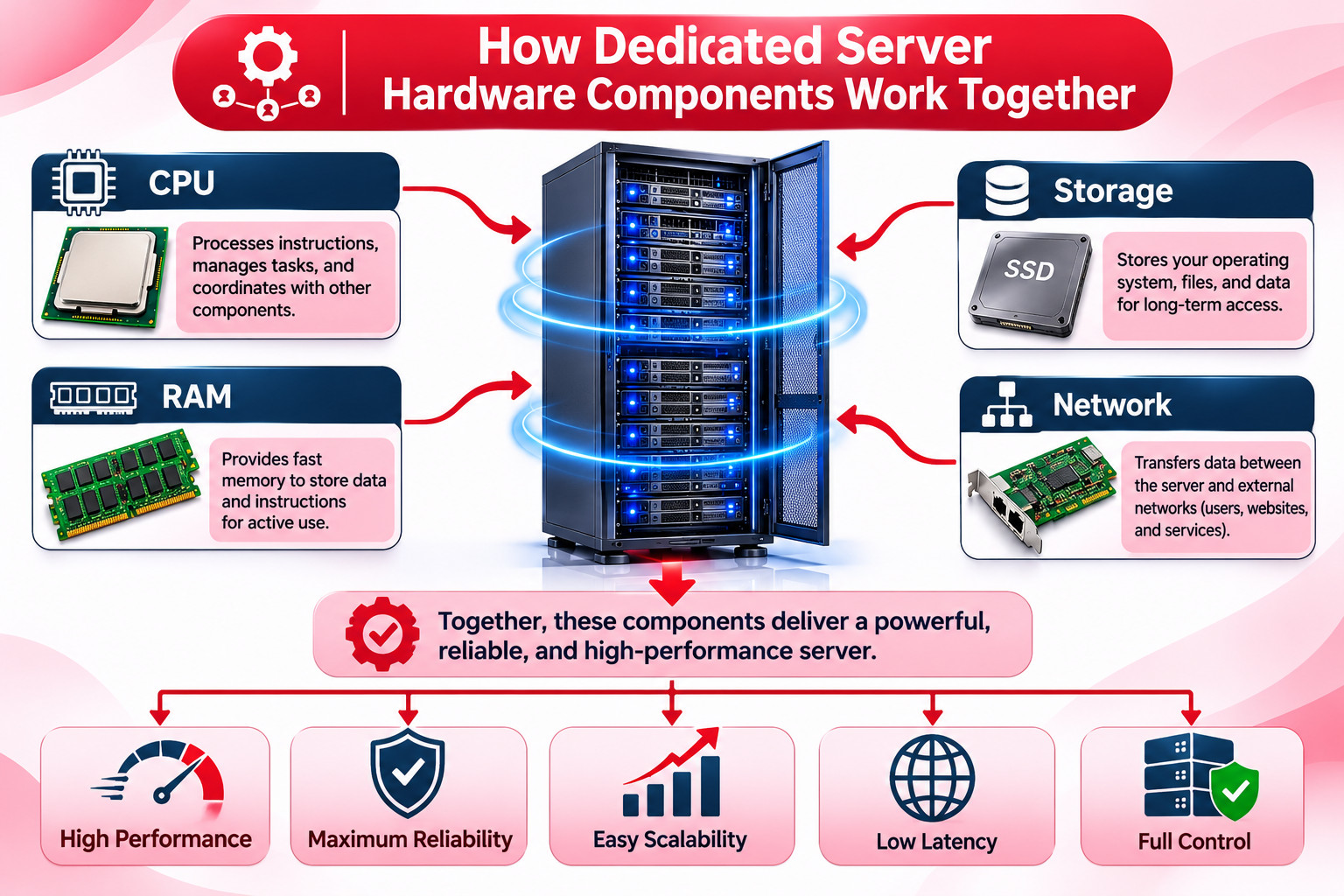
CPU, RAM, storage, and network connectivity do not operate independently. They work together to process requests and deliver application services.
Consider a customer visiting an ecommerce website hosted on a dedicated server.
- Network: The visitor’s browser sends a request to the server.
- CPU: The processor handles the request and executes the application’s instructions.
- RAM: The server uses memory for active processes, application data, and frequently accessed information.
- Storage: The server retrieves website files, database records, and other required information from its drives.
- Network: The server sends the requested content back to the visitor.
This process happens continuously as users interact with the website.
If one component becomes a bottleneck, overall performance can suffer.
For example:
- Insufficient CPU capacity can slow down application processing.
- Low RAM can create memory pressure and increase swapping.
- Slow storage can delay database operations and file access.
- Limited network capacity can affect data delivery.
This is why balanced dedicated server specifications are more important than maximizing a single hardware component.
Example of a Balanced Dedicated Server Hardware Configuration
The following is an illustrative configuration showing how CPU, RAM, storage, and networking can be combined in a dedicated server.
| Component | Example Specification |
| CPU | 16-core server processor |
| RAM | 128 GB DDR5 ECC |
| Storage | 2 × 1.92 TB NVMe SSD |
| RAID | RAID 1 |
| Network | 1 Gbps network port |
This example represents a general-purpose server configuration rather than a recommendation for every workload.
For example, RAID 1 would provide mirrored storage using the two NVMe drives, reducing usable capacity to approximately the capacity of one drive before formatting and other overhead.
A database-intensive application may require a different storage arrangement, while a virtualization environment may need additional RAM or CPU capacity.
The appropriate configuration depends on the operating system, applications, expected traffic, storage requirements, and future growth.
Understanding Hardware Bottlenecks in Dedicated Servers
A hardware bottleneck occurs when one component cannot keep up with the demands placed on the server.
This can affect application responsiveness even when the other components have sufficient resources.
Here are some common examples:
| Component | Possible Bottleneck | Potential Impact |
| CPU | High processor utilization | Slow application processing |
| RAM | Insufficient available memory | Increased swapping and application delays |
| Storage | High disk latency or I/O saturation | Slow database and file operations |
| Network | Limited throughput or congestion | Slow data delivery |
For example, a server may have a powerful processor but insufficient RAM to support its database workload.
Similarly, adding more CPU cores may not solve a problem caused by slow storage.
Identifying the actual resource limitation is important before upgrading hardware.
Server monitoring tools can help administrators evaluate CPU utilization, memory consumption, storage performance, and network activity.
What to Check When Comparing Dedicated Server Hardware Specifications
Before purchasing a dedicated server, evaluate the hardware as a complete system.
Consider the following points:
1. Check the Exact CPU Model
Review the processor generation, physical cores, threads, clock speed, and supported features.
Do not compare processors based only on GHz or core count.
2. Evaluate RAM Capacity and Compatibility
Check memory capacity, DDR generation, ECC support, memory channels, and expansion options.
3. Review Storage Technology
Determine whether the server uses HDD, SATA SSD, or NVMe SSD.
Also check drive capacity, interface, RAID configuration, and available expansion options.
4. Understand Network Specifications
Review network port speed, bandwidth allowance, monthly transfer limits, and any applicable traffic policies.
5. Check Hardware Compatibility
The CPU, motherboard, memory, storage interfaces, and other components must be compatible.
6. Consider Future Expansion
Your resource requirements may increase as website traffic, databases, and applications grow.
Select hardware that provides sufficient capacity for current workloads while allowing reasonable room for future upgrades.
Common Mistakes When Comparing Dedicated Server Hardware
When comparing dedicated server configurations, buyers sometimes focus on individual specifications without considering the complete system.
Avoid these common mistakes:
- Choosing a CPU based only on clock speed: Architecture, core count, and workload characteristics also matter.
- Buying insufficient RAM: Memory shortages can affect application responsiveness and system stability.
- Ignoring memory compatibility: Not every server supports every DDR generation or memory module.
- Overlooking storage technology: HDD-based configurations may not suit database-intensive applications.
- Assuming all NVMe drives perform equally: Drive models and PCIe specifications can make a significant difference.
- Confusing network port speed with bandwidth: A high-speed port does not automatically guarantee equivalent internet throughput.
- Assuming RAID replaces backups: RAID redundancy and independent backups serve different purposes.
- Ignoring future expansion: Limited memory slots or drive bays can make upgrades difficult.
A balanced hardware configuration based on actual workload requirements is generally a better investment than selecting the highest specification in every category.
Frequently Asked Questions
