

How much RAM does a dedicated server need? For a small business website, 16 GB may be sufficient, while hosting multiple websites, running ecommerce applications, or managing databases may require 32 GB to 64 GB or more. Virtualization environments can need considerably more memory depending on the number and size of virtual machines.
The right RAM configuration depends on your applications, concurrent users, database activity, operating system, and background services. Choosing an appropriate amount of memory helps maintain server performance, avoid resource shortages, and prevent unnecessary hardware expenses.
In this guide, we explain how to estimate dedicated server RAM requirements for different workloads, recognize memory-related performance problems, and choose a configuration that meets your current and future needs.
How Much RAM Do You Need for a Dedicated Server?
There is no single RAM configuration suitable for every dedicated server. A server running a few business websites has different memory requirements from one hosting a busy ecommerce platform or multiple virtual machines.
The following table provides general starting points for common server workloads.
| Dedicated Server Workload | Suggested RAM |
| Small business websites | 8–16 GB |
| Multiple WordPress websites | 16–32 GB |
| High-traffic websites | 32–64 GB |
| Ecommerce websites | 32–64 GB |
| cPanel/WHM hosting servers | 32–64 GB |
| Application and API servers | 16–64 GB |
| Database servers | 32–128 GB |
| Virtualization environments | 64–256 GB or more |
| Enterprise applications | 64–256 GB or more |
These figures are indicative planning ranges, not fixed minimum requirements. Actual memory consumption depends on software configuration, website traffic, concurrent requests, database size, caching, and the number of services running simultaneously.
For example, a dedicated server hosting several lightweight websites may work comfortably with 16 GB RAM. However, a hosting environment running multiple PHP applications, database services, email accounts, and control panel software may benefit from 32 GB or more.
The best approach is to estimate workload requirements first and then select a configuration that provides sufficient room for normal operations and peak activity.
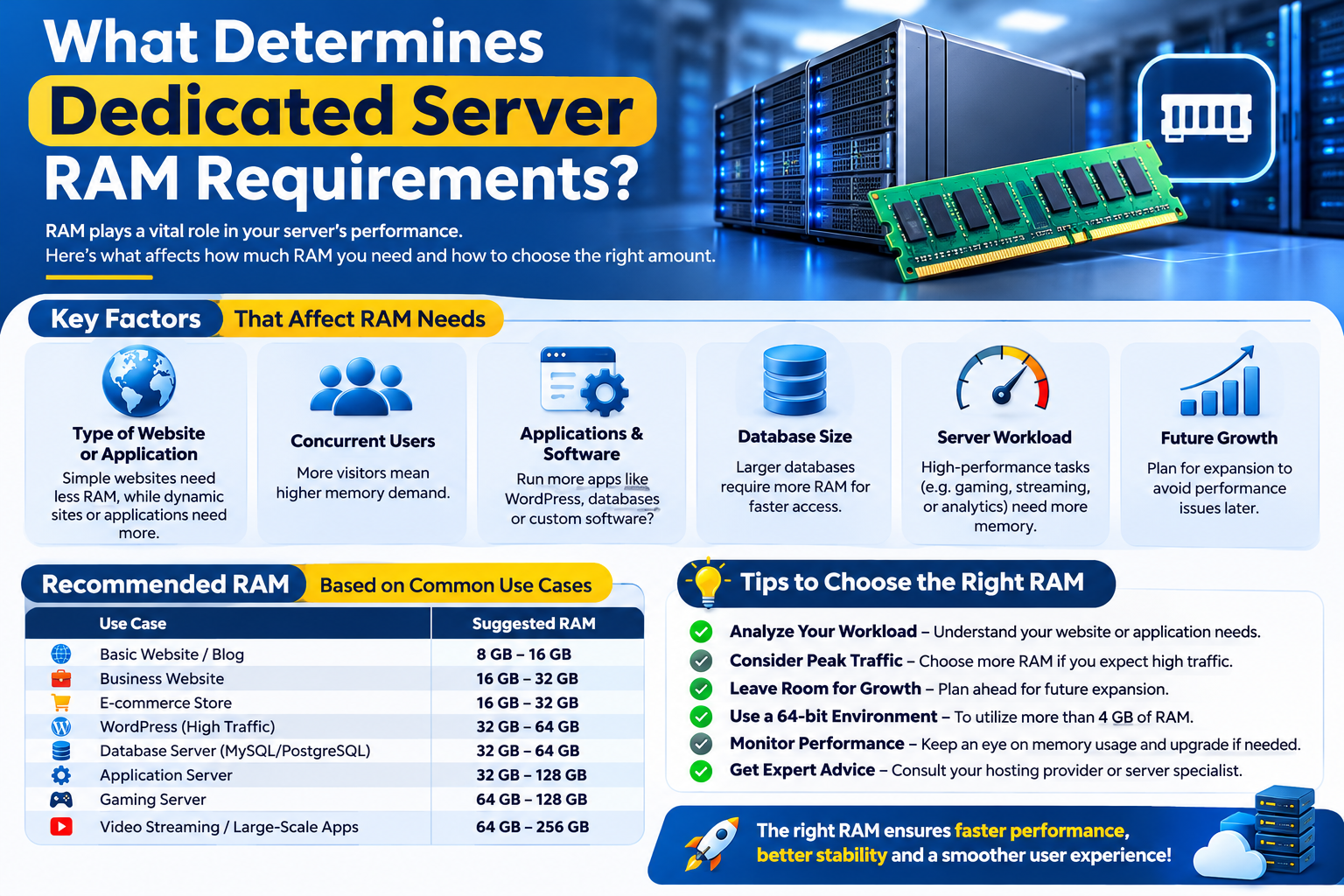
What Determines Dedicated Server RAM Requirements?
Several factors influence how much memory your physical server needs. Understanding these factors will help you avoid choosing a configuration that is either insufficient or unnecessarily expensive.
1. Website Traffic and Concurrent Users
Website traffic influences memory consumption, but monthly visitor numbers alone do not determine how much RAM a server needs.
Concurrent users are often more important because they determine how many requests the server must process at the same time.
For example:
- A business website with relatively low traffic may operate comfortably with modest memory.
- A website receiving frequent simultaneous requests may need additional RAM for web server processes and application workers.
- An ecommerce website handling product searches, customer accounts, shopping carts, and checkout requests may require more memory.
The efficiency of the website also matters. Optimized code, caching, and efficient database queries can reduce memory consumption, while poorly configured applications may consume more resources than expected.
2. Operating System and Server Software
Your operating system and installed server software consume part of the available memory.
Linux distributions such as AlmaLinux, Ubuntu Server, and Rocky Linux can operate with relatively modest memory when running minimal installations. However, installing a control panel, web server, database, email services, and security applications increases overall requirements.
Windows Server also requires memory for its operating system and installed roles.
For reference, Microsoft’s Windows Server 2025 documentation lists 2 GB as the minimum for Server Core and 2 GB for Desktop Experience, with 4 GB recommended for the latter. These are installation requirements, not recommended configurations for production workloads.
When planning your server, account for:
- Operating system memory consumption.
- Web server software such as Apache, Nginx, or LiteSpeed.
- Control panels such as cPanel/WHM.
- Database services such as MySQL or MariaDB.
- Security software and monitoring services.
- Background applications and scheduled processes.
A server running several of these services simultaneously will need more memory than a basic operating system installation.
3. Database Size and Workload
Databases can consume a significant portion of available server memory, particularly when applications handle frequent queries or large amounts of data.
MySQL and MariaDB use RAM for caching, query execution, connection handling, and internal buffers.
For MySQL, one important component is the InnoDB buffer pool. It stores frequently accessed table data and indexes in memory, reducing the need to retrieve the same information repeatedly from storage.
Database memory requirements depend on:
- Database size and frequently accessed data.
- Number of simultaneous connections.
- Query complexity and execution patterns.
- InnoDB buffer pool configuration.
- Temporary tables and query buffers.
- Other applications sharing the server.
For example, a dedicated server hosting a large ecommerce database may benefit from 64 GB or more RAM, depending on its workload and database configuration.
However, allocating too much memory to the database can leave insufficient resources for the operating system and other applications. Database memory should be configured according to actual workload requirements.
4. Number of Websites and Applications
When multiple websites share one dedicated server, their combined resource consumption determines the overall memory requirement.
Consider a hosting environment running:
- Multiple WordPress websites.
- PHP application processes.
- MySQL or MariaDB databases.
- LiteSpeed or Apache web services.
- Email and DNS services.
- Caching applications such as Redis or Memcached.
Each service consumes memory, and usage can increase during periods of high activity.
For example, a server hosting ten lightweight business websites may require considerably less RAM than one hosting ten busy ecommerce websites.
For hosting providers and agencies, it is important to consider the number of active applications, their traffic patterns, and the resources available to each account.
5. Virtualization and Virtual Machines
Virtualization introduces another layer of memory requirements because each virtual machine needs memory allocated to its operating system and applications.
Suppose you have a dedicated server with 128 GB physical RAM and want to run four virtual machines.
An illustrative allocation could look like this:
| Component | Allocated RAM |
| Virtual Machine 1 | 16 GB |
| Virtual Machine 2 | 16 GB |
| Virtual Machine 3 | 32 GB |
| Virtual Machine 4 | 16 GB |
| Total VM allocation | 80 GB |
| Remaining physical memory | 48 GB |
The remaining memory must accommodate the host operating system, hypervisor services, management applications, and additional workload requirements.
Popular virtualization platforms include Proxmox VE, VMware ESXi, and KVM-based environments.
Remember that allocated memory and actual memory consumption are not necessarily the same. Some platforms support dynamic memory allocation or memory overcommitment, but these features require careful capacity planning.
For production environments, avoid allocating all physical RAM to virtual machines. The host and its services need sufficient memory to operate reliably.
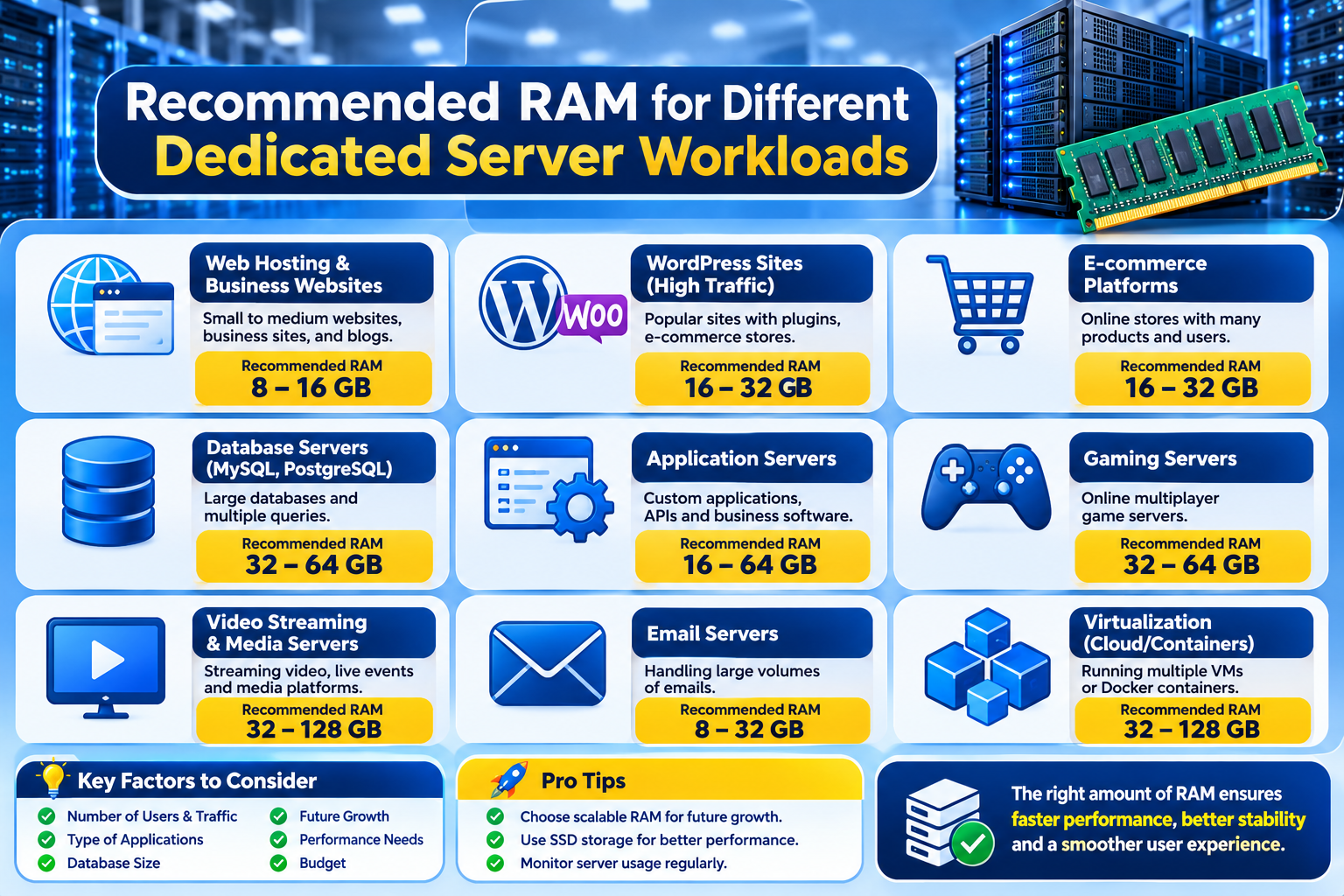
Recommended RAM for Different Dedicated Server Workloads
The right memory configuration becomes easier to understand when you consider the applications you intend to run.
Dedicated Server for WordPress Hosting
WordPress uses memory through PHP processes, database queries, plugins, themes, and caching systems.
A dedicated server hosting a few lightweight WordPress websites may work with 16 GB RAM. However, agencies or hosting providers managing multiple websites should consider 32 GB or more.
General planning ranges:
- Small WordPress environment: 8–16 GB.
- Multiple business websites: 16–32 GB.
- Busy WordPress hosting environment: 32–64 GB or more.
The number of PHP workers, active plugins, concurrent visitors, and database activity will influence actual memory consumption.
Dedicated Server for Ecommerce Websites
Ecommerce websites often require more resources because they handle dynamic product pages, customer accounts, shopping carts, searches, and checkout operations.
For a small or medium-sized ecommerce platform, 32 GB RAM can be a reasonable starting point.
Larger platforms with significant traffic, complex databases, and additional application services may benefit from 64 GB or 128 GB.
The final configuration should be based on measured memory consumption and expected peak activity rather than monthly visitor numbers alone.
Dedicated Server for Database Hosting
Database servers benefit from having enough RAM to keep frequently accessed data and indexes in memory.
For smaller database workloads, 32 GB may be sufficient. Larger databases and applications with high query concurrency may require 64 GB, 128 GB, or more.
Database memory allocation should account for the operating system, other applications, and per-connection memory usage.
Dedicated Server for Virtualization
If you intend to run several virtual machines on a dedicated server, RAM should be one of your primary hardware considerations.
A 64 GB configuration may support several smaller virtual machines, while 128 GB or 256 GB provides more capacity for larger environments.
The number of virtual machines supported depends on their individual memory requirements, actual utilization, and workload peaks.
For production virtualization, prioritize predictable memory availability over aggressive overcommitment.
Signs Your Dedicated Server Needs More RAM
A dedicated server does not necessarily need additional memory simply because its RAM utilization appears high. Linux, for example, uses available memory for filesystem caching, which can improve performance.
However, certain symptoms can indicate genuine memory pressure.
1. Frequent swapping
When physical memory becomes insufficient, Linux may move less frequently used memory pages to swap space. Excessive swapping can increase disk activity and slow down applications.
2. Consistently low available memory
If available memory remains low during normal and peak workloads, investigate which applications are consuming resources.
3. Out-of-memory errors
Linux may invoke its Out-Of-Memory (OOM) killer when the system cannot satisfy memory demands. This can result in processes or services being terminated.
4. Slow database performance
Insufficient memory may reduce database caching efficiency and increase disk reads. However, inefficient queries and storage performance can produce similar symptoms.
5. Application crashes or service interruptions
Applications that exceed their memory limits may crash, restart, or become unresponsive.
Before purchasing additional RAM, investigate possible memory leaks, excessive background processes, application limits, and configuration problems.
How to Check RAM Usage on a Dedicated Server
If your dedicated server runs Linux, you can use built-in commands to monitor memory consumption and identify potential problems.
Check Available Memory
Run:
free -h
This command displays total, used, free, shared, cached, and available memory.
Pay particular attention to the available column. It provides a more useful estimate of memory available for new applications than the amount shown under free.
Monitor Memory Usage in Real Time
Run:
top
Alternatively, use:
htop
If installed, htop provides an easy-to-read interface for monitoring memory consumption and identifying processes using significant resources.
Check Detailed Memory Information
Run:
cat /proc/meminfo
This displays detailed memory information, including available memory, cached memory, swap usage, and other system statistics.
For meaningful results, monitor these values during normal operations and peak traffic periods. A server that performs well during quiet hours may experience memory pressure when more users access its applications simultaneously.
How to Choose the Right RAM for Your Dedicated Server
Instead of selecting the largest available memory configuration, estimate your actual workload requirements.
Follow these steps before purchasing or upgrading a dedicated server.
1. Identify the applications you will run
List your websites, databases, control panels, virtualization platforms, and other services. Each application contributes to overall memory consumption.
2. Estimate normal and peak memory usage
Consider how much memory your applications consume during regular operations and periods of increased activity. Peak usage is particularly important for busy websites and databases.
3. Account for operating system and background services
Reserve sufficient memory for the operating system, web server, database services, security software, and management applications.
4. Keep room for workload growth
If you expect to add websites, users, or applications, select a configuration that can accommodate reasonable growth without immediately requiring a hardware upgrade.
5. Check hardware compatibility
Before selecting a RAM configuration, confirm that the server’s processor and motherboard support the desired memory capacity, memory speed, and DIMM configuration.
Also consider the number of available memory slots and whether future upgrades will be possible.
6. Consider ECC memory
Error-Correcting Code (ECC) RAM can detect and correct certain memory errors. It is commonly used in reliability-focused server environments.
ECC is a reliability feature rather than a way to increase memory capacity or application performance. Check hardware compatibility before choosing an ECC configuration.
7. Monitor performance after deployment
Once the server is running, monitor memory utilization, available memory, swap activity, and application performance.
This helps you determine whether the selected configuration is sufficient or requires adjustment.
Frequently Asked Questions
