
A dedicated server provides an entire physical server for one customer, offering exclusive access to its hardware resources, greater configuration flexibility, and more control over the hosting environment. Unlike shared hosting and VPS hosting, a dedicated server does not share its physical CPU, RAM, and storage resources with other hosting customers.
These benefits make dedicated servers suitable for businesses running resource-intensive websites, enterprise applications, large databases, and demanding workloads. However, dedicated server hosting also involves higher costs, hardware limitations, and greater management responsibilities.
Before choosing this infrastructure, businesses should understand both sides of the investment and determine whether dedicated hardware offers enough value for their applications.
Is a Dedicated Server Right for Your Business?
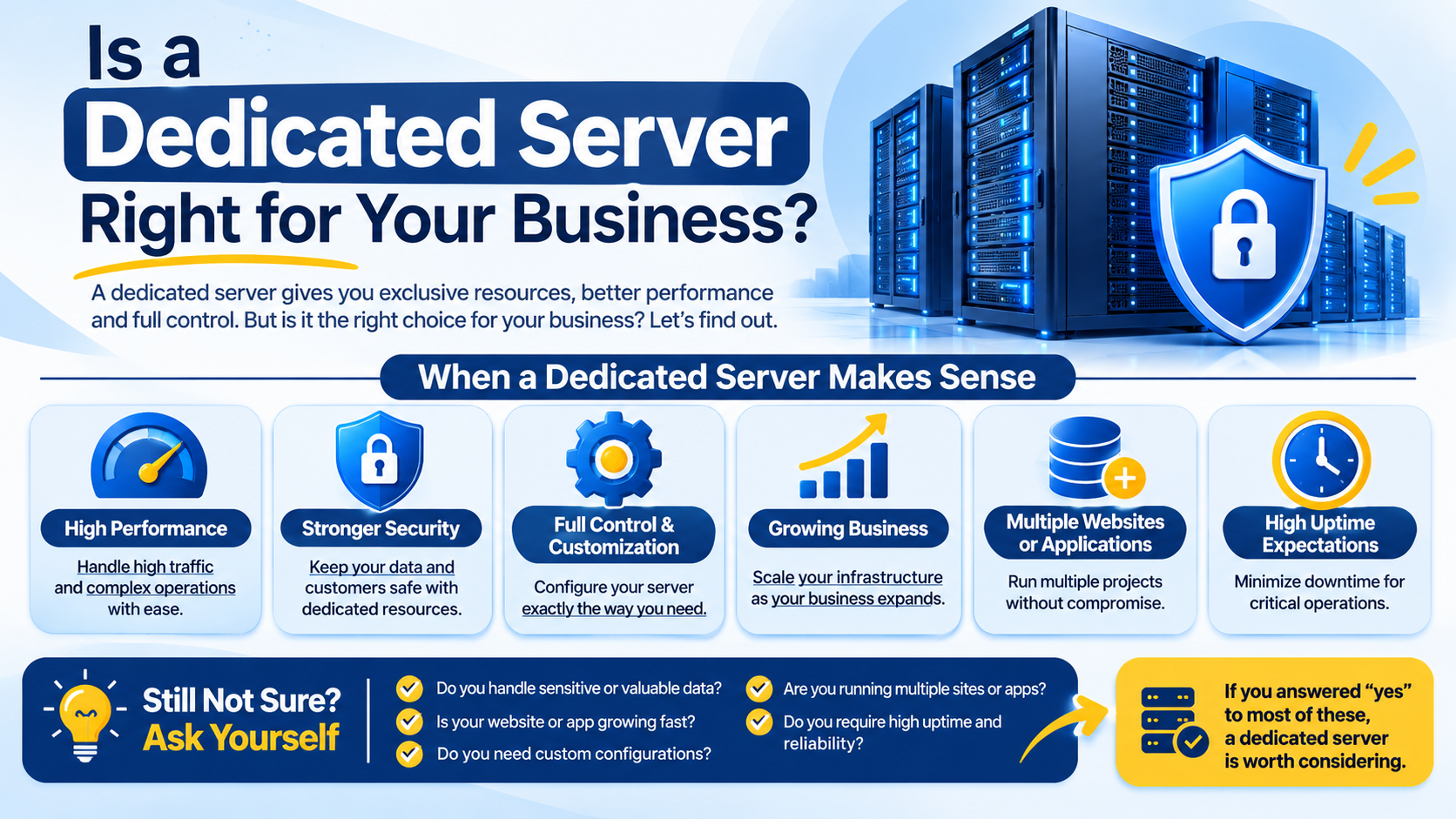
A dedicated server is generally worth considering when an application requires substantial computing resources, specific hardware configurations, or greater control over its hosting environment.
A dedicated server may be suitable if you:
- Run resource-intensive websites or business applications.
- Need exclusive access to physical CPU, RAM, and storage.
- Require specific operating systems or software configurations.
- Have consistent workloads that justify dedicated hardware.
- Need greater control over server security and administration.
A dedicated server may be unnecessary if you:
- Operate a small website with modest traffic.
- Have applications that use limited computing resources.
- Need highly elastic infrastructure for fluctuating workloads.
- Cannot justify the additional hardware and management costs.
- Do not have the technical expertise or support required to manage the environment.
The right choice depends on actual workload requirements rather than the server specifications alone.
What Are the Main Advantages of a Dedicated Server?
Dedicated servers offer several benefits for organizations that need consistent computing resources, greater control, and flexibility over their hosting environment.
1. Exclusive Access to Hardware Resources
One of the biggest advantages of a dedicated server is exclusive access to its physical hardware.
Unlike shared hosting and VPS environments, where resources are shared or allocated through virtualization, a dedicated server assigns the entire physical machine to one customer.
This provides:
- Dedicated CPU resources for applications and processes.
- Physical RAM available for your workloads.
- Storage devices assigned to your server.
- Greater control over hardware utilization.
- Reduced resource contention from other hosting customers.
This arrangement is particularly useful for applications that require consistent computing capacity.
However, dedicated hardware does not mean every part of the hosting infrastructure is exclusive. Network switches, upstream connectivity, data centre power systems, and cooling infrastructure may still be shared.
2. More Consistent Server Performance
Dedicated server hosting can provide more consistent performance because other hosting customers cannot directly consume the physical server’s CPU, RAM, and storage resources.
This is valuable for applications that require substantial computing capacity, including:
- High-traffic websites and ecommerce platforms.
- Large database-driven applications.
- Enterprise software.
- Media streaming platforms.
- Resource-intensive business applications.
For example, an ecommerce platform processing frequent database queries may benefit from dedicated CPU and memory resources without competing with neighbouring virtual machines for the same physical hardware.
However, dedicated hosting does not automatically guarantee faster performance.
Actual performance depends on processor architecture, RAM capacity, storage technology, network connectivity, and application optimization.
A properly configured modern VPS may outperform an older dedicated server. Hardware specifications and workload requirements should always be evaluated together.
3. Greater Server Configuration Flexibility
Dedicated servers provide greater control over the hardware and software environment.
Depending on the hosting provider and management arrangement, customers can configure:
- Linux distributions or Windows Server operating systems.
- Web servers such as Apache, Nginx, and LiteSpeed.
- Database platforms such as MySQL and PostgreSQL.
- PHP versions and application dependencies.
- Firewall rules and network configurations.
- Virtualization platforms and additional server software.
This flexibility is useful for developers, system administrators, and businesses running applications with specific technical requirements.
For example, an organization operating a custom application may need a particular operating system version, database configuration, or software environment that is not available in conventional shared hosting.
Dedicated servers may also provide out-of-band hardware management technologies, such as IPMI or equivalent remote management interfaces, when supported by the server and hosting provider. These tools can allow administrators to access a remote console, check hardware status, or power-cycle a machine even when its operating system is unavailable.
4. Physical Resource Isolation
A dedicated server provides physical resource isolation from other hosting customers.
On shared hosting, multiple websites operate within the same server environment. VPS hosting provides virtualized environments, but multiple virtual machines may still use the same physical hardware.
With a dedicated server, the physical machine’s computing resources are assigned to one customer.
This reduces the impact of other customers’ workloads on your server and provides greater control over resource allocation.
Physical isolation can also be beneficial for organizations with specific infrastructure requirements.
However, it does not eliminate vulnerabilities in applications, operating systems, network configurations, or administrative access. Security still depends on proper server configuration and ongoing maintenance.
5. Greater Security Configuration Control
Dedicated server hosting gives businesses greater flexibility in implementing security policies according to their applications and operational requirements.
Customers can configure security measures such as:
- Custom firewall rules.
- Restricted SSH and remote administrative access.
- Intrusion detection and monitoring systems.
- Application-specific security policies.
- Network access restrictions.
- Encrypted storage and backup configurations.
Businesses can also evaluate additional network-level protections, including DDoS mitigation, depending on their hosting provider’s infrastructure and service offerings.
However, dedicated hardware does not automatically make a server more secure. Businesses must still maintain operating systems, update applications, protect administrative credentials, and monitor suspicious activity.
A poorly maintained dedicated server can be more vulnerable than a properly secured VPS.
What Are the Disadvantages of Dedicated Server Hosting?
Despite their advantages, dedicated servers also have limitations that businesses should consider before investing in this infrastructure.
1. Higher Infrastructure Costs
Cost is one of the most significant disadvantages of dedicated server hosting.
Unlike shared hosting and VPS solutions, where infrastructure expenses are distributed across multiple customers, a dedicated server’s hardware and associated infrastructure costs are assigned to one customer.
The overall cost may include:
- Physical server rental.
- Data centre infrastructure and connectivity.
- Operating system and software licensing.
- Server management services.
- Backup infrastructure.
- Security solutions.
- Hardware upgrades and maintenance.
Businesses should evaluate the total cost of ownership (TCO), rather than comparing monthly hosting prices alone.
For example, an unmanaged dedicated server may initially appear economical, but additional expenses for system administration, software licensing, monitoring, and backup services can increase its overall cost.
For small websites, startups, and businesses with modest workloads, VPS hosting may provide better value.
2. Greater Management and Maintenance Responsibilities
A dedicated server provides greater administrative control, but that control comes with additional responsibilities.
Depending on whether the server is managed or unmanaged, customers may need to handle:
- Operating system updates and security patches.
- Firewall configuration.
- Software installation and maintenance.
- Server performance monitoring.
- Database administration.
- Backup management.
- Security incident investigation.
- Troubleshooting and recovery.
Businesses without experienced system administrators may find these responsibilities challenging.
Managed dedicated server hosting can reduce this burden by allowing the hosting provider to handle agreed administration and maintenance tasks.
However, management services vary between providers. Businesses should understand which responsibilities are included and which remain with the customer.
3. Hardware Failure and Availability Risks
A dedicated server operates on physical hardware. If a critical component fails, the server may experience downtime.
Potential hardware failures include:
- CPU or motherboard failure.
- RAM faults.
- Storage device failure.
- Power supply problems.
- Network interface failures.
A standalone dedicated server can become a single point of failure because its applications depend on one physical machine.
RAID configurations can help protect against certain disk failures, but they do not eliminate every storage risk or replace independent backups.
For example, RAID cannot protect against accidental deletion, ransomware, application-level data corruption, or the complete loss of a server.
Businesses running critical applications should consider independent backups, hardware replacement arrangements, and appropriate disaster recovery infrastructure.
Similarly, DDoS protection, hardware redundancy, and high availability should be evaluated separately rather than assumed to be included with dedicated hardware.
4. Hardware-Based Scaling Limitations
Dedicated servers provide substantial computing resources, but their capacity is limited by the installed hardware.
If an application outgrows its current server, additional resources may require:
- Installing additional RAM.
- Replacing or expanding storage devices.
- Upgrading supported hardware components.
- Migrating to a more powerful physical server.
- Deploying additional dedicated servers.
Some hardware upgrades can be performed with limited disruption, depending on the server’s design. Others, such as motherboard or processor replacements, generally require downtime.
Businesses can also scale horizontally by adding more servers and distributing workloads between them. However, this requires appropriate application architecture, networking, and workload management.
Compared with elastic cloud infrastructure, physical server capacity can be less flexible to expand quickly.
Dedicated Server Trade-offs Businesses Should Understand
Choosing dedicated server hosting involves balancing performance, cost, control, scalability, and management requirements.
| Factor | Advantage | Trade-off |
| Performance | Exclusive physical resources | Depends on hardware and application optimization |
| Cost | Dedicated infrastructure | Higher overall ownership expenses |
| Security | Greater configuration control | More security responsibilities |
| Scalability | Customizable hardware | Physical upgrades may require downtime |
| Management | Administrative flexibility | Requires technical expertise |
| Availability | Independent physical server environment | A standalone machine can become a single point of failure |
These trade-offs are closely connected. For example, greater hardware control can improve workload management, but it also increases administrative responsibility. Similarly, dedicated resources can provide consistent performance, but businesses must pay for the entire physical machine even when some capacity remains unused.
What Does a Dedicated Server Not Guarantee?
Dedicated server hosting provides greater control over physical infrastructure, but some benefits are often incorrectly assumed to be automatic.
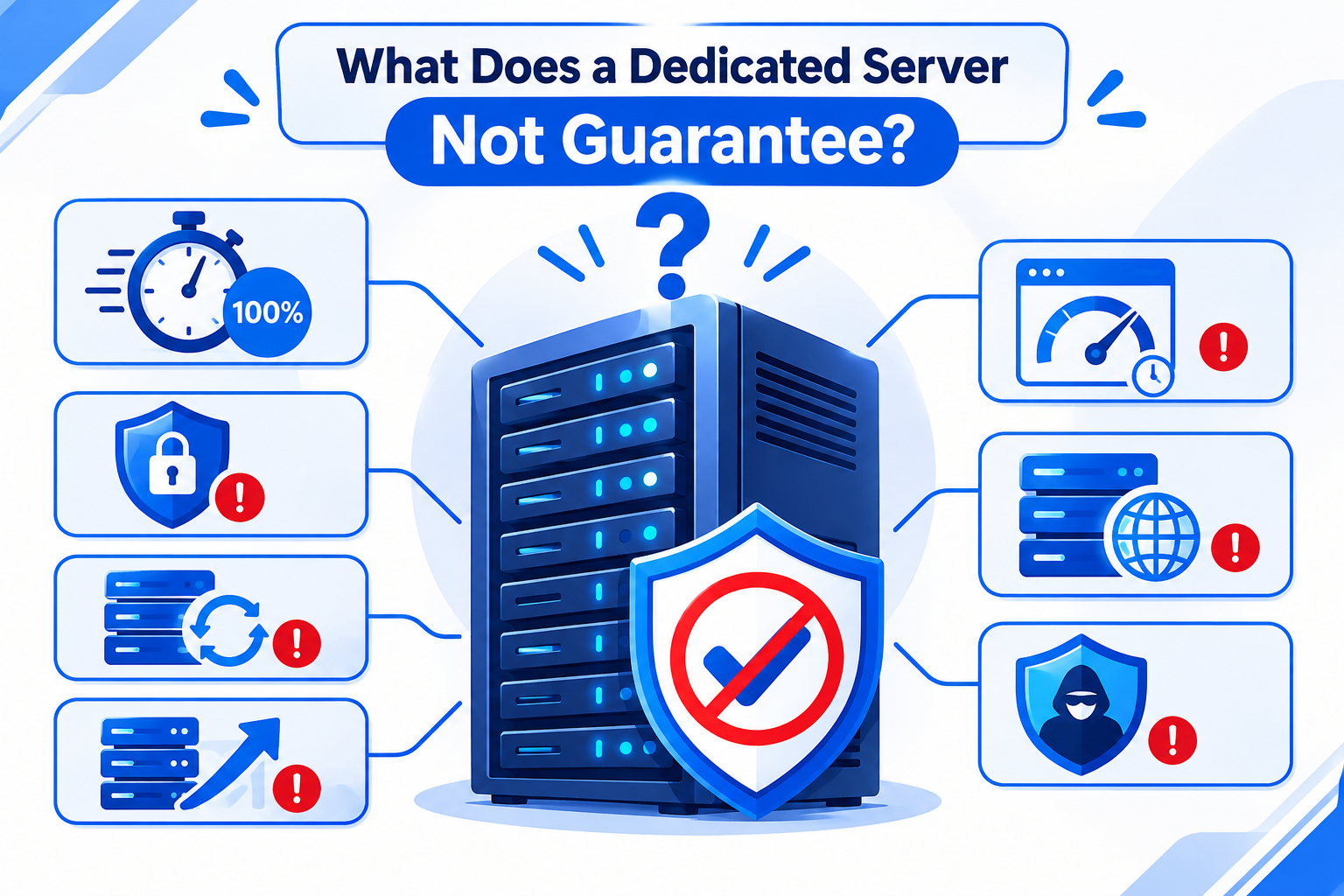
A dedicated server does not automatically guarantee:
- 100% uptime: Hardware, network, power, and software failures can still cause downtime.
- Complete security: Physical isolation does not prevent malware, application vulnerabilities, or unauthorized access.
- Automatic backups: Backup arrangements must be configured separately unless included in the hosting service.
- Unlimited scalability: Computing capacity remains limited by the available physical hardware.
- Faster website performance: Actual performance depends on application optimization, databases, storage, and network connectivity.
- High availability: A standalone dedicated server can remain a single point of failure.
- DDoS protection: Network-level attack mitigation depends on the protection services provided by the hosting company.
Understanding these limitations helps businesses evaluate hosting services realistically and plan additional infrastructure where necessary.
Dedicated Server vs. VPS vs. Cloud Hosting
Dedicated servers, VPS hosting, and cloud hosting provide different approaches to infrastructure management.
| Consideration | VPS Hosting | Dedicated Server | Cloud Hosting |
| Infrastructure | Virtual machine on physical hardware | Entire physical server | Cloud-based virtualized or distributed infrastructure |
| CPU and RAM | Allocated virtual resources | Physical resources assigned to one customer | Configurable resources according to provider offerings |
| Resource isolation | Virtualized isolation | Physical resource isolation | Depends on service and architecture |
| Customization | Good flexibility | Greater hardware and configuration control | Flexible within service limitations |
| Scalability | Often easier within provider limits | May require hardware upgrades | Often supports flexible resource provisioning |
| Cost | Generally lower entry cost | Higher dedicated infrastructure cost | Depends on resource consumption and pricing model |
A VPS is generally suitable for growing websites and applications that need more control than shared hosting provides.
A dedicated server is more appropriate when applications consistently require substantial physical resources or specific hardware configurations.
Cloud hosting is worth considering for applications requiring flexible resource provisioning, distributed infrastructure, or workloads with changing capacity requirements.
Cloud hosting is not automatically cheaper or faster than dedicated hosting. Costs and performance depend on architecture, resource utilization, storage, networking, and the provider’s pricing model.
When Should You Upgrade from a VPS to a Dedicated Server?
A VPS may no longer be sufficient when an application consistently experiences resource constraints that affect performance or operational requirements.
Some signs include:
- CPU resources remain saturated during normal workloads.
- Memory pressure causes frequent swapping.
- Database performance deteriorates because of resource constraints.
- Storage I/O limitations affect application response times.
- Your application requires hardware or configuration options unavailable on the VPS.
- Additional resources cannot be provisioned within acceptable time or cost limits.
Before upgrading, investigate whether software optimization, database tuning, caching, or resource reallocation could resolve the problem.
A dedicated server becomes worth considering when these limitations persist and the application can benefit from exclusive physical resources.
Dedicated Server Hosting Considerations in Pakistan
Businesses evaluating dedicated server hosting in Pakistan should consider more than hardware specifications and monthly rental prices.
Several local and international infrastructure factors can influence the hosting experience.
Server location: Choose a location based on the geographical distribution of your website visitors, customers, and applications.
Network latency: Evaluate actual connectivity from your target audience rather than assuming that a locally located server will always deliver the lowest latency.
International routing: Check connectivity to international customers, APIs, and business services if your applications serve audiences outside Pakistan.
PKR billing and payment: Local currency billing can simplify budgeting and payment arrangements for Pakistani businesses.
Technical support: Understand support availability, escalation procedures, and hardware replacement arrangements.
Data location: Confirm where production data and backups are physically stored, particularly if contractual or regulatory requirements apply.
For businesses serving Pakistani audiences, network performance and support arrangements should be evaluated alongside server specifications.
Frequently Asked Questions
