
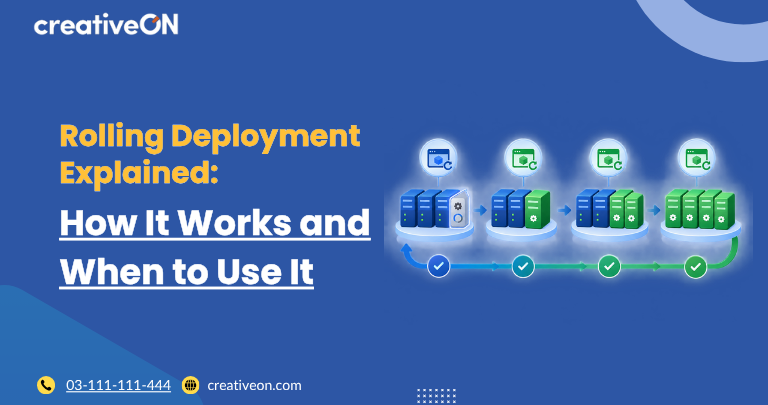
A rolling deployment is a software deployment strategy that gradually replaces an application’s existing instances with a new version instead of updating everything at once.
During the rollout, some instances can continue serving users while others are being updated and tested. This can help reduce deployment downtime and limit the impact of a faulty release.
Rolling deployments are commonly used with applications running across multiple VPS servers, virtual machines, containers, or other application instances.
In this guide, we’ll explain what rolling deployment is, how it works, how deployment batches are managed, its benefits and limitations, and how to use it safely in a VPS environment.
What Is a Rolling Deployment?
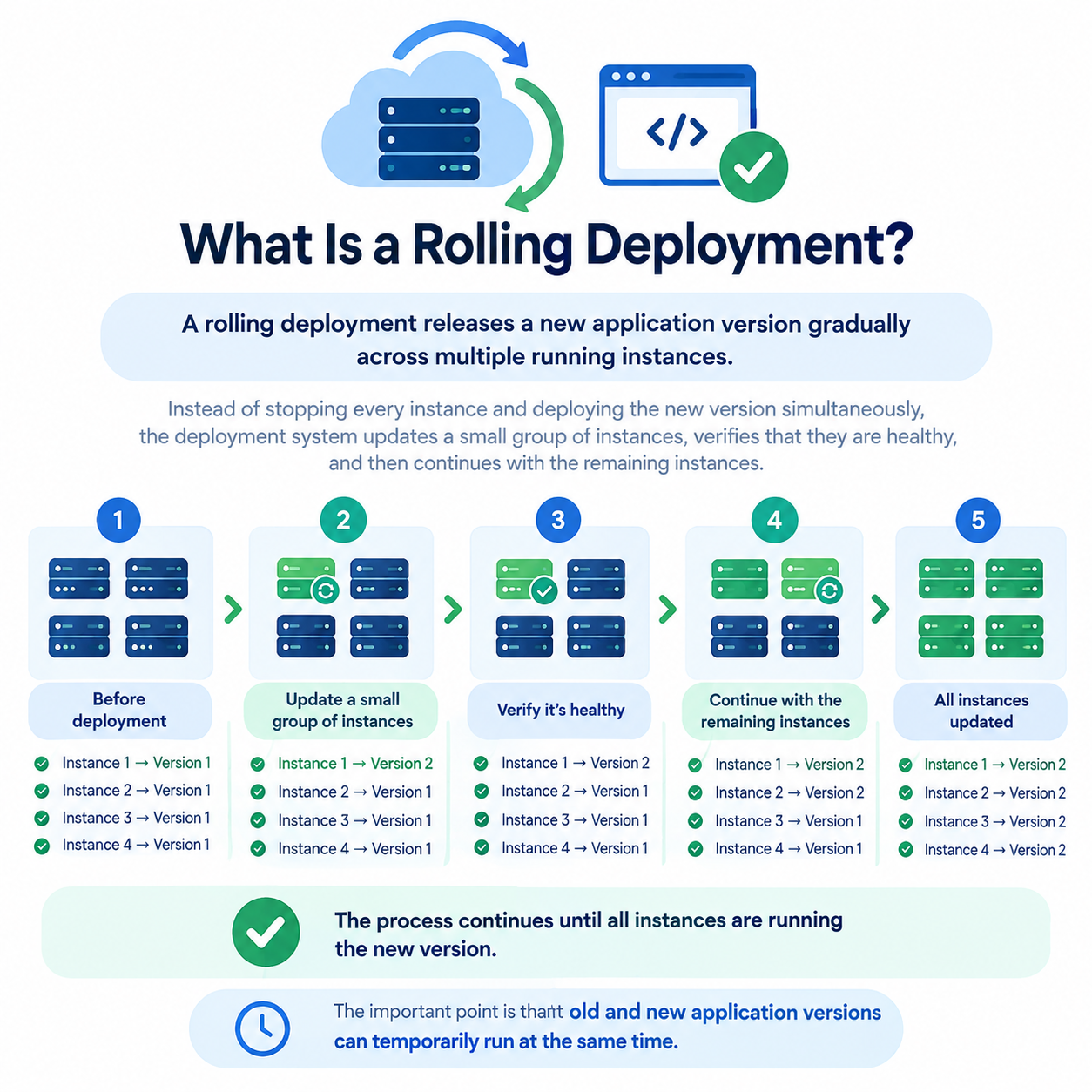
A rolling deployment releases a new application version gradually across multiple running instances.
Instead of stopping every instance and deploying the new version simultaneously, the deployment system updates a small group of instances, verifies that they are healthy, and then continues with the remaining instances.
For example, suppose an application has four instances:
Before deployment
Instance 1 → Version 1
Instance 2 → Version 1
Instance 3 → Version 1
Instance 4 → Version 1
During the rollout:
Instance 1 → Version 2
Instance 2 → Version 1
Instance 3 → Version 1
Instance 4 → Version 1
After the first instance is verified:
Instance 1 → Version 2
Instance 2 → Version 2
Instance 3 → Version 1
Instance 4 → Version 1
The process continues until all instances are running the new version.
The important point is that old and new application versions can temporarily run at the same time.
A rolling deployment is therefore more than simply updating servers one by one. It is a controlled process for gradually replacing application instances while maintaining enough healthy capacity to serve users.
How Does Rolling Deployment Work?
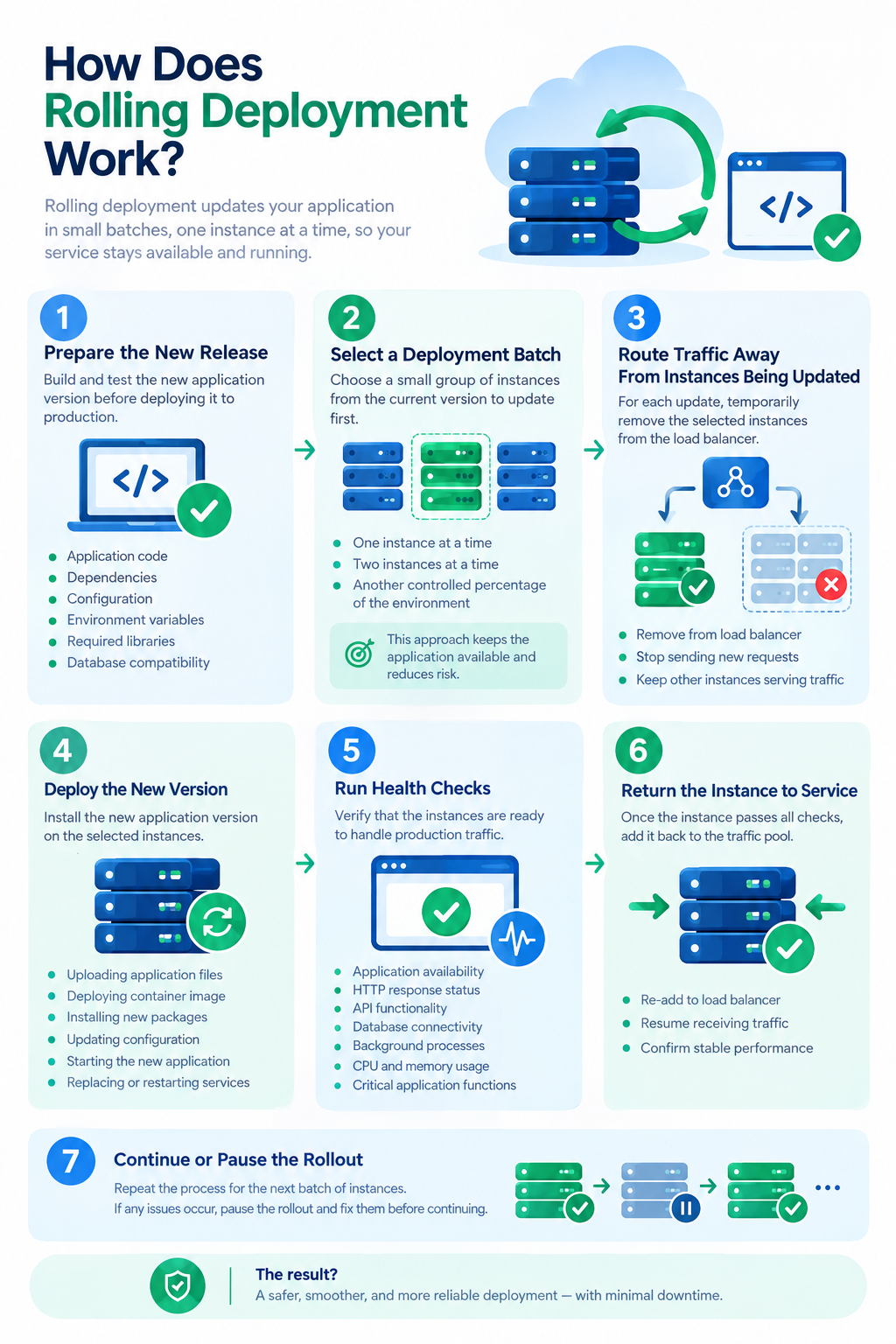
The exact implementation depends on the infrastructure and deployment tools being used. However, a typical rolling deployment process follows these stages.
1. Prepare the New Release
Build and test the new application version before deploying it to production.
Check:
- Application files
- Dependencies
- Configuration
- Environment variables
- Required services
- Database compatibility
The goal is to identify obvious problems before the production rollout begins.
2. Select a Deployment Batch
Instead of updating every instance, choose how many instances should be updated during each stage.
For example, with six application instances, you might update:
- One instance at a time
- Two instances at a time
- Another controlled percentage of the environment
The appropriate batch size depends on the application’s capacity, availability requirements, and tolerance for deployment risk.
3. Route Traffic Away From Instances Being Updated
Before updating an instance that is currently serving users, traffic may need to be redirected to other healthy instances.
In a load-balanced environment, this can mean temporarily removing the instance from the traffic pool.
Other platforms may use service discovery, orchestration, or application-level traffic management to determine which instances receive requests.
The important principle is to avoid sending production traffic to an instance while it is being changed or has not yet passed its health checks.
4. Deploy the New Version
Install or start the new application version on the selected instance.
Depending on the environment, this may involve:
- Updating application files
- Deploying a container image
- Installing a new package
- Updating configuration
- Starting a new application process
- Replacing an existing application instance
The deployment method depends on the technology stack.
5. Run Health Checks
Once the new version is deployed, verify that the instance is ready to handle production traffic.
Useful checks may include:
- Application availability
- HTTP response status
- API functionality
- Database connectivity
- Background processes
- Error logs
- CPU and memory usage
- Critical application functions
A server being online does not necessarily mean that the application is healthy.
6. Return the Instance to Service
If the updated instance passes its checks, it can be returned to the traffic pool.
Users can then be served by the updated version while the next deployment batch is prepared.
7. Continue or Pause the Rollout
If the updated instances remain healthy, continue with the next batch.
If errors, failed health checks, or unexpected behavior appear, pause the rollout and investigate before updating additional instances.
Modern deployment systems can provide controls for monitoring, pausing, resuming, and rolling back deployments. Kubernetes, for example, supports all of these operations for rolling updates.
How Many Instances Should You Update at Once?
The number of instances updated during each stage is often called the deployment batch size.
There is no universal batch size that works for every application.
|
Batch size |
Main advantage |
Main trade-off |
|
One instance |
Lowest initial release exposure |
Slower deployment |
|
Small batch |
Good balance between speed and safety |
Moderate rollout time |
|
Large batch |
Faster deployment |
More infrastructure is exposed if the release fails |
For a critical production application, starting with a small batch can provide an additional safety margin.
For larger environments, deployment systems may use limits such as the maximum number of unavailable instances or the maximum number of additional instances created during the rollout. Kubernetes, for example, provides maxUnavailable and maxSurge controls for this purpose.
You do not need Kubernetes to use the underlying rolling deployment concept. The same principle can be applied through other deployment and infrastructure tools.
Rolling Deployment on VPS Infrastructure
A rolling deployment can be useful on VPS infrastructure when an application has multiple independent instances.
For example, a business might run an application across several VPS servers:
Users → Load Balancer → VPS 1
→ VPS 2
→ VPS 3
→ VPS 4
During deployment, one or more instances can be updated while the others continue serving traffic.
This requires enough capacity to keep the application operating while instances are temporarily unavailable.
A VPS-based rolling deployment may involve:
- Multiple VPS instances
- Load balancing or traffic management
- Application health checks
- Deployment automation
- Monitoring
- Reliable backups
- Tested rollback procedures
The exact architecture depends on the application.
A rolling deployment does not automatically make a VPS environment highly available. The underlying infrastructure still needs sufficient redundancy and capacity.
Does Rolling Deployment Guarantee Zero Downtime?
No.
A rolling deployment can support zero or minimal downtime, but the deployment strategy alone does not guarantee it.
Availability depends on factors such as:
- Number of healthy application instances
- Available capacity
- Traffic routing
- Health checks
- Application architecture
- Database compatibility
- Deployment configuration
- Failure handling
For example, Kubernetes documentation explains that multiple application instances are required for updates that maintain application availability.
If an application runs on only one VPS, there is normally no independent instance available to serve traffic while that server is being updated.
Therefore, it is more accurate to say:
Rolling deployment can enable zero-downtime or minimal-downtime releases when the application and infrastructure are designed to support continuous availability.
What Happens If a Rolling Deployment Fails?
One of the main advantages of a rolling deployment is that a problem can potentially be detected before the entire environment is updated.
Suppose the first two instances successfully receive the new version, but the third begins returning errors.
The rollout should be paused rather than continuing automatically.
The team can then:
- Investigate the failed instance.
- Check application and server logs.
- Review health-check results.
- Determine whether the issue is configuration, code, dependency, or infrastructure related.
- Fix the problem or restore the previous application version.
- Resume the deployment only after the issue has been addressed.
Deployment platforms can provide explicit pause and rollback mechanisms. Kubernetes, for example, supports pausing a rollout and reverting a Deployment to a previous revision.
Rolling Deployment vs. Other Deployment Strategies
Rolling deployment is one of several ways to release a new application version.
|
Strategy |
Basic approach |
|
Rolling deployment |
Gradually replace existing application instances |
|
Blue-green deployment |
Maintain separate old and new environments and switch traffic between them |
|
Canary deployment |
Initially expose the new version to a limited portion of traffic or users |
|
Recreate deployment |
Stop the existing instances before starting the new version |
These approaches solve related deployment problems but use different rollout patterns.
A rolling deployment changes the existing environment gradually, while blue-green deployment generally maintains separate environments. Canary deployment focuses on limiting the initial exposure of a new release.
For detailed implementation guidance, these strategies should have their own dedicated articles rather than being fully explained here.
Benefits of Rolling Deployment
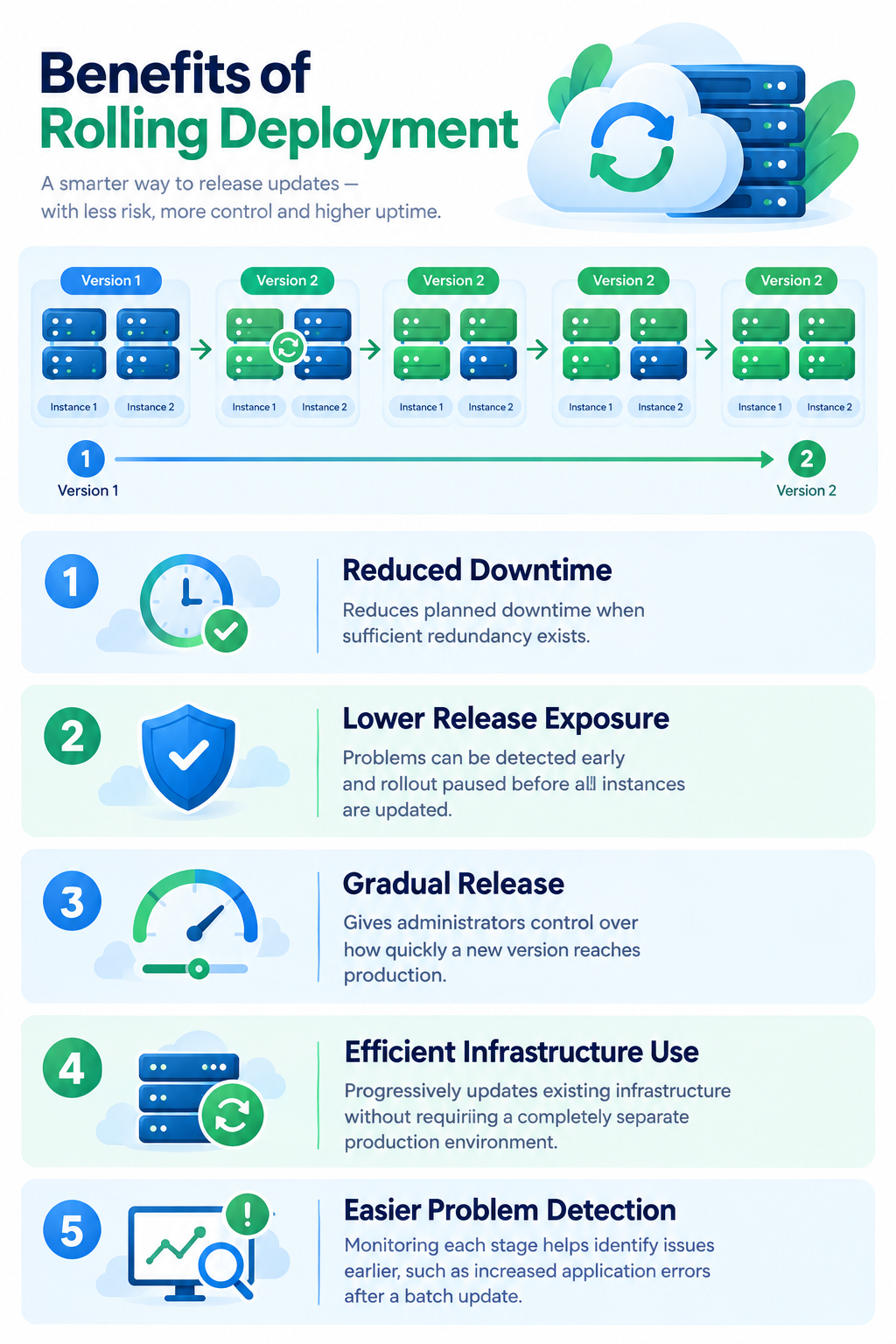
Reduced Deployment Downtime
Healthy instances can continue serving users while other instances are being updated.
This can reduce planned downtime when the application has sufficient redundancy.
Lower Release Exposure
The new version does not have to reach the entire production environment immediately.
If a problem appears during an early stage, the rollout can be paused before the remaining instances are updated.
Gradual Release
A rolling deployment gives administrators greater control over how quickly a new version reaches production.
This is particularly useful for applications where unexpected release problems could affect users or business operations.
Efficient Infrastructure Use
Unlike a blue-green deployment, a rolling deployment does not necessarily require a completely separate production environment.
Existing infrastructure can be updated progressively.
Easier Problem Detection
Monitoring each stage can help identify problems earlier.
For example, a sudden increase in application errors after a particular batch is updated can provide a useful indication that the new release needs investigation.
Limitations and Risks
Rolling deployment is not suitable for every application.
Multiple Application Instances Are Usually Needed
A rolling deployment works best when multiple instances can serve the application.
If the entire application runs on one VPS, updating that server will normally interrupt service.
Old and New Versions May Run Together
During the rollout, some instances may run the previous version while others run the new version.
The two versions therefore need to remain compatible with shared services.
This is particularly important for:
- Databases
- APIs
- Message queues
- Shared storage
- Configuration systems
Database Changes Require Care
A new application version should not immediately introduce database changes that make the previous version unable to function.
For complex database migrations, use a dedicated migration strategy rather than assuming that application rollback will automatically reverse database changes.
Deployment Can Take Longer
Updating instances gradually takes longer than replacing the entire environment simultaneously.
The additional time provides greater control and verification, but it should be considered when planning releases.
Capacity Can Become a Constraint
If one or more instances are unavailable during deployment, the remaining infrastructure must still have enough capacity to handle production traffic.
A rolling deployment cannot solve a capacity shortage by itself.
Rolling Deployment Best Practices
Start With a Small Batch
Begin with one or a small number of instances when releasing an important application change.
If the deployment behaves as expected, continue with subsequent batches.
Use Meaningful Health Checks
A health check should verify that the application can actually perform important functions.
Simply checking whether a process is running may not detect application-level failures.
Monitor Each Stage
Monitor the application after each deployment batch.
Pay attention to:
- Error rates
- Response times
- Traffic
- CPU and memory usage
- Application logs
- Database errors
- Failed requests
For broader server monitoring practices, link to the dedicated VPS Monitoring Guide.
Maintain a Rollback Plan
Before deployment, know how the previous application version can be restored.
The rollback process should be documented and tested rather than designed for the first time during an incident.
Understand Rollback vs. Backup
A deployment rollback normally means returning application instances to a previous software version.
A backup restoration is different. It is used to recover data, files, or system state.
Rolling back an application does not necessarily reverse a database change or restore deleted data.
For this reason, a rollback strategy and a backup strategy should complement each other rather than being treated as the same thing.
For detailed backup planning, link to the dedicated VPS Backup & Disaster Recovery Guide.
Make Database Changes Backward-Compatible Where Possible
Because old and new application versions may temporarily coexist, database changes should ideally support both versions during the transition.
This reduces the risk of one version breaking another during the rollout.
Verify the Final State
After all deployment batches are complete, verify that:
- All intended instances run the new version
- Health checks pass
- Traffic is distributed correctly
- Error rates are normal
- Critical application functions work correctly
Common Rolling Deployment Mistakes
Updating Too Many Instances at Once
If almost the entire environment is updated simultaneously, there may be little healthy capacity left if the release fails.
Skipping Health Checks
An instance can appear online while the application running on it is broken.
Ignoring Version Compatibility
Old and new application versions may temporarily operate together. Ignoring this can cause problems with databases, APIs, or shared services.
Deploying Without a Rollback Plan
A failed release can take longer to recover when there is no tested procedure for returning to the previous version.
Continuing After a Failed Batch
If an early deployment stage shows significant problems, continuing the rollout can increase the impact of the failure.
Pause, investigate, and resolve the issue before proceeding.
When Should You Use Rolling Deployment?
Rolling deployment is particularly useful when an application:
- Runs across multiple application instances
- Needs controlled production releases
- Requires high availability during updates
- Can operate with old and new versions temporarily
- Has sufficient capacity to handle instances being updated
- Has reliable health checks and monitoring
Common use cases include:
- Web applications running across multiple VPS servers
- APIs with multiple application instances
- Containerized applications
- High-availability application environments
- Production systems using automated deployment pipelines
A simple single-VPS application without redundancy may not be a good candidate for a conventional rolling deployment.
A Practical Rolling Deployment Workflow
A simplified production workflow looks like this:
Build → Test → Prepare Backup → Select Batch → Route Traffic Away → Deploy → Health Check → Monitor → Restore Traffic → Continue or Roll Back → Verify
The important principle is that every stage should be controlled and observable.
If the updated instances remain healthy, continue with the next batch.
If a problem appears, pause the rollout and investigate instead of automatically updating the remaining infrastructure.
This approach limits the number of instances exposed to a potentially faulty release.
Frequently Asked Questions
