
A slow or unreliable website can frustrate visitors, reduce sales, and even hurt your search engine rankings. That’s one reason why many businesses are moving away from traditional hosting setups and choosing cloud hosting instead.
But what exactly is cloud hosting, and why has it become such an important part of modern web hosting services?
If you are new to website hosting, terms like cloud hosting, VPS hosting, shared hosting, and dedicated servers can feel confusing at first. The good news is that cloud hosting is actually easier to understand than most people think.
In this guide, you’ll learn:
- What cloud hosting is
- How cloud hosting works
- The benefits and disadvantages of cloud hosting
- How it compares to traditional hosting
- Who should use cloud hosting
- How to choose the right hosting solution for your website
Whether you run a small business website, an online store, a blog, or a growing application, understanding cloud hosting can help you make smarter decisions about your online infrastructure.
What Is Cloud Hosting?
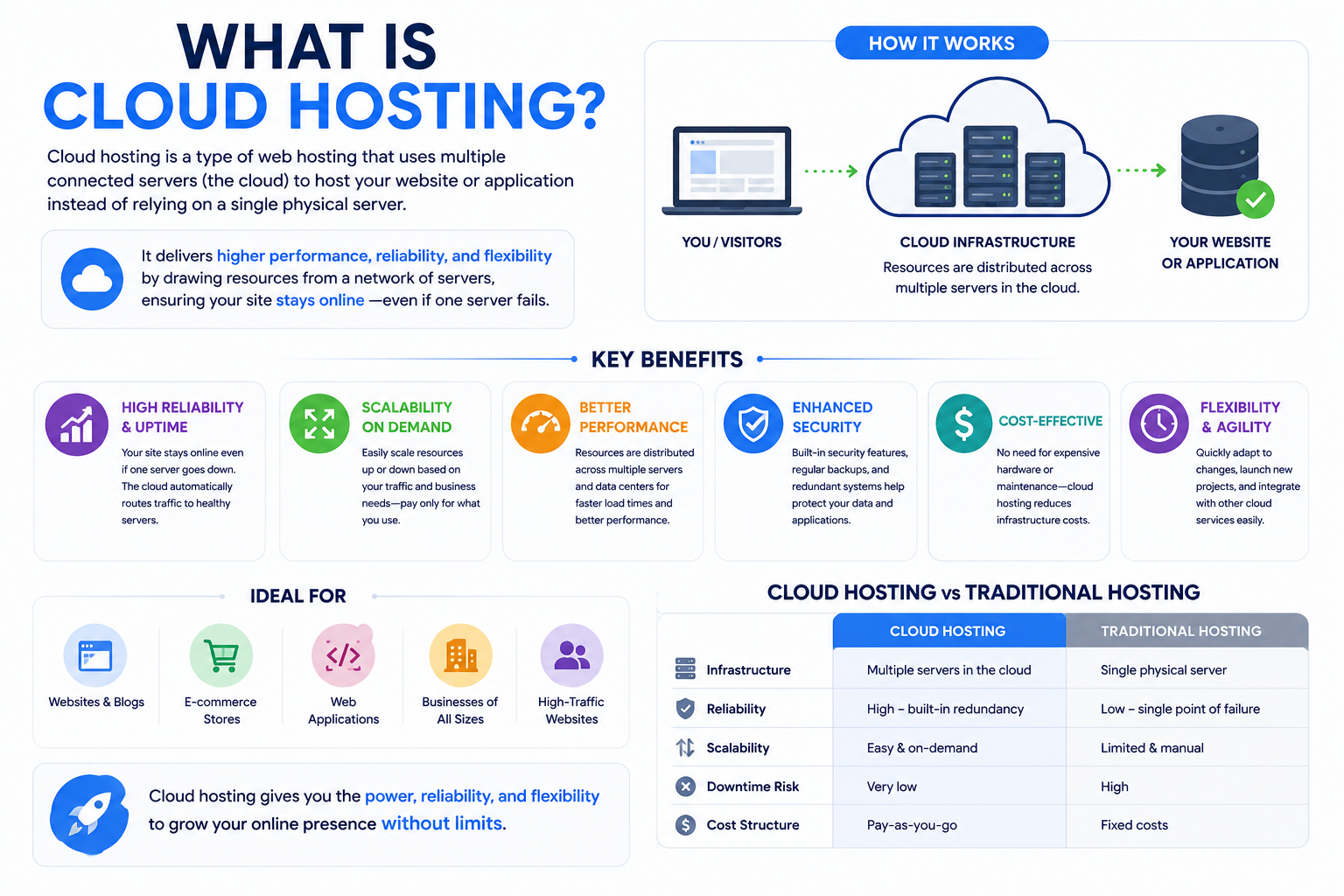
Cloud hosting is a type of web hosting where your website uses multiple connected servers instead of relying on one physical server.
Traditional website hosting usually stores your website on a single machine. If that server experiences problems, your website may slow down or even go offline.
Cloud hosting works differently.
Instead of depending on one server, cloud hosting spreads your website resources across a network of interconnected servers called “the cloud.”
This means:
- Multiple servers work together
- Resources can be shared dynamically
- Traffic loads are distributed
- Reliability improves significantly
A simple way to understand cloud hosting is to imagine a team instead of a single worker.
With traditional hosting:
- One server handles everything
With cloud hosting:
- Multiple servers support your website together
This approach makes cloud hosting services more scalable, flexible, and reliable for modern websites.
Today, cloud hosting is commonly used for:
- Business websites
- eCommerce stores
- SaaS applications
- Web applications
- WordPress websites
- Developer environments
- Enterprise platforms
How Does Cloud Hosting Work?
To understand cloud hosting properly, it helps to first understand how websites normally operate.
Every website needs:
- Storage space
- Processing power
- Memory (RAM)
- Databases
- Network connectivity
- Security systems
These resources are provided through hosting servers.
With traditional web hosting, one server provides all these resources.
With cloud hosting, resources are distributed across multiple servers connected together through virtualization technology.
Think of cloud hosting like using several backup generators instead of depending on a single power source. If one system fails, another system continues supplying power.
That same concept applies to cloud infrastructure.
Step 1: Your Website Is Stored Across Multiple Servers
In cloud hosting environments, your website data is distributed across several servers instead of existing on one machine only.
This improves:
- Redundancy
- Stability
- Availability
- Reliability
If one server experiences issues, another server can continue delivering your website.
This is one reason cloud hosting often provides better uptime than traditional hosting services.
Step 2: Visitors Access Your Website Through the Cloud Network
When someone visits your website:
- Their browser sends a request
- The cloud system receives the request
- The infrastructure selects the best available server
- The website content is delivered to the visitor
This process helps distribute workloads efficiently.
Instead of overwhelming one server, cloud hosting spreads traffic across multiple systems.
That improves:
- Speed
- Performance
- Traffic handling
- Website responsiveness
Step 3: Resources Scale Dynamically
One of the biggest advantages of cloud hosting is scalability.
If your website suddenly receives more visitors, additional resources can often be allocated automatically.
For example:
- More CPU power
- More RAM
- Additional bandwidth
- Increased storage resources
This is extremely useful for:
- Online stores during sales
- Seasonal businesses
- Viral content
- Fast-growing startups
Many businesses first switch to cloud hosting after experiencing downtime or slow performance on traditional shared hosting plans during traffic spikes.
Step 4: Redundancy Helps Prevent Downtime
Cloud hosting environments usually include redundant systems.
This means:
- Data may exist on multiple servers
- Backup systems remain active
- Failover systems can take over automatically
If one server fails, another can continue operating.
That reduces the chances of complete website outages.
Cloud Hosting vs Traditional Hosting
One of the easiest ways to understand cloud hosting is by comparing it with traditional hosting infrastructure.
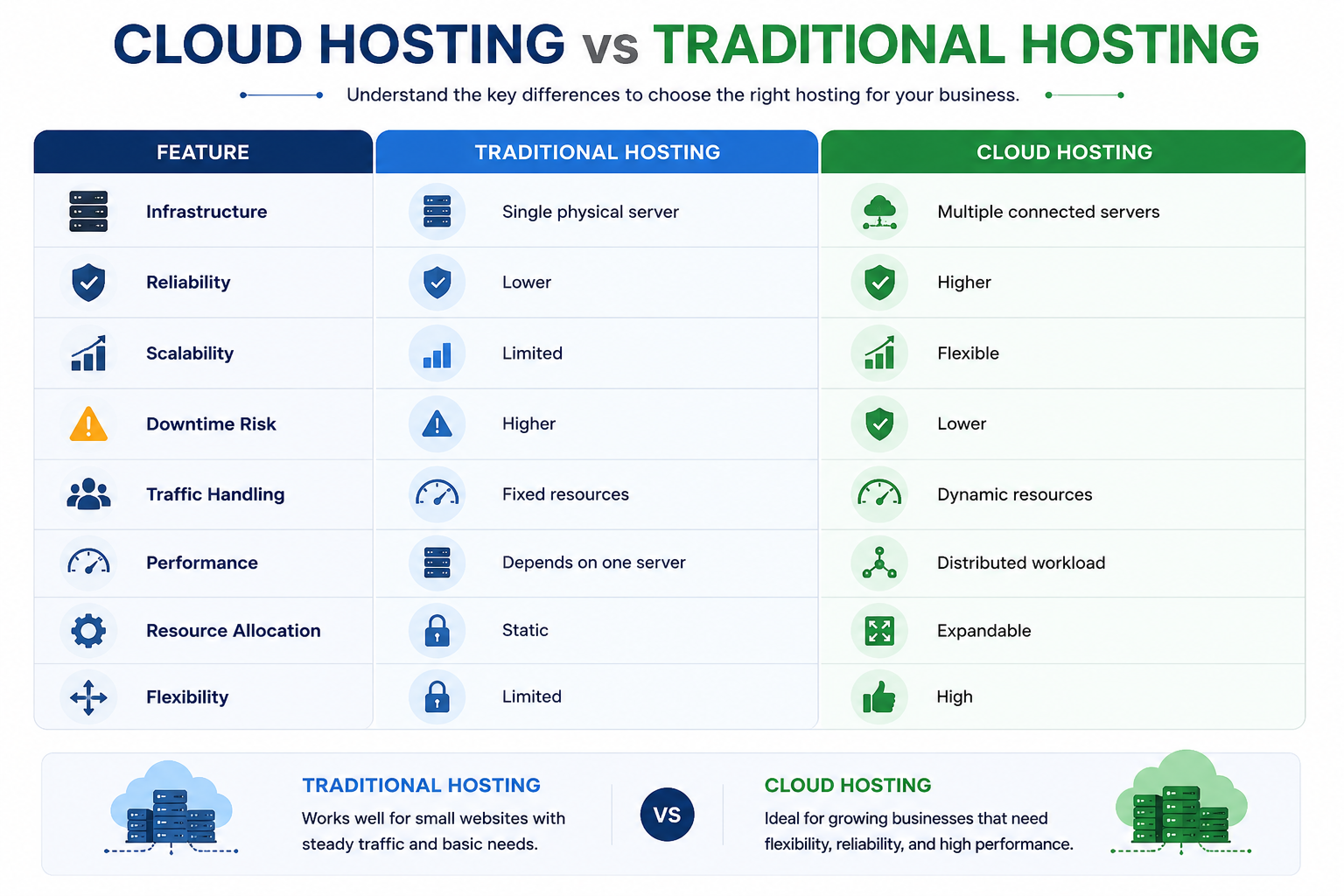
Feature | Traditional Hosting | Cloud Hosting |
Infrastructure | Single physical server | Multiple connected servers |
Reliability | Lower | Higher |
Scalability | Limited | Flexible |
Downtime Risk | Higher | Lower |
Traffic Handling | Fixed resources | Dynamic resources |
Performance | Depends on one server | Distributed workload |
Resource Allocation | Static | Expandable |
Flexibility | Limited | High |
This flexibility is one reason cloud hosting services have become increasingly popular among modern businesses.
Why Cloud Hosting Matters for Businesses
Modern businesses depend heavily on their websites and online applications.
Even a few minutes of downtime can:
- Reduce customer trust
- Hurt revenue
- Affect SEO rankings
- Interrupt business operations
Cloud hosting helps solve many of these challenges.
Better Website Reliability
Traditional hosting environments are vulnerable to single-server failure.
Cloud hosting reduces this risk because multiple servers work together.
This often results in:
- Better uptime
- Fewer outages
- Improved availability
Reliable web hosting is especially important for businesses that rely on:
- Online sales
- Lead generation
- Customer portals
- Business applications
Improved Website Performance
Website speed affects:
- User experience
- Search rankings
- Conversion rates
- Bounce rates
Cloud hosting platforms often improve performance by distributing workloads efficiently across multiple systems.
This helps websites:
- Load faster
- Handle traffic spikes
- Deliver more stable performance
Fast web hosting services are especially valuable for growing websites and eCommerce stores.
Easier Scalability
One major limitation of traditional hosting is resource restrictions.
Upgrading resources may require:
- Manual migrations
- Server downtime
- Technical reconfiguration
Cloud hosting makes scaling easier.
Businesses can often increase resources quickly without major interruptions.
Developers also prefer cloud hosting because infrastructure can usually be adjusted more easily than traditional hosting environments.
Global Accessibility
Many cloud hosting providers operate data centers worldwide.
This can help websites:
- Deliver content faster globally
- Reduce latency
- Improve user experience in different regions
For international businesses, this flexibility can be extremely valuable.
Benefits of Cloud Hosting
Cloud hosting has become one of the most popular hosting services because it offers several important advantages.
High Uptime
Since cloud hosting uses multiple servers, websites are less dependent on one machine.
If one server experiences problems, another server can continue operating.
This improves uptime and reliability.
Scalability
Cloud hosting allows businesses to scale resources more easily.
This flexibility helps websites adapt to:
- Traffic spikes
- Business growth
- Seasonal demand
- Increased application usage
Better Performance
Cloud infrastructure distributes workloads efficiently.
This can improve:
- Website loading speed
- Server responsiveness
- Resource management
- Traffic balancing
Flexible Resource Usage
Some cloud hosting providers use pay-as-you-go pricing models.
Businesses may only pay for the resources they actually use.
This helps reduce wasted infrastructure costs.
Improved Disaster Recovery
Cloud environments usually include:
- Redundant systems
- Backup infrastructure
- Failover support
This helps reduce the impact of:
- Hardware failures
- Server crashes
- Unexpected outages
Cloud Hosting Pros and Cons
Before choosing any website hosting solution, it’s important to understand both the advantages and limitations.
Pros
- Better uptime and reliability
- Flexible scalability
- Improved performance
- Easier traffic handling
- Reduced risk of total server failure
- Better infrastructure redundancy
- More adaptable resource management
Cons
- Costs can increase during heavy usage
- Advanced setups may require technical knowledge
- Pricing models can sometimes be confusing
- Resource overuse may increase monthly expenses
For many growing businesses, however, the benefits of cloud hosting often outweigh the disadvantages.
Who Should Use Cloud Hosting?
Cloud hosting is not only for large enterprises anymore.
Today, many affordable web hosting providers offer cloud hosting plans suitable for businesses of all sizes.
Cloud Hosting Is Ideal For:
Growing Businesses
Businesses expecting steady traffic growth benefit from cloud scalability.
eCommerce Stores
Online stores often experience sudden traffic spikes during:
- Sales
- Promotions
- Holiday seasons
Cloud hosting helps maintain stability during these periods.
Startups
Startups often need flexible infrastructure that can grow quickly without major migrations.
Developers and Agencies
Developers frequently use cloud hosting for:
- Testing environments
- Applications
- Client projects
- Resource customization
High-Traffic Blogs and Media Websites
Cloud hosting can handle fluctuating traffic more effectively than many shared hosting environments.
Cloud Hosting May Not Be Necessary For:
Small Personal Websites
A basic shared hosting plan may be enough for:
- Small blogs
- Portfolio websites
- Beginner projects
If your website receives low traffic, cloud hosting may be more than you currently need.
Types of Web Hosting
Understanding other hosting services helps clarify where cloud hosting fits.
Shared Hosting
Shared hosting is the most beginner-friendly and affordable web hosting option.
Multiple websites share the same server resources.
It is suitable for:
- Beginners
- Small websites
- Personal blogs
- Low-traffic websites
However, performance may suffer if other websites consume excessive resources.
VPS Hosting
VPS hosting stands for Virtual Private Server hosting.
A physical server is divided into separate virtual environments.
VPS hosting solutions provide:
- Better performance
- Dedicated resources
- Greater control
- Improved stability
Many growing businesses move from shared hosting to VPS hosting before transitioning to cloud infrastructure.
Cloud Hosting
Cloud hosting distributes resources across multiple interconnected servers.
Its major strengths include:
- Scalability
- Reliability
- Flexibility
- Better uptime
Cloud hosting services work well for websites with changing traffic demands.
Dedicated Server Hosting
Dedicated server hosting gives one physical server entirely to a single customer.
This provides:
- Maximum performance
- Full server control
- Dedicated hardware
- Advanced customization
Dedicated server hosting is commonly used for:
- Enterprise environments
- Large applications
- High-performance workloads
Is Cloud Hosting Secure?
Security is a major concern for businesses choosing hosting services.
Cloud hosting platforms often include several security advantages.
Redundant Infrastructure
Since resources are distributed, cloud environments are often more resilient against hardware failures.
Backup and Recovery Systems
Many cloud hosting providers offer:
- Automated backups
- Snapshot recovery
- Disaster recovery options
These systems help protect critical data.
Network Security Features
Cloud hosting environments may include:
- Firewalls
- DDoS protection
- SSL support
- Monitoring systems
However, security also depends on:
- Proper server configuration
- Software updates
- Strong passwords
- User management practices
Even with cloud hosting, businesses should still maintain regular backups and security monitoring.
Real-Life Example of Cloud Hosting
Imagine an online clothing store preparing for a major seasonal sale.
Normally, the website receives:
- 5,000 visitors daily
During the sale:
- Traffic increases to 100,000 visitors
With traditional hosting, the website may:
- Slow down
- Crash
- Become unavailable
But with cloud hosting, additional resources can be allocated automatically to handle the increased traffic.
This helps:
- Keep the website online
- Maintain customer experience
- Reduce lost sales opportunities
This real-world scalability is one reason many businesses switch to cloud hosting services as they grow.
Common Misconceptions About Cloud Hosting
“Cloud Hosting Means Unlimited Resources”
Cloud hosting is scalable, but resources are still limited by your hosting plan and provider infrastructure.
Scaling is easier, but not infinite.
“Cloud Hosting Is Only for Large Companies”
Today, even small businesses and startups use affordable cloud hosting solutions.
Cloud hosting is no longer limited to enterprise organizations.
“Cloud Hosting Replaces Backups”
Cloud redundancy improves reliability, but backups are still essential.
Businesses should always maintain:
- Backup strategies
- Disaster recovery plans
- Security monitoring
“Hosting and Domain Names Are the Same”
Many beginners confuse domain registration with web hosting.
A domain name is your website address.
Website hosting is the infrastructure where your website files are stored.
You need both to launch a website.
Related Concepts You Should Know
Domain Names
A domain name is the address people type into browsers to visit your website.
Examples:
- example.com
- yourbusiness.net
Domain registration helps establish your online identity.
DNS Explained
DNS stands for Domain Name System.
It connects domain names to hosting servers and helps browsers locate websites.
Without DNS, users would need to remember IP addresses instead of domain names.
Email Hosting
Many businesses also use hosting providers for professional email services.
Examples:
Professional business email improves trust and credibility.
WordPress Hosting
Some hosting providers offer specialized web hosting for WordPress websites.
These plans may include:
- Optimized performance
- Managed updates
- Enhanced security
- WordPress-specific tools
Google Workspace Solutions
Many organizations combine cloud infrastructure with business productivity tools like Google Workspace for:
- Business email
- Team collaboration
- Video meetings
- File sharing
- Productivity management
This creates a more complete business infrastructure environment.
Frequently Asked Questions
