
Hey there! 👋
If you want to build fast, modern web applications on a VPS server in Pakistan, you’ll eventually come across Node.js. Don’t worry if the name sounds technical — this guide explains everything in a simple, friendly way, and walks you step-by-step through installing Node.js on any VPS.
By the end, you’ll know exactly what Node.js is, why developers love it, and how you can install and run it smoothly on a VPS in Pakistan from CreativeON.
Let’s get started!
What Is Node.js? (Explained Super Simply)
Node.js is a tool that lets you run JavaScript on a server — not just in a browser like you normally would.
Here’s the simple idea:
- In your browser → JavaScript controls buttons, animations, menus
- On a server → JavaScript can run your whole backend
Node.js is built on Google’s powerful V8 engine, so it’s fast, efficient, and perfect for modern applications.
⭐ Why Everyone Loves Node.js
- Handles thousands of users at the same time
- Runs extremely fast
- Has more than 1 million free packages (thanks to npm)
- Is completely free and open-source
Big brands like Netflix, PayPal, Uber, and LinkedIn all use Node.js — and with a VPS hosting in Pakistan from CreativeON, you can too.
What You Need Before Installing Node.js
Make sure you have:
- A VPS server (CreativeON offers the best VPS in Pakistan with SSD storage)
- SSH access
- Basic familiarity with the terminal
- A few minutes — that’s honestly all it takes!
How to Install Node.js on Ubuntu (Easy Method)
If your VPS uses Ubuntu, you’re in luck — this is the simplest and most accurate method in 2025.
Step 1: Update Your Server
sudo apt-get update
sudo apt-get upgrade -y
Step 2: Install Node.js (Modern Recommended Method)
Ubuntu’s default Node.js version is often outdated.
Use the official NodeSource repository:
curl -fsSL https://deb.nodesource.com/setup_18.x | sudo -E bash –
sudo apt-get install -y nodejs
This installs the latest stable Node.js and npm.
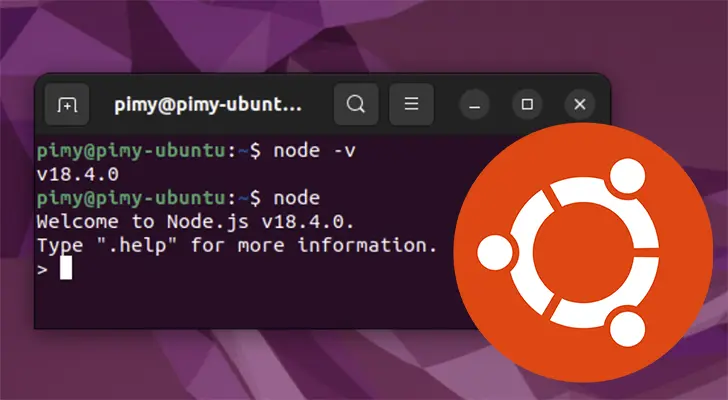
Step 3: Check Installation
node -v
npm -v
If you see version numbers — congratulations! Node.js is now installed.
Manual Installation (If You Need a Specific Version)
If you want an older or custom version:
Step 1: Go to Home Directory
cd ~
Step 2: Download Node.js
wget https://nodejs.org/dist/v14.18.1/node-v14.18.1-linux-x64.tar.xz
Replace the version number if needed.
Step 3: Extract Files
tar xvf node-v14.18.1-linux-x64.tar.xz
Step 4: Rename the Folder
mv node-v14.18.1-linux-x64 node
Step 5: Set Up Executables
mkdir ~/bin
cp node/bin/node ~/bin
cd ~/bin
ln -s ../node/lib/node_modules/npm/bin/npm-cli.js npm
Step 6: Verify
node -v
npm -v
How to Run a Node.js Application on Your VPS
Once Node.js is installed, you can deploy your app.
If your app has package.json
nohup npm start –production &
If your app is a single .js file
nohup node yourapp.js &
nohup keeps your app running even after you close the terminal.
How to Stop Your App
pkill node
Connecting Your Website to Your Node.js App (Apache Reverse Proxy)
Many VPS users run Apache for hosting normal websites but want to forward some traffic to their Node.js app.
Here’s how:
✔ First enable required ApHey there! 👋
If you want to build fast, modern web applications on a VPS server in Pakistan, you’ll eventually come across Node.js. Don’t worry if the name sounds technical — this guide explains everything in a simple, friendly way, and walks you step-by-step through installing Node.js on any VPS.
By the end, you’ll know exactly what Node.js is, why developers love it, and how you can install and run it smoothly on a VPS in Pakistan from CreativeON.
Let’s get started!
ache modules
sudo a2enmod proxy
sudo a2enmod proxy_http
sudo systemctl restart apache2
✔ Add this to your .htaccess file:
DirectoryIndex disabled
RewriteEngine On
RewriteRule ^$ http://127.0.0.1:XXX/ [P,L]
RewriteCond %{REQUEST_FILENAME} !-f
RewriteRule ^(.*)$ http://127.0.0.1:XXX/$1 [P,L]
Replace XXX with your Node.js app’s port (3000, 3001, etc.).
The Easy Way: Use a Control Panel
If you don’t want to run commands, some VPS setups offer:
- One-click Node.js deployment
- GUI-based app management
- Auto-restart on crash
- Built-in monitoring
CreativeON can set this up for you if needed — just request it when ordering.
Why CreativeON Is the Best Choice for VPS Hosting in Pakistan
For over 20 years, CreativeON has powered the online presence of leading Pakistani brands:
City42 • Channel 24 • QTV • Chughtai Lab • Alkhair Group • Daewoo Pakistan • Orange Line Metro
We are also:
- Official Google Workspace Partner & Reseller
- PKNIC Gold Partner for .PK domains
- Providers of cheap VPS in Pakistan with premium performance
- Experts in Linux VPS, Windows VPS, RDP VPS, and enterprise hosting
Our VPS hosting gives you:
- SSD storage for maximum speed
- Full root access
- Free support & setup
- Pakistan-based servers for low-latency performance
- Flexible billing and upgrade options
Whether you want to buy VPS, upgrade to best VPS hosting, or host Node.js applications — CreativeON has you covered.
Node.js Frequently Asked Questions (FAQ)
