

Ever clicked on a website and stared at a blank screen, wondering why nothing is showing up yet?
It’s annoying — and in today’s fast-paced online world, even a one-second delay feels like forever.
But there’s a simple way to understand what causes this delay.
It’s called TTFB, and learning about it is one of the easiest ways to speed up your website and make your visitors happier.
This guide is proudly brought to you by CreativeON, one of Pakistan’s leading hosting providers for over two decades. We help businesses — including City42, Channel 24, QTV, Chughtai Lab, Alkhair Group, Daewoo Pakistan, and the Orange Line Metro — stay fast, stable, and secure online.
What Is TTFB (Time To First Byte)?
Think of visiting a website like ordering food at a drive-thru.
- You place your order.
- The worker takes a moment to confirm it.
- Then you finally hear, “Okay! That’ll be X rupees.”
That short pause before you get the first response?
That’s TTFB — the Time To First Byte.
In simple words:
TTFB is the time it takes for your browser to send a request to a server and receive the very first byte of data back.
It’s not the full load time of the website — just the initial response.
But this tiny moment matters a lot for speed, SEO, and user experience.
How the TTFB Process Works
Whenever you open a website, three things happen:
1. Request
You type a web address and hit Enter.
Your browser sends a request to the website’s server.
2. Waiting Time (This is TTFB)
The server thinks, processes, and prepares the information you requested.
3. Response
The server sends the very first byte of data back to your browser.
A fast TTFB means your server is responsive and ready to deliver your website quickly.
What Makes TTFB Slow?
TTFB goes up when any of these three stages become slow:
1. Network Latency (Distance Matters)
Before the server even starts working, your request has to reach it.
If your visitors are in Pakistan and your server is hosted in the US, the request travels thousands of miles — adding delay.
What affects network latency:
- Physical distance
- Internet routing
- Quality of hosting network
- Poor connectivity between regions
Choosing a hosting provider with reliable, optimized networks makes a big difference.
2. Server Processing Time (The Big One)
Once the request reaches the server, it must “think” and prepare the response.
If your website is heavy or poorly optimized, this can take time.
Reasons server processing becomes slow:
- Slow or overloaded shared hosting
- Heavy WordPress themes
- Too many plugins
- Slow database queries
- Inefficient PHP scripts
- No caching
- Underpowered hosting resources
This is why many websites move from shared hosting to a VPS—it gives you dedicated power, faster processing, and stable performance.
3. Your Visitor’s Connection Quality
While TTFB mostly depends on the server and network, extremely slow internet on the visitor’s side can slightly delay how quickly the first byte reaches them.
But it’s not the main factor — the server is.
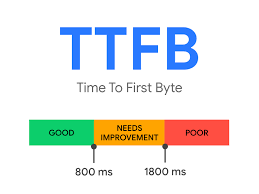
What Is a Good TTFB Score?
Here’s a simple way to understand TTFB performance:
TTFB Score | What It Means |
Below 100ms | Excellent — world-class speed. |
100–500ms | Good — ideal for most websites. |
500–1000ms | Needs improvement. |
Above 1 second | Slow — hurts SEO and user experience. |
For dynamic sites (like WordPress, WooCommerce, or Laravel apps), a TTFB of 200–300ms after optimization is perfectly healthy — especially on a VPS.
How to Reduce TTFB (Expert Tips from CreativeON)
Want your website to feel instant?
Here are the three biggest improvements you can make.
1. Use Caching (The #1 Speed Booster)
Caching means storing pre-built versions of your website so the server doesn’t rebuild everything every time someone visits.
Why caching helps:
- Reduces database queries
- Cuts down PHP processing
- Makes WordPress fly
- Sends the first byte faster
For WordPress users:
Use a premium caching plugin or LiteSpeed Cache (if your server supports it).
For VPS users:
CreativeON can help enable server-level caching for maximum impact.
2. Upgrade to Better Hosting
If you’re on basic shared hosting, your website shares resources with hundreds of others.
If someone else gets traffic, your site slows down.
A VPS Hosting plan solves this by giving you:
- Dedicated CPU
- Dedicated RAM
- More control
- Faster database performance
- Improved TTFB
At CreativeON, our VPS servers are optimized specifically for low latency and fast response times.
Whether you run a small blog or a large ecommerce store, upgrading hosting is often the biggest improvement you can make.
3. Use a Content Delivery Network (CDN)
A CDN stores copies of your website’s static files (like images, CSS, and JS) on servers around the world.
So if your site is hosted in Karachi and someone visits from London, they get the files from a nearby European CDN server.
Benefits for TTFB:
- Reduces travel distance
- Improves global speed
- Reduces load on your server
- Boosts performance for international users
Cloudflare is a popular choice and works great with CreativeON servers.
Quick Summary
Action | Effect on TTFB |
Use Caching | Speeds up server processing & reduces load. |
Upgrade Hosting | Faster CPU/RAM = quicker “first byte.” |
Use a CDN | Reduces distance data needs to travel. |
A faster TTFB improves user experience, keeps visitors engaged, and helps your search rankings — especially on mobile.